
Introduzione
This manual provides comprehensive instructions for the installation, operation, maintenance, and troubleshooting of your RESTMO Sprinkler Timer. Please read this manual carefully before use to ensure proper function and longevity of your device.

Immagine: Frontale view of the RESTMO 2-Zone Sprinkler Timer, displaying its large LCD screen, control dial, and brass connections.
Prodotto finitoview
Caratteristiche principali
- Reliable & Leak-Proof Design: Features pure brass inlet and outlet metal threads for enhanced durability and high working pressure (max. 120psi) to prevent water leakage. Weatherproof construction with UV-resistant material.
- Doppie zone indipendenti: Two independent outlets, each capable of setting up to 3 separate watering programs.
- Molteplici opzioni di programmazione: Each zone supports 3 distinct programs (P1, P2, P3) for a total of 6 customizable schedules.
- Programmi di irrigazione flessibili: Watering frequency from 1-23 hours or 1-30 days. Watering duration from 1 minute to 299 minutes.
- Interfaccia intuitiva: Large 3.2-inch LCD display for easy readability. Oversized dial for setting clock, start time, duration, and frequency.
- Manual & Rain Delay Functions: Manual watering without interrupting preset programs. Long press delay button to pause programs for 0, 24, 48, or 72 hours during rainy conditions.
Componenti

Image: Detailed diagram illustrating the components of the RESTMO Sprinkler Timer, including the LCD screen, control dial, buttons, and brass inlet/outlet dimensions.
- Ingresso in ottone: Connects to faucet (3/4" NH thread).
- Brass Outlets (x2): Connects to hoses (3/4" NH thread).
- Schermo LCD: Displays time, program settings, and zone status.
- Quadrante di controllo: Used to navigate through settings (SET CLOCK, START TIME, HOW LONG, HOW OFTEN, ON/OFF).
- Pulsante OK: Conferma le selezioni.
- +/- Pulsanti: Adjust values and activate Delay function.
- ZN/P Button: Switches between zones (Left/Right) and selects programs (P1/P2/P3).
- Pulsante MANUALE: Attiva l'irrigazione manuale.
- Vano batteria: Located on the back, requires 2 AA alkaline batteries.
Impostare
1. Installazione della batteria
- Individuare il vano batterie sul retro del timer.
- Far scorrere il coperchio della batteria per rimuoverlo.
- Insert two (2) new AA alkaline batteries (not included), ensuring correct polarity (+/-).
- Riposizionare saldamente il coperchio della batteria.

Immagine: View of the open battery compartment, showing the correct placement of two AA batteries.
2. Collegamento del timer
- Assicurarsi che il rubinetto sia chiuso.
- Thread the brass inlet of the timer onto your outdoor faucet. Hand-tighten until secure. The 360° swivel brass inlet allows for easy positioning.
- Connect your garden hoses or drip irrigation lines to the brass outlets at the bottom of the timer. Ensure a tight, leak-proof connection.
- Turn on the faucet fully. The timer is designed to withstand high pressure, but ensure there are no leaks at the connections.

Image: The sprinkler timer connected to a faucet, with close-ups of the pure brass inlet thread and pure brass outlet, emphasizing durability and leak-proof design.
Istruzioni per l'uso
1. Impostazione dell'orologio
- Rotate the control dial to IMPOSTA OROLOGIO.
- Le cifre dell'ora lampeggeranno. Utilizzare il +/- pulsanti per regolare l'ora.
- Premere OK to confirm the hour. The minute digits will flash.
- Utilizzare il +/- pulsanti per regolare i minuti.
- Premere OK to confirm the minutes. The day of the week will flash.
- Utilizzare il +/- buttons to select the current day (e.g., MO for Monday).
- Premere OK to save the clock settings.
2. Programming Watering Schedules (P1, P2, P3)
Each zone (Left and Right) can have up to three independent programs (P1, P2, P3). You can switch between zones using the ZN/P pulsante.

Immagine: un primo piano view of the LCD screen, illustrating the display of program settings (P1, P2, P3) and current time.
- Seleziona Zona: Premere brevemente il tasto ZN/P button to switch between ZONE L (Left) and ZONE R (Right).
- Seleziona programma: Premere a lungo il tasto ZN/P button to cycle through P1, P2, P3. Select the program you wish to set.
- Imposta ora di inizio:
- Ruota la manopola su ORA DI INIZIO.
- Utilizzo +/- to set the desired start hour and minute.
- Premere OK per confermare.
- Imposta la durata:
- Ruota la manopola su PER QUANTO.
- Utilizzo +/- to set the watering duration from 1 minute to 299 minutes.
- Premere OK per confermare.
- Imposta la frequenza:
- Ruota la manopola su QUANTE VOLTE.
- Utilizzo +/- per impostare la frequenza di irrigazione:
- Ogni 1-23 ore.
- Every 1-30 days.
- Specific days of the week (e.g., MO, TU, WE...).
- Premere OK per confermare.
- Attiva programma: Ruota la manopola su ON. The timer will now run according to your programmed schedules. To turn off all programs, rotate the dial to SPENTO.

Image: Visual representation of setting up three distinct watering programs (P1, P2, P3) with different start times, durations, and frequencies.
3. Irrigazione manuale
The manual watering function allows for immediate watering without affecting your preset programs.
- Assicurarsi che il quadrante sia impostato su ON.
- Premere a lungo il tasto MANUALE button. The display will show a flashing duration.
- Utilizzare il +/- buttons to set the desired manual watering duration (1 to 299 minutes).
- Premere OK per avviare l'irrigazione manuale.
- To stop manual watering, long press the MANUALE button again, or rotate the dial to SPENTO e poi torna a ON.

Image: Instructions for activating manual watering by long-pressing the MANUAL button, and for activating rain delay by long-pressing the DELAY button.
4. Funzione di ritardo pioggia
The rain delay function temporarily pauses your watering programs to conserve water during rainy periods.
- Assicurarsi che il quadrante sia impostato su ON.
- Premere a lungo il tasto RITARDO button. The display will show "0h".
- Utilizzare il +/- pulsanti per selezionare la durata del ritardo desiderata: 24 ore, 48 ore o 72 ore.
- Premere OK to activate the rain delay. The timer will resume its programmed schedule after the selected delay period.
- To cancel the rain delay, long press the RITARDO button again until "0h" is displayed, then press OK.

Image: The timer displaying the rain delay function, showing options to delay watering for 0, 24, 48, or 72 hours.
5. Selezione della zona
The RESTMO Sprinkler Timer features two independent zones (Left and Right) that can be controlled separately.
- Premere brevemente il tasto ZN/P button to toggle between ZONE L (Left) and ZONE R (Right).
- When setting programs, ensure you are in the correct zone (L or R) for which you intend to create or modify a schedule.
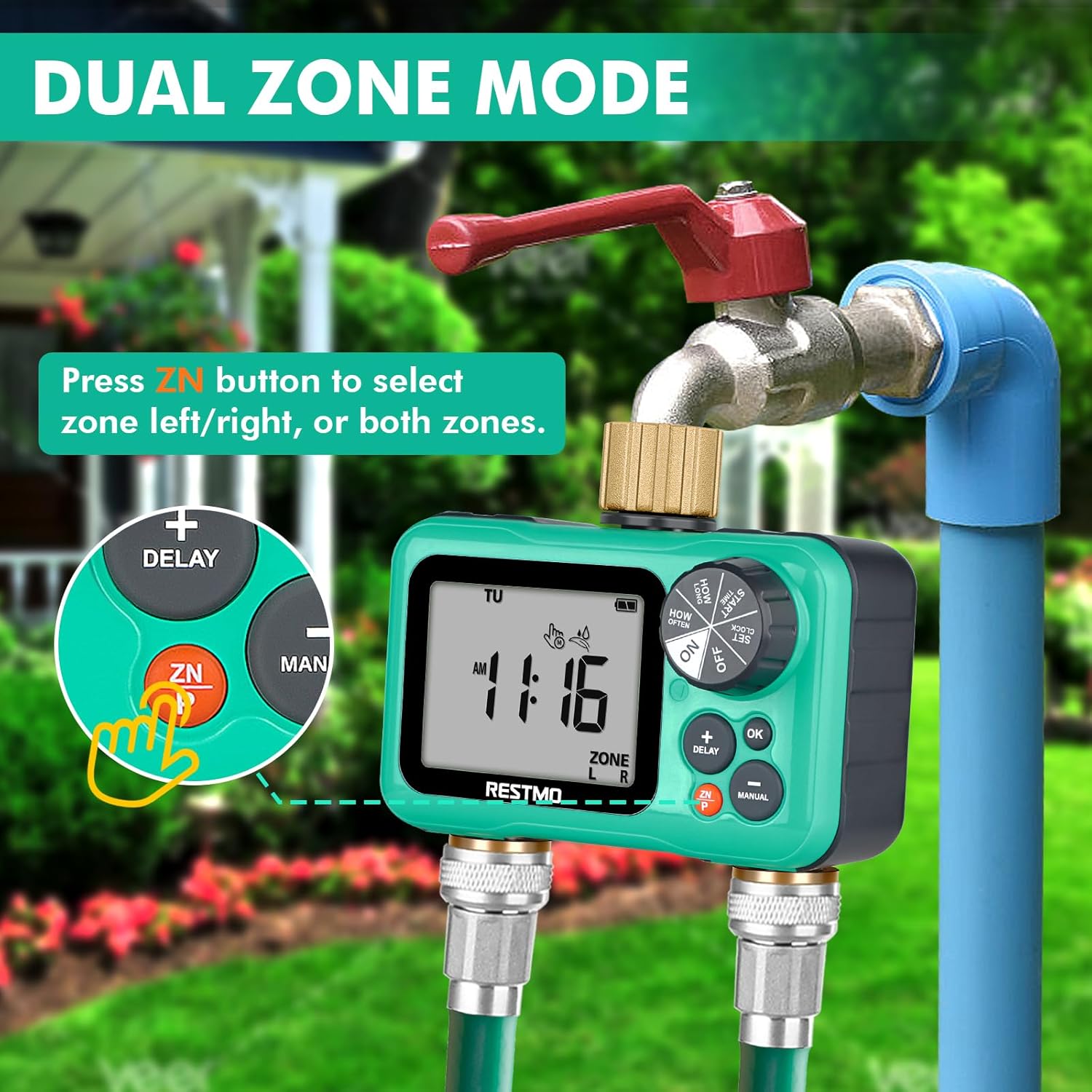
Image: The timer displaying "ZONE L" and "ZONE R", with an arrow pointing to the ZN button, indicating how to switch between the left and right watering zones.
Manutenzione
- Sostituzione della batteria: Replace batteries annually or when the low battery indicator appears on the LCD screen. Always use new AA alkaline batteries.
- Pulizia: Clean the timer's exterior with a soft, damp panno. Non usare detergenti abrasivi o solventi.
- Schermata filtro: Periodically check the filter screen inside the brass inlet for debris. If clogged, remove and rinse it under running water.
- winterization: Before freezing temperatures, disconnect the timer from the faucet and hoses. Remove batteries. Store the timer indoors in a dry, frost-free location. Failure to do so may result in damage not covered by warranty.
- Prevenzione delle perdite: Ensure all connections are hand-tightened. If leaks occur, check for worn washers and replace if necessary.
Risoluzione dei problemi
| Problema | Possibile causa | Soluzione |
|---|---|---|
| Timer not turning on/LCD blank. | Batterie scariche o installate in modo errato. | Replace batteries with new AA alkaline batteries. Ensure correct polarity. |
| L'acqua non scorre. | Faucet is off; timer is set to OFF; low water pressure; clogged filter; program not set correctly. | Turn on faucet. Rotate dial to ON. Check water pressure (8-120 psi required). Clean inlet filter. Verify program settings. |
| Timer leaks at connections. | Loose connections; worn washers; damaged threads. | Tighten connections. Replace rubber washers if worn. Inspect threads for damage. |
| Programs not running at scheduled times. | Timer set to OFF; incorrect clock setting; rain delay active; program deleted or incorrectly set. | Ensure dial is ON. Reset clock. Check if rain delay is active. Re-program schedules. |
| LCD screen is faded or unreadable. | Exposure to direct, intense sunlight/heat; low battery. | Relocate timer to a shaded area if possible. Replace batteries. If problem persists, contact customer support. |
Specifiche
- Modello: O-HT-2
- Inlet/Outlet Thread: 3/4" NH (pure brass)
- Zone indipendenti: 2
- Programmi indipendenti: Up to 3 per zone (P1, P2, P3)
- Pressione di esercizio: 8 - 120 PSI (0.5 - 8 bar)
- Portata massima: 10 GPM (35 LPM)
- Temperatura di lavoro: 38 - 120 °F (3 - 50 °C)
- Frequenza di irrigazione: 1-23 ore o 1-30 giorni
- Durata dell'irrigazione: 1 minuto a 299 minuti
- Fonte di energia: 2 batterie alcaline AA (non incluse)
- Dimensioni dello schermo: 3.2 pollici
- Dimensioni: 3"P x 5"L x 3"A (circa)
- Peso: 1.06 libbre (0.48 kg)
- Materiale: Brass, UV-resistant plastic
Garanzia e supporto
Restmo is committed to providing reliable and intelligent watering solutions. For any questions, concerns, or technical assistance regarding your sprinkler timer, please contact Restmo Customer Service.
While specific warranty details are not provided in this manual, Restmo aims to ensure customer satisfaction. Please retain your proof of purchase for any warranty claims.
For further support, visit the official Restmo store or contact their customer service channels as provided with your product packaging or on their official websito.

Image: The official Restmo brand logo.