
imuto B0DRFZ1S9W (Bundle)
imuto Product User Manual
Model: B0DRFZ1S9W (Bundle: Power Bank, SSD Enclosure, HDMI Cables)
Informazioni sulla sicurezza
Si prega di leggere attentamente tutte le istruzioni di sicurezza prima di utilizzare il prodotto. Il mancato rispetto di queste istruzioni può causare scosse elettriche, incendi o altri pericoli.
- Tenere il prodotto lontano da acqua, umidità e temperature estreme.
- Non smontare, riparare o modificare il prodotto.
- Evitare di far cadere o sottoporre il prodotto a forti impatti.
- Utilizzare solo cavi e accessori originali o certificati.
- Smaltire i rifiuti elettronici in modo responsabile, nel rispetto delle normative locali.
Prodotto finitoview
This imuto product bundle includes a high-capacity power bank, a versatile SSD enclosure, and a set of essential HDMI cables, designed to meet various power, data storage, and connectivity needs.
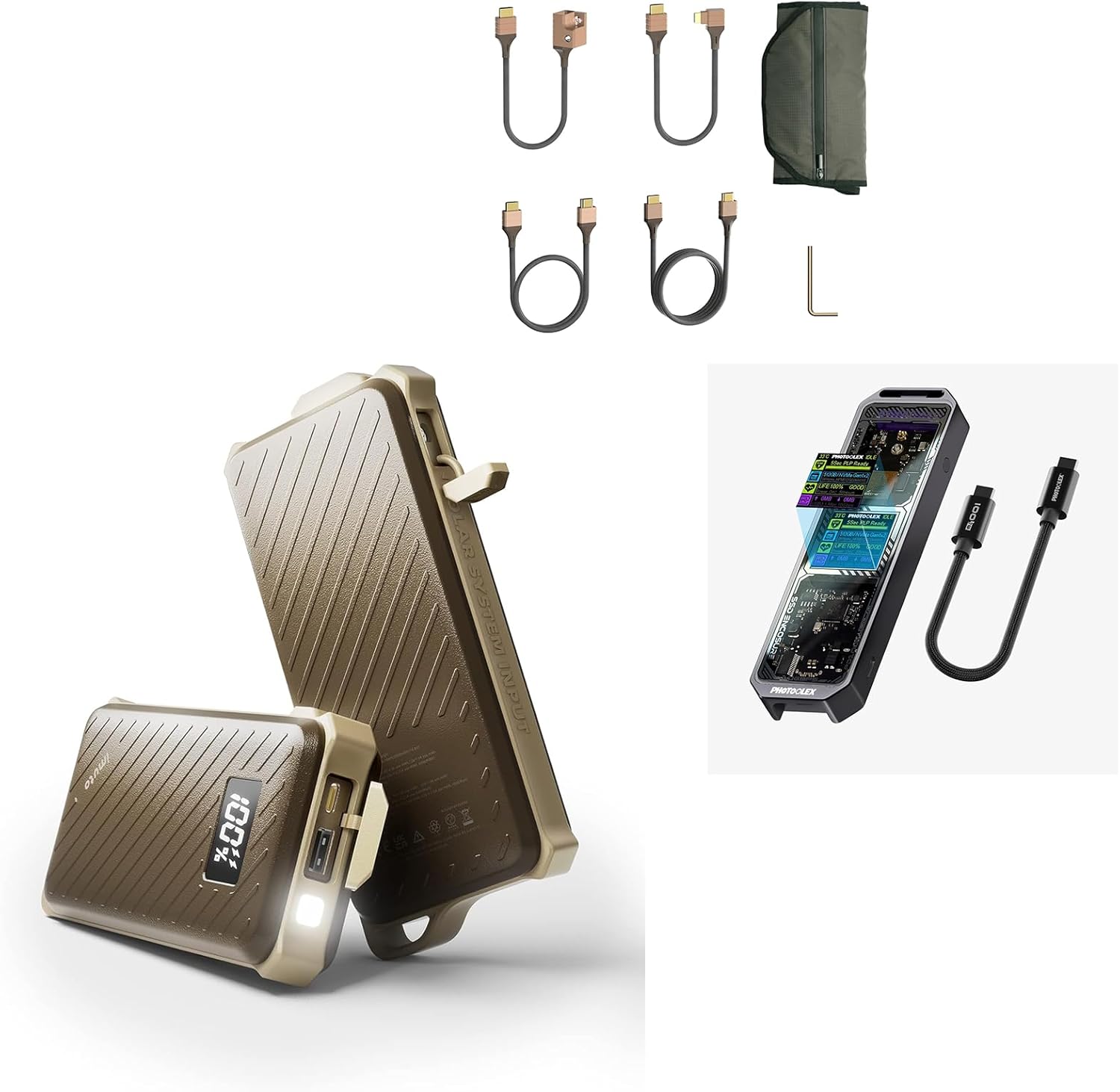
Image: The complete imuto product bundle, showcasing the power bank, SSD enclosure, and various HDMI cables.
Component 1: imuto 20000mAh Waterproof Power Bank
The imuto 20000mAh Power Bank is a rugged, high-capacity portable charger designed for outdoor use and fast charging of various devices.
Caratteristiche
- Erogazione di potenza da 65 W (PD 3.0): Fast charging for laptops, tablets, and smartphones via USB-C.
- Capacità 20000mAh: Provides multiple charges for most devices.
- Design impermeabile: Enhanced durability for outdoor and travel use.
- Doppie porte di uscita: Includes USB-C (65W Input & Output) and USB-A (18W Output).
Configurazione e ricarica
- Ricarica del Power Bank: Connect the included USB-C to USB-C cable to the power bank's USB-C port and a 65W (or higher) USB-C power adapter. The digital display will show the charging progress. A full charge takes approximately 1.5 hours with a 65W charger.
- Ricarica i tuoi dispositivi:
- For USB-C devices (laptops, tablets, phones): Use the USB-C port with a compatible USB-C to USB-C cable.
- For USB-A devices (phones, accessories): Use the USB-A port with a compatible USB-A cable.

Image: The imuto 20000mAh Power Bank displaying its capacity on a digital screen, set in an outdoor environment.
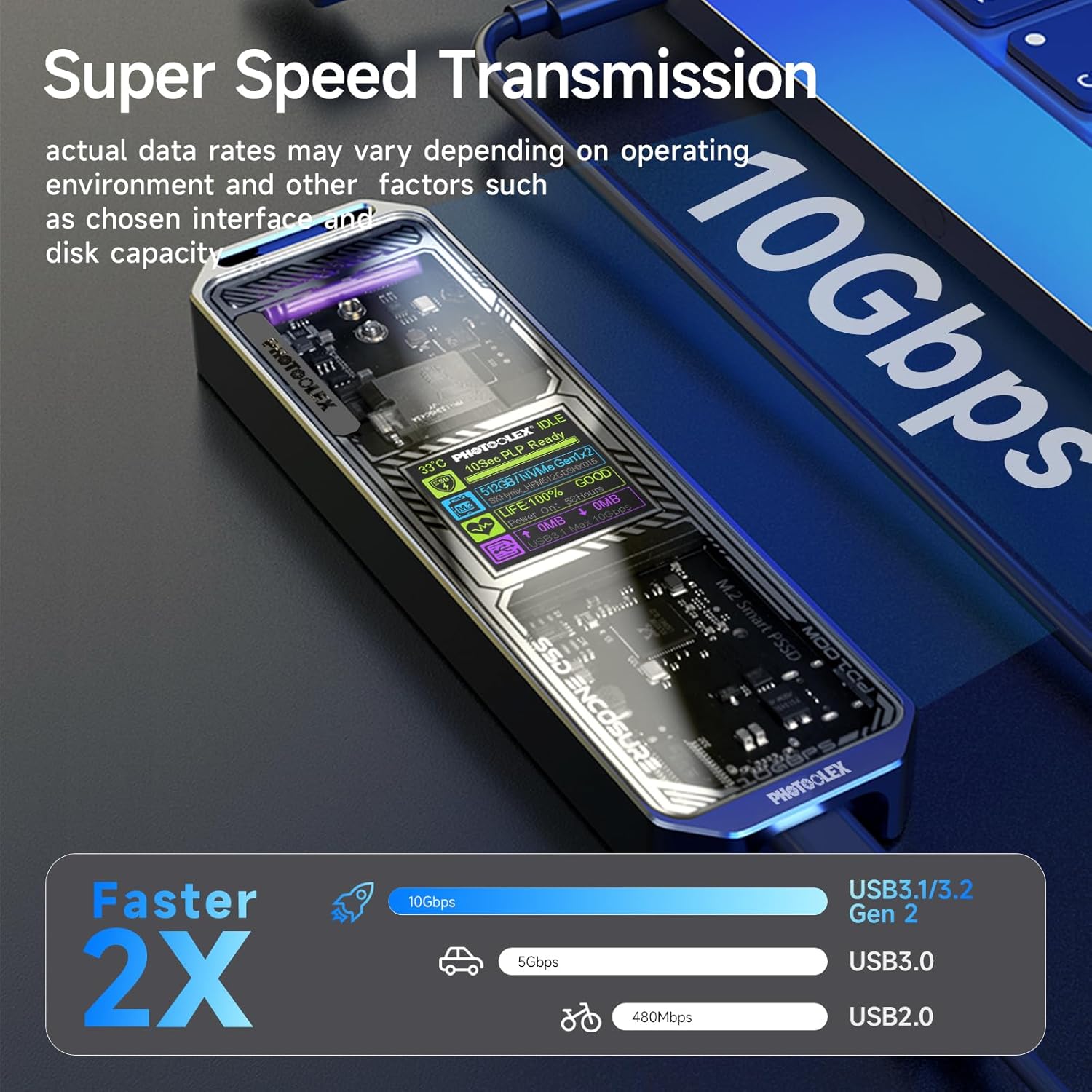
Image: The imuto Power Bank being charged via a 65W USB-C adapter, illustrating its fast charging capability and dual output ports (USB-C 65W and USB-A 18W) for charging multiple devices.
Operazione
The power bank automatically detects connected devices and begins charging. The digital display shows the remaining battery percentage. Press the power button briefly to check the battery level.
Specifiche
| Capacità | 20000mAh |
| Ingresso/uscita USB-C | Erogazione di potenza da 65 W (PD 3.0) |
| Uscita USB-A | 18W |
| Tempo di ricarica | Circa 1.5 ore (con caricabatterie da 65 W) |
| Caratteristiche | Waterproof, Digital Display |
Component 2: USB 3.2 Gen 2 SSD Enclosure
The imuto SSD Enclosure provides a high-speed external storage solution for M.2 NVMe SSDs, featuring a smart screen for real-time information.
Caratteristiche
- USB 3.2 Gen 2 (10 Gbps): Offers super-speed data transmission, up to 2 times faster than USB 3.0.
- 10s PLP (Power Loss Protection): Prevents data loss during unexpected power interruptions.
- Schermo intelligente: Shows real-time hard disk working information, including temperature, SSD health, and data transfer speed.
- Ampia compatibilità: Supports M.2 NVMe PCIe M-Key and B&M Key SSDs (2230/2242/2260/2280 sizes).
Installation Guide (SSD)
Per installare un SSD M.2 NVMe nell'alloggiamento, seguire questi passaggi:
- Gently slide open the enclosure to reveal the internal PCB.
- Insert your M.2 NVMe SSD into the M-Key or B&M Key slot. Ensure it is fully seated.
- Secure the SSD with the provided screw or retention clip, using the appropriate spacer for your SSD size (2230, 2242, 2260, or 2280).
- Rimettere il coperchio dell'alloggiamento in posizione finché non scatta in posizione.
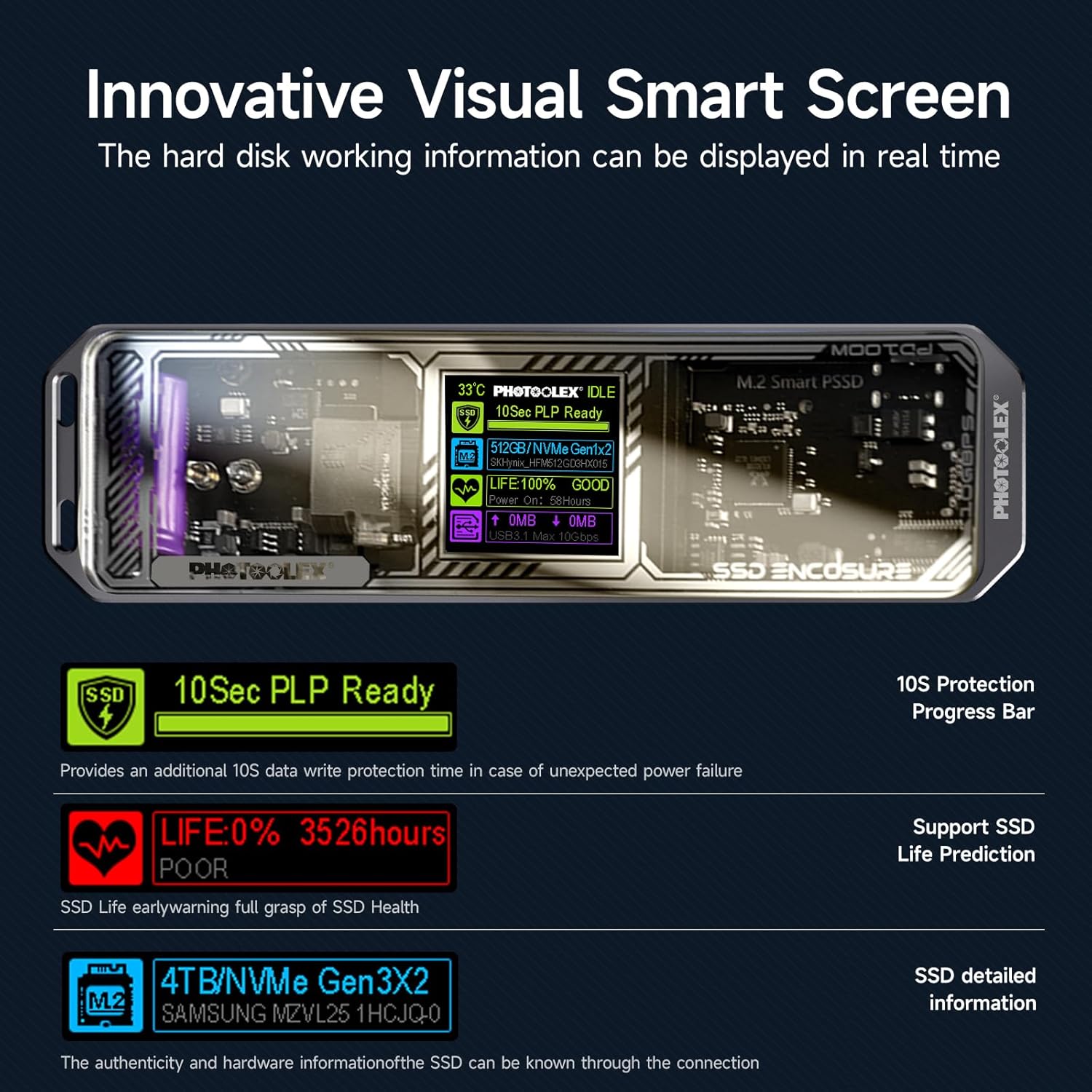
Image: The SSD enclosure disassembled, illustrating its compatibility with various M.2 NVMe SSD sizes (2230, 2242, 2260, 2280) and how they are installed with spacers.

Image: The SSD enclosure's innovative smart screen displaying real-time information such as temperature, SSD health, and data transfer details, along with a 10-second Power Loss Protection indicator.
Operazione
Connect the SSD enclosure to your computer using the included USB cable. The enclosure will be recognized as an external drive. You can then format the SSD (if new) and begin transferring data. The smart screen will provide live feedback on its status.
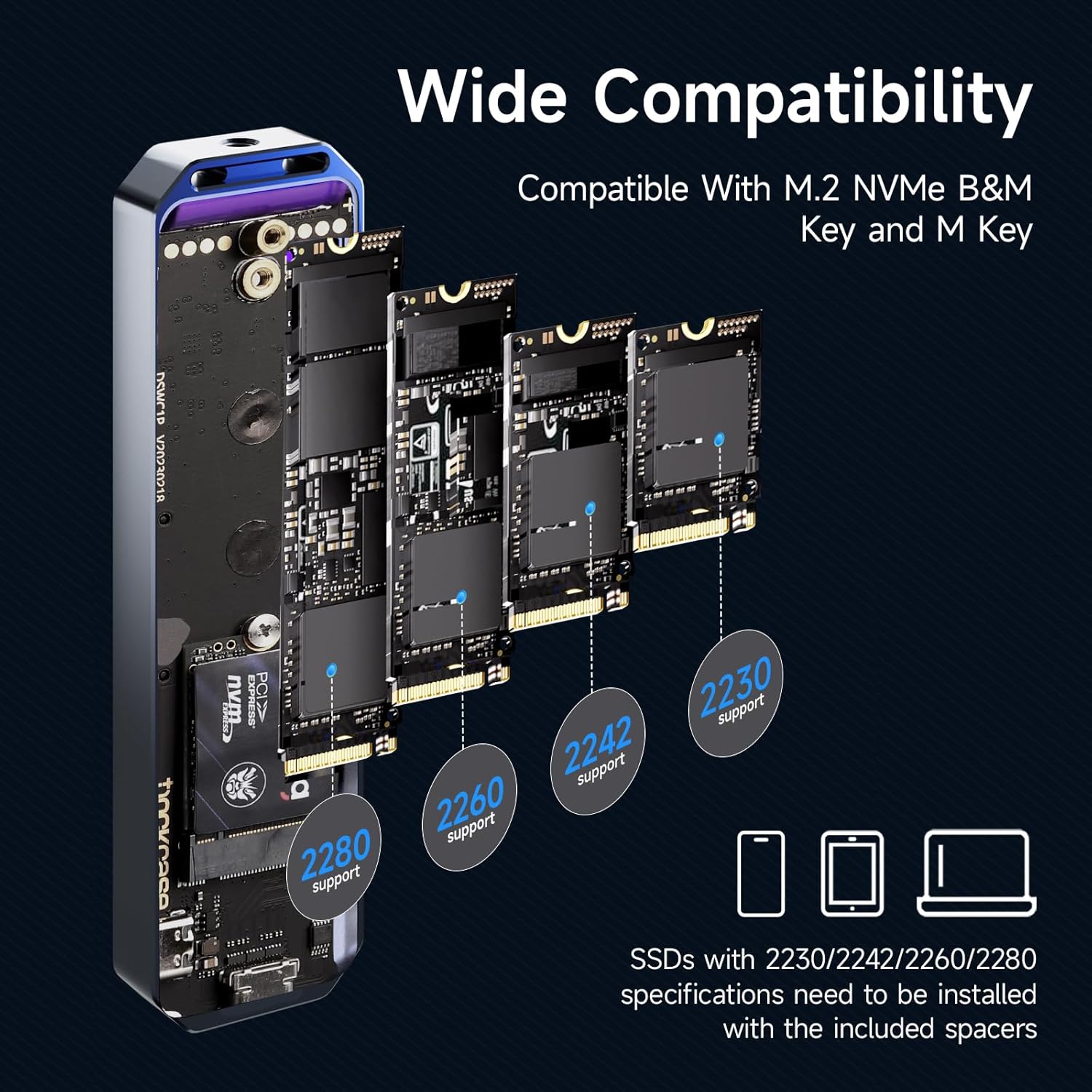
Image: The SSD enclosure connected to a laptop, highlighting its 10Gbps super-speed data transmission capability, which is 2X faster than USB 3.1/3.2 Gen 1 (5Gbps).
Specifiche
| Interfaccia | USB 3.2 di seconda generazione (2 Gbps) |
| Compatibilità SSD | M.2 NVMe PCIe M-Key/B&M Key (2230/2242/2260/2280) |
| Caratteristiche | 10s PLP, Smart Screen Display, UASP Support |
Component 3: HDMI Cables (4-Pack)
This bundle includes a versatile set of four high-speed HDMI cables designed for various connectivity needs, supporting 4K@60Hz resolution.
Types and Usage
- Mini HDMI to HDMI Cable (0.3m / 0.98ft): Ideal for connecting devices with a Mini HDMI output (e.g., some cameras, tablets) to standard HDMI input displays.
- Mini HDMI Male to HDMI Female Cable (0.25m / 0.82ft): An adapter cable to convert a Mini HDMI output to a standard HDMI female port, allowing connection of a standard HDMI cable.
- HDMI to HDMI Cable (1m / 3.28ft): A standard length HDMI cable for connecting devices like Blu-ray players, gaming consoles, or computers to TVs or monitors.
- HDMI to HDMI Cable (3m / 9.84ft): A longer standard HDMI cable for connections requiring more reach.

Image: A visual representation of the four different HDMI cables included: Mini HDMI to HDMI, Mini HDMI Male to HDMI Female, and two HDMI to HDMI cables of different lengths.

Image: A Mini HDMI cable with a 90-degree elbow design connected to a camera, demonstrating its use for protecting the camera's HDMI port and ensuring a stable connection.
Specifiche
| Supporto alla risoluzione | 4K a 60 Hz |
| Tipi di cavo | Mini HDMI to HDMI, Mini HDMI Male to HDMI Female, HDMI to HDMI |
| Lunghezze | 0.25ft, 0.82ft, 3.3ft, 10ft (approximate) |
| Caratteristiche | High Speed, 90° Elbow Design (for Mini HDMI) |
Risoluzione dei problemi
Power Bank Issues
- Il power bank non si carica: Ensure you are using a compatible USB-C charger (preferably 65W) and cable. Check if the cable and charger are securely connected.
- Dispositivo non in carica tramite power bank: Ensure the power bank has sufficient charge. Try a different cable or port. Verify your device is compatible with the power bank's output specifications.
SSD Enclosure Issues
- SSD non riconosciuto: Ensure the SSD is correctly installed and secured within the enclosure. Try connecting to a different USB port on your computer. Check if the SSD is properly formatted for your operating system.
- Trasferimento dati lento: Ensure you are connected to a USB 3.2 Gen 2 (10 Gbps) compatible port on your computer. Older USB ports (e.g., USB 2.0, USB 3.0/3.1 Gen 1) will result in slower speeds.
- Smart screen not displaying: Ensure the enclosure is properly connected to a power source (via USB).
HDMI Cable Issues
- No video/audio signal: Ensure both ends of the HDMI cable are securely connected to the correct ports on your devices. Verify the input source on your display is set correctly. Try a different HDMI cable.
- Poor resolution/flickering: Ensure your devices and display support the desired resolution (e.g., 4K@60Hz). Check cable length limitations for high resolutions.
Manutenzione e cura
- Clean the products with a soft, dry cloth. Do not use abrasive cleaners or solvents.
- Store the products in a cool, dry place away from direct sunlight and extreme temperatures.
- Avoid exposing the power bank to excessive heat or cold, as this can affect battery life.
- Handle cables by the connectors, not the cable itself, to prevent damage.
Garanzia e supporto
imuto products are designed for reliability and performance. For warranty information, technical support, or customer service inquiries, please refer to the contact information provided with your purchase or visit the official imuto websito.
Nota: The warranty typically covers manufacturing defects. Damage caused by misuse, unauthorized modification, or accidents is not covered.
For further assistance, please contact imuto customer support.
Ask a question about this manual
Ask about setup, troubleshooting, compatibility, parts, safety, or missing instructions. Manuals+ will review the question and use this page’s manual context to help answer it.