
1. Introduzione
This manual provides essential information for the safe and efficient operation of your DATOUBOSS 3600W 24V Hybrid Pure Sine Wave Inverter. Please read this manual thoroughly before installation and use, and retain it for future reference. This inverter is designed to provide stable and high-quality AC power from a DC 24V source, supporting various modes for solar power generation systems.
2. Informazioni sulla sicurezza
Per ridurre il rischio di scosse elettriche, incendi o lesioni, osservare sempre le seguenti precauzioni di sicurezza:
- Garantire la corretta messa a terra dell'inverter.
- Non esporre l'inverter a pioggia, neve, spruzzi o altri liquidi.
- Non smontare l'inverter. Per qualsiasi intervento di manutenzione, rivolgersi a personale qualificato.
- Keep the inverter away from flammable materials and gases.
- Assicurare un'adeguata ventilazione attorno all'inverter per evitare il surriscaldamento.
- Verifica il volume di input e outputtages are within specified ranges before connecting any devices.
The inverter features multiple protection mechanisms including overcharge protection, over-discharge protection, high voltage protezione, basso voltage protection, and short circuit protection to ensure safe operation.

Image: Safety features of the DATOUBOSS Hybrid Inverter, including overcharge, over-discharge, high voltage, volume bassotage, e protezione da cortocircuito.
3. Prodotto finitoview
The DATOUBOSS Hybrid Inverter is a versatile power solution integrating a 120A MPPT solar charge controller, a 3600W pure sine wave inverter, and an Uninterruptible Power Supply (UPS) function. It efficiently converts DC 24V power to AC 100V-120V, suitable for various applications including solar power generation systems.
Caratteristiche principali:
- Modalità multifunzionali: Supports Off-grid, Grid-tied, and Hybrid modes for flexible power management.
- Output di alta qualità: Produces pure sine wave AC output, safe for sensitive electronics and household appliances.
- Adjustable AC Output: Volume di uscitatage is adjustable between AC 100V-120V to match specific appliance requirements.
- Powerful Conversion: Efficiently converts DC 24V to AC 100V with a maximum output of 3600W.
- Efficienza energetica: Features a 120A MPPT PV charge controller for fast and efficient solar charging, maximizing energy utilization (up to 99.9% efficiency).
- Ampia compatibilità della batteria: Compatible with various 24V battery systems, including FLD, GEL, LiFePO4, Li-ion, and SLD, with user-definable settings.
- Funzionalità UPS: Provides uninterrupted power supply during grid outages.

Image: Diagram illustrating the integrated features of the DATOUBOSS Hybrid Inverter: 120A MPPT controller, 3600W pure sine wave inverter, UPS function, and 120A maximum charging current.
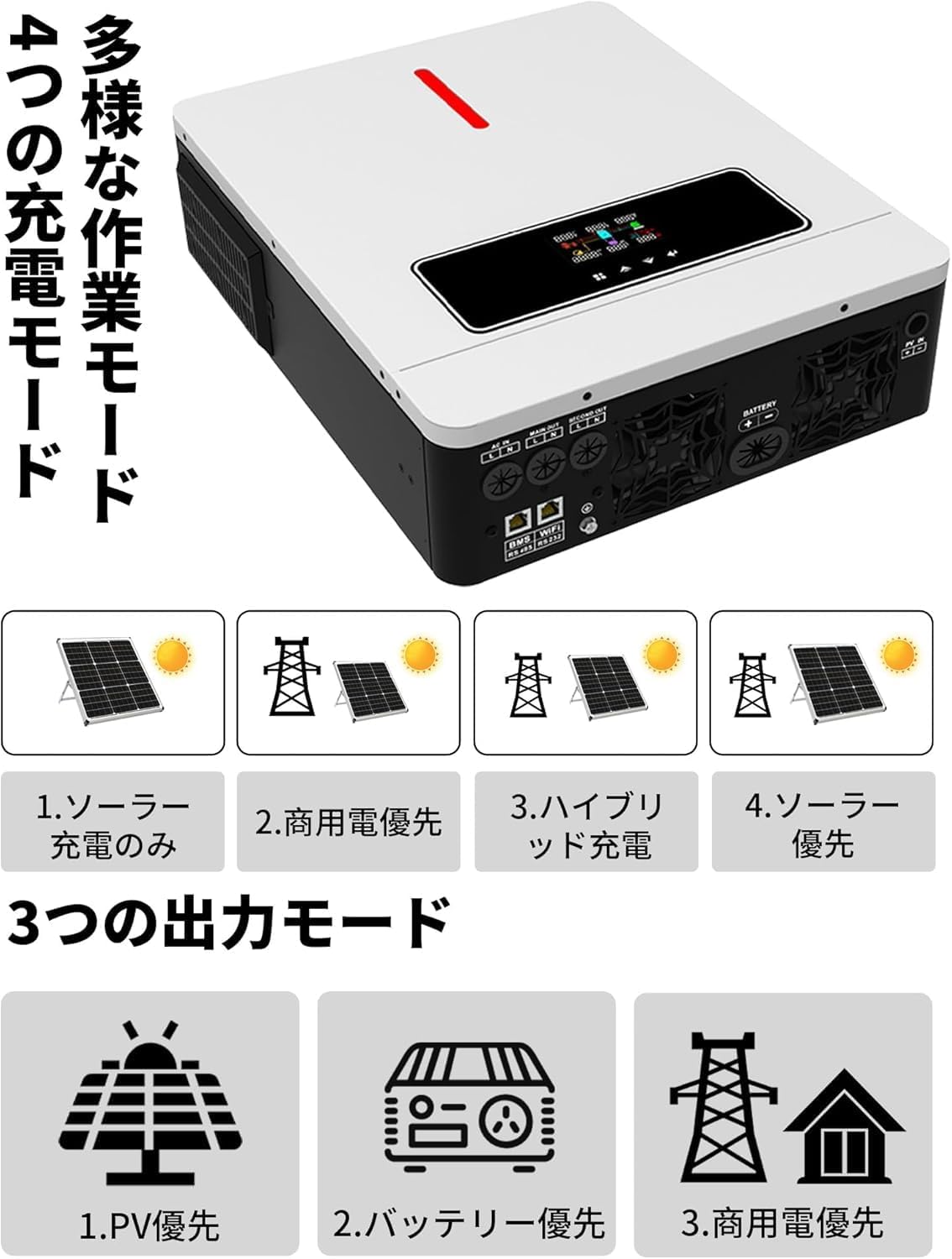
Image: Visual representation of the inverter's energy utilization efficiency (99.9%), LCD display, 120A MPPT controller, ability to operate without a battery, 100V-120V adjustable output, UPS function, 3600W pure sine wave output, and app control capability.
4. Configurazione e installazione
Proper installation is crucial for the performance and safety of your inverter. It is recommended that installation be performed by a qualified electrician.
4.1 Identificazione dei componenti
Familiarize yourself with the inverter's ports and controls:

Immagine: dettagliata view of the inverter's connection ports and display. Includes LCD screen, touch buttons, primary output port, AC input port, secondary output port, PV port, battery communication (RS-485) port, earth terminal, cooling fan, WiFi/RS-232 port, and battery port.
- Schermo LCD: Visualizza lo stato operativo e le impostazioni.
- Pulsanti a sfioramento: Per navigare nei menu e regolare le impostazioni.
- Porta di ingresso CA: Connects to the utility grid or AC generator.
- Primary Output Port: Main AC output for loads.
- Secondary Output Port: Additional AC output.
- Porta fotovoltaica: Si collega ai pannelli solari.
- Porta batteria: Si collega al banco batterie da 24 V.
- Battery Communication (RS-485) Port: Per la comunicazione con sistemi di gestione della batteria compatibili.
- WiFi/RS-232 Port: For remote monitoring and control (optional WiFi module may be required).
- Terminale di terra: Per la messa a terra dell'inverter.
- Ventola di raffreddamento: Garantisce una temperatura di esercizio ottimale.
4.2 Schema elettrico
The inverter can be integrated into a complete system as shown below:
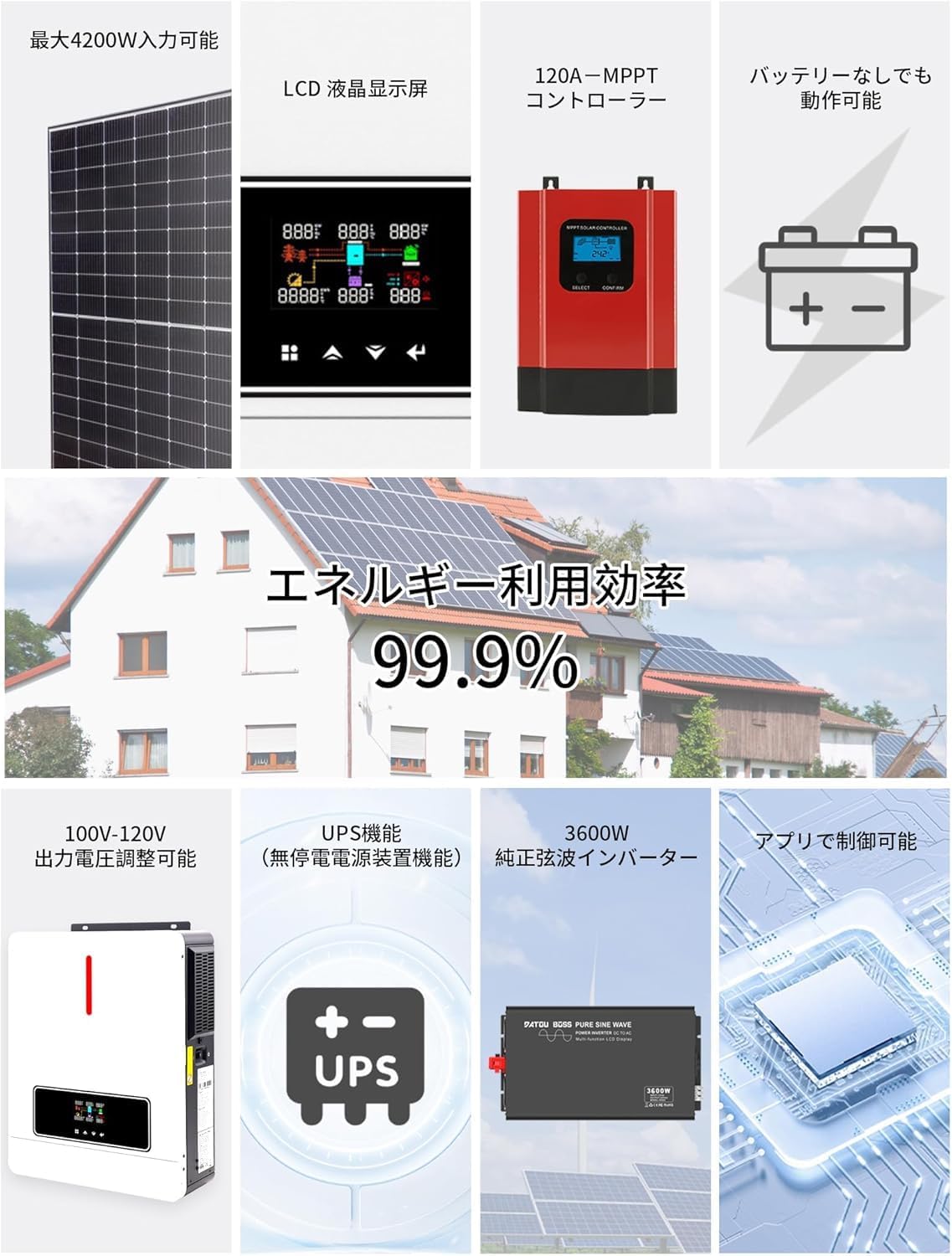
Image: System application diagram showing connections between solar panels, the hybrid inverter, a battery bank, an AC power source or generator, and various household loads (lights, fan, computer, refrigerator, heater).
Ensure all connections are secure and correctly polarized. Refer to local electrical codes for wiring standards.
4.3 Collegamento della batteria
The inverter supports various 24V battery types. Select the appropriate battery type in the inverter settings after connection.

Image: Diagram showing the DATOUBOSS Hybrid Inverter's compatibility with various 24V battery types: FLD (Flooded), GEL (Gel), LiFePO4 (Lithium Iron Phosphate), Li-ion (Lithium-ion), SLD (Sealed Lead-Acid), and USER (User-defined) battery types.
- Connect the positive (+) terminal of the 24V battery bank to the positive (+) battery port on the inverter.
- Connect the negative (-) terminal of the 24V battery bank to the negative (-) battery port on the inverter.
- Assicurarsi che la polarità sia corretta per evitare danni.
5. Modalità operative
The DATOUBOSS Hybrid Inverter offers flexible operating modes to suit different energy management needs. These modes can be configured via the LCD display or a connected application.
5.1 modalità di ricarica
L'inverter supporta quattro distinte modalità di ricarica:
- 1. Solar Only: Carica le batterie esclusivamente tramite pannelli solari.
- 2. Utility Priority: Charges batteries primarily from the utility grid, with solar as a secondary source if available.
- 3. Hybrid Charging: Utilizes both solar and utility power for charging, prioritizing solar.
- 4. Solar Priority: Dà priorità alla ricarica solare, utilizzando l'energia elettrica solo quando l'energia solare è insufficiente.
5.2 modalità di uscita
The inverter provides three output modes for power distribution:
- 1. PV Priority: Dà priorità all'energia proveniente dai pannelli solari per alimentare i carichi.
- 2. Battery Priority: Dà priorità all'energia proveniente dalle batterie per alimentare i carichi.
- 3. Utility Priority: Dà priorità all'energia proveniente dalla rete elettrica per alimentare i carichi.
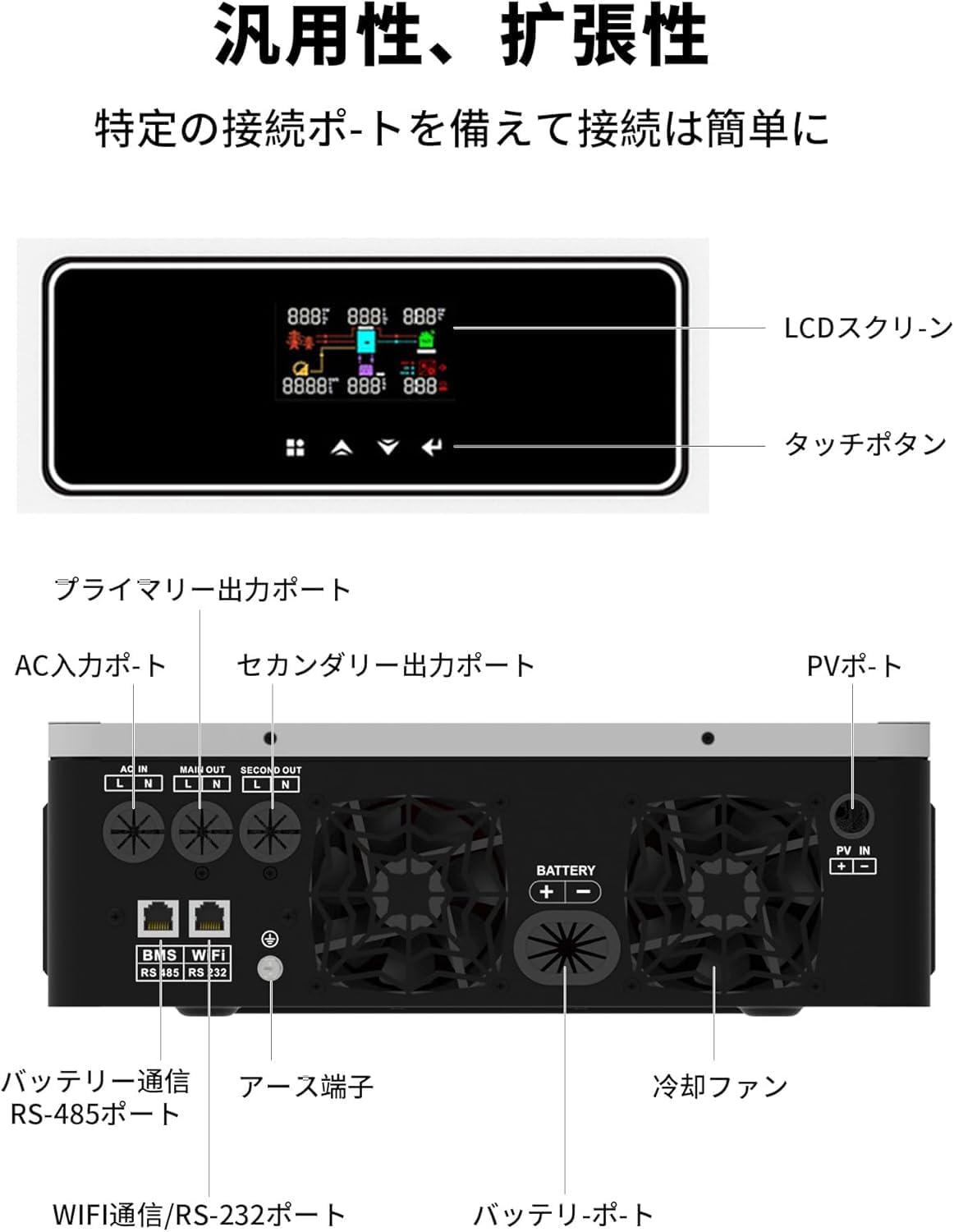
Image: Diagram illustrating the four charging modes (Solar Only, Utility Priority, Hybrid Charging, Solar Priority) and three output modes (PV Priority, Battery Priority, Utility Priority) of the DATOUBOSS Hybrid Inverter.
6. Manutenzione
Una manutenzione regolare garantisce la longevità e le prestazioni ottimali del vostro inverter.
- Pulizia: Mantenere l'esterno dell'inverter pulito e privo di polvere. Assicurarsi che le aperture di ventilazione non siano ostruite. Utilizzare un panno asciutto per la pulizia.
- Connessioni: Periodically check all electrical connections for tightness and corrosion. Loose connections can cause overheating and damage.
- Ambiente: Assicurarsi che l'inverter funzioni entro gli intervalli di temperatura e umidità specificati. Evitare la luce solare diretta e l'umidità eccessiva.
- Stato della batteria: Monitor the health of your connected batteries according to their manufacturer's guidelines.
- Aggiornamenti del firmware: Controllare il produttore websito per eventuali aggiornamenti firmware disponibili per migliorare le prestazioni o aggiungere funzionalità.
7. Risoluzione Dei Problemi
Questa sezione fornisce soluzioni ai problemi più comuni. Per problemi non elencati qui, contattare l'assistenza clienti.
| Problema | Possibile causa | Soluzione |
|---|---|---|
| Nessuna potenza in uscita | Inverter off, battery low, input power issue, overload | Check power switch, charge battery, verify input connections, reduce load. |
| Inverter beeping/error code | Overload, over-temperature, battery fault, short circuit | Refer to LCD display for specific error code, reduce load, ensure ventilation, check battery connections, inspect wiring. |
| Basso volume di uscitatage | Volume della batteriatage too low, incorrect settings | Charge battery, adjust output voltage settings via LCD. |
| La ricarica solare non funziona | PV panels not connected, insufficient sunlight, MPPT controller fault | Check PV connections, ensure panels are clean and exposed to sun, contact support if MPPT fault persists. |
8. Specifiche
| Caratteristica | Specificazione |
|---|---|
| Marca | DATOUBOSS |
| Numero di modello | 2412051554 |
| Ingresso DC Voltage | 24V |
| Uscita AC Voltage | AC 100V-120V (Adjustable) |
| Potenza nominale | 3600W |
| Forma d'onda di uscita | Onda sinusoidale pura |
| Frequenza | Frequenza di campionamento: 50 Hz/60 Hz |
| PV Charge Current (Max) | 120A (MPPT) |
| Tipo di visualizzazione | GUIDATO |
| Dimensioni (confezione) | Dimensioni: 50 x 42 x 18 cm |
| Peso (confezione) | 9 kg |
| Uso consigliato | Solar Power Generation |
| Fonte di alimentazione | Solar Battery and Battery Powered |
9. Garanzia e supporto
For warranty information and technical support, please refer to the official DATOUBOSS webo contattare il rivenditore autorizzato. Conservare la ricevuta d'acquisto come prova d'acquisto per eventuali reclami in garanzia.
For further assistance, you may contact the seller directly via the Amazon platform or visit the Negozio DATOUBOSS su Amazon.