
1. Introduzione
Grazie per l'acquistoasing the Sharp 4T-C65FL6EX 65-inch 4K Frameless Smart TV. This manual provides essential information for the safe and efficient use of your new television. Please read these instructions thoroughly before operating the TV and retain them for future reference.
Informazioni importanti sulla sicurezza
Always follow basic safety precautions when using this product to reduce the risk of fire, electric shock, and injury. Do not expose the TV to rain or moisture. Do not open the cabinet; refer all servicing to qualified personnel. Ensure proper ventilation and avoid placing the TV near heat sources.
2. Prodotto finitoview
The Sharp 4T-C65FL6EX is a 65-inch 4K UHD Smart LED TV designed to deliver an immersive viewing experience. It features a frameless design, Google TV operating system, and a built-in digital receiver.
Caratteristiche principali
- 65-inch 4K UHD Display: Enjoy stunning visuals with a resolution of 3840 x 2160 pixels.
- Design senza cornice: Massimizza lo spazio sullo schermo per un'ampia view.
- Google TV Operating System: Access a wide range of apps, movies, and shows.
- Built-in Digital Receiver: Supports DVB-S/S2/T/T2/C broadcast types.
- Dolby Atmos & DTS Studio Sound: Delivers rich, immersive audio.
- Dolby Vision e HDR10: Contrasto e colore migliorati per contenuti compatibili.
- Chromecast integrato: Trasmetti facilmente i contenuti dai tuoi dispositivi mobili.
- Far-field Voice Control & Google Assistant: Control your TV with voice commands.
- Connettività: Wi-Fi, Bluetooth v5.1, 3 HDMI 2.0 ports, 2 USB ports, LAN.
Contenuto della confezione
- Sharp 4T-C65FL6EX 65-inch 4K Smart TV
- Telecomando
- Cavo di alimentazione
- Supporto TV (2 pezzi)
- Viti per l'installazione del supporto
- Manuale dell'utente (questo documento)

Figura 2.1: Fronte view of the Sharp 4T-C65FL6EX Smart TV.
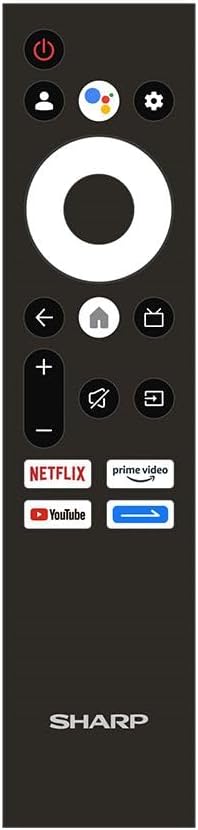
Figure 2.2: The included remote control for the Sharp Smart TV.
3. Impostazione
3.1 Disimballaggio e posizionamento
- Estrarre con cautela il televisore dall'imballaggio. Si consiglia di effettuare questa operazione in due persone.
- Place the TV on a stable, flat surface or prepare for wall mounting. Ensure adequate space around the TV for ventilation.
3.2 Installazione dello stand
Se non si monta la TV a parete, collegare il supporto incluso:
- Lay the TV screen-down on a soft, clean cloth to prevent scratches.
- Allineare ciascun pezzo del supporto con le fessure corrispondenti nella parte inferiore del televisore.
- Fissare i supporti utilizzando le viti fornite. Assicurarsi che siano ben serrate.
3.3 Montaggio a parete (opzionale)
This TV is compatible with VESA standard wall mounts. Consult a professional for wall mounting to ensure proper installation and safety. Remove the stand before wall mounting.
3.4 Collegamento dei dispositivi
Collega i tuoi dispositivi esterni al televisore utilizzando le porte appropriate:
- HDMI: For Blu-ray players, game consoles, cable/satellite boxes. The TV has 3 HDMI 2.0 ports.
- USB: For USB drives to play media (video, photos, music). The TV has 2 USB ports.
- Antenna/Satellite (RF Input): Connect your antenna or satellite dish cable to the RF input for digital broadcasting.
- LAN: Per una connessione Internet cablata.
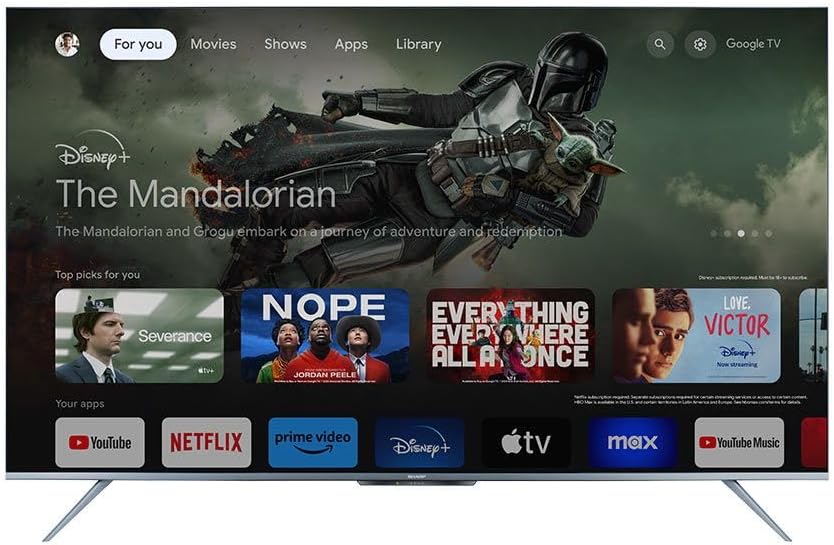
Figura 3.1: Posteriore view of the TV illustrating various input/output ports.
3.5 Accensione e prima configurazione
- Collegare il cavo di alimentazione al televisore e poi a una presa di corrente.
- Premere il pulsante di accensione sul telecomando o sul televisore.
- Follow the on-screen instructions to complete the initial setup, which includes selecting language, connecting to Wi-Fi, and signing in with your Google account.
4. Istruzioni per l'uso
4.1 Funzioni del telecomando
Il telecomando consente di navigare tra le funzioni del televisore. I pulsanti principali includono:
- Pulsante di accensione: Accende o spegne la TV.
- Pulsante Assistente Google: Attiva il controllo vocale.
- Tastierino di navigazione (cerchio): Moves through menus and selects items.
- Pulsante Home: Ritorna alla schermata iniziale di Google TV.
- Pulsante Indietro: Ritorna alla schermata precedente.
- Volume su/giù: Regola il volume.
- Tasto muto: Disattiva o riattiva l'audio.
- Pulsante di ingresso: Seleziona le sorgenti di ingresso (HDMI, AV, ecc.).
- Pulsanti di scelta rapida delle app: Accesso diretto a Netflix, Prime Video, YouTube.
4.2 Interfaccia di Google TV
The Google TV interface organizes your content from various streaming services and apps into one personalized screen. You can browse recommendations, access your library, and discover new content.
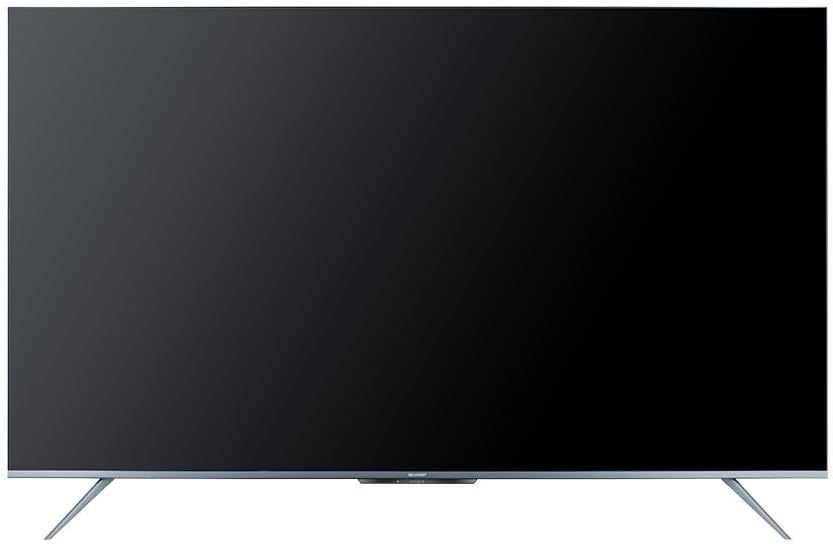
Figure 4.1: The Google TV home screen interface.
4.3 Utilizzo delle funzioni intelligenti
- Applicazioni di streaming: Navigate to the 'Apps' section or use the dedicated remote buttons to launch Netflix, Prime Video, YouTube, and other installed applications.
- Ricerca vocale: Press the Google Assistant button on your remote and speak into the microphone to search for content, control playback, or ask questions.
- Chromecast integrato: Use the Chromecast feature to cast videos, photos, and music from your compatible smartphone, tablet, or computer directly to the TV.
- Web Navigatore: Accedi a Internet utilizzando il dispositivo integrato web browser.
- Google Play Store: Download and install additional apps and games from the Google Play Store.
4.4 Selezione della sorgente di input
Per passare da un dispositivo all'altro (ad esempio, HDMI 1, HDMI 2, sintonizzatore TV), premere il tasto Ingresso sul telecomando e selezionare la sorgente desiderata dal menu sullo schermo.
5. Manutenzione
5.1 Pulizia del televisore
- Schermo: Pulisci delicatamente lo schermo con un panno morbido e privo di lanugine. Per le macchie ostinate, utilizza una soluzione detergente specifica per TV, da applicare sul panno, non direttamente sullo schermo.
- Consiglio dei ministri: Pulisci il mobile TV con un panno morbido e asciutto. Non utilizzare detergenti abrasivi, cere o solventi.
- Prima di pulire il televisore, scollegarlo sempre dalla presa di corrente.
5.2 Aggiornamenti software
Your Sharp Smart TV may receive software updates periodically to improve performance and add new features. Ensure your TV is connected to the internet to receive these updates. You can usually check for updates in the TV's settings menu.
6. Risoluzione Dei Problemi
Prima di contattare l'assistenza clienti, prova le seguenti soluzioni per i problemi più comuni:
| Problema | Possibile soluzione |
|---|---|
| Nessun potere | Controlla che il cavo di alimentazione sia collegato saldamente al televisore e alla presa di corrente. Assicurati che la presa funzioni. Prova a premere il pulsante di accensione sul televisore stesso. |
| Nessuna immagine, ma l'audio è presente | Ensure the correct input source is selected. Check HDMI or other video cables for secure connections. |
| Nessun suono, ma l'immagine è presente | Check the volume level and ensure the TV is not muted. Verify audio cable connections if using external speakers. Check audio output settings in the TV menu. |
| Il telecomando non funziona | Sostituisci le batterie del telecomando. Assicurati che non ci siano ostacoli tra il telecomando e il sensore IR del televisore. |
| Impossibile connettersi al Wi-Fi | Assicurati che il router Wi-Fi sia acceso e funzionante. Reinserisci la password Wi-Fi con attenzione. Prova a riavviare il router e la TV. |
| Le funzionalità intelligenti sono lente o non rispondono | Restart the TV. Ensure a stable internet connection. Close unused applications running in the background. |
7. Specifiche
| Caratteristica | Dettaglio |
|---|---|
| Numero di modello | 4T-C65FL6EX |
| Dimensioni dello schermo | 65 pollici |
| Tecnologia di visualizzazione | GUIDATO |
| Risoluzione | Risoluzione 3840 x 2160 (4K UHD) |
| Proporzioni | 16:9 |
| Viewangolo di ing | 178 gradi |
| Frequenza di aggiornamento | Frequenza 60 Hz |
| Sistema operativo | TV di Google |
| Memoria interna | 32 GB |
| Tipo di trasmissione | Digital (DVB-S/S2/T/T2/C) |
| Tecnologia audio | Dolby Atmos, suono DTS Studio |
| Tecnologia video | HLG, Dolby Vision, HDR10 |
| Connettività | Wi-Fi, Bluetooth v5.1 |
| Porte HDMI | 3 (HDMI2.0) |
| Porte USB | 2 |
| Porta LAN | 1 |
| Potenza di uscita audio | 12 Watt x 2 |
| Consumo energetico (in funzione) | 200 Watt |
| Consumo energetico (standby) | <0.5 Watt |
| Dimensioni (L x A x P) senza supporto | Dimensioni: 1447.7 x 837 x 81.3 mm |
| Dimensioni (L x A x P) con supporto | Dimensioni: 1447.7 x 922.6 x 280.2 mm |
| Peso netto | 17.9 kg |
| Paese di origine | Egitto |
8. Garanzia e supporto
8.1 Garanzia del prodotto
This Sharp 4T-C65FL6EX Smart TV comes with a 3-year full free warranty. Please retain your proof of purchase for warranty claims. The warranty covers manufacturing defects and malfunctions under normal use conditions. It typically does not cover damage caused by misuse, accidents, unauthorized repairs, or natural disasters.
8.2 Assistenza clienti
For technical assistance, service requests, or further inquiries regarding your Sharp TV, please contact Sharp customer support. Refer to the warranty card or Sharp's official websito per i dettagli di contatto specifici della tua regione.