
YL81C
Manuale utente per display LCD per bici elettrica YL81C
Modello: YL81C
Marca: Generico
Introduzione
The YL81C E-bike LCD display is designed to provide comprehensive functionality for your riding needs. It offers a range of features including power display, power gear adjustment, headlight indication, various speed measurements (real-time, maximum, average), mileage tracking (total and single trip), error code display, and parameter setting capabilities. This display is built with durable ABS and LCD housing, a tempered glass screen, and a nylon bracket, ensuring robust performance in diverse conditions.
Prodotto finitoview
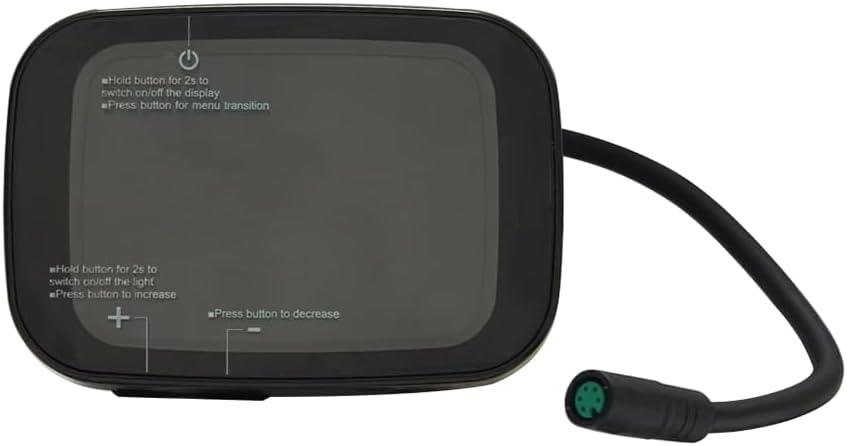
Figura 1: Davanti view of the YL81C E-bike LCD Display. This image highlights the display screen and the integrated control buttons for power, menu navigation, and adjustment.

Figura 2: Posteriore view of the YL81C E-bike LCD Display. This view shows the robust mounting bracket and the attached waterproof cable with a 5-hole female connector.

Figura 3: Key dimensions of the YL81C display. The display measures approximately 70mm in length, 47mm in height (including the mounting bracket), and 49mm in depth.
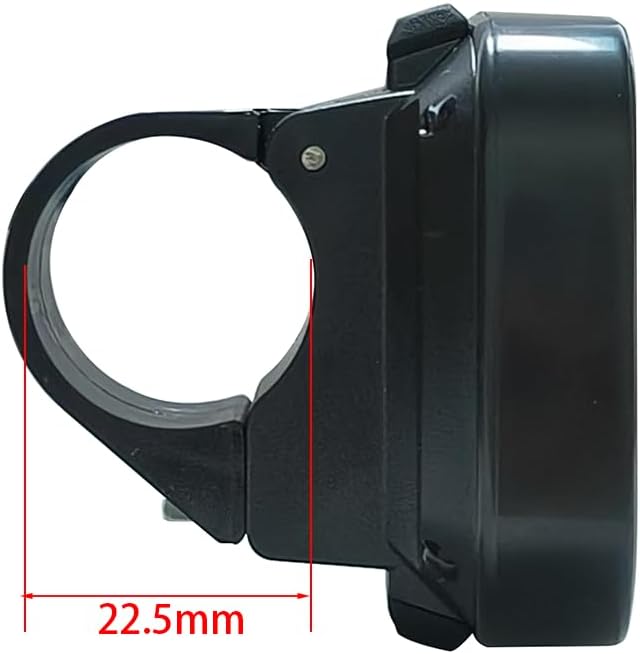
Figura 4: Lato view illustrating the handlebar clamp. The flexible bracket is designed to fit handlebar sizes of 22.2 mm, 25.4 mm, and 31.8 mm, with a visible clamp diameter of 22.5mm in this specific view.
Configurazione e installazione
The YL81C display is designed for straightforward installation. Ensure your e-bike's battery voltage is compatible (24V, 36V, 48V, or 60V).
Controllo di compatibilità
- Voltage: The YL81C display is compatible with 24V, 36V, 48V, and 60V e-bike battery systems.
- Tipo di connettore: The display features a female 5-hole waterproof connector. Verify that your e-bike's wiring harness has a compatible male connector.
- Protocollo di comunicazione: The YL81C LCD monitor utilizes various communication protocols. To ensure plug-and-play functionality, it is highly recommended to contact customer service after purchase and provide the serial number from your old monitor. This allows for verification of protocol compatibility.

Figura 5: Location of the serial number on the back of the YL81C display. This number is crucial for compatibility verification with customer service.
Fasi di installazione
- Montaggio sul manubrio: The flexible bracket accommodates handlebar sizes of 22.2 mm, 25.4 mm, and 31.8 mm. Securely attach the display to your desired position on the handlebar.
- Connessione via cavo: Connect the 5-pin waterproof cable from the display to the corresponding connector on your e-bike's wiring harness. The exposed cable length is 150mm. Ensure a firm and secure connection to maintain waterproofing.
- Gestione dei cavi: Route the cable neatly along your e-bike frame, securing it with cable ties if necessary, to prevent interference with moving parts and protect it from damage.

Figura 6: The YL81C display securely mounted on an e-bike handlebar, demonstrating its ergonomic fit.
Istruzioni per l'uso
The YL81C display provides intuitive controls for managing your e-bike's functions and monitoring ride data.
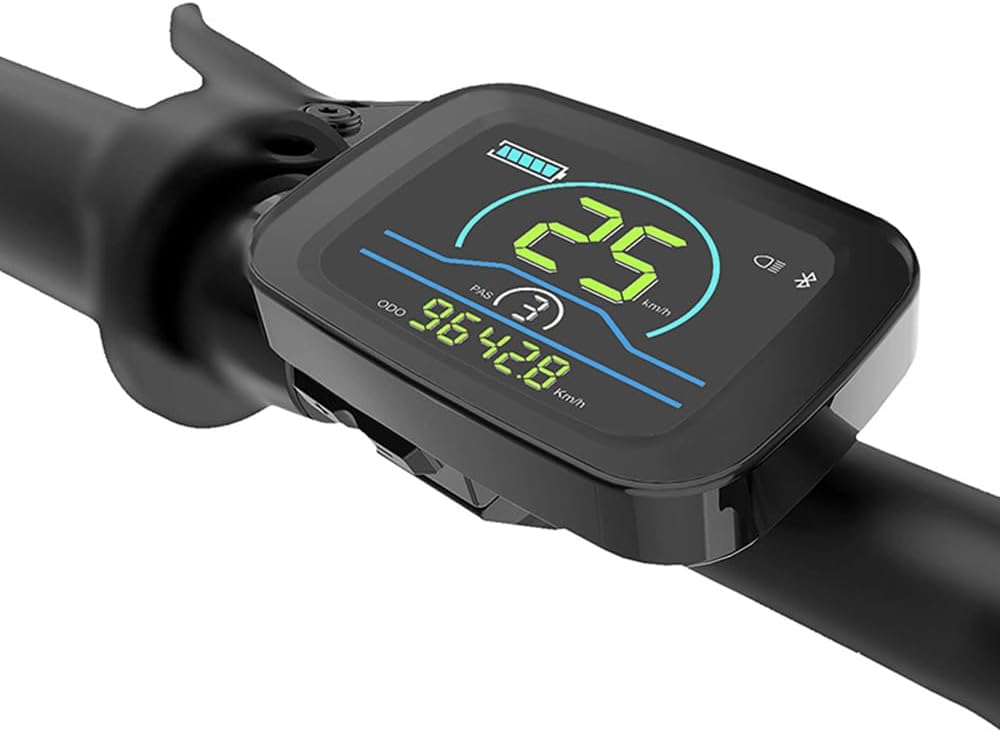
Figura 7: The YL81C display in operation, showing real-time data such as speed (25 km/h), pedal assist level (PAS 3), and total mileage (ODO 9642.8 km).
Funzioni dei pulsanti
- Pulsante di accensione (in alto):
- Hold for 2 seconds: Switches the display on or off.
- Press briefly: Transitions between menu screens or display modes.
- Plus Button (+) (Bottom Left):
- Hold for 2 seconds: Switches the e-bike's headlight on or off.
- Press briefly: Increases values or navigates up in menus (e.g., increases pedal assist level).
- Minus Button (-) (Bottom Right):
- Press briefly: Decreases values or navigates down in menus (e.g., decreases pedal assist level).
Funzioni di visualizzazione
- Visualizzazione della potenza: Mostra il livello attuale della batteria.
- Power Gear Adjustment and Display: Allows selection and shows the current pedal assist level.
- Indicatore dei fari: Si illumina quando il faro anteriore della bici elettrica è attivo.
- Visualizzazione della velocità:
- Velocità in tempo reale
- Maximum Speed (MAXS)
- Velocità media (AVG)
- Visualizzazione del chilometraggio:
- Chilometraggio totale (ODO)
- Single Mileage (Trip)
- Visualizzazione del codice di errore: Indica i malfunzionamenti del sistema con codici specifici.
- Funzione di impostazione dei parametri: Allows modification of key bike parameters such as wheel diameter and speed limit.
- Bluetooth Connection Indication (Reserved): The display is pre-wired for a Bluetooth module; if installed, this indicator will show connection status.
Manutenzione e cura
Proper maintenance ensures the longevity and optimal performance of your YL81C display.
- Pulizia: Utilizzare un morbido, damp cloth to wipe the display screen and housing. Avoid abrasive cleaners, solvents, or harsh chemicals, as these can damage the LCD or housing material.
- Resistenza all'acqua: The display has an International Protection Rating of IPX65, meaning it is protected against low-pressure water jets from any direction. While it is waterproof for typical riding conditions, avoid submerging the display in water or exposing it to high-pressure water sprays.
- Durata del materiale: The YL81C display is constructed with rugged ABS and LCD housing, a tempered glass screen, and a nylon bracket. These materials are chosen for superior durability and performance, designed to withstand harsh terrain and weather conditions.
- Magazzinaggio: Quando non vengono utilizzati per lunghi periodi, riporre la bici elettrica e il display in un luogo fresco e asciutto, lontano dalla luce solare diretta e da temperature estreme.
Risoluzione dei problemi
If you encounter issues with your YL81C display, refer to the following common solutions. For persistent problems or error codes not listed, please contact customer support.
- Il display non si accende:
- Assicurarsi che la batteria della bici elettrica sia carica e collegata correttamente.
- Verify that the 5-hole waterproof connector between the display and the e-bike is securely seated.
- Confirm you are holding the power button for at least 2 seconds to turn on the display.
- Letture errate (velocità, chilometraggio):
- Check the wheel diameter setting in the display's parameter settings. An incorrect setting will lead to inaccurate readings.
- Ensure the speed sensor on your e-bike is clean and properly aligned.
- Codici di errore visualizzati:
- The display can show specific error codes. Consult your e-bike's main controller manual or contact customer service with the error code for diagnosis.
- Compatibility Issues (New Installation):
- As the YL81C display supports various communication protocols, it is crucial to ensure compatibility with your e-bike's controller. If you did not provide your old monitor's serial number upon purchase, contact customer service immediately with this information to verify compatibility and receive guidance.
- Bluetooth Module Not Functioning (if applicable):
- If you customized your display with a Bluetooth module and it's not working, ensure it was properly installed and configured. Contact customer service for assistance.
Specifiche
| Caratteristica | Specificazione |
|---|---|
| Nome del modello | YL81C EBIKE DISPLAY |
| Marca | Generico |
| Tipo di visualizzazione | LCD |
| Materiale | ABS, LCD |
| Colore | Nero |
| Peso dell'articolo | 87 grammi |
| Tecnologia di connettività | 5-Hole Female Connector |
| Valutazione internazionale di protezione | Grado di protezione IPX65 |
| Tipo di montaggio | Supporto manubrio |
| Input dell'interfaccia umana | Pulsanti |
| Vol. compatibiletages | 24 V, 36 V, 48 V, 60 V. |
| Manubrio adatto | 22.2 millimetri, 25.4 millimetri, 31.8 millimetri |
| Produttore | YOLIN |
Informazioni sulla garanzia
The YL81C E-bike LCD Display comes with a Garanzia del produttore di 1 anni from the date of purchase. This warranty covers defects in materials and workmanship under normal use. Please retain your proof of purchase for warranty claims. For detailed warranty terms and conditions, or to initiate a claim, please contact the manufacturer or seller.
Assistenza clienti
For any questions, technical assistance, or support regarding your YL81C E-bike LCD Display, please contact our online customer service. It is especially important to reach out for:
- Verifying communication protocol compatibility by providing the serial number of your old monitor.
- Customizing production for a Bluetooth module (if required).
- Troubleshooting specific error codes or operational issues.
- General inquiries about product features or usage.
We are committed to ensuring you have the best possible experience with your new display.
Ask a question about this manual
Ask about setup, troubleshooting, compatibility, parts, safety, or missing instructions. Manuals+ will review the question and use this page’s manual context to help answer it.