
1. Prodotto finitoview
This manual provides detailed instructions for the installation, operation, and maintenance of your GreenYi FW93-19H422-AB Backup Camera. This camera is designed as a direct OE replacement, offering enhanced rear visibility for safer parking and reversing maneuvers.

Image 1.1: The GreenYi FW93-19H422-AB Backup Camera, a compact and durable unit designed for vehicle integration.
2. Compatibilità del veicolo
The GreenYi FW93-19H422-AB Backup Camera is compatible with a range of Land Rover and Jaguar models. Please verify your vehicle's OE part number to ensure proper fitment.
- Land Rover Discovery IV: 2012-2015
- Range Rover IV L405: 2012-2016
- Range Rover Sport L494: 2013-2016
- Range Rover Evoque L538: 2012-2016 (Including Dynamic, Prestige, Pure)
- Jaguar E-Pace (X540): 2017-2022
- Jaguar F-Pace (X761): 2016-2022
- Jaguar F-Type (X152): 2015-2022
- Jaguar XE (X760): 2015-2022
- Jaguar XF (X260): 2016-2022
- Jaguar XJ (X351): 2010-2022
Replaces OE Part Numbers: FW93-19H422-AB, FW9319H422AB, T4N3099, LR060915.

Image 2.1: Visual representation of compatible vehicle models and corresponding OE part numbers.
3. Caratteristiche principali
- Star Night Vision: Experience superior visual clarity in low-light conditions, providing enhanced safety and convenience during nighttime maneuvers.
- Grado di impermeabilità IP68: Built with a robust metal housing, this camera is designed to withstand diverse weather conditions, ensuring reliable performance even during car washes or heavy rain. It offers strength, toughness, high-temperature resistance, sturdiness, durability, wear resistance, and non-deformation.
- High-Definition Vision: Delivers delicate and high-definition images for improved visibility and safety.
- Obiettivo grandangolare: Features a 130-degree real angle of view for comprehensive coverage of the rear area.
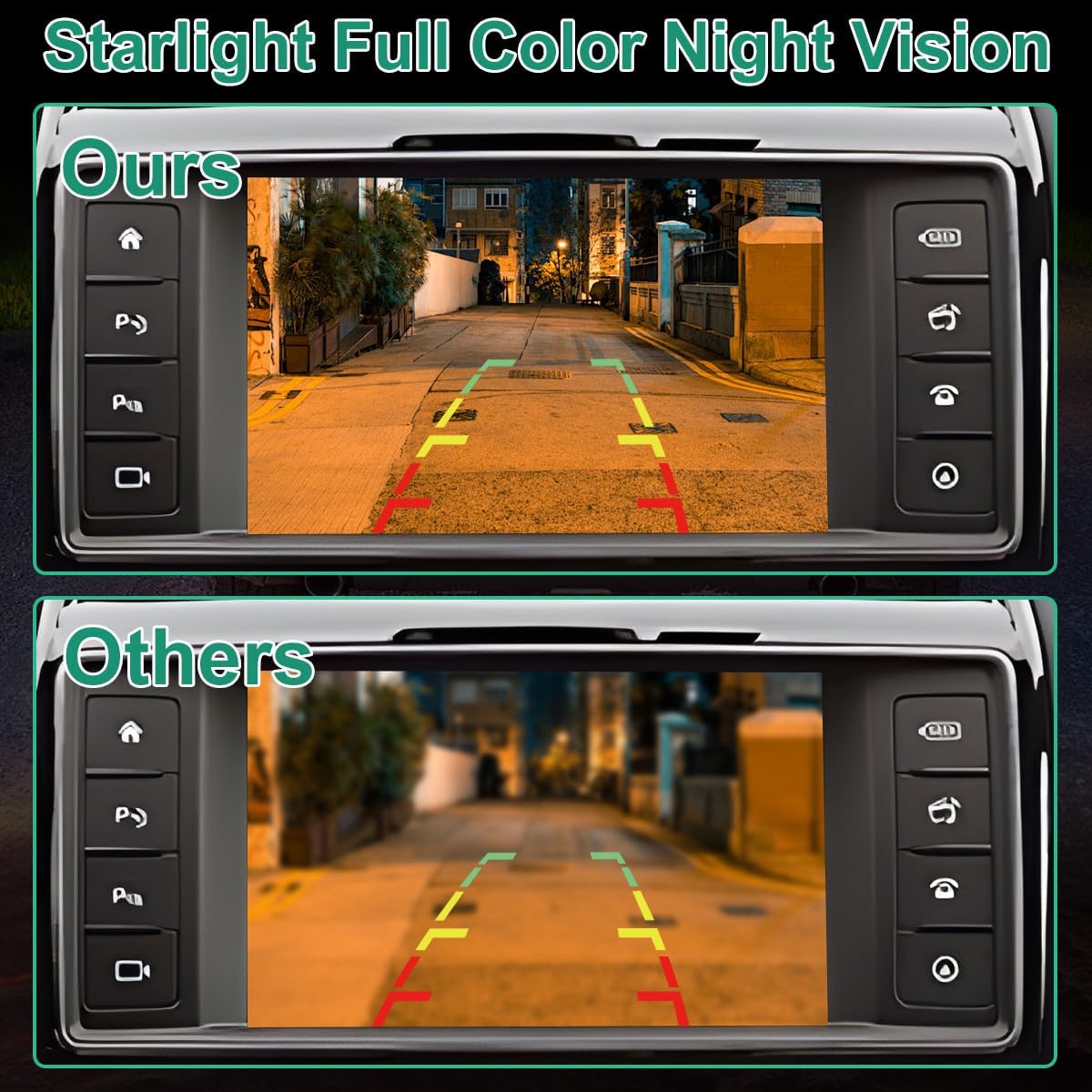
Image 3.1: Comparison illustrating the superior Starlight Full Color Night Vision feature of the GreenYi camera versus standard cameras.

Image 3.2: Depiction of the camera's IP68 waterproof capability, showcasing its resilience in wet conditions.
4. Guida all'installazione
The GreenYi FW93-19H422-AB camera is engineered for seamless integration as a direct replacement for the original backup camera part. It supports coding with original vehicle features and utilizes a plug-and-play mechanism, eliminating the need for complex wiring.
4.1 Controlli pre-installazione
- Prima di iniziare l'installazione, assicurarsi che il veicolo sia spento e che la batteria sia scollegata.
- Confirm the new camera matches the OE part number of your original camera.
- Raccogliere gli strumenti necessari (ad esempio, strumenti per la rimozione delle finiture, cacciaviti).
4.2 Passaggi di installazione
- Locate the existing backup camera on your vehicle. This is typically found near the license plate or tailgate handle.
- Carefully remove any trim panels or fasteners securing the original camera.
- Disconnect the electrical connector from the original camera.
- Remove the original camera from its mounting location.
- Connect the new GreenYi camera to the vehicle's existing electrical connector. Ensure a secure connection.
- Mount the new camera in the original location, securing it with the appropriate fasteners.
- Reinstall any trim panels or covers removed earlier.
- Ricollegare la batteria del veicolo.
4.3 Post-installazione
After installation, test the camera functionality by engaging reverse gear. If the image does not appear or is distorted, refer to the troubleshooting section. For visual step-by-step guidance, consider searching for installation videos on platforms like YouTube specific to your vehicle model and camera type.
Video 4.1: Un overview of the FW93-19H422-AB parking camera, showcasing its design and features relevant to installation.
Video 4.2: A detailed look at the FW93-19H422-AB backup camera, highlighting its components and connection points for installation.
Video 4.3: A demonstration of the front and rear backup camera, providing visual context for its function and placement.
5. Specifiche del prodotto
| Numero di modello | GreenYi-350 |
| Dimensioni del prodotto | 1.1 x 0.91 x 0.91 pollici |
| Peso dell'articolo | 2.08 once |
| Colore | Nero |
| Tipo di installazione | Original Mounting, Plug and Play |
| Voltage | 12 Volt (CC) |
| Tecnologia dei sensori ottici | CMOS |
| Tipo di lente | Grandangolo |
| Angolo reale di View | 130 gradi |
| Tipo di connettore | Original Connector Compatible with Vehicle |
6. Cura e manutenzione
To ensure optimal performance and longevity of your GreenYi backup camera, follow these maintenance guidelines:
- Pulizia regolare: Pulire periodicamente l'obiettivo della fotocamera con un panno morbido eamp panno per rimuovere sporco, polvere o macchie d'acqua che potrebbero ostruire il viewEvitare detergenti abrasivi.
- Ispezionare le connessioni: Occasionally check the electrical connections for any signs of corrosion or looseness. Ensure they remain secure.
- Protezione dalle intemperie: While the camera is IP68 waterproof, extreme weather conditions (e.g., prolonged exposure to harsh chemicals, high-pressure washing directly on the lens) should be avoided to prevent potential damage.
7. Risoluzione Dei Problemi
If you encounter issues with your GreenYi backup camera, refer to the following common problems and solutions:
- Nessuna visualizzazione dell'immagine:
- Controllare tutti i collegamenti elettrici per accertarsi che siano saldamente fissati.
- Verificare che il veicolo sia in retromarcia.
- Inspect the camera cable for any visible damage or kinks.
- Ensure the vehicle's display unit is functioning correctly.
- Distorted or Blurry Image:
- Pulire accuratamente l'obiettivo della fotocamera.
- Check for any physical damage to the lens.
- Assicurarsi che la telecamera sia montata saldamente e non vibri.
- Immagine intermittente:
- Ricontrollare che tutti i collegamenti non siano allentati.
- Ensure there are no electrical interferences from other vehicle components.
If these steps do not resolve the issue, please contact GreenYi customer support for further assistance.
8. Garanzia e supporto
For information regarding product warranty, returns, or technical support, please refer to the documentation included with your purchase or visit the official GreenYi websito. Conservare la ricevuta d'acquisto come prova d'acquisto per eventuali reclami in garanzia.
GreenYi Customer Support: For specific inquiries or assistance, please contact GreenYi directly through their official channels.