
1. Introduzione
This manual provides detailed instructions for the setup, operation, and maintenance of your Irfora D1007 TAM Cordless Telephone. Please read this manual thoroughly before using the device to ensure proper functionality and to familiarize yourself with all features. Keep this manual for future reference.
2. Contenuto della confezione
Verifica che tutti gli articoli elencati di seguito siano inclusi nella confezione. Se alcuni articoli risultano mancanti o danneggiati, contatta il rivenditore.
- 1 x portatile
- 1 x Culla (unità base)
- 1 x cavo per linea telefonica
- 2 batterie ricaricabili (400 mAh, 1.2 V ciascuna)
- 1 x Power Cord (US/EU Plug, as per region)
- 1 x Manuale utente (inglese)

Image: The complete package contents of the Irfora D1007 TAM Cordless Telephone, showing the handset, base unit, power adapter, telephone line cable, two rechargeable batteries, and the user manual.
3. Layout e componenti del prodotto
Familiarize yourself with the various parts of your cordless telephone and base unit.
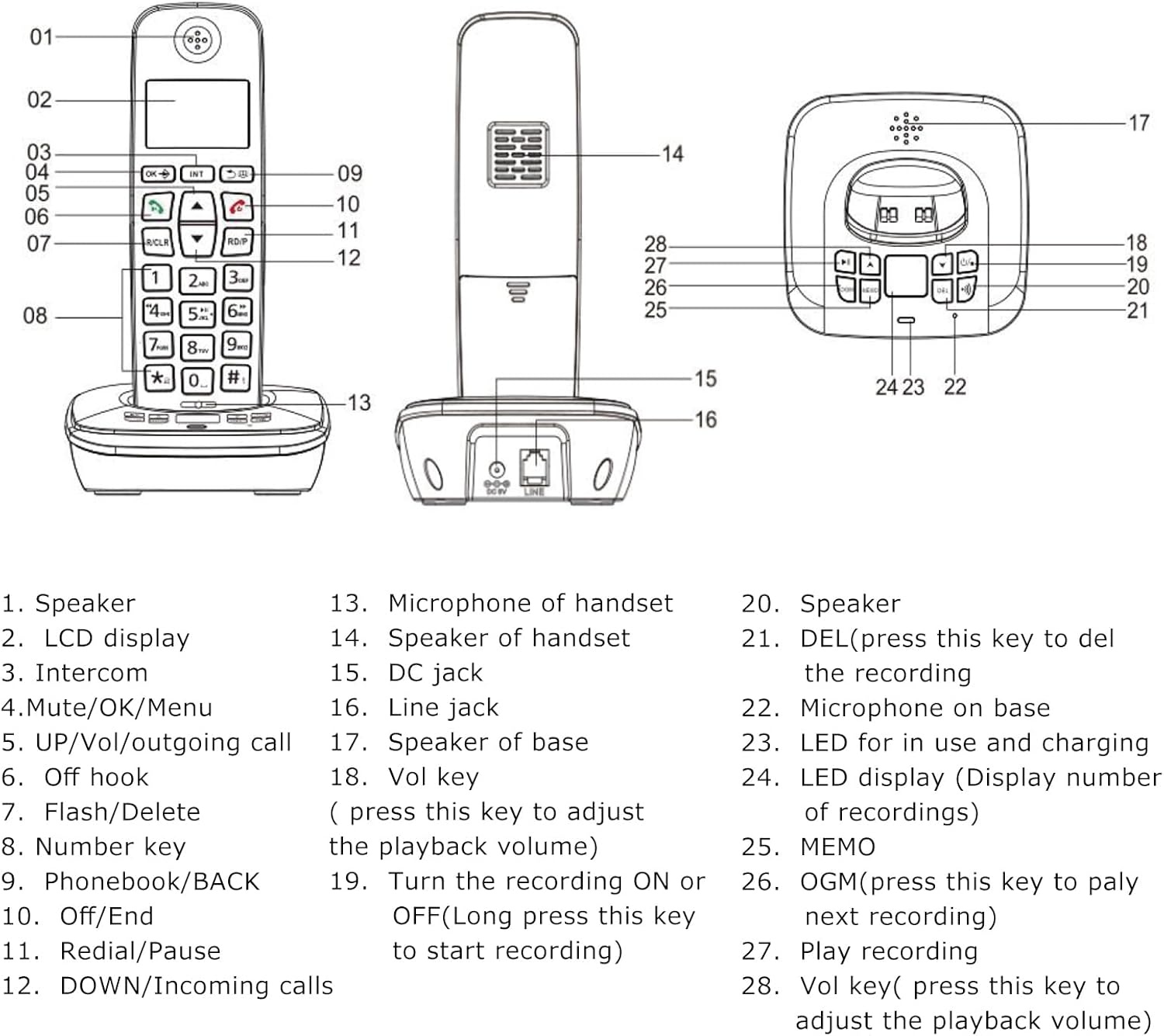
Image: A detailed diagram illustrating the handset and base unit with numbered labels pointing to specific components for easy identification.
Componenti del telefono:
- Oratore
- LCD display (3 lines)
- Intercom button (INT)
- Mute/OK/Menu button
- UP/Vol/Outgoing call button
- Off hook button (Green call button)
- Flash/Delete button (R/CLR)
- Number keys (0-9, *, #)
- Phonebook/BACK button
- Off/End button (Red call button)
- Redial/Pause button (RD/P)
- DOWN/Incoming calls button
- Microphone of handset
Componenti dell'unità base:
- Speaker of handset
- DC jack (Power input)
- Line jack (Telephone line input)
- Speaker of base
- Vol key (Volume adjustment for playback)
- Turn the recording ON or OFF (Long press to start recording)
- DEL (Press to delete the recording)
- Microphone on base
- LED for in use and charging indication
- LED display (Display number of recordings)
- Pulsante MEMO
- OGM (Press to play next recording)
- Play recording button
- Vol key (Press to adjust playback volume)
4. Impostazione
4.1 Installazione della batteria
- Aprire il coperchio del vano batterie sul retro del portatile.
- Insert the two rechargeable batteries, ensuring correct polarity (+ and -).
- Chiudere saldamente il coperchio del vano batterie.
4.2 Collegamento dell'unità base
- Connect one end of the telephone line cable to the LINE jack on the base unit and the other end to your telephone wall socket.
- Connect the power cord to the DC jack on the base unit and plug the adapter into a power outlet.
4.3 Carica iniziale
Place the handset on the base unit. For the first use, charge the handset for at least 12 hours. A full charge typically takes 10 hours. This ensures optimal battery performance and longevity.
4.4 Registrazione del portatile
Your handset may be pre-registered. If not, or if you wish to register additional handsets (up to 5 per base unit), refer to the detailed registration steps in the full user manual. The system supports a maximum of 4 base units per handset.

Immagine: Lato A view of the base unit, highlighting the DC power input and the telephone line jack for connecting to power and the telephone network.
5. Istruzioni per l'uso
5.1 Funzioni di chiamata di base
- Effettuare una chiamata: Press the green call button, then dial the number. Alternatively, dial the number first (pre-dial) and then press the green call button.
- Ricevere una chiamata: Quando squilla il telefono, premere il pulsante verde di chiamata.
- Terminare una chiamata: Press the red call button or place the handset back on the base unit.
- Ricomposizione: Press the RD/P button to redial the last number called.
- Regolazione del volume: During a call, use the UP/DOWN buttons to adjust the earpiece or hands-free volume.
- Disattiva audio: During a call, press the Mute button to temporarily disable your microphone. Press again to unmute.

Immagine: un primo piano view of the handset's keypad, emphasizing the design of the buttons for comfortable and easy use.
5.2 Answering Machine (TAM) Functions
The base unit features a digital answering machine with up to 60 minutes of message recording capacity.
- Registrazione del messaggio in uscita (OGM): The base can record two groups of OGM. Refer to the full manual for detailed steps on recording your personalized outgoing message.
- Riproduzione dei messaggi: Press the OGM button on the base unit to play recorded messages. Use the Vol keys to adjust playback volume.
- Registrazione promemoria: The system supports memo recording up to 120 seconds.
- Eliminazione dei messaggi: Press the DEL button on the base unit to delete recordings.
- Istruzioni vocali: La segreteria telefonica fornisce messaggi vocali in inglese, spagnolo, francese e tedesco.
5.3 Rubrica
Store up to 50 phone book memories, each with a maximum of 12 characters for the name and 20 digits for the number.
- Aggiunta di una voce: Navigate to the Phonebook menu, select 'Add New', enter the name and number, then save.
- Searching/Dialing: Press the Phonebook button to access your stored contacts. Use the UP/DOWN buttons to scroll, then press the green call button to dial.
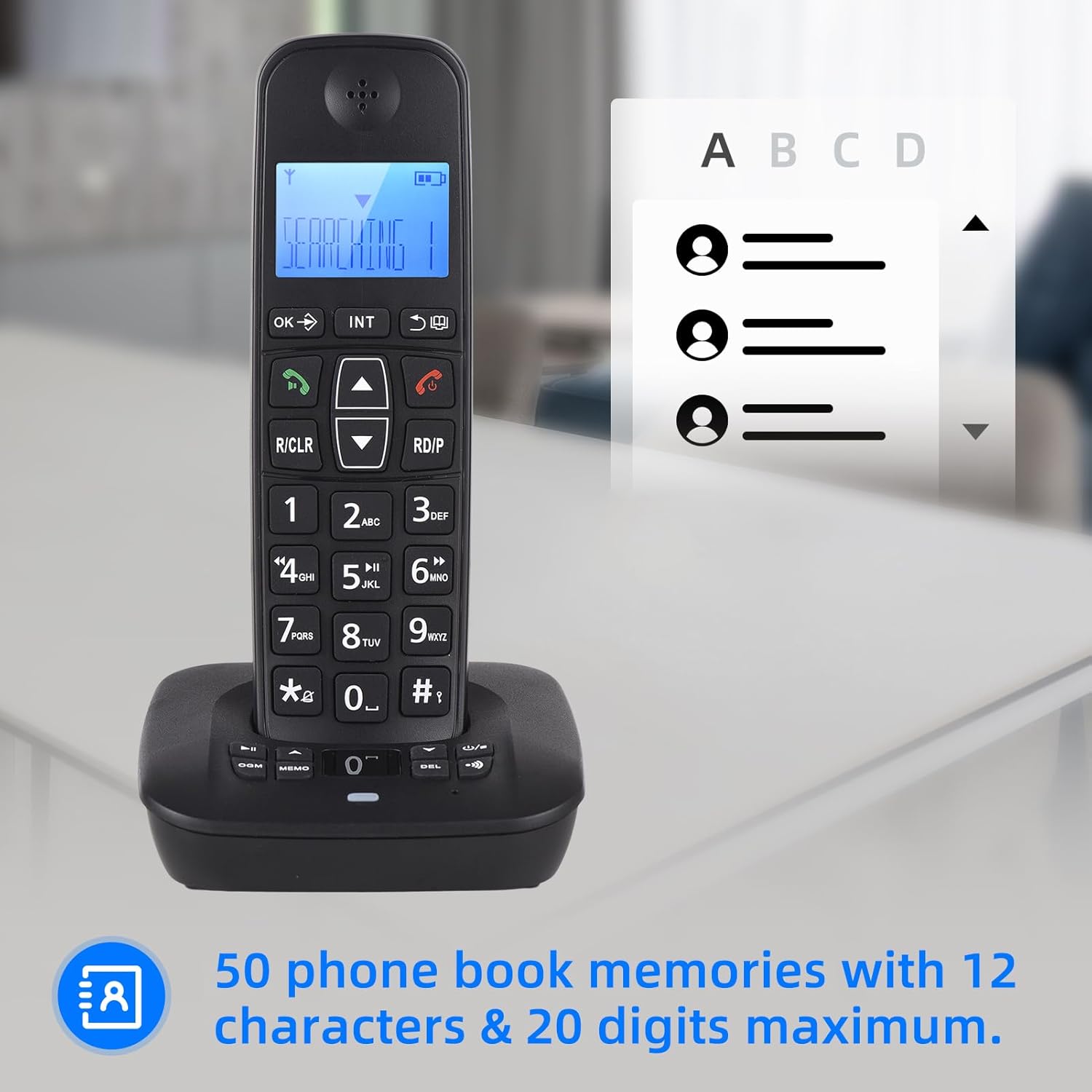
Image: The handset display showing the phonebook feature, indicating the capacity for 50 entries with space for names and numbers.
5.4 ID chiamante
The phone stores up to 30 incoming numbers and 10 outgoing numbers.
- Viewchiamate in arrivo: Press the DOWN button to access the incoming call list.
- Viewchiamate in uscita: Press the RD/P button repeatedly to cycle through outgoing calls.

Image: The handset on its base, with icons representing Caller ID, 30 incoming number memories, and 10 outgoing number memories.
5.5 Intercom and Conference Call
- Citofono: If you have multiple registered handsets, you can make intercom calls between them. Press the INT button and select the desired handset.
- Trasferimento di chiamata: Transfer an external call to another handset.
- Teleconferenza: Conduct a three-way conference call involving an external call and two internal handsets.
5.6 Ringing Tones
- Selezione: Choose from 10 different ringing tones.
- Personalizzazione: Set different melodies for different types of calls (e.g., internal vs. external).
Display LCD 5.7
The handset features a 3-line LCD display for clear visibility of caller ID, menu options, and phonebook entries.

Image: A close-up of the handset's LCD screen, demonstrating its 3-line display capability for showing information clearly.
6. Manutenzione
- Pulizia: Pulire il portatile e l'unità base con un panno morbido e asciutto.amp panno. Non usare detergenti abrasivi o solventi.
- Cura della batteria: Utilizzare solo le batterie ricaricabili specificate. Se il telefono non verrà utilizzato per un periodo prolungato, rimuovere le batterie.
- Ambiente: Tenere il telefono lontano da fonti di calore eccessivo, dalla luce solare diretta e dall'umidità.
7. Risoluzione Dei Problemi
If you encounter issues with your telephone, try the following basic troubleshooting steps:
- Nessun segnale di linea: Ensure the telephone line cable is securely connected to both the base unit and the wall socket. Check if the power adapter is properly plugged in.
- Impossibile effettuare/ricevere chiamate: Verify that the handset is charged. Check if the telephone line is active.
- Il portatile non si registra: Follow the registration steps in the full user manual. Ensure the handset is within range of the base unit.
- Scarsa qualità del suono: Check for interference from other electronic devices. Ensure the handset is within optimal range of the base.
- La segreteria telefonica non registra: Check the available memory. Ensure the answering machine function is enabled.
Per problemi più complessi, fare riferimento alla sezione completa sulla risoluzione dei problemi nel manuale utente completo oppure contattare l'assistenza clienti.
8. Specifiche
- Modello: D1007 TAM
- Colore: Nero
- Materiale: Plastica
- Ingresso: 100-240 V, 50/60 Hz
- Frequenza: 1.8/1.9GHz
- Lingue dell'interfaccia: Portugu, Spanish, English, French, German, Italian, Dutch, Hungarian, Greek, Polish, Danish, Norwegian, Swedish, Turkish, Russian, Ukrainian (16 kinds)
- Batteria: 2 batterie ricaricabili (400 mAh, 1.2 V ciascuna)
- Dimensioni del portatile: 18 x 5.3 x 2 cm (7 x 2 x 0.9 pollici)
- Cradle Size: 11 x 10.5 x 4.3 cm (4.3 x 4.1 x 1.6 pollici)
- Tempo di conversazione: Up to 10 hours continued talk
- Tempo di standby: Up to 120 hours on standby
- Capacità della segreteria telefonica: Massimo 60 minuti
- Phonebook Memories: 50 voci (12 caratteri e 20 cifre max)
- Incoming Call Memories: 30 numeri
- Outgoing Call Memories: 10 numeri
9. Garanzia e supporto
For warranty information and customer support, please refer to the documentation provided at the time of purchase or visit the official Irfora websito. Conserva la ricevuta d'acquisto come prova d'acquisto.