
Benvenuto
Thank you for choosing the TOPUTURE 4-in-1 Foldable Walking Pad with Incline. This versatile fitness equipment is designed for both home and office use, offering a compact and efficient way to stay active. With its powerful yet silent motor, adjustable incline, and smart features, you can enjoy a comprehensive workout experience. Please read this manual thoroughly before operation to ensure safe and optimal use of your new walking pad.
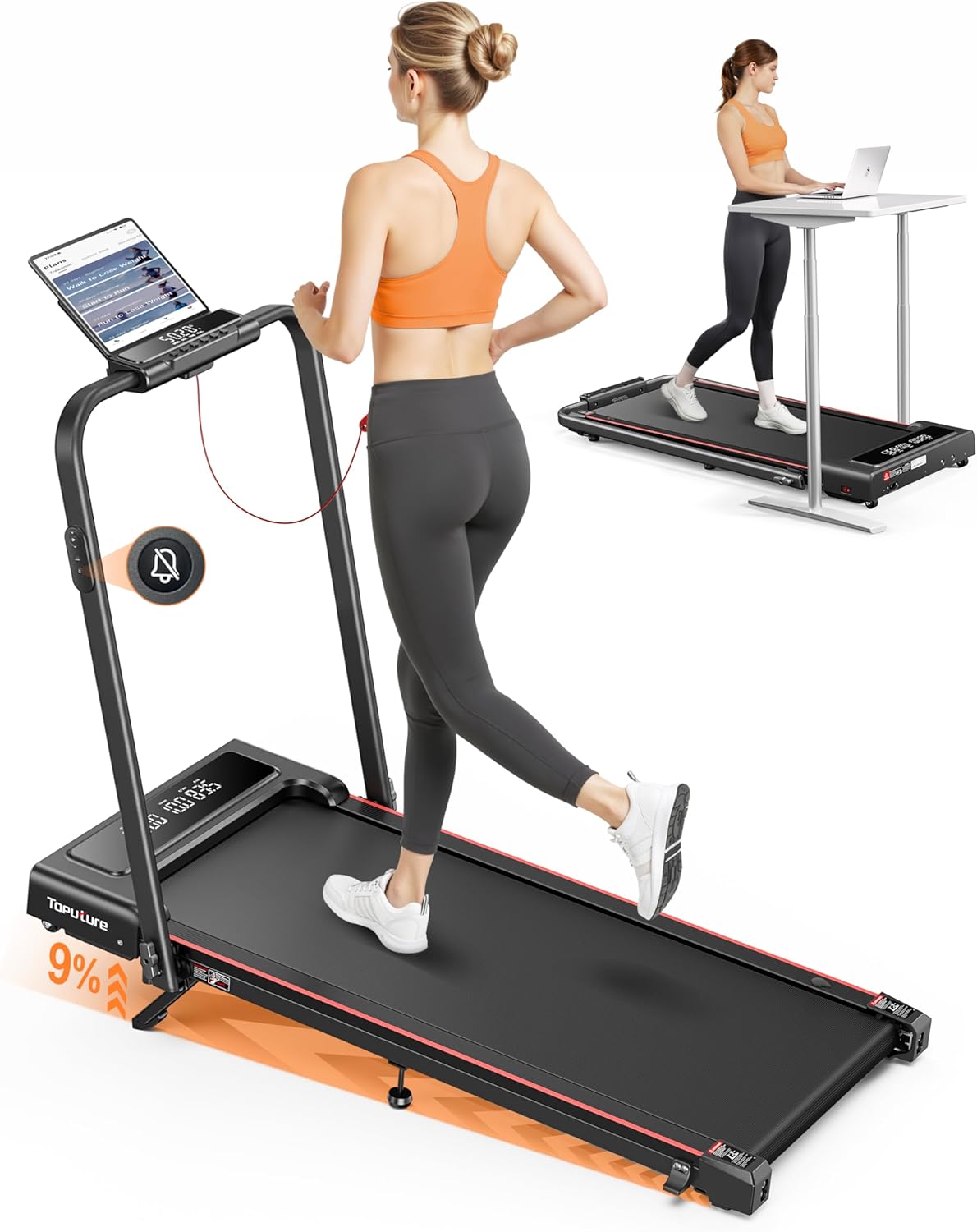
Image: The TOPUTURE 4-in-1 Foldable Walking Pad in its upright running configuration and folded flat for under-desk use, demonstrating its versatility.
Importanti istruzioni di sicurezza
To reduce the risk of serious injury, read all instructions before using this product. The manufacturer is not responsible for personal injury or property damage sustained by or through the use of this product.
- Posizionare sempre il tappetino da passeggio su una superficie piana e stabile.
- Tenere i bambini e gli animali domestici lontani dall'apparecchiatura durante il funzionamento.
- Ensure adequate clearance around the walking pad (at least 2 feet on all sides).
- Non superare la capacità massima di peso dell'utente di 300 libbre (circa 136 kg).
- Indossare calzature e abbigliamento sportivo adeguati.
- Se ti senti debole, stordito o provi dolore, interrompi immediatamente l'esercizio.
- Always unplug the walking pad from the power outlet when not in use, before cleaning, or performing maintenance.
- Use the emergency stop feature if necessary.
Prodotto finitoview
The TOPUTURE TP4 is designed with user convenience and effective workouts in mind. Key features include:
- 9% Manual Incline & M Mode: Adjust the incline to simulate uphill running and burn more calories. M Mode allows setting goals based on time, calories, or distance.
- Silent Remote Control & Dual Display: Enjoy quiet operation with a noiseless remote. The dual-screen display shows real-time data like time, speed, distance, and calories.
- No Assembly & Space-Saving Design: Ready to use out of the box. Lightweight and portable with front wheels for easy mobility. Folds compactly for storage under beds or sofas.
- 2.5HP Powerful Silent Motor: Delivers speeds of 0.6-7.6 MPH with a 300 lbs load capacity.
- Assorbimento degli urti avanzato: Features a 5-layer anti-slip belt, 8 silicone shock absorbers, and 2 soft rubber pads for double shock absorption, protecting your knees.
- Connettività app intelligente: Connect to a compatible app (e.g., FitShow) to sync exercise data, access training plans, and track progress.
Modalità del prodotto

Image: The walking pad supports both walking (0.6-5 MPH) and running (5-7.6 MPH) modes, adapting to various fitness needs.

Image: This diagram illustrates the four primary modes of operation: Running (3-7.6 MPH), Climbing (0.6-3 MPH), Walking (1.5-3 MPH), and Working (0.6-1.5 MPH), highlighting the treadmill's versatility.
Funzione di inclinazione

Image: The adjustable 0-9% manual incline feature allows for a more challenging workout, boosting calorie expenditure.
Visualizzazione e controllo

Image: The dual LED screen provides clear, real-time data, while the silent remote control offers convenient operation.
Motore e livello di rumore

Image: The 2.5HP motor operates quietly (under 45dB), making it suitable for use in shared spaces without disturbance.
Integrazione dell'app

Image: Enhance your workout experience by connecting to a smart app for real-time data synchronization and personalized training plans.
Running Belt and Shock Absorption

Image: The multi-layer belt and advanced shock absorption system provide a comfortable and joint-friendly running surface.
Configurazione iniziale
The TOPUTURE TP4 is designed for installation-free setup, meaning it's ready to use almost immediately out of the box.
Unboxing e posizionamento
- Estrarre con cautela il tappetino da passeggio dalla confezione.
- Place the walking pad on a firm, level surface. Ensure there is sufficient space around the unit for safe operation and movement.
- Unfold the handle/handrail if you intend to use it in running mode.
- Collegare il cavo di alimentazione a una presa elettrica dotata di messa a terra.
Folding and Unfolding for Storage
The compact design allows for easy storage.

Image: The treadmill easily folds flat to a compact size (50x23x4.5 inches) and features transport wheels for convenient storage under furniture or against a wall.
Adjusting the Manual Incline
The walking pad features a 9% manual incline for varied workouts.

Image: Follow these three steps to adjust the incline: 1. Unfold the footpad. 2. Insert the pin into the desired incline slot. 3. Adjust the middle footpad for stability.
Istruzioni per l'uso
Accensione/spegnimento
- Per accendere, assicurati che la chiave di sicurezza sia inserita e premi il pulsante di accensione sulla console o sul telecomando.
- Per spegnere, premere nuovamente il pulsante di accensione o rimuovere la chiave di sicurezza.
Utilizzo del telecomando
The remote control allows for convenient adjustment of speed and mode without reaching the console.
- Avvio/Arresto: Premi per iniziare o terminare l'allenamento.
- Velocità +/-: Adjust the walking/running speed.
- Modalità: Cycle through different workout modes (e.g., M Mode for time, distance, calorie goals).
- Disattiva audio: Press the mute button for quiet operation, especially useful for under-desk use.

Image: The remote control features a mute button, allowing for silent operation, perfect for office environments.
Comprensione del display
The dual LED display provides essential workout metrics:
- Tempo: Durata del tuo allenamento.
- Velocità: Velocità attuale in MPH.
- Distanza: Distanza totale percorsa.
- Calorie: Calorie bruciate stimate.
Connettività dell'app
For enhanced tracking and personalized workouts, connect your walking pad to a compatible fitness app (e.g., FitShow).
- Download the recommended app from your device's app store.
- Abilita il Bluetooth sul tuo dispositivo mobile.
- Open the app and follow the on-screen instructions to pair with your TOPUTURE TP4.
- Once connected, you can sync exercise data, access training plans, and participate in challenges.
Manutenzione e cura
Una manutenzione regolare garantisce la longevità e le prestazioni ottimali del tuo tappetino da passeggio.
Lubrificazione
Il tappeto da corsa richiede una lubrificazione periodica per ridurre l'attrito e prolungarne la durata. Utilizzare solo lubrificante per tapis roulant a base di silicone.

Image: The treadmill features a dedicated lubrication port for easy maintenance of the running belt.
- Unplug the walking pad from the power outlet.
- Locate the lubrication port (as shown in the image).
- Apply a small amount of lubricant into the port.
- Collegare il tappetino da passeggio e farlo funzionare a bassa velocità (ad esempio 1 MPH) per 2-3 minuti per distribuire uniformemente il lubrificante.
- Lubrificare ogni 3-6 mesi a seconda dell'utilizzo.
Regolazione della cinghia
If the running belt feels loose or is slipping, it may need adjustment. Use the included tool kit to tighten the belt tension screws located at the rear of the walking pad.
- Turn the screws clockwise in small increments (quarter turns) until the belt feels appropriately tensioned.
- Ensure the belt remains centered. If it drifts to one side, adjust the screw on the opposite side.
Pulizia
- Pulisci il tappetino da passeggio con un pannoamp panno dopo ogni utilizzo per rimuovere sudore e polvere.
- Non utilizzare detergenti abrasivi o solventi.
Magazzinaggio
When not in use, fold the walking pad and store it in a dry, cool place away from direct sunlight and moisture.
Guida alla risoluzione dei problemi
This section addresses common issues you might encounter with your TOPUTURE TP4 walking pad.
| Problema | Possibile causa | Soluzione |
|---|---|---|
| Il tappetino da passeggio non si accende. | Cavo di alimentazione non collegato; Chiave di sicurezza non inserita; Interruttore di alimentazione spento. | Ensure power cord is securely plugged in; Insert safety key fully; Turn on the main power switch. |
| Belt slips or hesitates during use. | Cinghia troppo lenta; lubrificazione insufficiente. | Adjust belt tension (see Maintenance section); Lubricate the running belt. |
| Rumore insolito proveniente dalla zona del motore. | Mancanza di lubrificazione; componenti allentati. | Lubricate the running belt; Check for any loose screws and tighten them. If noise persists, contact customer support. |
| Il display non mostra i dati corretti. | Problema con il sensore; collegamento allentato. | Restart the walking pad; Check connections. If problem persists, contact customer support. |
Specifiche del prodotto
| Specificazione | Valore |
|---|---|
| Numero di modello | TP4 |
| Dimensioni del prodotto (aperto) | 126 x 12 x 62 cm (50 x 23 x 42 pollici) |
| Dimensioni pieghevoli | 50 x 23 x 4.5 pollici |
| Peso dell'articolo | 25 kg (55 libbre) |
| Materiale | Acciaio legato |
| Potenza motore | 2.5 CV |
| Gamma di velocità | 0.6 - 7.6 MPH |
| Percentuale di inclinazione massimatage | 9% (manuale) |
| Capacità massima di peso dell'utente | 300 libbre (circa 136 kg) |
| Livello di rumore | <45 dB |
| Visualizza metriche | Velocità, calorie bruciate, tempo, distanza |
| Caratteristiche speciali | Shock Absorbent, Lightweight, Manual Incline, Foldable, Compact Design |
| Componenti inclusi | User Manual, Power Cord, Tool Kit |
Garanzia e assistenza clienti
TOPUTURE products are manufactured to high-quality standards and are backed by a manufacturer's warranty. Please refer to the warranty card included in your packaging for specific terms and conditions regarding coverage and duration.
For any questions, technical assistance, or warranty claims, please contact TOPUTURE customer support. Contact information can typically be found on the product packaging, the official TOPUTURE websito o la scheda di garanzia.
Please have your model number (TP4) and purchase information ready when contacting support to ensure efficient service.