
1. Introduzione
This manual provides comprehensive instructions for the setup, operation, and maintenance of your GUSGU G910 Pro 4K Ultra HD Webcam. Designed for high-quality video communication and streaming, this webcam features 4K resolution, auto-focus, an integrated ring light, and a privacy cover for enhanced user experience and security.
2. Cosa c'è nella scatola
- GUSGU G910 Pro 4K Webcamma x1
- Cavo USB (integrato)
- Adattatore da USB-A a USB-C
- Manuale d'uso
- Mini treppiede
3. Caratteristiche del prodotto
3.1. Ultra HD 4K Resolution
The GUSGU G910 Pro webcam delivers crisp 3840x2160P images and videos, utilizing an advanced 12-megapixel CMOS sensor and a high-performance encoding chip for superior visual clarity.

Immagine: Il webcam features a UHD 1/2" CMOS Sensor for 4K video capture.
3.2. AI-Powered Auto Focus
Equipped with AI-powered auto-focus, the G910 Pro ensures that your subject remains sharp and clear, automatically adjusting to keep you in focus during video calls and streams.

Image: A visual representation of the AI-powered auto-focus feature, keeping the subject sharp.
3.3. Luce ad anello integrata
IL webcam includes a built-in ring light with both white and warm color options, each offering 3 levels of brightness. This feature helps to illuminate your face, enhancing video quality in various lighting conditions.
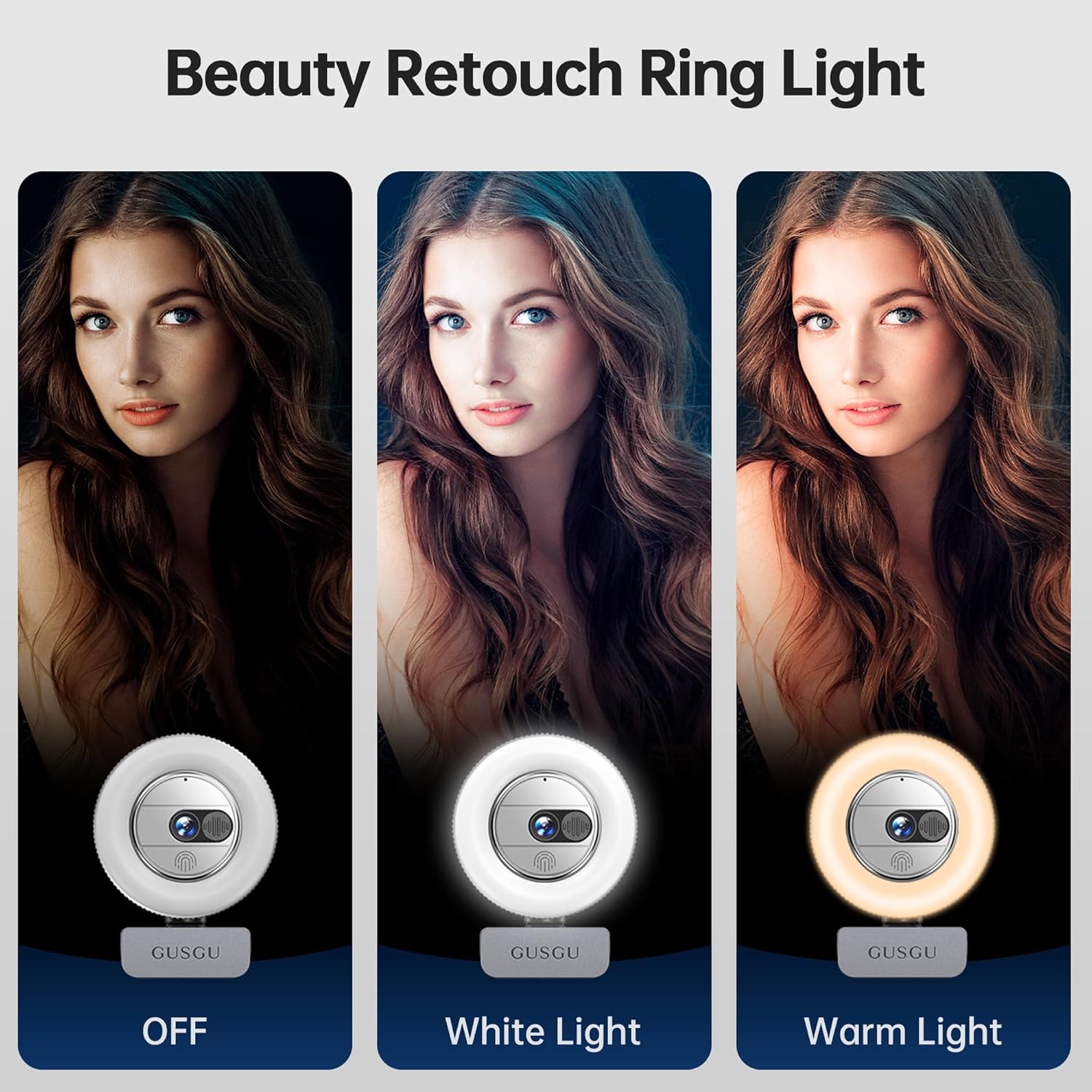
Image: Demonstrates the ring light's different color temperatures (white and warm) and brightness levels.
Video: A demonstration of the webcam's built-in ring light, showing how to activate it and cycle through different brightness and color temperature settings (white and warm).
3.4. Copertura per la privacy integrata
For enhanced privacy and security, the G910 Pro features a built-in privacy cover that can be easily slid to block the camera lens when not in use.

Image: Illustrates the webcam's integrated privacy cover, showing its open and closed states.
Video: A short demonstration of the webcam's privacy cover being slid open and closed.
3.5. Microfono con cancellazione del rumore
IL webcam integrates a noise-canceling microphone to capture clear audio, reducing background distractions for effective communication.

Image: Shows the webcam in use on a laptop, highlighting its noise-canceling microphone feature.
3.6. Ampia compatibilità
The GUSGU G910 Pro is compatible with various operating systems including Windows, macOS, and Android. It supports popular video conferencing and streaming applications such as Zoom, Teams, Meet, Skype, WhatsApp, FaceTime, YouTube, Facebook, and Twitch.

Image: Displays the webcam alongside icons of various compatible operating systems and applications.
4. Guida all'installazione
- Collegare il WebCamera: Collegare il cavo USB integrato dalla webcam into an available USB port on your computer. If your computer only has USB-C ports, use the provided USB-A to USB-C adapter.
Video: Demonstrates connecting the webcam via USB and using the USB-C adapter.
- Montare il WebCamera:
- Su un monitor/laptop: Unfold the clip at the base of the webcam and securely attach it to the top of your monitor or laptop screen. Adjust the angle as needed.
- Su un treppiede: IL webcam's base is compatible with a standard tripod mount. Attach the provided mini tripod or any compatible tripod to the webcam for desktop placement.
Video: Shows the webcam being unboxed, highlighting the USB-C adapter and demonstrating how to attach it to a monitor or use it with a tripod.
- Collega e usa: IL webcam is plug-and-play. Your computer should automatically detect and install the necessary drivers. No additional software installation is typically required.
5. Istruzioni per l'uso
- Utilizzo della Privacy Cover: To activate the privacy cover, slide the physical cover over the lens. Slide it back to expose the lens when you are ready to use the camera.
- Adjusting the Ring Light: The ring light is touch-sensitive. Tap the top of the webcam to cycle through the 3 brightness levels for white light, then 3 brightness levels for warm light, and finally to turn the light off.
- Messa a fuoco automatica: IL webcam's AI-powered auto-focus feature operates automatically, ensuring your image remains clear without manual adjustment.
- Grandangolo View: The 80-degree wide-angle lens captures a broad field of view, reducing the need to constantly adjust the webcam's position.
6. Specifiche
| Caratteristica | Dettaglio |
|---|---|
| Marca | GUSGU |
| Numero di modello | G910P |
| Risoluzione di acquisizione video | 3840*2160p (4K Ultra HD) |
| Tecnologia del sensore fotografico | CMOS |
| Modalità di messa a fuoco | Messa a fuoco automatica |
| Luce ad anello | White & Warm colors, 3 brightness levels each |
| Microfono | Integrated, Noise-Canceling |
| Funzione di privacy | Copertura per la privacy integrata |
| Tecnologia di connettività | USB |
| Peso dell'articolo | 6.4 once |
| Dimensioni del prodotto | 1 x 2.6 x 2.6 pollici |
7. Risoluzione Dei Problemi
- Telecamera non rilevata: Assicurarsi che il cavo USB sia collegato saldamente a entrambi i dispositivi webcam and your computer. Try a different USB port or restart your computer.
- Scarsa qualità video: Check your lighting conditions. Utilize the built-in ring light to improve illumination. Ensure the privacy cover is fully open.
- Nessun audio/Audio scadente: Verificare che il webcam's microphone is selected as the input device in your operating system's sound settings and in your video conferencing application.
- Problemi di messa a fuoco automatica: Ensure there are no obstructions in front of the lens. The auto-focus feature is designed to work automatically.
8. Manutenzione
- Pulizia della lente: Utilizzare un panno morbido e privo di lanugine, specificamente progettato per gli obiettivi delle fotocamere, per pulire delicatamente l'obiettivo. Evitare materiali abrasivi o sostanze chimiche aggressive.
- Pulizia generale: Pulisci il corpo del webcam with a soft, dry cloth. Do not immerse the device in water or use excessive moisture.
- Magazzinaggio: When not in use, engage the privacy cover to protect the lens from dust and scratches. Store the webconservare in un luogo fresco e asciutto.
9. Garanzia e supporto
The GUSGU G910 Pro 4K Ultra HD Webla cam è dotata di un Garanzia di sostituzione di 3 anno.
For any inquiries or support needs, please feel free to contact us. We typically respond within 12 hours.
Contact information can be found on the product packaging or the official GUSGU websito.