
1. Introduzione
The Oilsky M1 MP3 Player is a portable digital music player designed for high-quality audio playback. It features Bluetooth 5.4 for stable wireless connections, a 2.4-inch touchscreen for easy navigation, and a built-in speaker. With 128GB of internal storage and support for an additional 128GB Micro SD card, it can store a vast library of music, audiobooks, and other media. This manual provides detailed instructions on how to set up, operate, and maintain your device.
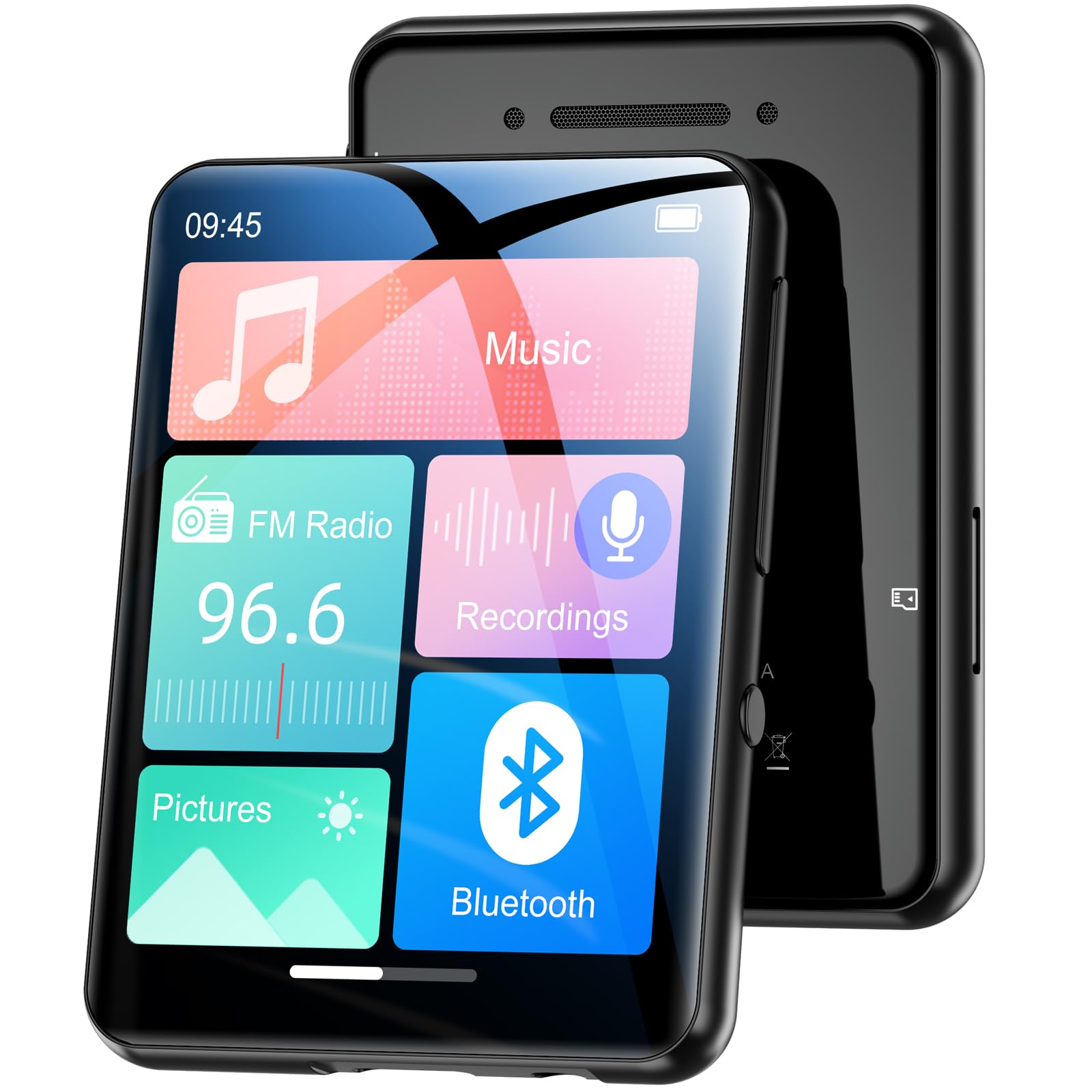
Immagine 1.1: anteriore view of the Oilsky M1 MP3 Player, showcasingrazie al suo design compatto e all'interfaccia touchscreen.
2. Cosa c'è nella scatola
Si prega di controllare il contenuto della confezione una volta disimballata per assicurarsi che siano presenti tutti gli articoli:
- 1x Oilsky M1 MP3 Player
- Cavo di ricarica USB 1x
- 1x Wired Headphones
- 1x Manuale utente (questo documento)
- 1x Custodia protettiva
- 1x cordino

Image 2.1: All included accessories and the MP3 player laid out, including the USB cable, headphones, protective case, and lanyard.
3. Impostazione
3.1 Ricarica del dispositivo
Before first use, fully charge the MP3 player. Connect the provided USB cable to the player's charging port and the other end to a USB power adapter (not included) or a computer's USB port. The device takes approximately 2 hours to fully charge, providing up to 50 hours of music playback.
3.2 Accensione/Spegnimento
- Per accendere: Tieni premuto il pulsante di accensione finché lo schermo non si accende.
- Per spegnere: Tenere premuto il pulsante di accensione finché sullo schermo non viene visualizzata l'opzione di spegnimento, quindi confermare.
3.3 Inserimento di una scheda Micro SD
The Oilsky M1 has 128GB of built-in memory and supports Micro SD cards up to an additional 128GB (not included). To expand storage:
- Individuare lo slot per la scheda Micro SD sul lato del lettore.
- Inserire delicatamente la scheda Micro SD nello slot con i contatti dorati rivolti verso il basso finché non scatta in posizione.
- Per rimuoverla, spingere la scheda verso l'interno finché non scatta fuori.

Image 3.1: Visual representation of the 128GB internal memory and the option to expand storage with a Micro SD card.
3.4 Impostazioni della lingua
The device supports English, German, French, Italian, Spanish, and 29 other languages. To change the language:
- Vai al menu "Impostazioni".
- Seleziona "Lingua".
- Scegli la lingua preferita dall'elenco.
4. Istruzioni per l'uso
The Oilsky M1 features a 2.4-inch full touchscreen for intuitive control. Navigate through menus by swiping and tapping.

Image 4.1: A hand interacting with the full touchscreen interface of the MP3 player, demonstrating ease of use.
4.1 Riproduzione di musica
The player supports various audio formats including MP3, WMA, APE, FLAC, WAV, and AAC, providing high-fidelity sound with digital noise reduction. You can organize music by title, folder, artist, or album.
- Trasferimento di musica: Connect the player to your computer using the USB cable. The player will appear as a removable disk. Drag and drop your music files into the 'Music' folder on the device or Micro SD card.
- Riproduzione di musica: From the main menu, tap 'Music'. You can browse by 'All Songs', 'Artists', 'Albums', 'Folders', etc. Tap a song to begin playback.
- Controlli: Use the on-screen controls for play/pause, next/previous track, and volume adjustment.

Image 4.2: A user enjoying music with headphones connected to the Oilsky M1 MP3 Player, highlighting the high-quality sound experience.

Image 4.3: Display illustrating the multiple audio formats supported by the MP3 player, including MP3, WMA, APE, FLAC, WAV, and AAC.
4.2 Connessione Bluetooth
The player features Bluetooth 5.4 for connecting to Bluetooth headphones and speakers. It includes a memory function that automatically reconnects to previously paired devices. Note: The player cannot connect to mobile phones or car Bluetooth systems.
- Dal menu principale, tocca "Bluetooth".
- Attiva il Bluetooth. Il lettore cercherà i dispositivi nelle vicinanze.
- Seleziona dall'elenco le cuffie o gli altoparlanti Bluetooth desiderati per associarli.

Image 4.4: The MP3 player screen showing the Bluetooth connection icon, indicating stable and fast Bluetooth 5.4 connectivity to external audio devices.
4.3 Radio FM
Per utilizzare la funzione radio FM:
- Connect the wired headphones (they act as an antenna).
- Dal menu principale, tocca "Radio FM".
- Utilizzare i comandi sullo schermo per cercare le stazioni o sintonizzarle manualmente.
4.4 Registratore vocale
The player includes a built-in microphone for digital voice recording.
- Dal menu principale, tocca "Registrazioni".
- Tap the record icon to start and stop recording.
- Recordings are saved and can be played back from this menu.

Image 4.5: The MP3 player displaying its voice recording interface, useful for capturing notes or conversations.
4.5 Lettore di e-book
Il lettore supporta gli e-book in formato TXT.
- Trasferisci TXT files to the 'E-book' folder on the device.
- From the main menu, tap 'E-book' to access your library.
4.6 Foto Viewer
View JPEG/BMP image files sullo schermo da 2.4 pollici.
- Transfer image files to the 'Pictures' folder.
- From the main menu, tap 'Pictures' to browse your photos.
4.7 Funzione di allarme
Set alarms using your favorite music as the ringtone.
- From the main menu, tap 'Alarm'.
- Configure alarm time, repeat settings, and select a music file per il suono della sveglia.

Image 4.6: The MP3 player displaying an alarm clock icon, indicating its alarm function capability.
5. Manutenzione
5.1 Pulizia
- Pulisci il dispositivo con un panno morbido e asciutto.
- Do not use liquid cleaners or aerosols, as they may damage the device.
5.2 Cura della batteria
- Evitare di esporre il dispositivo a temperature estreme.
- Per preservare la salute della batteria, caricare regolarmente il dispositivo, anche quando non lo si utilizza.
5.3 Conservazione
When not in use for extended periods, store the player in a cool, dry place, away from direct sunlight and moisture.
6. Risoluzione Dei Problemi
| Problema | Possibile soluzione |
|---|---|
| Il dispositivo non si accende. | Ensure the device is fully charged. If the battery is depleted, it may take a few minutes of charging before it can power on. |
| Bluetooth headphones/speaker won't connect. | Ensure Bluetooth is enabled on both devices. Make sure the headphones/speaker are in pairing mode. Confirm the MP3 player is not attempting to connect to a mobile phone or car system, as this is not supported. |
| Impossibile trasferire files al giocatore. | Check the USB cable connection. Ensure the player is properly recognized by your computer. Try a different USB port or cable. |
| Music playback is distorted or silent. | Check headphone connection or Bluetooth connection. Ensure volume is not muted and is set to an audible level. Verify the audio file formato è supportato. |
| Lo schermo non risponde. | Perform a soft reset by pressing and holding the power button for 10-15 seconds. If the issue persists, ensure the device is charged. |
7. Specifiche
| Caratteristica | Dettaglio |
|---|---|
| Marca | Oilsky |
| Numero di modello | M1 |
| Caratteristiche speciali | Touchscreen, Built-in Speaker, Digital Noise Reduction |
| Tecnologia di connettività | Bluetooth 5.4, USB |
| Memoria interna | 128 GB |
| Archiviazione espandibile | Scheda microSD fino a 128 GB |
| Colore | Nero |
| Dimensioni dello schermo | 2.4 pollici |
| Dispositivi compatibili | Bluetooth Speakers, Bluetooth Headphones, Personal Computers |
| Formati audio supportati | MP3, WMA, APE, FLAC, WAV, AAC |
| Formato e-book supportato | TXT |
| Formati di immagine supportati | Formato JPEG, BMP |
| Durata della batteria | Fino a 50 ore |
| Tempo di ricarica | Circa 2 ore |
| Peso dell'articolo | 65 grammi |
| Dimensioni dell'articolo (P x L x A) | Dimensioni: 1 cm x 5 cm x 7 cm |
8. Garanzia e supporto
8.1 Politica di garanzia
Oilsky offers a one-year return policy for this product. This warranty covers manufacturing defects and issues arising from normal use.
8.2 Assistenza clienti
Our team is dedicated to providing prompt, attentive, and high-quality support. We guarantee a response within 24 hours for any inquiries or issues you may have.
For assistance, please contact us through the platform where you purchased the product or refer to the contact information provided on the official Oilsky websito.
We are committed to ensuring your satisfaction with your Oilsky M1 MP3 Player.