
CATLINK CL-CG-01
CATLINK 2025 New Ultra Self Cleaning Litter Box with AI Camera User Manual
Model: CL-CG-01
Introduzione
The CATLINK 2025 New Ultra Self Cleaning Litter Box is an advanced pet care solution designed for multi-cat households. It features an integrated AI camera for health monitoring, 5G WiFi connectivity for remote control and live streaming, and a comprehensive odor control system. This manual provides detailed instructions for setup, operation, maintenance, and troubleshooting to ensure optimal performance and a clean environment for your feline companions.

The CATLINK 2025 New Ultra Self Cleaning Litter Box, showcasinil suo design elegante e i componenti integrati.
Caratteristiche principali
- AI Camera & Health Monitor: World's first AI-camera & health monitor self-cleaning litter box, automatically spotting health issues and providing 24/7 real-time live streaming.
- Smart Capture for Memories: Records daily cat activities with intelligent snapshots, allowing interaction via built-in camera and two-way audio.
- Cinque-Stage Odor Control: Features a quintuple deodorization system including a C70 odor eliminator, HDPE trash bags, and achieves 98.55% odor removal efficiency.
- App Connectivity (2.4GHz & 5G WiFi): CATLINK APP provides updates on litter status, usage, and reminders for refilling or cleaning.
- Multi-Cat Health Tracking: Patented algorithm provides daily/weekly health reports for each cat, ideal for multi-cat households.
- Maximum Safety Protection: 10 levels of protection with anti-pinch features, sensitive sensors, and radar, suitable for cats weighing 3.5 to 22 pounds.
- Upgraded ComfortPlus Silicone Mat: Extra-thick, soft-touch silicone mat prevents litter tracking and urine leaks, with a non-stick surface for easy cleaning.
- Large Space & Drawer: 70L internal space and a 13L waste container supporting nearly 20 days of no-scooping for one cat.
Impostare
Initial Placement and Power On
Place the CATLINK litter box on a flat, stable surface. Avoid placing it on carpets, as this can interfere with the internal sensors. Ensure there is enough space around the unit for proper ventilation and access to the waste drawer. Connect the power adapter to the unit and plug it into a wall outlet. The unit will perform a self-test upon initial power-on.
Connecting to Wi-Fi and App Setup
To utilize the smart features, download the CATLINK app from your device's app store. The litter box supports both 2.4GHz and 5G WiFi networks. Follow the in-app instructions to connect your device. This typically involves pressing the Mode button and Clean button simultaneously on the unit to enter WiFi connection mode, then adding the device in the app and following the prompts.

Visual guide for connecting your CATLINK Scooper PRO Ultra to your home Wi-Fi network using the CATLINK app.
Questo video fornisce un overview of the CATLINK ULTRA 5G WIFI & AI Camera Self-Cleaning Litter box, highlighting its key features and connectivity.
Istruzioni per l'uso
Ciclo di pulizia automatico
The CATLINK litter box automatically detects when your cat has used the litter box and exited. After a set delay (configurable in the app), it will initiate a cleaning cycle, sifting the litter and depositing waste into the internal waste drawer. The unit will pause immediately if a cat re-enters during a cleaning cycle for safety.
Manual Control and App Features
You can manually initiate a cleaning cycle using the control panel on the unit or through the CATLINK app. The app provides comprehensive control, allowing you to monitor litter status, usage statistics, and receive intimate reminders for maintenance. The integrated AI camera provides live streaming and intelligent snapshots of your cat's activities, enabling two-way audio interaction.

The CATLINK app allows for 24/7 interaction with your cat, including live video and two-way audio, easing separation anxiety.

Receive timely notifications and reminders from the CATLINK app regarding litter status and maintenance needs.
A short video demonstrating the CATLINK AI cat litter box PRO-X in action, highlighting its features and ease of use.
This video captures the "secret life" of cats using the litter box, showcasing the AI camera's monitoring capabilities.
Health Monitoring and Multi-Cat Recognition
The AI camera and patented algorithm work together to provide detailed health reports for each individual cat, including weight, frequency of use, and detection of abnormal stool conditions (e.g., blood or soft stools). This data is accessible through the app, allowing you to proactively monitor your cats' well-being.
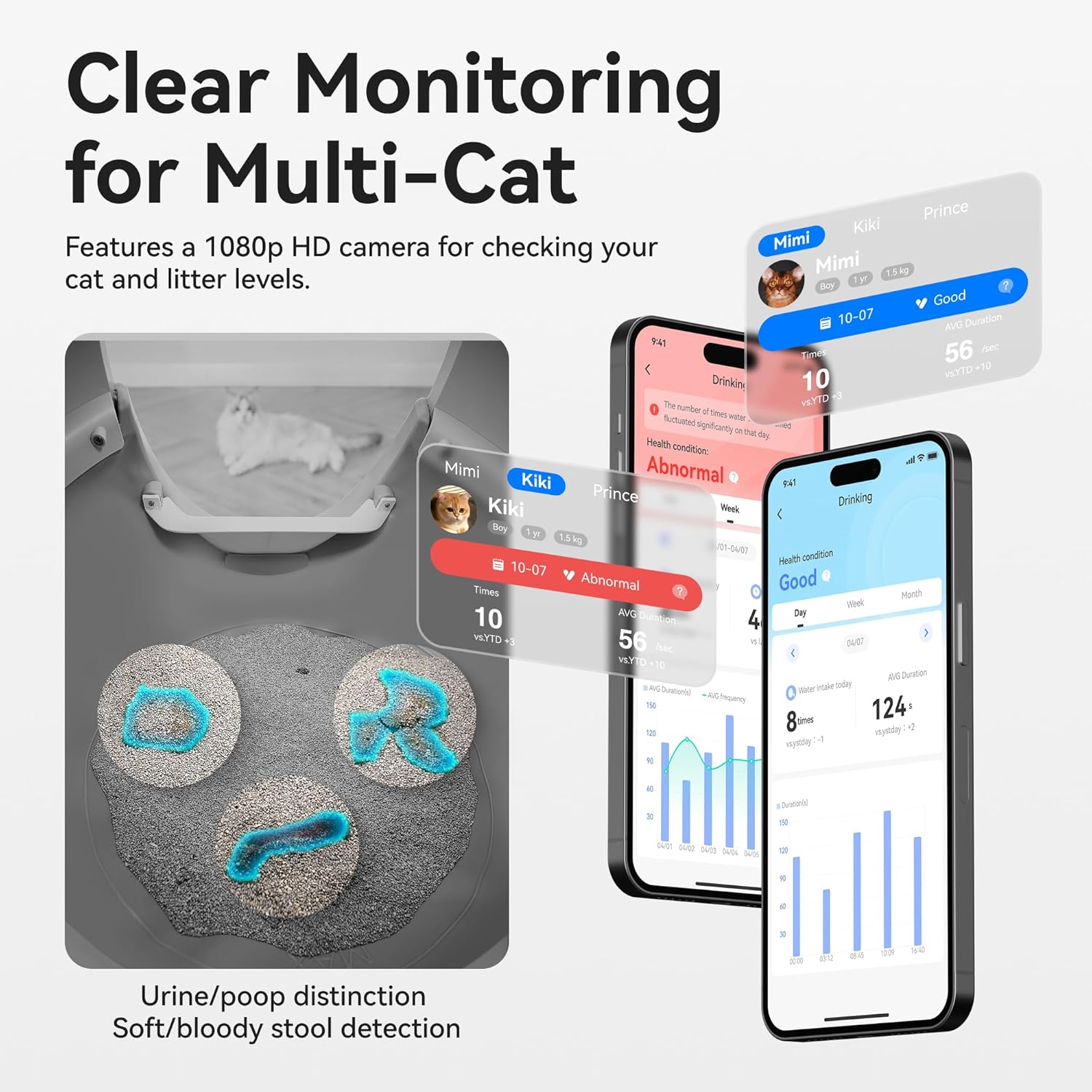
The system provides clear monitoring for multi-cat households, distinguishing between urine and poop, and detecting soft/bloody stool.
Manutenzione
Waste Drawer Emptying
The 13L waste container is designed to hold waste for up to 20 days for a single cat. When the waste drawer is full, the app will send a notification. Simply pull out the drawer, dispose of the waste bag, and replace it with a new one. The included cleaning brush can be used for touch-free cleaning of the waste drawer area.
Litter Replacement and Cleaning
Regularly check the litter level and refill as needed. For a thorough cleaning, empty all litter from the globe. The ComfortPlus Silicone Mat is designed for easy cleaning; simply wipe it down or rinse it. The five-stage odor control system includes replaceable components such as the C70 odor eliminator and activated carbon filters, which should be replaced periodically as indicated by the app or manufacturer guidelines.

The litter box features a comprehensive five-stage odor control system to keep your home fresh.
A step-by-step tutorial on how to replace the CATLINK Globe Liner, ensuring proper maintenance and hygiene.
Risoluzione dei problemi
- L'unità non risponde: Ensure the power adapter is securely plugged in and the outlet is functional. Check for any obstructions in the globe or waste drawer.
- Monitoraggio dei rifiuti: Ensure the ComfortPlus Silicone Mat is properly installed. Consider using a different type of litter if tracking persists.
- Problemi di odore: Verify that the C70 odor eliminator and activated carbon filters are not expired and are correctly installed. Replace them if necessary. Ensure the waste drawer is emptied regularly.
- Problemi di connettività dell'app: Check your home WiFi network (2.4GHz or 5G). Ensure the litter box is within range of your router. Restart both the litter box and your mobile device.
- Il gatto non usa la lettiera: Allow your cat time to adjust to the new litter box. Place a small amount of their old litter in the new unit. Ensure the litter type is suitable for automatic litter boxes.
- Safety sensor activation: If the unit stops unexpectedly, check for any objects or pets near the entrance or inside the globe. The safety sensors are designed to prevent operation when a cat is detected.
Specifiche
| Caratteristica | Dettaglio |
|---|---|
| Marca | COLLEGAMENTO CAT |
| Nome del modello | Pro Ultra (CL-CG-01) |
| Dimensioni (LxWxH) | 23.62" x 23.62" x 27.95" |
| Peso dell'articolo | 24.2 libbre (11 chilogrammi) |
| Spazio interno | 70L |
| Capacità del contenitore dei rifiuti | 13L |
| Materiale | Acrilonitrile Butadiene Stirene (ABS) |
| Connettività | Wi-Fi a 2.4 GHz e 5G |
| Telecamera | AI Camera, 1080p HD |
| Caratteristiche di sicurezza | 10 levels of protection, anti-pinch, gravity sensors, radar |
| Peso del gatto adatto | 3.5 - 22 pounds |
| Controllo degli odori | Cinque-stage deodorization (C70 odor eliminator, HDPE trash bag, etc.) |
Garanzia e supporto
The CATLINK 2025 New Ultra Self Cleaning Litter Box comes with a Garanzia di 1 anno from the manufacturer. For any product-related inquiries, technical assistance, or warranty claims, please contact CATLINK customer support directly. You can typically find their contact information on the product packaging, their official website, or through the CATLINK app's support section.
For additional resources and FAQs, visit the official CATLINK Store: CATLINK Amazon Store.
Ask a question about this manual
Ask about setup, troubleshooting, compatibility, parts, safety, or missing instructions. Manuals+ will review the question and use this page’s manual context to help answer it.