
Introduzione
The Trust Gaming GXT 498B Forta Gaming Headset is officially licensed for PlayStation 5 and PlayStation 4 consoles, designed to provide an immersive audio experience. This wired over-ear headset features 50mm drivers for powerful sound, a detachable microphone with a pop filter for clear communication, and comfortable ear pads for extended gaming sessions. This manual provides instructions for setup, operation, maintenance, and troubleshooting to ensure optimal performance of your headset.
Cosa c'è nella scatola
- Trust Gaming GXT 498B Forta Gaming Headset
- Detachable Microphone with Pop Filter
- 1.2m Audio Cable (3.5mm jack)
- Manuale d'uso

Image: The retail packaging for the Trust Gaming GXT 498B Forta Gaming Headset, showing the headset and included accessories.
Istruzioni di installazione
- Collegare il cavo audio: Locate the 3.5mm audio jack on your PlayStation 5 DualSense wireless controller or PlayStation 4 DualShock 4 wireless controller. Insert the 3.5mm audio cable from the headset firmly into the controller's audio jack.
- Collegare il microfono: The microphone is detachable. Align the microphone's connector with the port on the left earcup of the headset and push it in until it clicks securely into place. Ensure the pop filter is correctly positioned over the microphone for optimal voice clarity.
- Regola la vestibilità dell'auricolare: Extend or retract the adjustable padded headband to fit comfortably over your head. The earcups are moveable to ensure a snug fit over your ears.
- Configure Audio Settings (PlayStation):
- Per PS5: Vai a Impostazioni > Suono > Uscita audioSelezionare Cuffie as the output device. Adjust the volume and microphone levels as needed.
- Per PS4: Vai a Impostazioni > Dispositivi > Dispositivi audioSelezionare Cuffie collegate al controller as the input and output device. Adjust the volume and microphone levels.
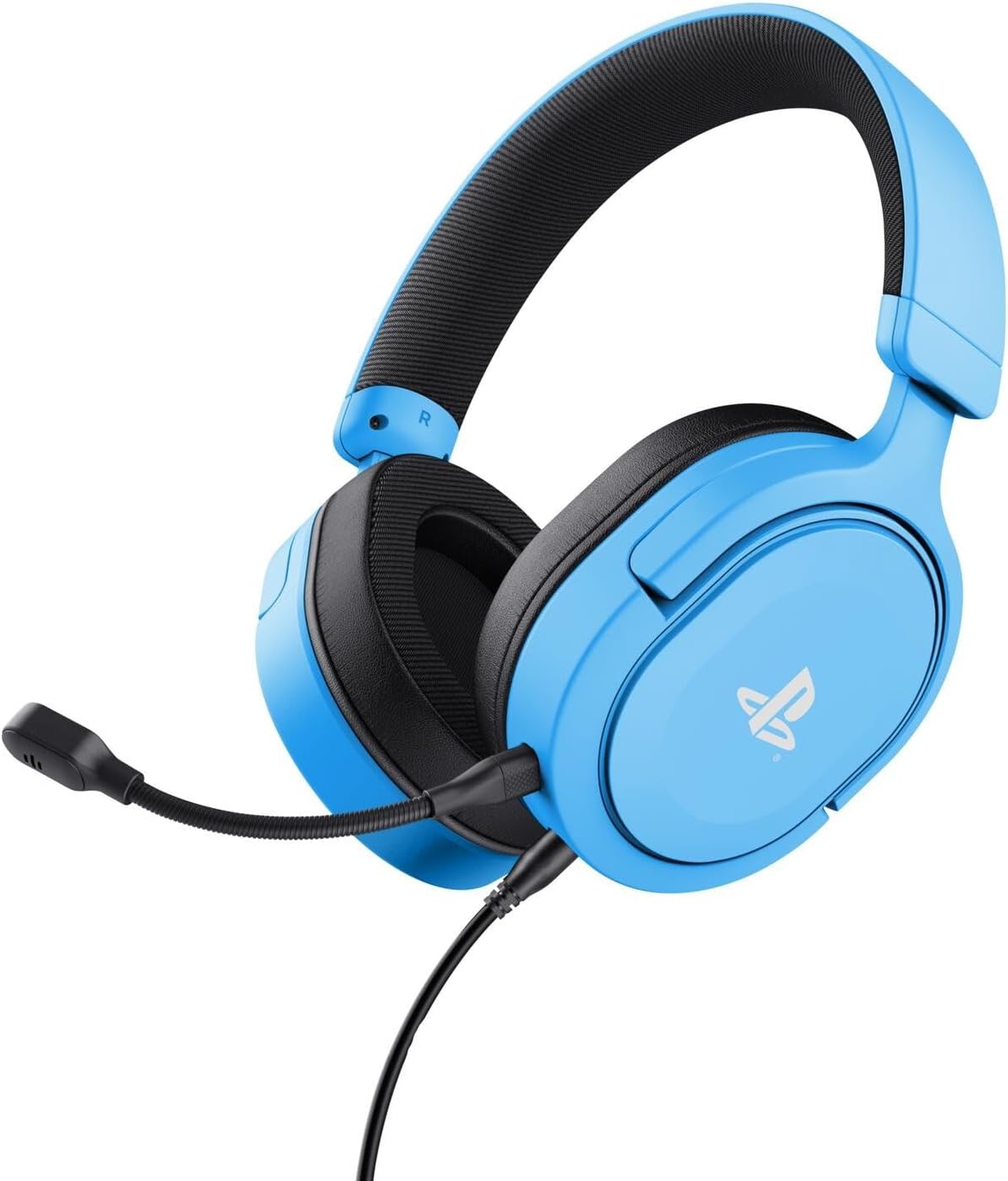
Image: The Trust Gaming GXT 498B Forta Gaming Headset, showcasingrazie al suo design e al microfono staccabile.
Istruzioni per l'uso
- Controllo del volume: The headset features an in-line volume control wheel on the audio cable. Rotate the wheel up or down to adjust the audio output level.
- Microfono disattivato: An in-line mute switch is located on the audio cable. Slide the switch to mute or unmute the microphone.
- Audio 3D: The headset supports 3D Audio on compatible PlayStation 5 games, providing an enhanced spatial sound experience. Ensure 3D Audio is enabled in your PS5 sound settings for optimal immersion.
- Microfono staccabile: The microphone can be detached when not in use for a more streamlined headset profile. Store it safely to prevent loss or damage.

Immagine: un primo piano view of the Trust Gaming GXT 498B Forta headset, highlighting the earcups and the attached audio cable with controls.
Manutenzione
- Pulizia: Utilizzare un panno morbido e asciutto per pulire le cuffie. Per i cuscinetti auricolari, un panno leggermenteamp È possibile utilizzare un panno, ma assicurarsi che non penetri umidità nelle griglie degli altoparlanti. Non utilizzare prodotti chimici aggressivi o detergenti abrasivi.
- Magazzinaggio: Conservare le cuffie in un luogo fresco e asciutto, lontano dalla luce solare diretta e da temperature estreme. Evitare di appoggiare oggetti pesanti sulle cuffie.
- Cura del cavo: Avoid sharp bends or kinks in the audio cable. Do not pull the cable forcefully when disconnecting.
- Cura del microfono: Handle the detachable microphone with care. When not in use, detach it and store it safely to prevent damage.
Risoluzione dei problemi
- Nessun suono dalle cuffie:
- Ensure the 3.5mm audio cable is fully inserted into both the headset and the controller.
- Check the in-line volume control wheel on the cable and turn it up.
- Verify audio settings on your PlayStation console (refer to "Setup Instructions" section).
- Test the headset with another device (e.g., smartphone, PC) to determine if the issue is with the headset or the console.
- Microfono non funzionante:
- Assicurarsi che il microfono staccabile sia saldamente fissato all'auricolare.
- Check the in-line microphone mute switch and ensure it is in the "unmute" position.
- Verify microphone input settings on your PlayStation console (refer to "Setup Instructions" section).
- Ensure the pop filter is not obstructing the microphone's input.
- Sound Quality Issues (Distortion, Low Volume):
- Adjust the volume levels on both the headset's in-line control and your console's settings.
- Assicurarsi che il cavo audio non sia danneggiato o piegato.
- Try connecting the headset to a different audio source to rule out console-specific issues.
Specifiche
| Nome del modello | GXT 498B Forta |
| Numero di modello | 25556 |
| Connettività | Cablato (jack da 3.5 mm) |
| Lunghezza del cavo | 1.2 metri |
| Dimensioni del conducente | 50 millimetri |
| Gamma di frequenza | 20 Hz - 20,000 Hz |
| Impedenza | 32 Ohm |
| Sensibilità | 90 dB |
| Tipo di microfono | Detachable with Pop Filter |
| Posizionamento dell'orecchio | Sopra l'orecchio |
| Peso dell'articolo | 253 grammi |
| Dispositivi compatibili | PlayStation 5, PlayStation 4, PC |
| Materiale | Plastic (up to 65% recycled) |
Garanzia e supporto
This Trust Gaming GXT 498B Forta Gaming Headset is covered by the manufacturer's standard warranty. For detailed warranty information, please refer to the documentation included with your purchase or visit the official GXTrust website. For technical support, troubleshooting assistance beyond this manual, or warranty claims, please contact GXTrust customer service through their official support channels.
Si prega di conservare la prova d'acquisto ai fini della garanzia.