
1. Introduzione
This manual provides essential information for setting up, operating, and maintaining your AITRIP Nano V3.0 microcontroller board. The Nano V3.0 is a compact, breadboard-friendly development board based on the ATmega328P microcontroller, featuring a CH340 USB-to-serial converter and a Type-C USB connector. It is designed for various electronics projects and is compatible with the Arduino IDE.
2. Contenuto della confezione
Verifica che tutti gli articoli elencati di seguito siano inclusi nel tuo pacchetto:
- 3 x AITRIP Nano V3.0 Microcontroller Boards (ATmega328P, CH340, Type-C USB)
- 1 x Cavo USB di tipo C
- Pin headers (typically included for soldering)

Image: Contents of the AITRIP Nano V3.0 package, showing three Nano boards, a Type-C USB cable, and pin headers.
3. Layout e componenti della scheda
Familiarize yourself with the key components and pinout of the AITRIP Nano V3.0 board.

Image: Detailed diagram illustrating the various components and pin functions on the AITRIP Nano V3.0 board, including digital pins, analog pins, power pins, Type-C USB, ATmega328P, reset button, and LEDs.
- Microcontrollore ATmega328P: The main processing unit.
- Chip USB-seriale CH340: Facilitates communication between the board and your computer via USB.
- Type-C USB Connector: Per la comunicazione di energia e dati.
- Pin I/O digitali (D0-D13): 14 pins for digital input/output, 6 of which support PWM (Pulse Width Modulation).
- Pin di ingresso analogico (A0-A7): 8 pins for analog input.
- Pin di alimentazione: 5 V, 3.3 V, GND (massa), VIN (tensione esterna)tage Ingresso).
- Pulsante di reset: Reimposta il microcontrollore.
- LED TX/RX: Indicate data transmission and reception.
- LED di potenza: Indicates the board is powered on.
4. Specifiche
Key technical specifications of the AITRIP Nano V3.0 board:
| Caratteristica | Specificazione |
|---|---|
| Microcontrollori | ATmega328P |
| Chip da USB a seriale | CH340 |
| Volume di eserciziotage | 5V |
| Ingresso volumetage (consigliato) | 7-12 V |
| Ingresso volumetage (Limite) | 6-20 V |
| Pins I / O digitali | 14 (6 forniscono uscita PWM) |
| Pin di ingresso analogico | 8 |
| Corrente continua per pin I / O | 40mA |
| Memoria Flash | 32 KB (ATmega328P), 2 KB used by bootloader |
| SRAM | 2 KB (ATmega328P) |
| Memoria EEPROM | 1 KB (ATmega328P) |
| Velocità di clock | 16 MHz |
| Dimensioni | 43 mm x 18 mm (1.69 pollici x 0.70 pollici) |
| Connettore USB | Tipo C |

Image: AITRIP Nano V3.0 board showing its dimensions (43mm x 18mm) and the included Type-C USB cable with its length (22cm).
5. Guida all'installazione
Follow these steps to prepare your AITRIP Nano V3.0 board for use with the Arduino IDE.
5.1. Driver Installation (CH340)
The AITRIP Nano V3.0 uses the CH340 chip for USB-to-serial communication. You may need to install specific drivers for your operating system if they are not automatically recognized.
- Download CH340 Driver: Search online for "CH340 driver" for your operating system (Windows, macOS, Linux). Reputable sources include the manufacturer's website or Arduino community forums.
- Installa il driver: Follow the installation instructions provided with the driver package. On Windows, this usually involves running an executable. On macOS, it might involve installing a
.pkgfile and potentially restarting your computer. - Verifica installazione: After installation, connect the Nano board to your computer using the provided Type-C USB cable. Open your computer's Device Manager (Windows) or System Information (macOS) and look for a new COM port (Windows) or USB serial device (macOS).
5.2. Configurazione dell'IDE Arduino
To program your Nano V3.0 board, configure the Arduino IDE as follows:
- Installa Arduino IDE: Se non l'hai già fatto, scarica e installa l'IDE Arduino dal sito ufficiale Arduino webposto (www.arduino.cc/en/software).
- Connect Board: Connect your AITRIP Nano V3.0 board to your computer using the Type-C USB cable.
- Seleziona la bacheca: Nell'IDE di Arduino, vai a Strumenti > Scheda e seleziona "Arduino Nano".
- Select Processor: This is a critical step for many clone boards. Go to Strumenti > Processore e seleziona "ATmega328P (Old Bootloader)". If this option is not available or if you encounter upload errors, try "ATmega328P".
- Seleziona Porto: Vai a Strumenti > Porta and select the COM port (Windows) or
/dev/cu.usbserial-XXXX(macOS/Linux) corresponding to your connected Nano board.
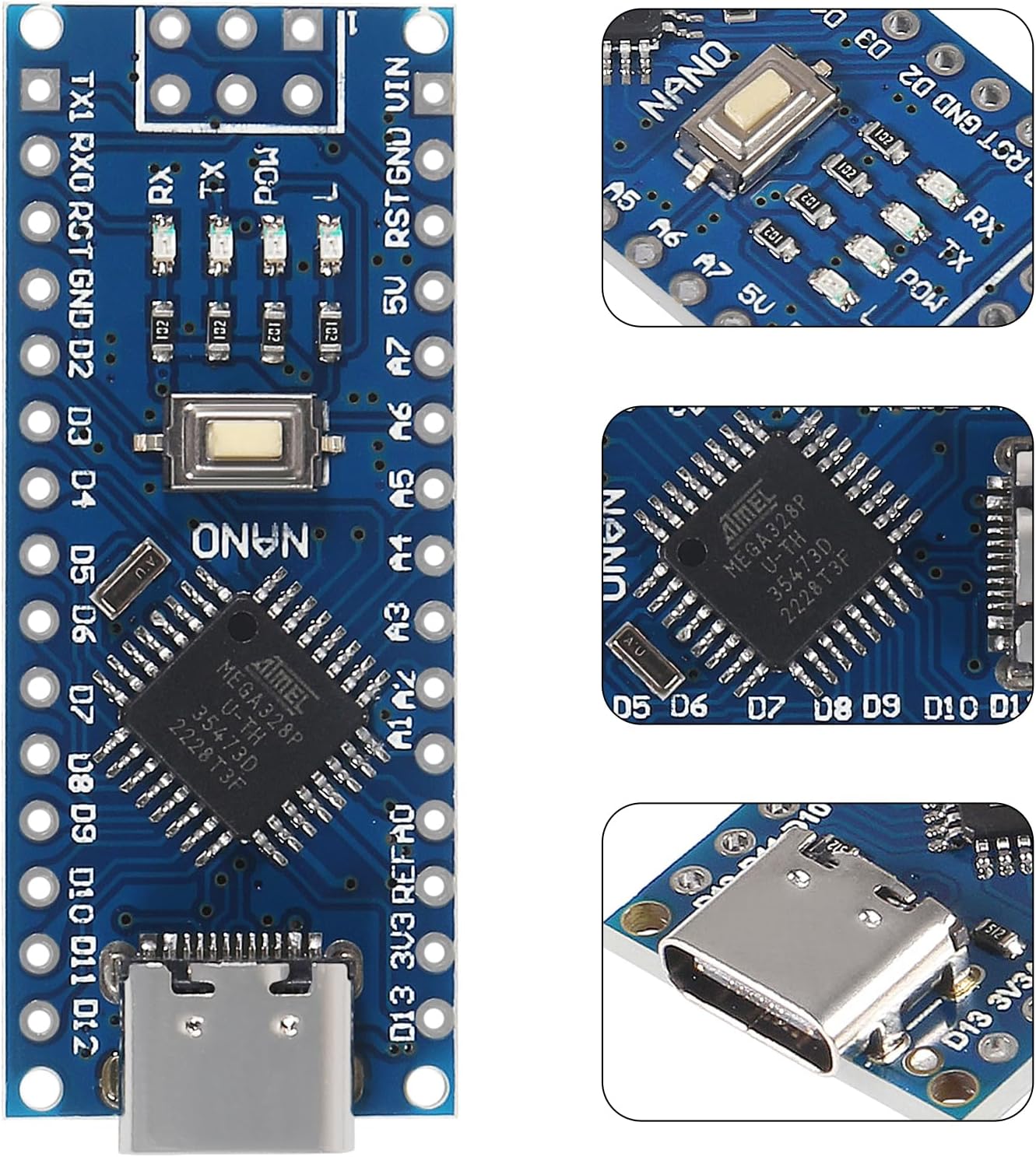
Immagine: Primo piano view of the AITRIP Nano V3.0 board, highlighting the ATmega328P microcontroller and the CH340 USB-to-serial chip.
6. Istruzioni per l'uso
Once your AITRIP Nano V3.0 board is set up, you can begin programming and using it in your projects.
6.1. Alimentazione della scheda
The Nano V3.0 offers several power options:
- Connessione USB-C: Connect the board to your computer via the Type-C USB cable. This provides 5V power and enables data communication.
- External Unregulated Power Supply (VIN pin): Provide 6-12V DC to the VIN pin. The onboard voltage regulator will convert this to 5V for the microcontroller.
- External Regulated 5V Power Supply: Provide a regulated 5V DC to the 5V pin.
The board automatically senses and switches to the higher potential power source, eliminating the need for a manual power selection jumper.
6.2. Uploading Sketches
To upload your code (sketch) to the Nano V3.0:
- Write or open a sketch in the Arduino IDE.
- Ensure the correct board (Arduino Nano), processor (ATmega328P (Old Bootloader)), and port are selected under the Utensili menu.
- Fare clic sul Caricamento button (right arrow icon) in the Arduino IDE. The TX/RX LEDs on the board will blink during the upload process.
- Upon successful upload, the IDE will display "Done uploading."
7. Manutenzione
The AITRIP Nano V3.0 board requires minimal maintenance to ensure longevity.
- Magazzinaggio: Store the board in an anti-static bag or container when not in use to protect it from electrostatic discharge.
- Pulizia: Se necessario, pulire delicatamente la tavola con una spazzola morbida e asciutta o con aria compressa per rimuovere la polvere. Evitare l'uso di liquidi.
- Gestione: Handle the board by its edges to avoid touching components, especially the pins, which can be sensitive to static electricity.
- Alimentazione elettrica: Assicuratevi sempre che il vostro alimentatore sia ben alimentatotage is within the recommended limits (7-12V for VIN, 5V for 5V pin) to prevent damage.
8. Risoluzione Dei Problemi
Here are solutions to common issues you might encounter with your AITRIP Nano V3.0 board.
8.1. Board Not Recognized by Computer
- Autista CH340: Ensure the CH340 driver is correctly installed for your operating system. Refer to Section 5.1.
- Cavo USB: Try a different Type-C USB cable. Some cables are for charging only and do not support data transfer.
- Porta USB: Prova a connetterti a un'altra porta USB del tuo computer.
8.2. Upload Errors (e.g., "avrdude: stk500_getsync(): not in sync")
- Processor Selection: The most common issue. Go to Strumenti > Processore e garantire "ATmega328P (Old Bootloader)" is selected. If this option is not present, ensure you have the correct board package installed in the Arduino IDE.
- Selezione della porta: Verify that the correct COM port is selected under Strumenti > Porta.
- Selezione del consiglio: Confermare "Arduino Nano" è selezionato sotto Strumenti > Scheda.
- Pulsante di reset: Sometimes pressing the reset button on the Nano board just before or during the upload process can help.
8.3. Board Not Powering On
- Fonte di energia: Check your USB cable or external power supply. Ensure the power source is providing adequate voltage e corrente.
- LED di potenza: If the power LED does not light up, there might be an issue with the power input or the board itself.
9. Garanzia e supporto
Specific warranty details and official support contact information for the AITRIP Nano V3.0 board are not provided in the product information. For any issues or inquiries, please refer to the retailer or vendor from whom the product was purchased.