
1. Introduzione
This manual provides comprehensive instructions for the installation, operation, and maintenance of your Eonon Android 14 Car Stereo, model VWX7. This advanced head unit is designed to integrate seamlessly with your vehicle, offering enhanced connectivity, entertainment, and navigation features.

Image 1.1: Eonon Android 14 Car Stereo (VWX7) with accessories.
2. Compatibilità e installazione
2.1 Modelli di auto applicabili
The VWX7 car stereo is compatible with a wide range of Volkswagen, SEAT, and SKODA models. Please refer to the compatibility chart below to confirm if your vehicle is supported.
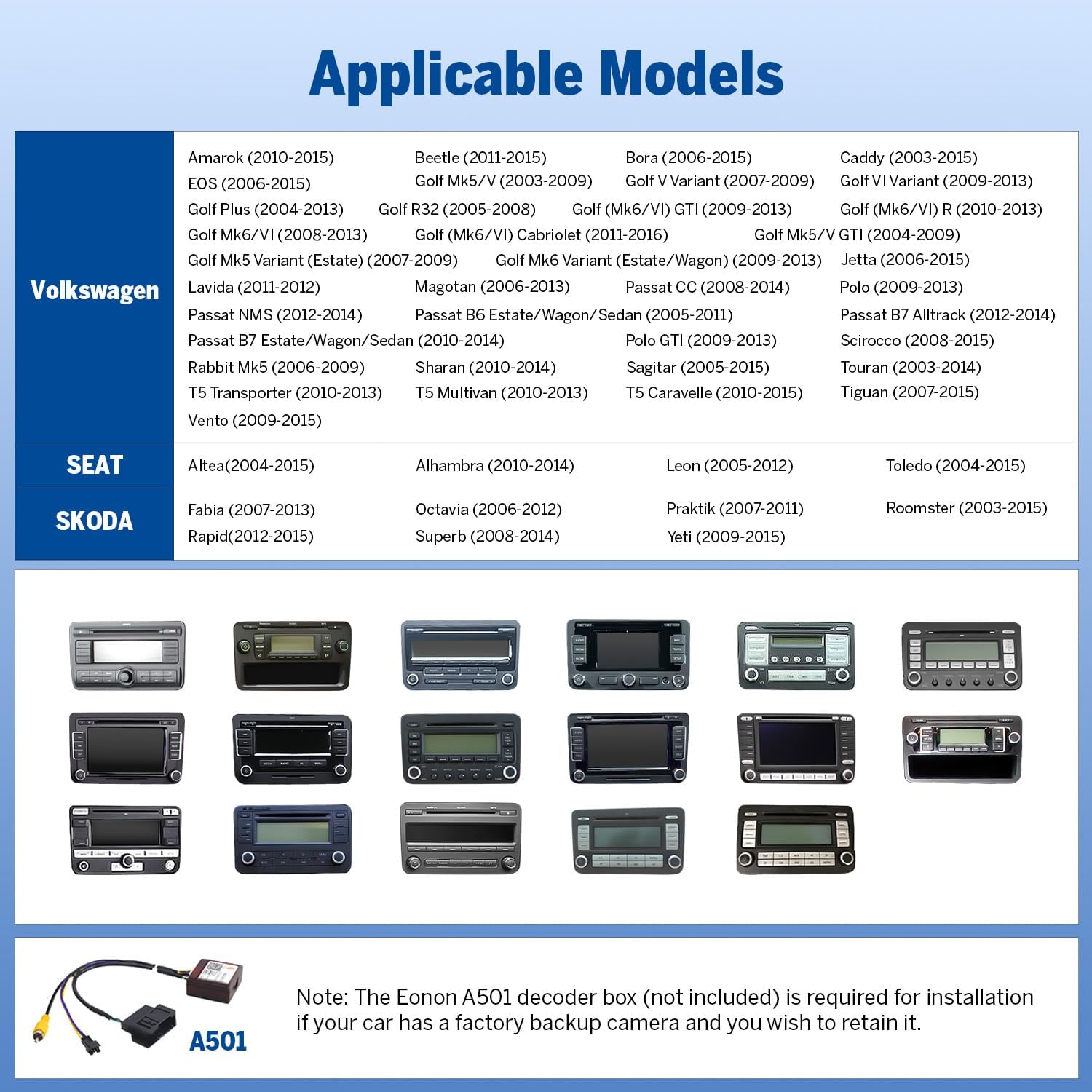
Image 2.1: Compatibility chart for Volkswagen, SEAT, and SKODA vehicles.
2.2 Requisiti di installazione
An installation kit (not included) may be required if your factory radio matches the examples shown below. This ensures proper fitment and integration.

Image 2.2: Factory radio types indicating installation kit necessity or incompatibility.
Nota: If your car has a factory backup camera and you wish to retain its functionality, the Eonon A501 decoder box (not included) is required for installation.
2.3 Plug & Play Features
The VWX7 unit is designed for plug-and-play installation, supporting most original vehicle functions through the included CANBUS system. These features include:
- Comandi al volante (SWC)
- Dynaudio & Fender audio system integration
- Air conditioning information display
- Radar sensors and vehicle information display
- Door reminder
- Parking sensor and reversing guidelines (with compatible camera)

Image 2.3: Supported factory features and integrations.
3. Caratteristiche principaliview
3.1 Sistema Android 14
The VWX7 operates on the latest Android 14 system (API level 34) with 3GB RAM and 32GB ROM. It is equipped with a cutting-edge Rockchip processor, ensuring superior performance and energy efficiency for a smooth user experience.

Image 3.1: Android 14 system interface and performance metrics.
3.2 CarPlay wireless/cablato e Android Auto
Enjoy seamless integration with your smartphone using wireless or wired Apple CarPlay and Android Auto. This allows for hands-free control of navigation, music, calls, and messages via voice commands (Siri or Google Assistant).

Immagine 3.2: Interfacce wireless CarPlay e Android Auto.
3.3 Built-in DSP and Bluetooth 5.4
The integrated Digital Signal Processing (DSP) chip, along with a 4x45W output and 36-band equalizer, provides a richer and more immersive audio experience. The independent Bluetooth 5.4 module ensures quick, stable connections, noise reduction, and crystal-clear call quality.

Image 3.3: Built-in DSP and Bluetooth module details.
Schermo IPS da 3.4 pollici da 9 pollici
The unit features a 9-inch IPS display with a 1280x720 resolution and a 178° viewing angle, providing vibrant colors and sharp details for navigation and entertainment.
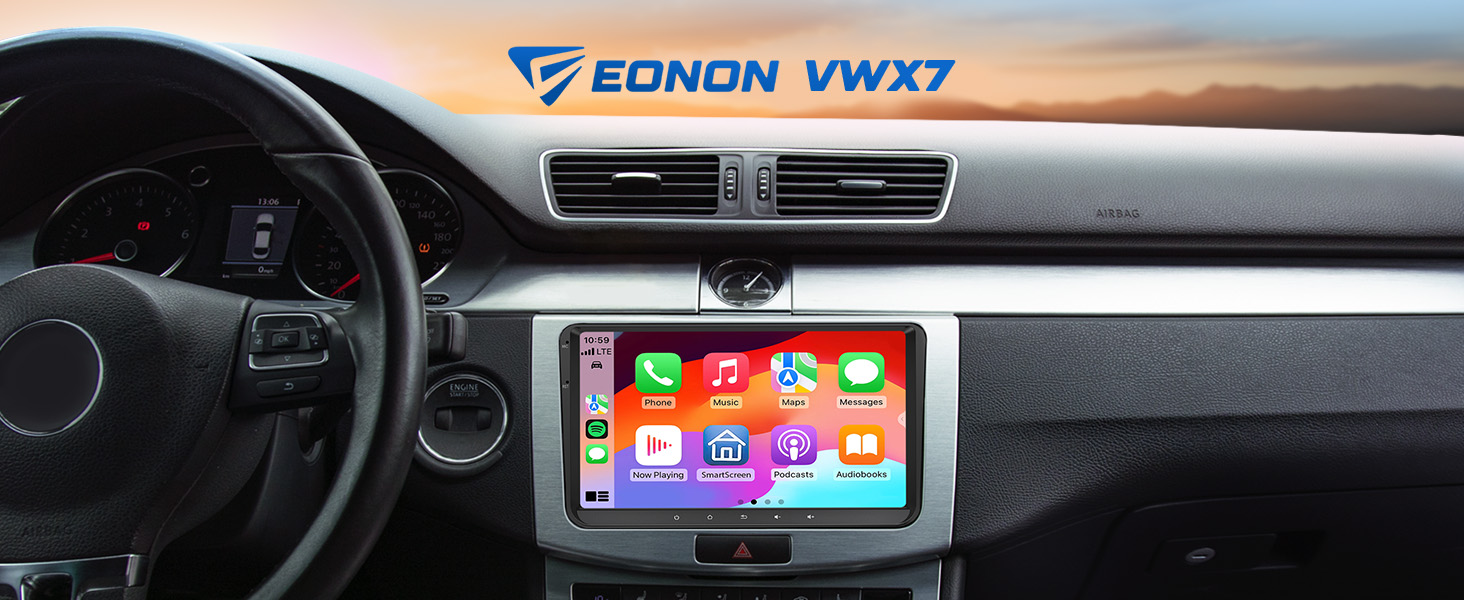
Image 3.4: 9-inch IPS Display features.
3.5 Componenti interni
The Eonon X7 series is built with high-quality components, including a 4-layer automotive PCB, ST 4x45W amplifier, ultra-low latency Wi-Fi 6 & Bluetooth 5.4 module, Silicon Labs Si4755 Tuner, and top-grade Silicongo eMMC memory.

Image 3.5: Internal components of the Eonon X7 Series.
4. Configurazione e funzionamento
4.1 Connessione CarPlay wireless
- Click the Zlink5 app on the car stereo.
- Attiva il Wi-Fi e il Bluetooth sul tuo iPhone.
- Find 'EONON' in your phone's Bluetooth device list and enter 0000 to pair. Once connected, tap 'Use CarPlay'.
- Attendi qualche secondo per completare la connessione.
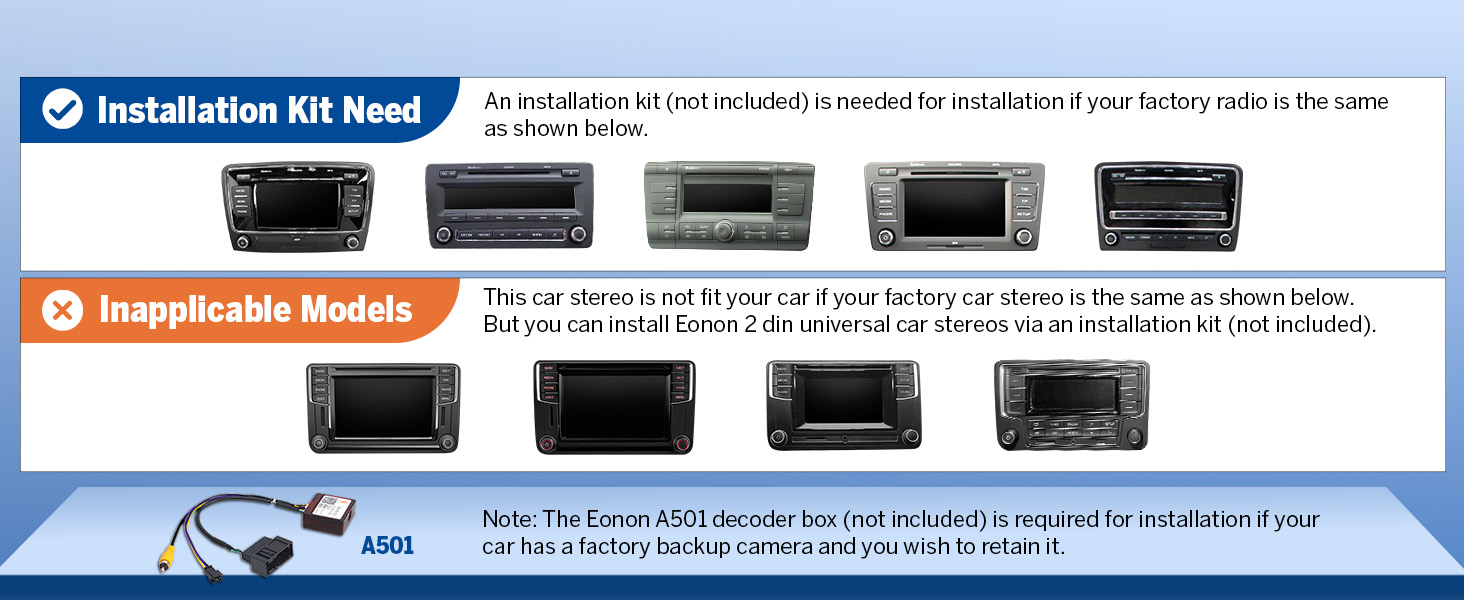
Image 4.1: Wireless Apple CarPlay connection steps.
4.2 Connessione wireless Android Auto
- Click the Zlink5 app on the car stereo.
- Attiva il Wi-Fi e il Bluetooth sul tuo telefono Android.
- Find 'EONON' in your phone's Bluetooth device list, enter 0000 to pair, and click 'OK'.
- Attendi qualche secondo per completare la connessione.
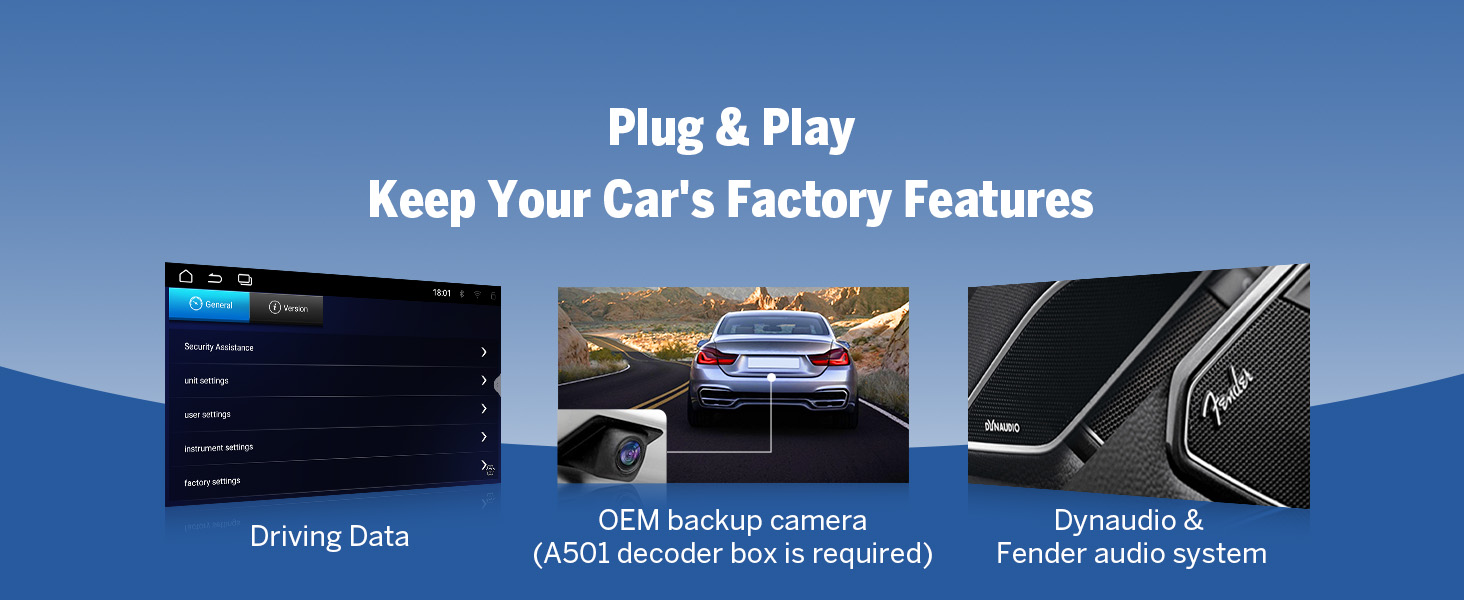
Image 4.2: Wireless Android Auto connection steps.
4.3 Mirroring dello schermo
The unit supports screen mirroring for both iOS and Android devices, allowing you to display your phone's screen directly on the car stereo.
Per iOS:
- Click the Zlink5 app on the car stereo, then set the car stereo to iPhone wireless screen mirroring mode.
- Attiva l'hotspot dell'iPhone e connettiti all'autoradio.
- Attiva la funzione di mirroring dello schermo dell'iPhone e seleziona "zj-airplay".
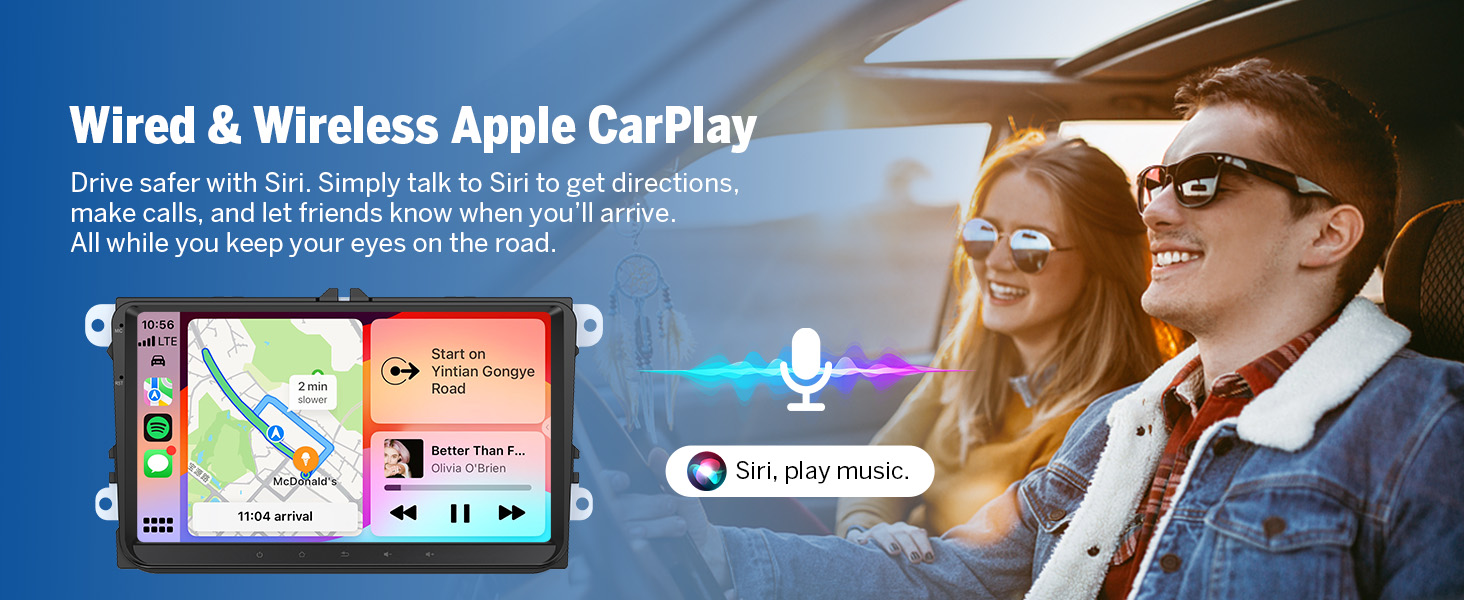
Image 4.3: Screen Mirroring for iOS devices.
Per Android:
- Click the Zlink5 app on the car stereo, then set the car stereo to Android wireless screen mirroring mode.
- Turn on your phone's Bluetooth. Find 'EONON' in your phone's Bluetooth device list, enter 0000 to pair.
- Attiva l'hotspot del telefono e connettiti all'autoradio.
- Installa l'app Zplus sul tuo telefono. Avvia l'app e seleziona "connessione wireless".
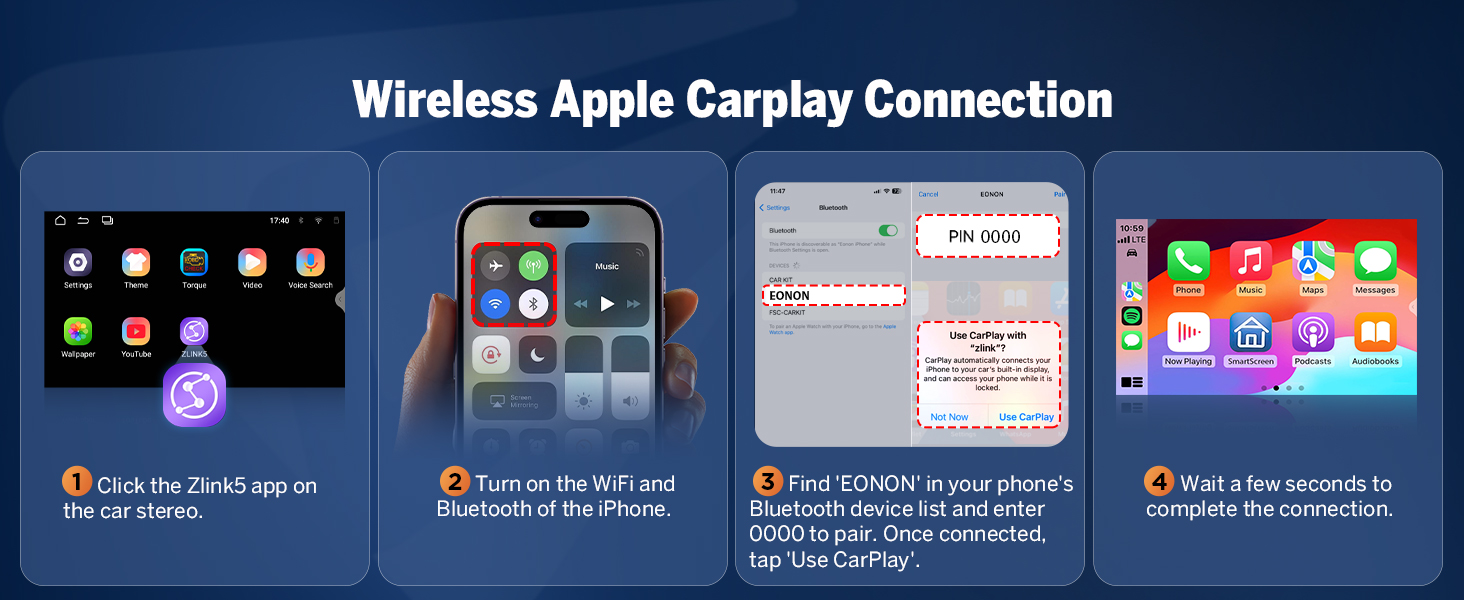
Image 4.4: Screen Mirroring for Android devices.
4.4 Opzioni di personalizzazione
Personalize your car stereo's interface with various customization options:
- Logo dello stivale: Set a custom boot logo.
- Colore del pulsante: Change the color of the physical buttons.
- Carta da parati: Choose from pre-installed wallpapers or upload your own.
- Temi dell'interfaccia utente: Select from 3 different user interface themes to match your preference.
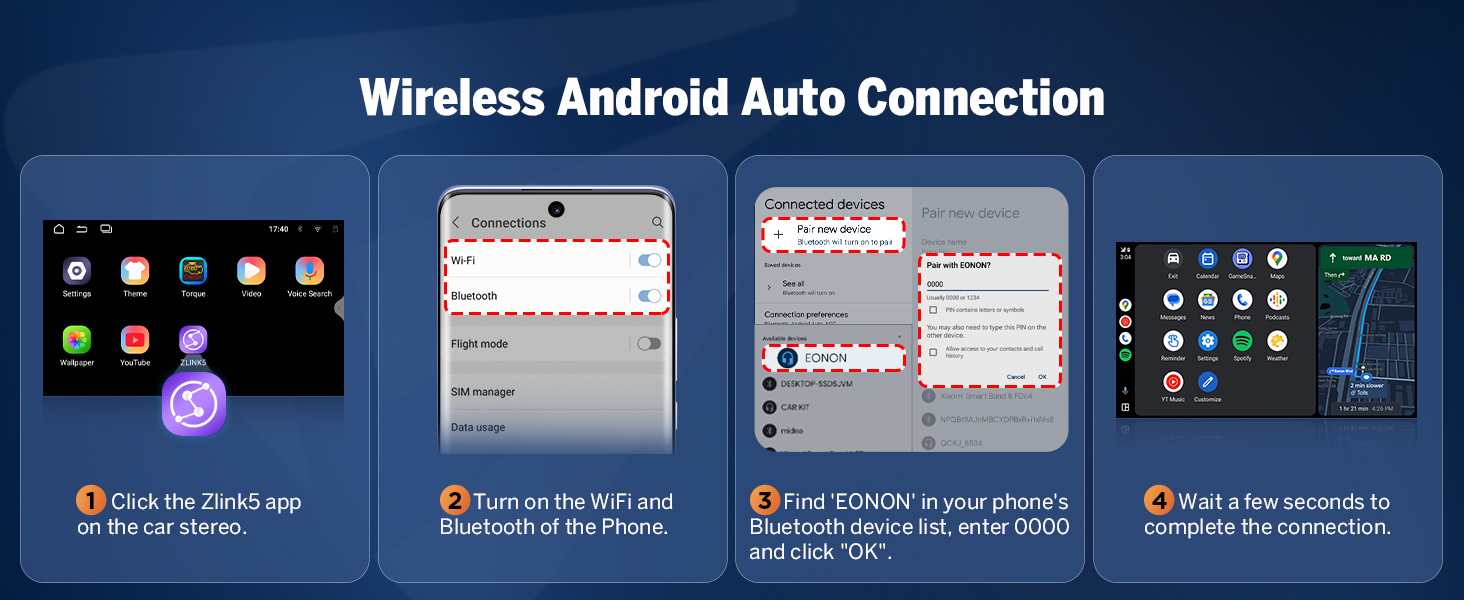
Image 4.5: Interface customization options.
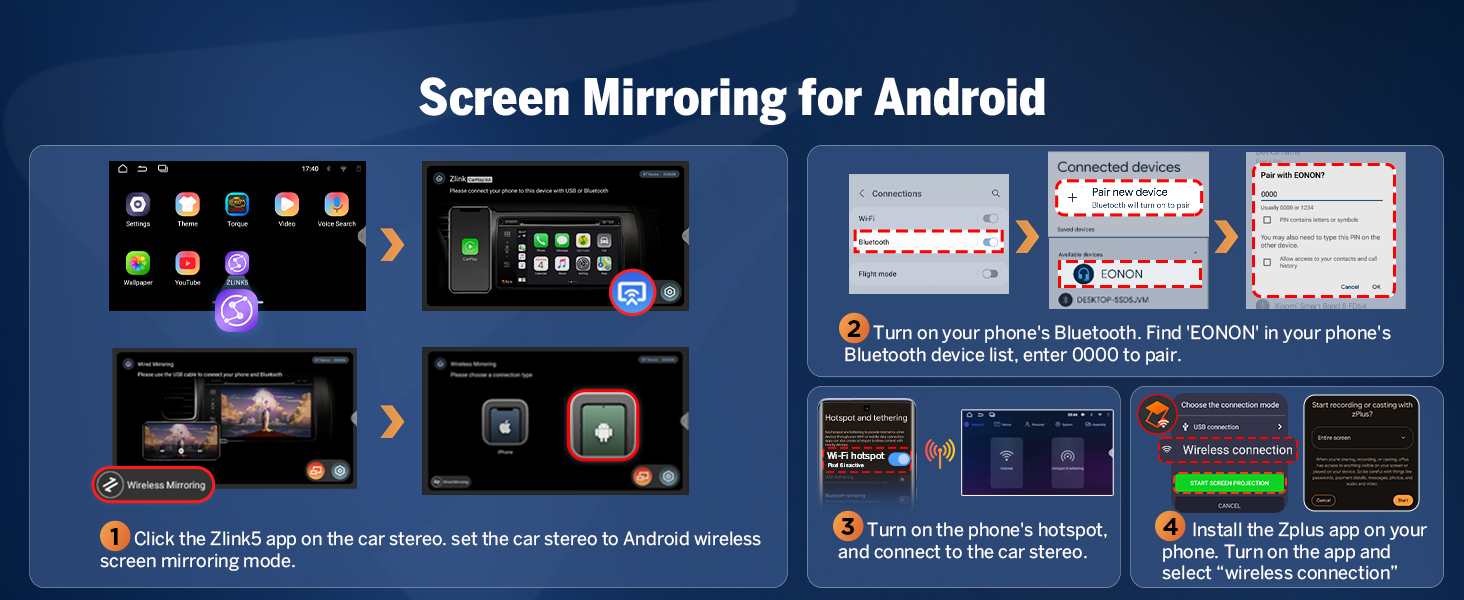
Image 4.6: Available UI Themes.
4.5 funzioni aggiuntive
The VWX7 unit includes several other useful features:
- 1-second fast boot time.
- Support for online and offline maps.
- Three USB ports for external devices.
- RCA output for external amplificatori o subwoofer.
- Dual-band Wi-Fi (2.4G/5G).
- AM/FM radio tuner with 18 preset channels.
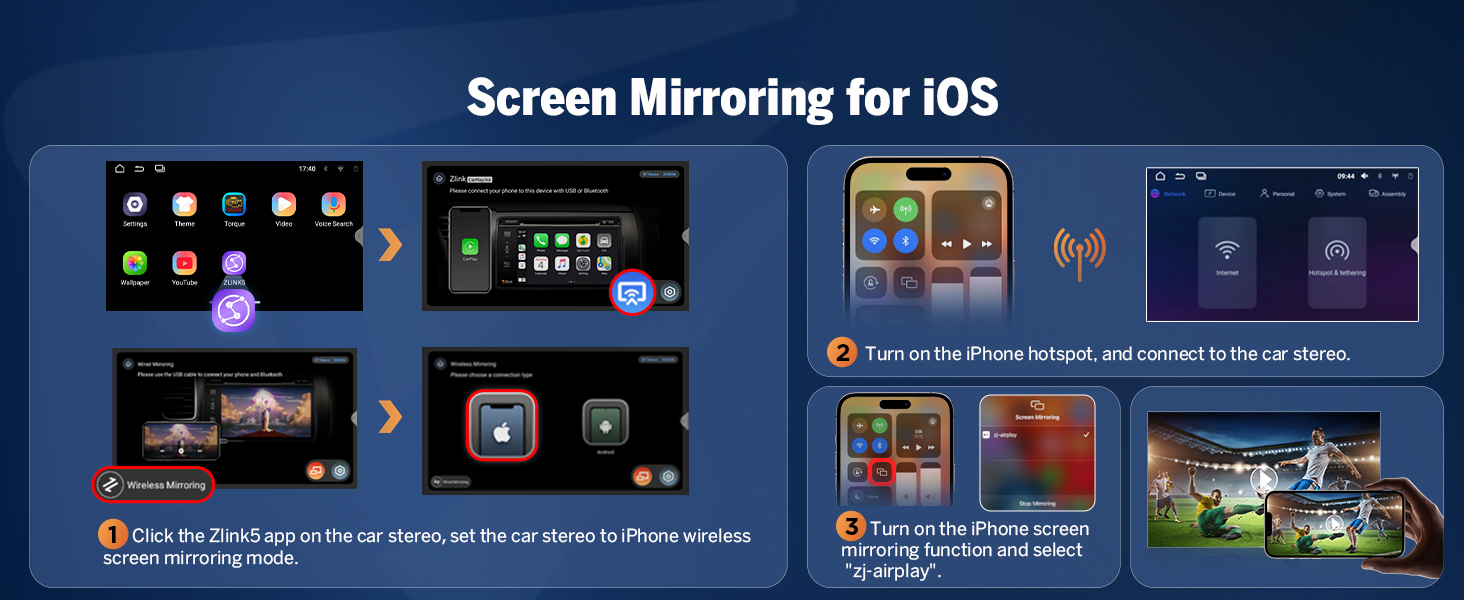
Immagine 4.7: Passoview of additional features.
5. Manutenzione
5.1 Over-the-Air (OTA) Firmware Updates
The Eonon VWX7 supports Over-the-Air (OTA) updates, allowing you to keep your car stereo's software up-to-date. These updates can fix software issues and enhance security. Simply check for updates within the system settings and follow the on-screen prompts. Note that these updates are for the software and do not upgrade the core Android system version.

Image 5.1: Over-the-Air Firmware Update process.
6. Risoluzione Dei Problemi
This section addresses common issues you might encounter with your Eonon Android 14 Car Stereo.
6.1 Wireless Connectivity Issues (CarPlay/Android Auto/Wi-Fi)
If you experience intermittent disconnections or difficulty connecting wirelessly:
- Ensure both Wi-Fi and Bluetooth are enabled on your phone and the car stereo.
- Prova a eliminare il dispositivo dalle impostazioni Bluetooth del telefono e a riassociarlo.
- Riavvia sia il telefono che l'autoradio.
- Ensure the Zlink5 app is running on the car stereo.
- Check for any obstructions or interference near the unit.
6.2 OEM Functionality (Backup Camera, Steering Wheel Controls, etc.)
If original car functions are not working as expected after installation:
- Verify that the CANBUS decoder is correctly connected.
- For OEM backup cameras, ensure the A501 decoder box (if required for your model) is properly installed and connected.
- Double-check all wiring connections according to the wiring diagram.
- Consult the installation kit instructions if one was used, as specific wiring might be required.
6.3 Problemi con il segnale GPS
If the GPS unit is not receiving a signal or navigation is inaccurate:
- Ensure the GPS antenna is securely connected to the unit.
- Posizionare l'antenna GPS in un luogo con una vista libera view of the sky, away from metal obstructions (e.g., on the dashboard near the windshield).
- Test with a different navigation app to rule out app-specific issues.
6.4 Problemi di qualità audio
If audio quality is poor or distorted:
- Controllare i collegamenti degli altoparlanti.
- Adjust the DSP settings and equalizer bands to optimize sound for your vehicle's acoustics.
- Ensure the volume levels are appropriately set on both the unit and any connected devices.
7. Specifiche
| Caratteristica | Specificazione |
|---|---|
| Dimensioni del prodotto | 8.67 x 5.12 x 1.34 pollici |
| Peso dell'articolo | 2.64 libbre (1.2 chilogrammi) |
| Numero di modello | VWX7 |
| Sistema operativo | Androide 14 |
| Memoria RAM + ROM | 3 GB di RAM + 32 GB di ROM |
| Processore | Roccia scheggiata |
| Dimensioni dello schermo | 9 pollici (23 cm) |
| Risoluzione dello schermo | Schermo IPS 1280x720 |
| Viewangolo di ing | 178° |
| CarPlay / Android Auto | Supporto wireless/cablato |
| Versione Bluetooth | 5.4 |
| Wifi | Dual-band (2.4G/5G) |
| Potenza di uscita audio | 4x45W |
| Equalizzatore | 36-band (DSP) |
| Porte USB | 3 |
| Tecnologia sintonizzatore | FM, AM |
| Fonte di alimentazione | Batteria per auto |
8. Package Contents and Wiring
8.1 Cosa c'è nella scatola
Your Eonon Android 14 Car Stereo package includes the following components:
- Audio Video Adapter Cable x1
- Audio Adapter Cable x1
- CarPlay & Android Auto USB Adapter Cable x1
- USB Adapter Cable x1
- Backup Camera Video Input Cable x1
- Radio Antenna Adapter Cable x1
- Cavo di alimentazione x1
- Antenna GPS x1
- Microfono esterno x1
- CAN-Bus x1
- Fusibile di ricambio x1
- Tampone adesivo x1
- Manuale utente x1
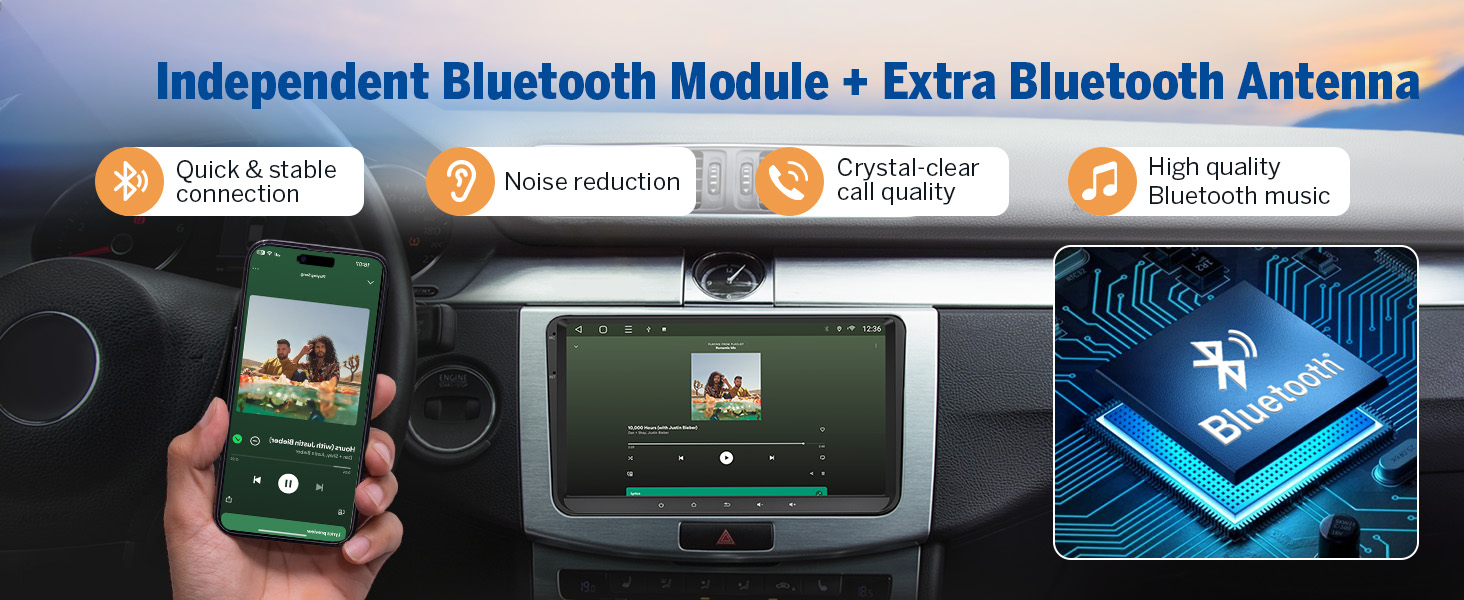
Immagine 8.1: Contenuto della confezione del prodotto.
8.2 Schema elettrico
Refer to the following diagram for proper connection of all cables and accessories to the main unit.
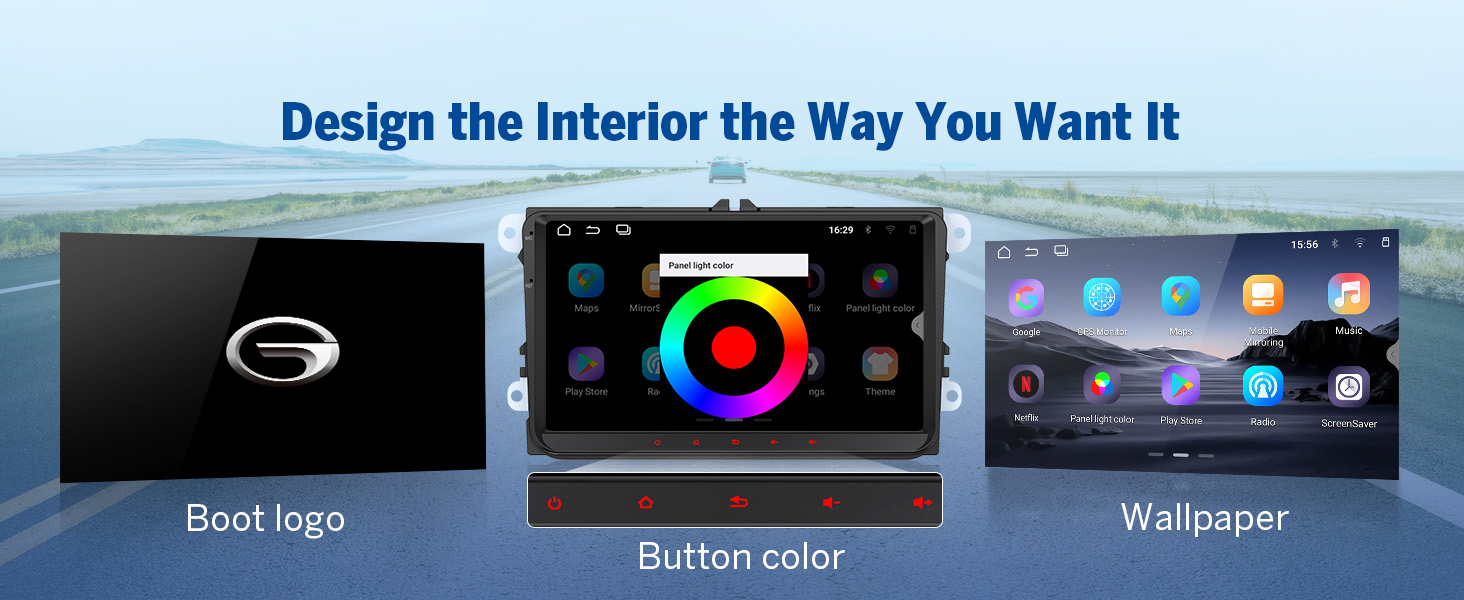
Image 8.2: Comprehensive wiring diagram.
9. Supporto e garanzia
For technical assistance, troubleshooting beyond this manual, or warranty inquiries, please contact Eonon customer support through their official website or the retailer where you purchased the product. Specific warranty terms and conditions may vary by region and retailer.