
1. Prodotto finitoview
The Pyle 4K USB Video Conference Room Camera System is an integrated solution designed for high-quality video conferencing. It features a 4K camera with a 120° field of view, 5X digital zoom, and AI-powered auto-framing. The system includes an 8-meter microphone pickup range with echo cancellation and noise reduction for clear audio. It is compatible with various platforms such as Zoom, Skype, and Microsoft Teams, and supports PC, Mac, phone, and tablet devices.

Immagine 1: anteriore view of the Pyle 4K USB Video Conference Room Camera System.
2. Cosa c'è nella scatola
Verificare che tutti i componenti siano presenti nella confezione:
- Pyle 4K USB Video Conference Room Camera System (Main Unit)
- Cavo USB
- Peeping Cover (Privacy Cover)
- Wall-mounted Components (Bracket and Screws)
- Power Adapter (12VDC 3.0A)
- Telecomando
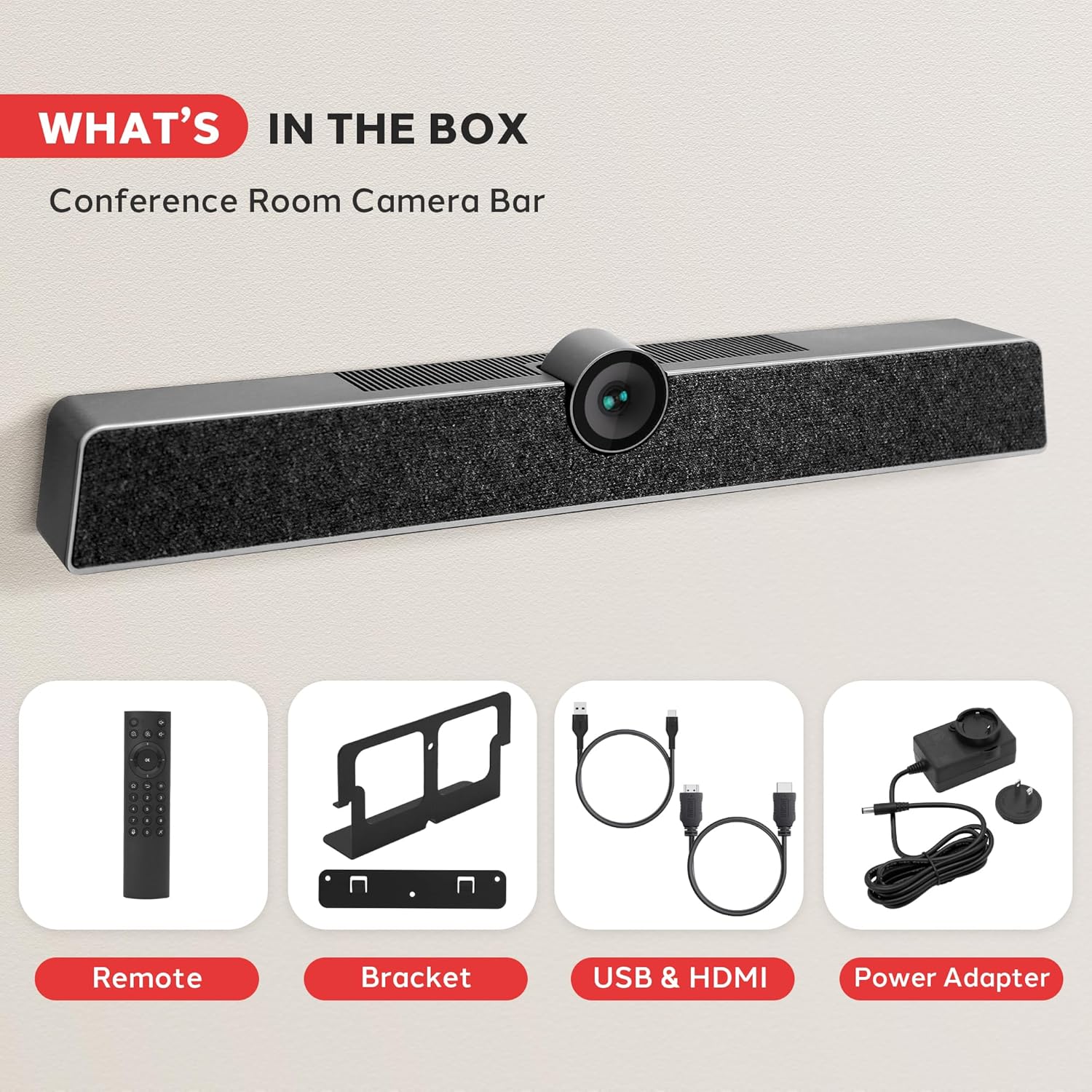
Image 2: All components included in the product package. This includes the main camera unit, remote control, mounting bracket, USB and HDMI cables, and power adapter.
3. Configurazione e installazione
The Pyle 4K USB Video Conference Room Camera System offers flexible installation options for various meeting environments.
3.1 Posizionamento sul desktop
For desktop use, simply place the camera system on a flat, stable surface in front of your display. Ensure the camera lens is unobstructed and positioned to capture the desired area.
3.2 Montaggio a parete
To wall-mount the system, use the provided wall-mounted components. Secure the bracket to the wall using appropriate screws, then attach the camera system to the bracket. Ensure the mounting location provides a clear line of sight for the camera and is at an optimal height for participants.

Image 3: Illustration of multiple installation methods, including wall mounting above a display and desktop placement.
3.3 Connettività
Connect the camera system to your computer or display using the appropriate cables:
- Connessione USB: Use the provided USB cable to connect the camera system to your computer. This enables video, audio, and control functions.
- Collegamento elettrico: Connect the power adapter to the camera system and a power outlet.
- HDMI Output (Optional): If desired, connect an HDMI cable from the camera system's HDMI OUT port to a display for direct video output.
- Aux In/Out (Optional): For external audio devices, use the Aux In/Out ports.
- Porta LAN (facoltativa): Connect an Ethernet cable for network connectivity if required by your setup.

Immagine 4: Dettagliata view of the multi-port connectivity options on the rear of the device.
4. Istruzioni per l'uso
Once connected, the system is generally plug-and-play. Your operating system should automatically recognize the device.
4.1 Starting a Conference
Open your preferred video conferencing application (e.g., Zoom, Microsoft Teams, Skype). In the application's settings, select the Pyle camera system as your primary video and audio input device.
4.2 Caratteristiche della fotocamera
- Qualità video 4K: The camera captures video in 4K resolution, providing clear and detailed visuals.
- Campo di 120° View: The wide-angle lens ensures that all participants in a room are visible.
- Zoom digitale 5X: Use the remote control to zoom in or out, focusing on specific individuals or areas.
- Inquadratura automatica AI: The system automatically adjusts the camera's view to keep all participants centered and optimally framed within the video feed.
- Riconoscimento facciale: Advanced AI identifies and tracks faces for improved framing and focus.
- Voice Localization: The system can detect the direction of speech, enhancing audio clarity for the active speaker.

Image 5: Visual representation of key features including wide viewing angle, face detection, voice localization, and clear audio output.
4.3 Caratteristiche audio
- 8-Meter Voice Pickup: The integrated MEMS microphone array can capture voices clearly from up to 8 meters away.
- Cancellazione dell'eco: Reduces echo effects for clearer communication.
- Riduzione del rumore: Filters out background distractions, ensuring the speaker's voice is prominent.
4.4 Funzioni del telecomando
The included remote control allows for convenient adjustment of camera settings, including zoom, volume, and other functions. Refer to the remote control's button layout for specific operations.
5. Manutenzione
To ensure optimal performance and longevity of your Pyle 4K USB Video Conference Room Camera System, follow these maintenance guidelines:
- Pulizia: Use a soft, dry cloth to clean the exterior of the device. For the camera lens, use a lens cleaning cloth and solution specifically designed for optical surfaces. Avoid abrasive cleaners or solvents.
- Magazzinaggio: Quando non viene utilizzato per lunghi periodi, conservare il dispositivo in un luogo fresco e asciutto, lontano dalla luce solare diretta e da temperature estreme.
- Gestione dei cavi: Assicurarsi che tutti i cavi siano ordinatamente disposti e non sottoposti a sollecitazioni per evitare danni.
- Aggiornamenti del firmware: Periodically check the Pyle official websito per eventuali aggiornamenti firmware disponibili per migliorare le prestazioni e aggiungere nuove funzionalità.
6. Risoluzione Dei Problemi
If you encounter issues with your camera system, refer to the following common problems and solutions:
- Nessuna uscita video:
- Ensure the USB cable is securely connected to both the camera system and your computer.
- Verificare che l'adattatore di alimentazione sia collegato e che il dispositivo sia acceso.
- Check your video conferencing application settings to confirm the Pyle camera is selected as the video source.
- Prova a connetterti a un'altra porta USB del tuo computer.
- Nessun ingresso/uscita audio:
- Confirm the Pyle camera system is selected as both the microphone and speaker in your computer's sound settings and your conferencing application.
- Check the volume levels on the device, your computer, and the application.
- Ensure the microphone is not muted (check the remote control or application settings).
- Scarsa qualità video:
- Ensure sufficient lighting in the room.
- Pulisci l'obiettivo della fotocamera con un panno morbido e asciutto.
- Verify your internet connection speed is adequate for 4K video streaming.
- Chiudere altre applicazioni che potrebbero consumare risorse di sistema.
- Il telecomando non risponde:
- Controllare e sostituire le batterie del telecomando.
- Ensure there are no obstructions between the remote control and the camera system.
7. Specifiche
| Caratteristica | Specificazione |
|---|---|
| Marca | Pilo |
| Numero di modello | SQOCULICAMERA.6 |
| Risoluzione di acquisizione video | 4K |
| Campo di View (campo visivo) | 120 gradi |
| Digital Zoom | 5X |
| Intervallo di ricezione del microfono | 8 metri |
| Tecnologia di connettività | USB |
| Caratteristiche speciali | AI Auto-Framing, Face Detection, Remote Control, Speakers, Wind Noise Reduction, Echo Cancellation |
| Peso dell'articolo | 2.27 libbre |
| Dimensioni del pacco | 21.3 x 7.8 x 6.61 pollici |
8. Garanzia e supporto
Per informazioni sulla garanzia e supporto tecnico, fare riferimento al sito ufficiale Pyle webo contattare il servizio clienti. Conservare la ricevuta d'acquisto per eventuali reclami in garanzia.
Pyle Customer Support:
Visita www.pyleusa.com for product registration, support, and contact information.