
1. Prodotto finitoview
The Eonon Android 13 Car Stereo is a custom-designed head unit for Honda Civic 2006-2011 Left-hand drive vehicles. It features a 10.1-inch IPS HD touchscreen, Wireless CarPlay & Android Auto, and an advanced Android 13 system for enhanced in-car entertainment and navigation.

Figure 1.1: Eonon Android 13 Car Stereo with CarPlay interface.
2. Modelli di auto applicabili
This car stereo is specifically designed for Honda Civic models manufactured between 2006 and 2011, for left-hand drive vehicles. Please ensure your vehicle's dashboard dimensions and model year align before installation. Nota: This car stereo is not compatible with the co-pilot airbag indicator light.
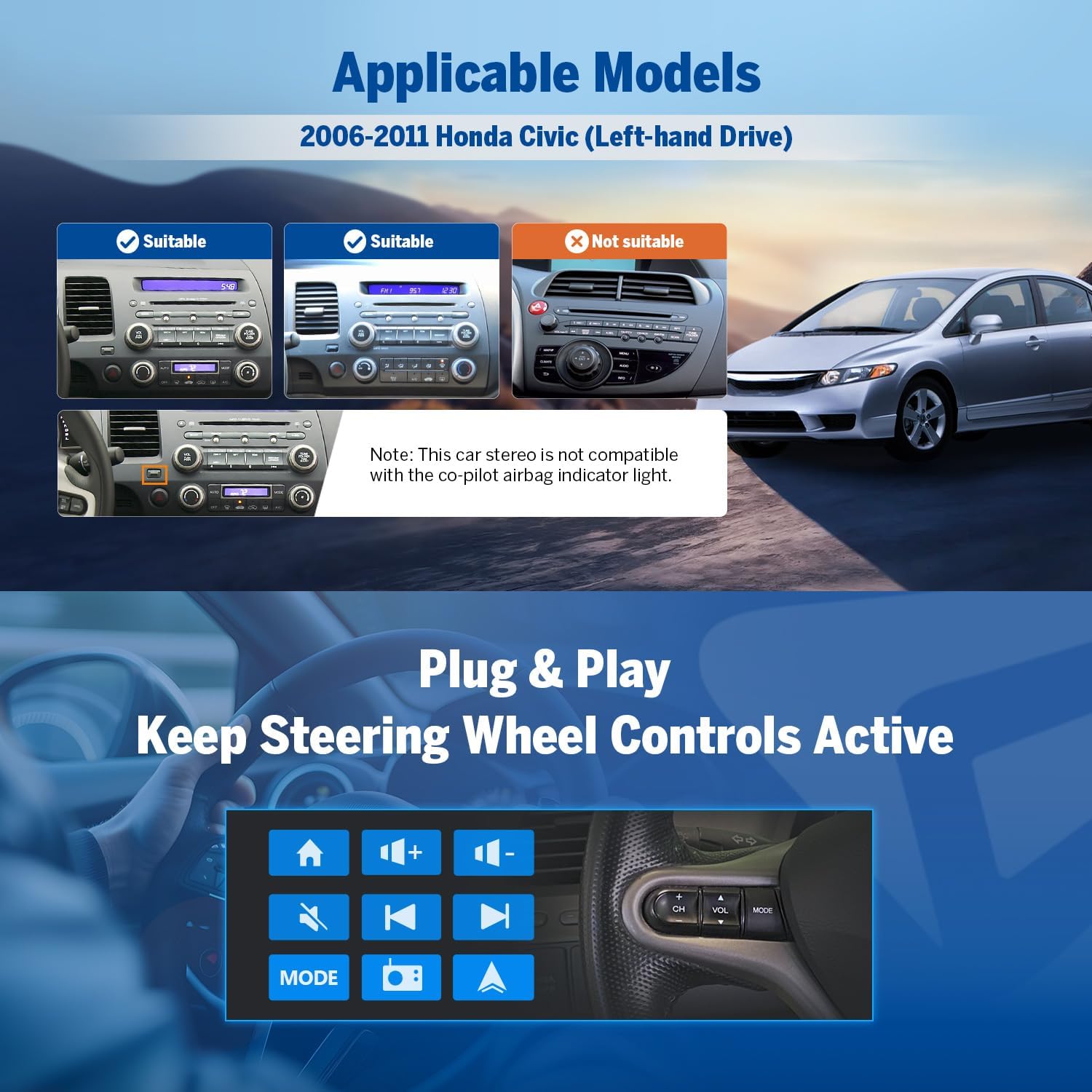
Figure 2.1: Compatibility guide for Honda Civic dashboards.
3. Cosa c'è nella scatola
Dopo aver disimballato il prodotto, verificare che siano presenti tutti i seguenti componenti:
- Reversing Camera A0125 x1
- Cavo di alimentazione x1
- Antenna GPS x1
- USB Adapter Cable x2
- Audio/Video Adapter Cable x1
- Audio Adapter Cable x1
- Reverse Video Input Cable x1
- 15A Spare Fuse x1
- Microfono esterno x1
- Manuale utente x1

Figura 3.1: Contenuto della confezione del prodotto.
4. Configurazione e installazione
The Eonon car stereo is designed for a plug-and-play installation, aiming to retain your car's factory features such as steering wheel controls. Professional installation is recommended.
4.1 Schema elettrico
Refer to the detailed wiring diagram for proper connection of all cables and accessories. Ensure all connections are secure before powering on the unit.
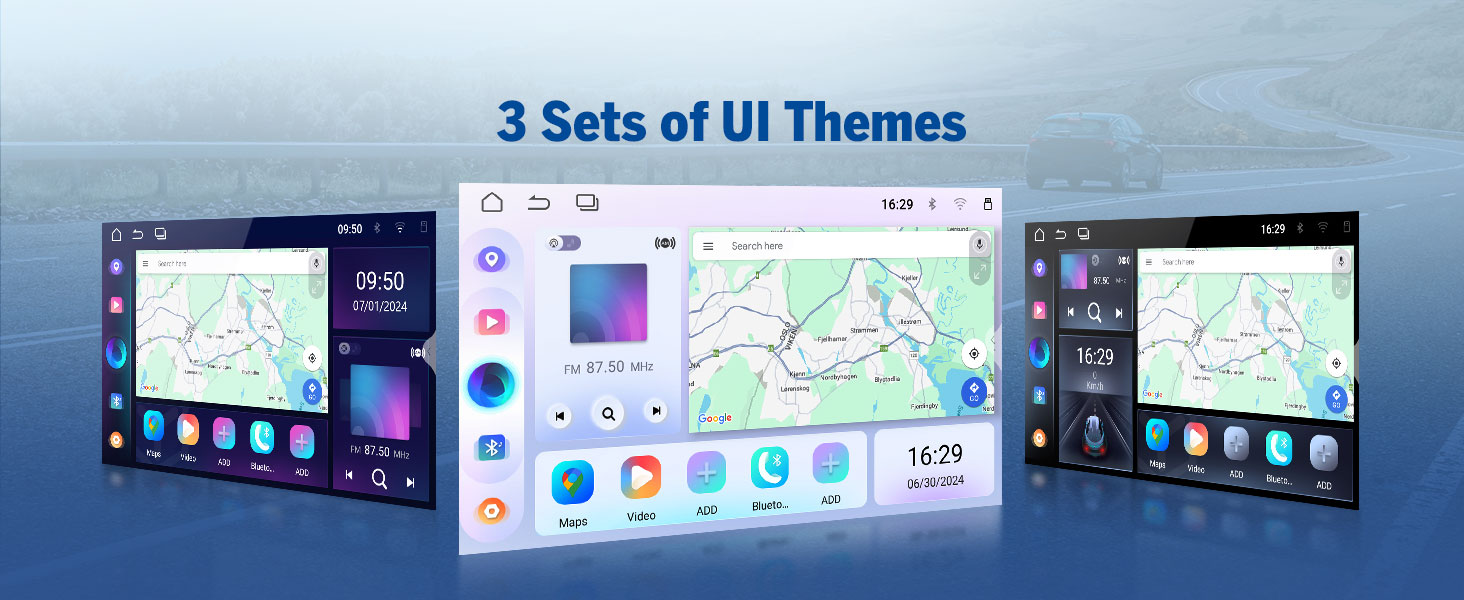
Figure 4.1: Comprehensive wiring diagram for the head unit.
4.2 Mantenimento delle caratteristiche di fabbrica
The unit supports integration with existing steering wheel controls, door reminders, and AC information/control, providing a seamless upgrade while preserving essential vehicle functionalities.

Figure 4.2: Integration with car's factory features.
5. Istruzioni per l'uso
5.1 Sistema Android 13
The head unit runs on the latest Android 13 system, powered by an RK3562 Quad-core ARM Cortex-A53 CPU (2.0GHz) with 2GB RAM and 32GB ROM. This configuration ensures smooth multitasking and fast app response times.

Figure 5.1: Android 13 system interface.
5.2 Display and Audio Excellence
The 10.1-inch IPS HD capacitive touchscreen offers a resolution of 1280x720 and a wide 178° viewing angle for clear visuals. The built-in 36-band EQ and 4x45W surround sound amplifier provide a customizable and immersive audio experience, supporting various media formats including 1080P video, MP3, FLAC, and APE.

Figure 5.2: Display features and screen mirroring.

Figure 5.3: Audio customization options.
5.3 CarPlay wireless e Android Auto
Enjoy seamless integration with your smartphone using Wireless CarPlay and Android Auto. Access navigation, music, calls, and messages via voice commands or the touchscreen. Wired options are also available for flexibility.

Figura 5.4: Funzionalità Wireless CarPlay e Android Auto.
5.3.1 Connessione wireless Apple CarPlay
- Click the Zlink5 app on the car stereo.
- Attiva il Wi-Fi e il Bluetooth sul tuo iPhone.
- Find 'EONON' in your phone's Bluetooth device list and enter 0000 to pair. Once connected, tap 'Use CarPlay'.
- Attendi qualche secondo per completare la connessione.
5.3.2 Connessione wireless Android Auto
- Click the Zlink5 app on the car stereo.
- Attiva il Wi-Fi e il Bluetooth sul tuo telefono Android.
- Find 'EONON' in your phone's Bluetooth device list, enter 0000 and click 'OK'.
- Attendi qualche secondo per completare la connessione.
5.4 Connettività Bluetooth
Equipped with Bluetooth 5.4 and an independent Bluetooth module, the unit provides stable hands-free calls, high-quality music streaming, and quick phonebook searches.

Figura 5.5: Funzionalità Bluetooth.
5.5 Advanced Features & Expandability
The unit supports backup camera input, dual-band Wi-Fi (2.4G/5G), and app installation. It includes 3 USB ports for external devices and is compatible with additional Eonon accessories (sold separately).
- Telecamera di retromarcia: Supports A0125 rearview camera (included). Provides 720P AHD video with a 140° rear viewing angle and reversing guidelines.
- dash cam: Compatible with Eonon dashcam (A100, not included) for 120° viewing angle and video playback.
- Scanner OBD2: Supports OBD2 scanner (V0056, not included) for vehicle fault diagnosis and real-time status monitoring.

Figure 5.6: Backup camera features.

Figure 5.7: Dashcam compatibility.

Figure 5.8: OBD2 scanner compatibility.
5.6 Personalizzazione dell'interfaccia utente
Personalize your stereo's appearance with options for boot logo, button color, and wallpaper. The unit also offers three distinct UI themes to choose from.

Figure 5.9: UI customization options.
6. Manutenzione
To ensure the longevity and optimal performance of your Eonon car stereo, follow these maintenance guidelines:
- Pulizia: Utilizzare un panno morbido e asciutto per pulire lo schermo e l'esterno. Per le macchie ostinate, leggermente dampLavare il panno con acqua. Evitare prodotti chimici aggressivi o materiali abrasivi.
- Temperatura: Evitare di esporre l'unità a temperature estreme, sia calde che fredde, per periodi prolungati.
- Aggiornamenti software: Regularly check for and apply Over-The-Air (OTA) firmware updates to fix software issues and enhance security. Note that these updates are for the software, not for an upgrade of the Android system.
7. Risoluzione Dei Problemi
This section addresses common issues you might encounter with your Eonon car stereo.
| Problema | Possibile causa | Soluzione |
|---|---|---|
| Nessun potere | Fusibile bruciato, cablaggio errato, collegamento elettrico allentato. | Check the 15A spare fuse. Verify all power cables are securely connected according to the wiring diagram. |
| Nessuna uscita audio | Cablaggio degli altoparlanti errato, volume troppo basso, disattivazione audio attivata, ampproblema del lificatore. | Check speaker connections. Increase volume. Ensure unit is not muted. Verify ampcollegamenti del filtro. |
| CarPlay/Android Auto non si connette | Bluetooth/Wi-Fi off, incorrect pairing, Zlink5 app not launched. | Ensure Bluetooth and Wi-Fi are enabled on both devices. Re-pair the devices. Launch the Zlink5 app on the stereo. |
| Touchscreen non responsivo | Problema software, interferenza con la pellicola protettiva dello schermo. | Restart the unit. If a screen protector is installed, ensure it is properly applied and not causing issues. |
| Segnale GPS scarso | Posizionamento dell'antenna GPS, interferenze ambientali. | Assicurarsi che l'antenna GPS sia posizionata in una posizione libera, in genere sul cruscotto con una vista libera view del cielo. |
8. Specifiche
| Caratteristica | Dettaglio |
|---|---|
| Numero di modello | HCIV1X6 |
| Sistema operativo | Androide 13 |
| processore | RK3562 Quad-core ARM Cortex-A53 @ 2.0GHz |
| Memoria RAM | 2 GB |
| ROM | 32 GB |
| Dimensioni dello schermo | 10.1 pollici |
| Tipo di visualizzazione | IPS HD Capacitive Touchscreen |
| Risoluzione | 1280x720 |
| Viewangolo di ing | 178° |
| Amppiù vivace | 4x45W Surround Sound |
| Equalizzatore | Equalizzatore a 36 bande |
| Versione Bluetooth | 5.4 |
| Wifi | Dual-band (2.4G/5G) |
| Porte USB | 3 |
| Peso dell'articolo | 4.4 libbre |
| Dimensioni del pacco | 17.25 x 11.35 x 9.2 pollici |
9. Garanzia e supporto
For warranty information and technical support, please refer to the official Eonon website or contact their customer service directly. Eonon offers convenient online firmware updates (OTA) to ensure your head unit remains up-to-date and to address any software issues.
Puoi visitare il Negozio EONON su Amazon per maggiori informazioni sui prodotti e sugli accessori.


