
1. Introduzione
This manual provides detailed instructions for the installation, operation, and maintenance of your Eonon E46X7 Android 14 Car Stereo. Please read this manual thoroughly before using the product to ensure proper functionality and to maximize your user experience. Keep this manual for future reference.

Image 1.1: Eonon E46X7 Car Stereo with accessories.
2. Modelli applicabili
The Eonon E46X7 Android 14 car stereo is designed for compatibility with the following BMW 3 Series (E46) models:
- BMW E46 M3 / 328i / 330Ci / 325i / 325xi / 328i / 328xi / 330i / 330xi 3 Series (1998-2006)
- BMW M3 (2000-2006)
No additional frame or cable changes are typically needed for these models, offering a plug-and-play installation. For specific model compatibility, refer to the detailed images provided.

Image 2.1: Visual guide for applicable BMW E46 models and AC control panel considerations.
3. Cosa c'è nella scatola
Verificare che tutti i componenti siano presenti prima di iniziare l'installazione:
- E46X7 Car Stereo (x1)
- Cavo di alimentazione (x1)
- GPS antenna (x1)
- USB adapter cable (x2)
- Audio/video adapter cable (x2)
- Reverse video input cable (x1)
- 15A fuse (x1)
- Microfono esterno (x1)
- CANBUS (x1)
- Manuale (x1)
- Double-sided adhesive sticker (x1)
- Radio antenna adapter (x2)

Image 3.1: Contents of the Eonon E46X7 package.
4. Configurazione e installazione
4.1 Power Cable Connector Verification
Before installation, confirm the type of your original car radio power connector:
- If your 17-pin connector has 4 empty pins, it is NON suitable for direct installation.
- If your 17-pin connector does not have empty pins, or if you have a 40-pin connector, the E46X7 can be installed directly.
- If the connector in the trunk is 17-pin or 40-pin, an additional Eonon A0590 extension harness may be required (not included).

Image 4.1: Power connector compatibility guide.
4.2 AC Control Panel Relocation
If your car's air conditioning control panel is located in the center console, it must be removed and reinstalled below the E46X7 car stereo. Refer to Image 2.1 for a visual guide on this process.
4.3 Schema elettrico
Follow the wiring diagram carefully for correct connections. Ensure all cables are securely connected to their respective ports.
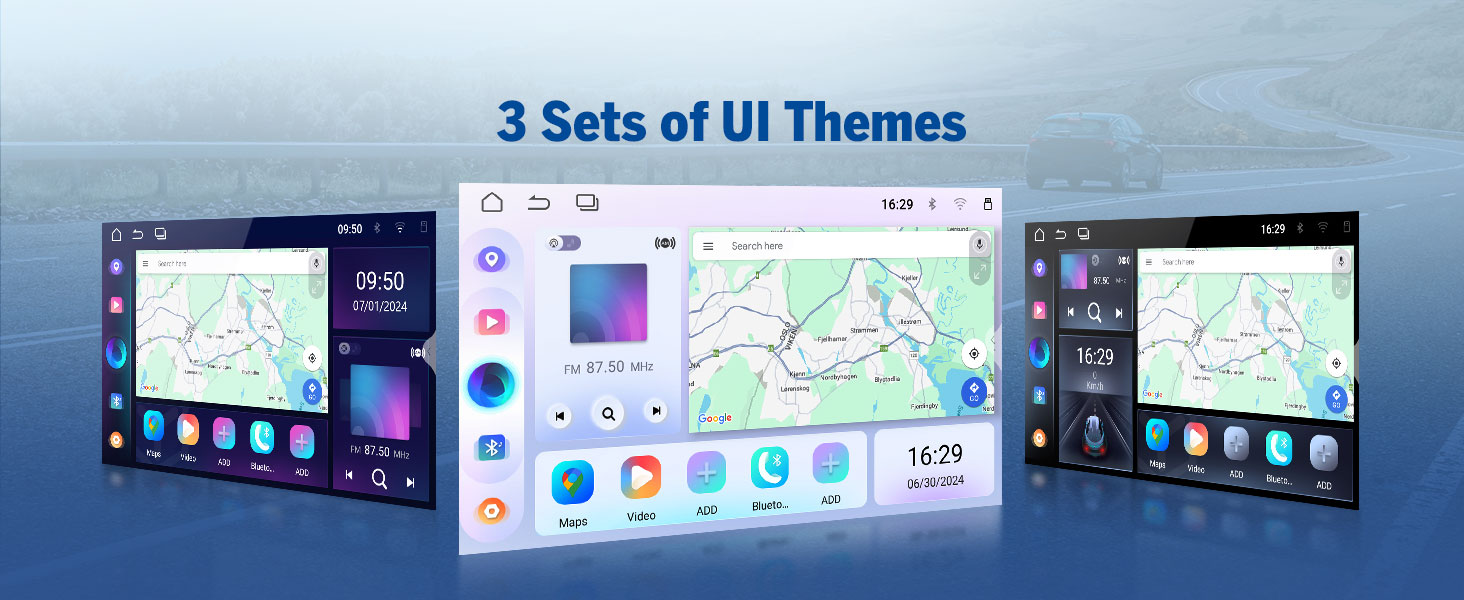
Image 4.2: Comprehensive wiring diagram for the E46X7 unit.
5. Istruzioni per l'uso
5.1 CarPlay wireless e Android Auto
The E46X7 supports both wireless Apple CarPlay and Android Auto for seamless smartphone integration. This allows for hands-free control of music, navigation, calls, and messages via voice commands like 'Hey Siri' or 'Hey Google'.
5.1.1 Connessione wireless Apple CarPlay
- Click the Zlink5 app on the car stereo.
- Attiva il Wi-Fi e il Bluetooth sul tuo iPhone.
- Find 'EONON' in your phone's Bluetooth device list and enter '0000' to pair. Once connected, tap 'Use CarPlay'.
- Wait a few seconds for the connection to complete.
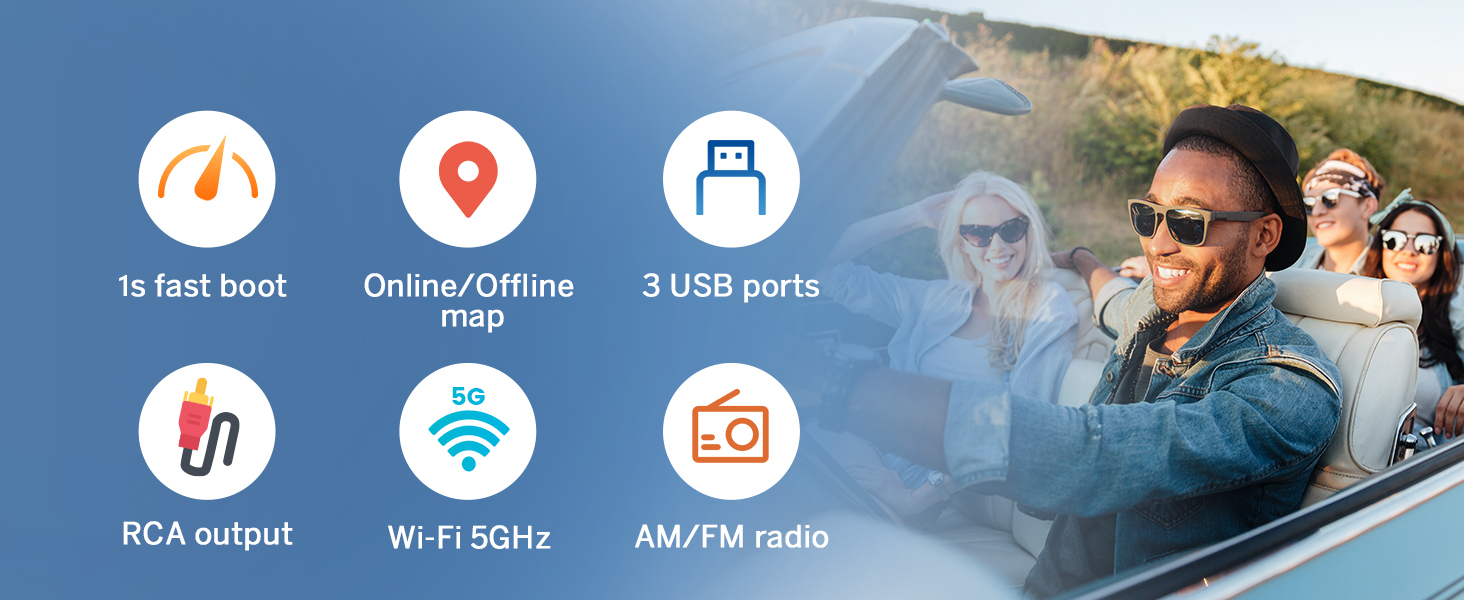
Image 5.1: Wireless Apple CarPlay connection steps.
5.1.2 Connessione wireless Android Auto
- Click the Zlink5 app on the car stereo.
- Attiva il Wi-Fi e il Bluetooth sul tuo telefono Android.
- Find 'EONON' in your phone's Bluetooth device list, enter '0000' to pair, and click 'OK'.
- Wait a few seconds for the connection to complete.

Image 5.2: Wireless Android Auto connection steps.
5.2 Mirroring dello schermo
Mirror your smartphone's display onto the car stereo screen.
5.2.1 Mirroring dello schermo per iOS
- Click the Zlink5 app on the car stereo. Set the car stereo to iPhone wireless screen mirroring mode.
- Attiva l'hotspot dell'iPhone e connettiti all'autoradio.
- Turn on the iPhone screen mirroring function and select 'zj-airplay'.

Image 5.3: iOS Screen Mirroring connection steps.
5.2.2 Mirroring dello schermo per Android
- Click the Zlink5 app on the car stereo. Set the car stereo to Android wireless screen mirroring mode.
- Turn on your phone's Bluetooth. Find 'EONON' in your phone's Bluetooth device list, enter '0000' to pair.
- Attiva l'hotspot del telefono e connettiti all'autoradio.
- Install the Zplus app on your phone. Turn on the app and select 'wireless connection'.
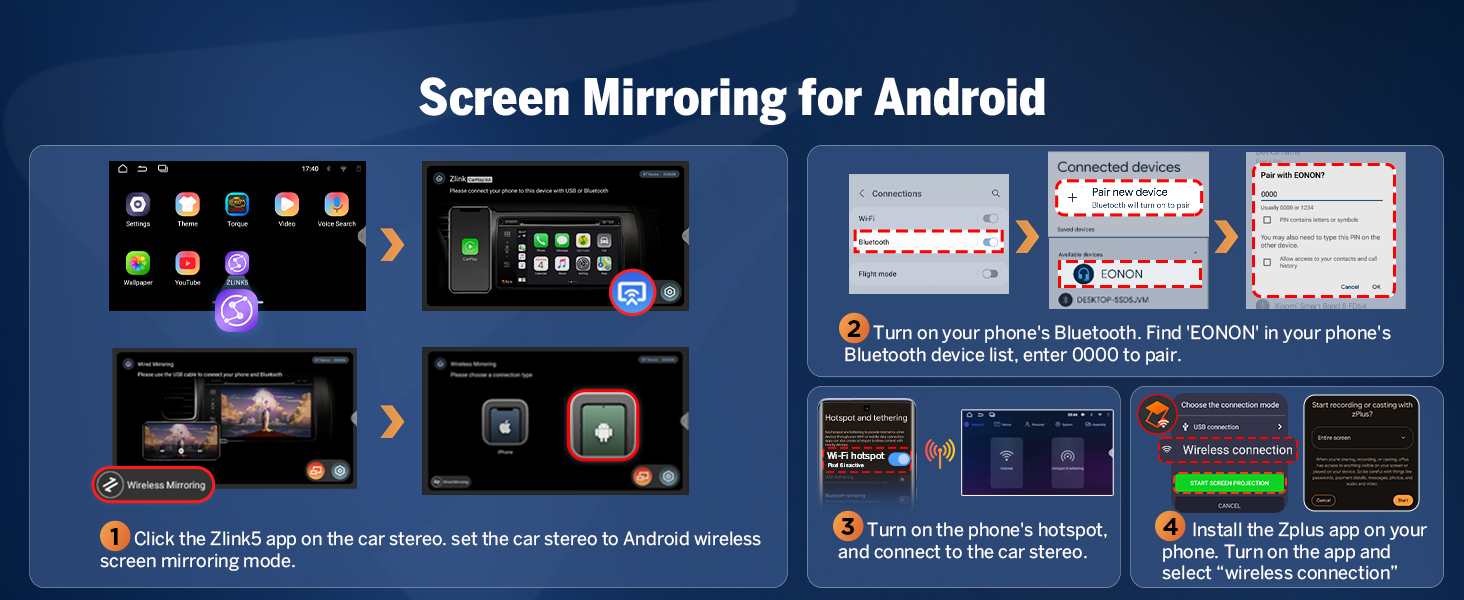
Image 5.4: Android Screen Mirroring connection steps.
5.3 Built-in DSP (Digital Signal Processing)
The integrated DSP chip allows for precise audio tuning. It features a 4x45W output, a 36-band equalizer, and 6 EQ modes to customize your sound experience. DSP enables time alignment, ensuring sound waves from different speakers reach the listener simultaneously for improved sound quality and precision.
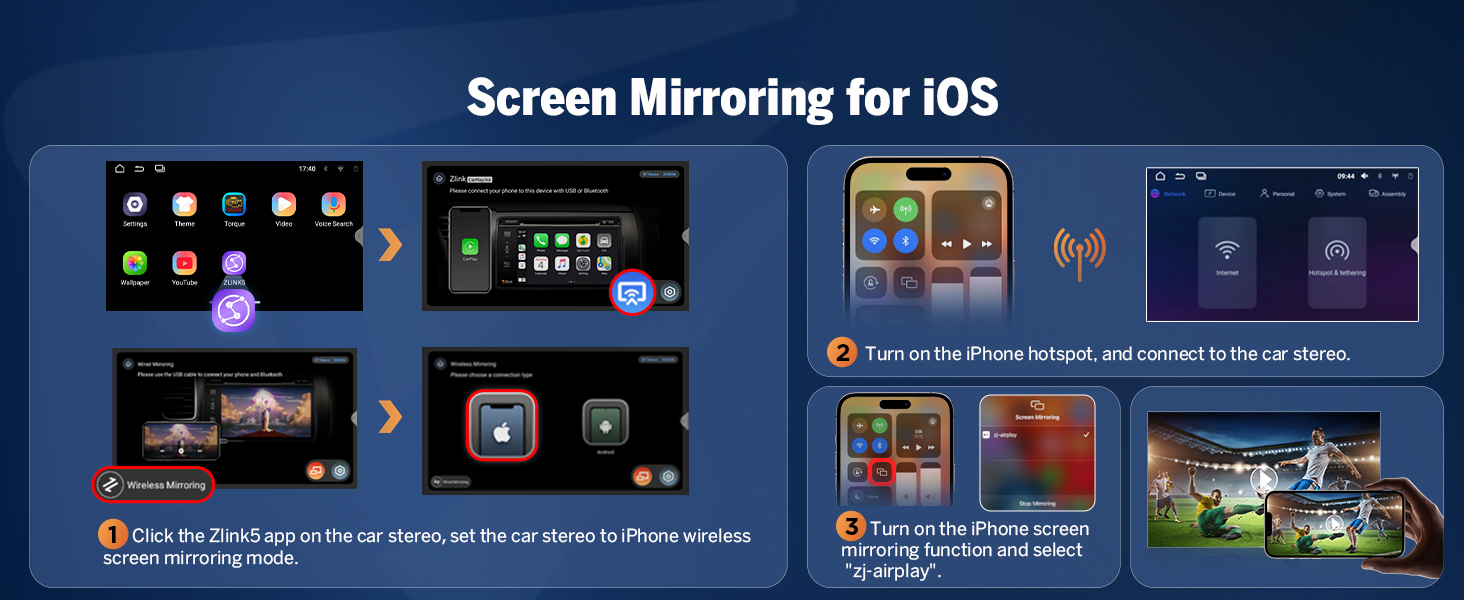
Image 5.5: Built-in DSP features and interface.
5.4 Connettività Bluetooth
The E46X7 includes an independent Bluetooth module and an extra Bluetooth antenna for quick, stable connections, noise reduction, crystal-clear call quality, and high-quality Bluetooth music streaming.

Image 5.6: Bluetooth module and features.
5.5 Personalizzazione dell'interfaccia utente
Personalize your car stereo's appearance with various customization options:
- Logo dello stivale: Set a custom boot logo.
- Colore del pulsante: Adjust the color of the physical buttons.
- Carta da parati: Scegli tra vari sfondi o caricane uno tuo.
- Temi dell'interfaccia utente: Select from 3 distinct user interface themes.

Immagine 5.7: Opzioni di personalizzazione dell'interfaccia utente.
6. Caratteristiche e specifiche
6.1 Caratteristiche principali
- Sistema operativo: Newest Android 14 System (API level 34)
- Processore: Rockchip processor (outperforms conventional 8-core processors)
- Memoria: 3 GB di RAM + 32 GB di ROM
- Display: 9-inch IPS 1280x720 resolution HD screen with 178° viewing angle, multi-touch capacitive touchscreen.
- Audio: Built-in DSP chips, 4x45W output, 36-band equalizer adjustment.
- Connettività: Wireless/Wired CarPlay & Android Auto, Bluetooth, Wi-Fi (5GHz), USB (3 ports), AUX audio input.
- Radio: 18 FM/AM channels.
- Aggiornamenti: Online firmware updates (OTA) for software enhancements and security. Note: These updates are for software, not Android system upgrades.
- Compatibilità: Supports Eonon dashcam (A100) and DAB+ box (502) (not included). Eonon rearview camera (A0125) is included and supported.
- Avvio rapido: 1-second fast boot.
- Navigazione: Online/Offline map support.
- Produzione: Uscita RCA.

Image 6.1: Android 14 system overview.

Image 6.2: Performance benchmark (AnTuTu scores).
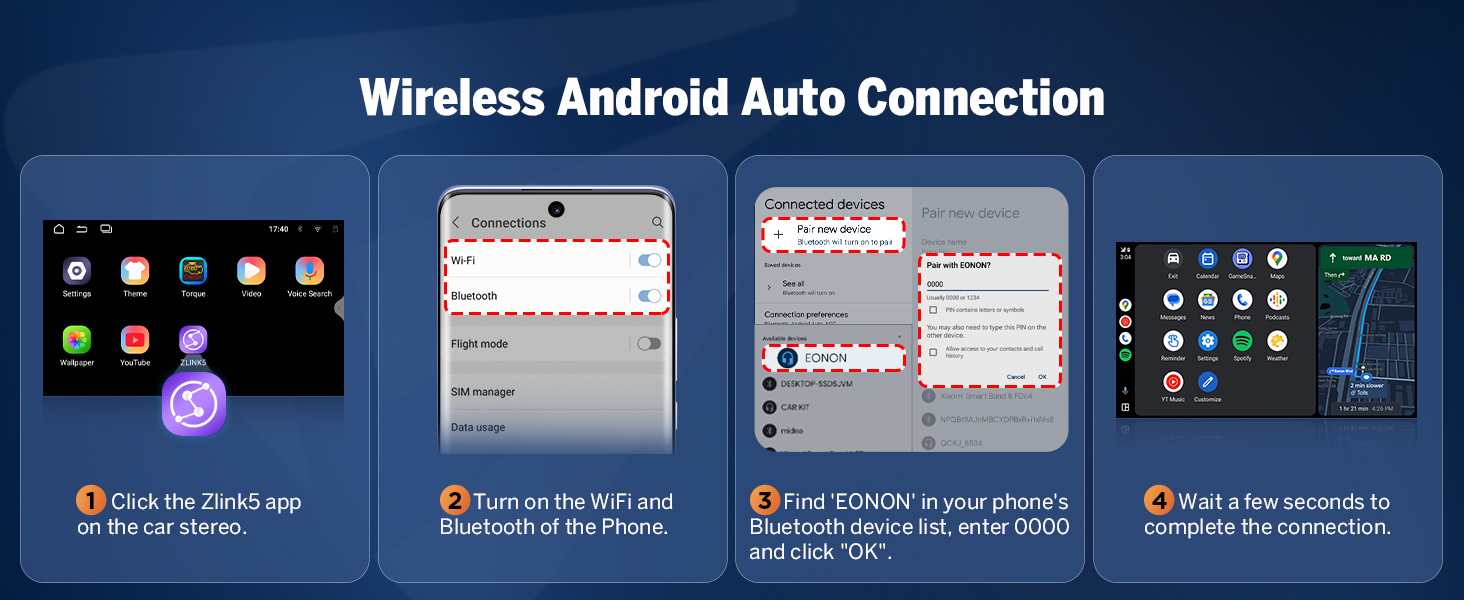
Image 6.3: 9-inch IPS display features.
6.2 Specifiche generali
- Dimensioni del prodotto: 8.98 x 3.94 x 5.32 pollici
- Peso dell'articolo: 3.59 libbre
- Nome modello: E46X7
- Dimensioni dello schermo: 9 pollici
- Tipo di montaggio: Supporto per cruscotto
- Modalità di uscita audio: Stereo
7. Manutenzione
To ensure the longevity and optimal performance of your Eonon E46X7 car stereo, follow these general maintenance guidelines:
- Pulizia: Utilizzare un panno morbido e asciutto per pulire lo schermo e l'esterno. Evitare detergenti abrasivi o solventi che potrebbero danneggiare la superficie.
- Aggiornamenti software: Regularly check for and install available firmware updates via OTA (Over-The-Air) to benefit from performance improvements and security enhancements.
- Condizioni ambientali: Evitare di esporre l'unità a temperature estreme, alla luce solare diretta per periodi prolungati o a umidità eccessiva.
- Connessioni via cavo: Controllare periodicamente tutti i collegamenti dei cavi per assicurarsi che siano saldi e privi di danni.
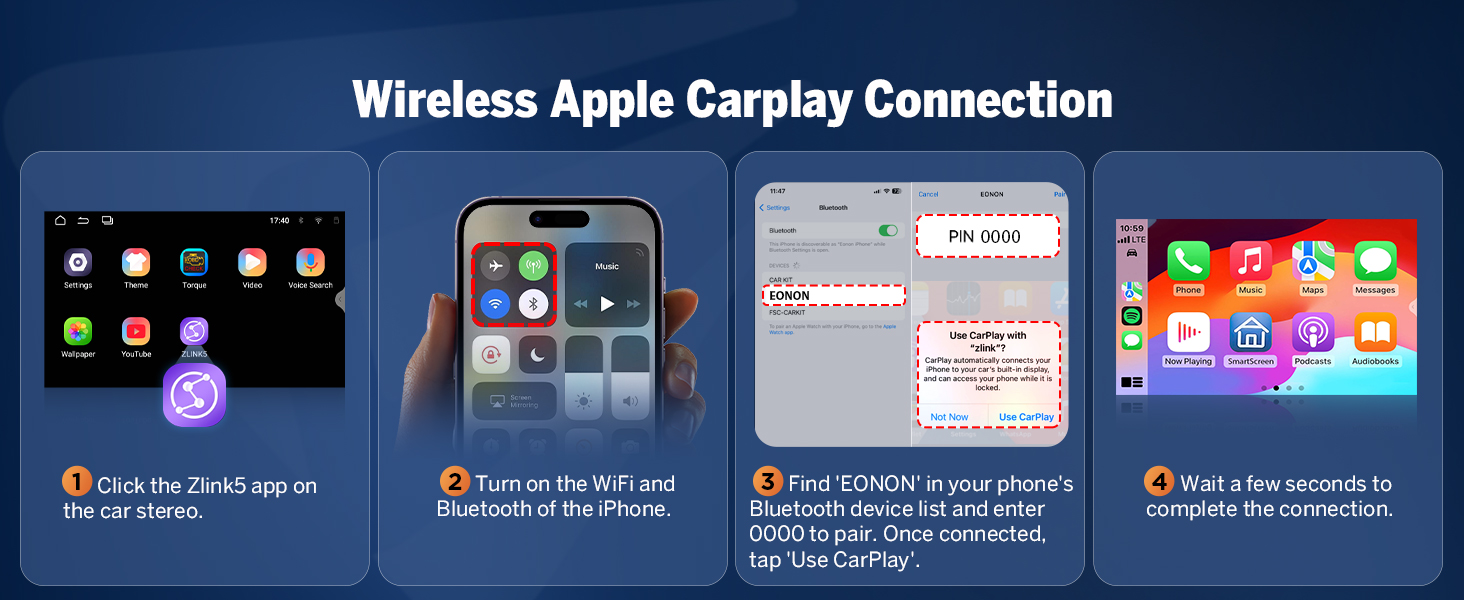
Image 7.1: Over-the-air firmware update screen.
8. Risoluzione Dei Problemi
If you encounter issues with your Eonon E46X7, refer to the following common troubleshooting tips:
- Nessun potere: Controllare tutti i collegamenti elettrici e il fusibile da 15 A. Assicurarsi che l'accensione dell'auto sia inserita.
- Nessun suono: Verify speaker connections, check volume levels, and ensure the DSP settings are correctly configured. Confirm that the audio output mode is set to Stereo.
- CarPlay/Android Auto non si connette: Ensure Wi-Fi and Bluetooth are enabled on both the stereo and your phone. Re-pair the devices. Check the Zlink5 app settings.
- Comandi al volante non funzionanti: Some vehicles may require specific programming or an additional adapter for full steering wheel control functionality. Consult your vehicle's manual or Eonon support.
- Problemi con la telecamera di backup: Ensure the camera is correctly wired to the reverse video input. Verify the camera's resolution is supported (minimum 720p).
- Impostazioni non salvate: Ensure the unit is receiving constant power (B+ wire) to retain settings when the car is off.
- Ritardo/mancanza di risposta del sistema: Close unnecessary background applications. Perform a system restart. Ensure the firmware is up to date.
For persistent issues, contact Eonon customer support for further assistance.
9. Garanzia e supporto
Eonon products typically come with a manufacturer's warranty. Please refer to the warranty card included with your product or visit the official Eonon websito per termini e condizioni di garanzia dettagliati.
For technical support, product inquiries, or warranty claims, please contact Eonon customer service through their official channels. You can often find support information on the Eonon brand store page on Amazon or their dedicated support websito.
Visit the official EONON Store: EONON Store