
1. Introduzione
Thank you for choosing the HUXGO HXA005 4G WiFi + GSM Home Alarm System. This system provides comprehensive security for your home, apartment, office, garage, or garden shed. It features dual communication channels (WiFi and GSM 4G LTE) for reliable alarm notifications via the TUYA Smart mobile application or SMS. This manual will guide you through the installation, setup, and operation of your new alarm system.
2. Informazioni sulla sicurezza
- Ensure the control panel is installed in a secure, dry location, away from direct sunlight and extreme temperatures.
- Utilizzare esclusivamente l'adattatore di alimentazione fornito.
- Keep the system out of reach of children.
- Non tentare di smontare o riparare il dispositivo da soli. Contattare personale qualificato per l'assistenza.
- Test the alarm system regularly to ensure proper functionality.
3. Contenuto della confezione
The HUXGO HXA005 alarm system package includes the following components:

Immagine: Oltreview of the HUXGO HXA005 alarm system components, including the control panel, motion sensor, door/window sensor, remote control, wired siren, and RFID tag.
- 1x Control Panel: The central unit for managing the alarm system.
- 1x Internal Alarm Siren: Per avvisi acustici.
- 5x Motion Detectors: Wireless sensors to detect movement.
- 1x Door/Window Opening Detector: Wireless sensor for entry points.
- 2x Remote Controls: Per un inserimento e un disinserimento rapidi.
- 2x RFID Key Fobs: For convenient system control.
- 1x adattatore di alimentazione: To power the control panel.
- Batterie: For wireless sensors and backup power.
- Accessori per l'installazione: Including adhesive tape, screws, and wall plugs.
- Manuale d'uso: Questo documento.
4. Prodotto finitoview
4.1 Pannello di controllo
The control panel is the brain of your alarm system, featuring a 2.4-inch color touchscreen for easy navigation. It supports both WiFi and GSM 4G LTE connectivity for reliable communication.
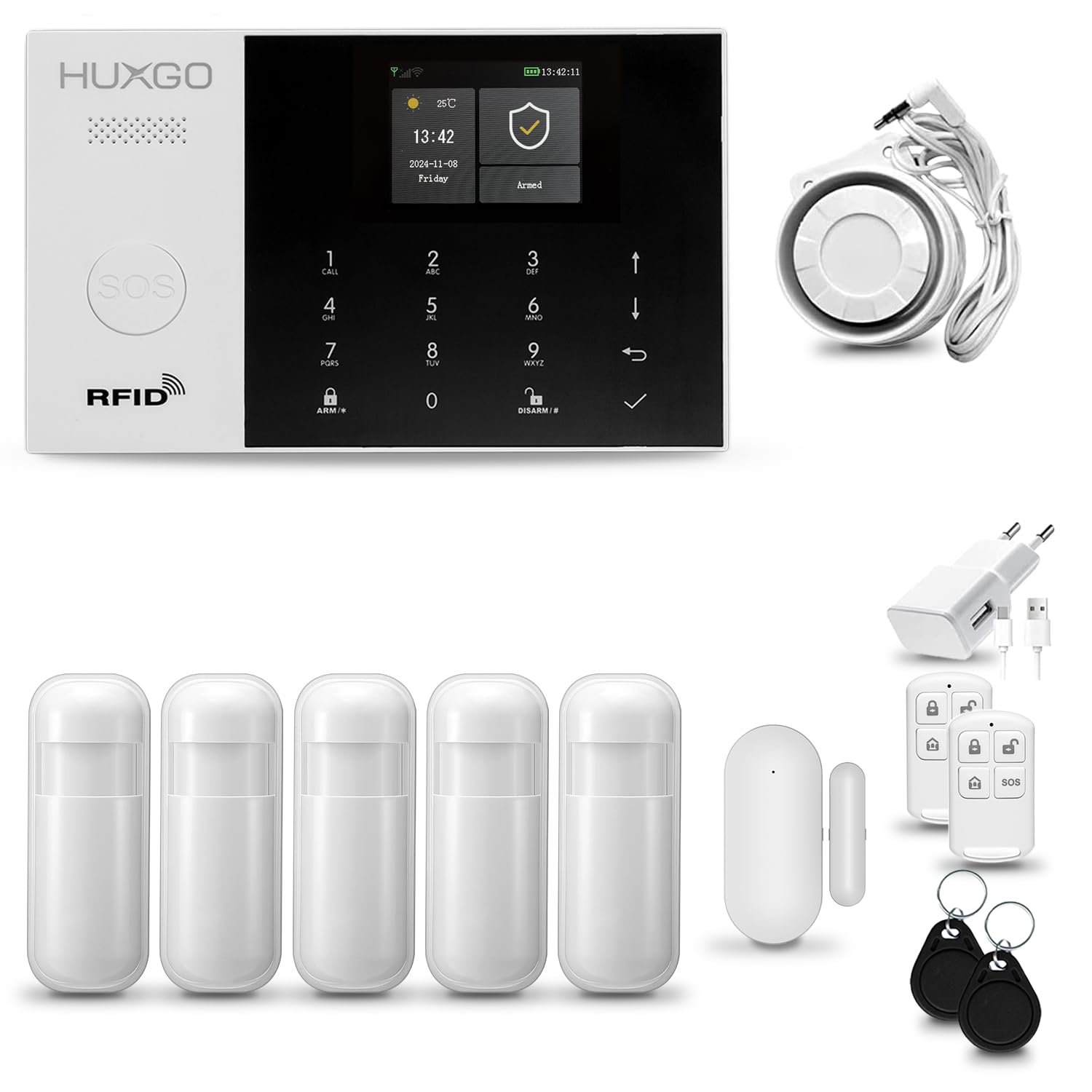
Immagine: Frontale view of the HUXGO HXA005 control panel, showing the touchscreen display, numeric keypad, and RFID reader.
4.2 Sensori
The system includes wireless motion detectors and door/window opening detectors. These sensors are battery-powered and communicate wirelessly with the control panel, allowing for flexible placement without additional wiring.
4.3 Remote Controls and RFID Key Fobs
Use the remote controls for quick arming, disarming, and activating the SOS function. RFID key fobs provide a convenient tap-to-arm/disarm feature on the control panel.
5. Configurazione e installazione
5.1 Installazione del pannello di controllo
- Choose a central location for the control panel, preferably near a power outlet and within good WiFi signal range.
- Mount the control panel to the wall using the provided screws and wall plugs, or place it on a flat surface. The anti-tamper feature will trigger an alarm if the panel is removed from the wall while armed.
- Collegare l'adattatore di alimentazione al pannello di controllo e inserirlo in una presa di corrente.
- If using GSM functionality, insert a valid SIM card into the designated slot on the control panel.

Image: Dimensions of the HUXGO HXA005 control panel, showing its compact size for discreet installation.
5.2 Installazione del sensore
Install batteries into all sensors before mounting. The system supports up to 99 wireless accessories.
5.2.1 Rilevatori di movimento
- Mount motion detectors in corners of rooms or hallways, ensuring a clear line of sight to the area you wish to monitor.
- Avoid placing them directly facing windows or heat sources to prevent false alarms.
5.2.2 Door/Window Opening Detectors
- Attach the two parts of the detector to the door/window frame and the door/window itself, ensuring they are aligned and close to each other when the door/window is closed.
- Use the provided adhesive tape or screws for mounting.
5.3 TUYA Smart App Setup
- Scarica il TUYA intelligente app dall'App Store (iOS) o dal Google Play Store (Android).
- Registrati o accedi al tuo account TUYA Smart.
- On the control panel, navigate to the WiFi settings and connect it to your home WiFi network.
- In the TUYA Smart app, add a new device and follow the on-screen instructions to pair your HUXGO HXA005 alarm system.
- Once paired, you can manage and control your alarm system remotely via the app.
6. Istruzioni per l'uso
The HUXGO HXA005 system offers multiple ways to control and monitor your security.

Image: Illustration showing dual network control via Tuya app (WiFi) and SMS (GSM) for the HUXGO HXA005 alarm system.
6.1 Inserimento e disinserimento
- Tramite il Pannello di controllo: Use the touchscreen or keypad to arm (full or partial) or disarm the system.
- Tramite telecomando: Premere il pulsante di attivazione o disattivazione sul telecomando.
- Tramite portachiavi RFID: Tap the RFID key fob on the designated area of the control panel.
- Via TUYA Smart App: Use the app for remote arming and disarming.
- Tramite SMS: Send specific SMS commands to the SIM card number in the control panel (refer to app or full manual for commands).
The system supports full arming, partial arming (e.g., for internal zones while you are home), and 24-hour zones (e.g., for smoke detectors, which are always active).
6.2 Entry/Exit Delay
Configure an entry/exit delay (1-99 seconds) to allow you to leave or enter your premises after arming/before disarming without triggering an immediate alarm.
6.3 Funzione SOS
In an emergency, press the SOS button on the remote control or the control panel. This will immediately trigger the alarm and send notifications to pre-programmed emergency contacts.

Image: Visual representation of the SOS function on the remote control and various alarm scenarios detected by motion and door/window sensors.
6.4 Caratteristiche di comunicazione
- Notifiche di allarme: Receive alarm notifications via the TUYA Smart app or SMS messages to up to 5 pre-defined phone numbers.
- Comunicazione bidirezionale: The control panel allows you to make and receive calls, and activate a listening function to hear what is happening at the alarm location.

Image: Illustration of two-way communication capability, showing a person making a call through the control panel and listening to audio from the alarm location.
6.5 Pianificazione
Program automatic arming and disarming times for convenience, such as arming when you typically leave for work and disarming when you return.
7. Manutenzione
- Sostituzione della batteria: The TUYA Smart app will notify you of low battery levels for sensors. Replace batteries promptly to ensure continuous protection.
- Pulizia: Pulire il pannello di controllo e i sensori con un panno morbido e asciutto. Non utilizzare detergenti abrasivi o solventi.
- Test di sistema: Periodically test your alarm system by triggering a sensor to ensure it functions correctly and sends notifications.
8. Risoluzione Dei Problemi
| Problema | Possibile causa | Soluzione |
|---|---|---|
| Il sistema non si attiva/disattiva. | Incorrect code, remote battery low, sensor fault. | Verify code, replace remote battery, check sensor status in app. |
| No alarm notification via app. | No internet connection, app not configured correctly. | Check WiFi connection, ensure app permissions are granted, re-pair device if necessary. |
| No alarm notification via SMS. | No SIM card, SIM card invalid, no GSM signal, incorrect phone numbers. | Insert valid SIM, check GSM signal strength, verify programmed phone numbers. |
| Falsi allarmi. | Posizionamento improprio del sensore, animali domestici, fattori ambientali. | Adjust sensor sensitivity, reposition sensors, ensure no obstructions. |
| Il pannello di controllo non risponde. | Power issue, system crash. | Check power connection, ensure backup battery is charged, restart the panel. |
9. Specifiche
| Caratteristica | Specificazione |
|---|---|
| Numero di modello | HXA005 4G |
| Produttore | HUXGO |
| Tecnologia di connettività | Wireless (WiFi & GSM 4G LTE) |
| Fonte di alimentazione | Electric Cable, Battery Powered (Backup) |
| Backup Power Duration | Circa 4-6 ore |
| Metodo di controllo | Application, Remote Control, RFID, Keypad |
| Dispositivi compatibili | Smartphone (iOS & Android via TUYA Smart App) |
| Max. Wireless Accessories | Up to 99 (including 10 RFID remotes) |
| Livello sonoro (sirena) | 105 decibel |
| Dimensioni del prodotto (L x P x A) | Dimensioni: 18 x 11.5 x 2 cm |
| Peso dell'articolo | 772 grammi |
| Tipo di installazione | Avvitare |
| Tipo di avviso | Audio and Movement |
| Paese di origine | Cina |
10. Garanzia e supporto
For warranty information, please refer to the documentation provided with your purchase or contact your retailer. If you encounter any issues or require technical assistance, please contact HUXGO customer support through their official websito o le informazioni di contatto fornite nella confezione del prodotto.