
1. Introduzione
Grazie per l'acquistoasing the DANFI AUDIO DF TE-2017 Vinyl Record Player. This manual provides essential information for the safe and correct operation of your new record player. Please read it thoroughly before use and retain it for future reference.
2. Contenuto della confezione
- DANFI AUDIO DF TE-2017 Vinyl Record Player
- Adattatore 45 giri
- Power Cord & Adapter (100-240V~)
- Ago di ricambio
- Tappetino antiscivolo per giradischi
- Manuale dell'utente (questo documento)
3. Prodotto finitoview
The DANFI AUDIO DF TE-2017 is a versatile 3-speed belt-drive turntable with built-in speakers, Bluetooth wireless playback, USB/SD recording, AUX input, and RCA output. It features a clear dust cover and a digital display for easy operation.

Figura 1: anteriore e posteriore View of the TE-2017 Record Player with Labeled Components. This image displays the turntable platter, spindle, 45 RPM adapter, tone arm lift lever, speed selection switch, auto stop on/off switch, tone arm lock, stylus, speakers, AUX input, Mode/TF/USB controls, LED display, RCA audio out, and power port.
4. Impostazione
- Disimballaggio: Estrarre con cautela il giradischi e tutti gli accessori dall'imballaggio. Conservare l'imballaggio per un eventuale trasporto o stoccaggio futuro.
- Installazione della copertura antipolvere: Slide the clear plastic dust cover into the brackets located at the rear of the turntable. Ensure it is securely seated.
- Collegamento elettrico: Connect the power adapter to the DC 5V/1A port on the rear of the record player and plug it into a wall outlet.
- Posizionamento: Posizionare il giradischi su una superficie stabile e piana, lontano dalla luce solare diretta, da fonti di calore e da polvere o vibrazioni eccessive.
- Protezione dello stilo: Prima di riprodurre un disco, rimuovere il cappuccio protettivo della puntina.
5. Istruzioni per l'uso
5.1 Riproduzione di dischi in vinile
- Accensione: Turn the ON/OFF/VOLUME knob clockwise to power on the unit and adjust the volume.
- Seleziona modalità: Set the PH/BT/AUX/USB switch to 'PH' (Phono) mode.
- Registra il luogo: Posiziona un disco in vinile sul piatto del giradischi. Se vuoi riprodurre un singolo da 7 pollici, usa l'adattatore per 45 giri incluso.
- Seleziona velocità: Adjust the 3-speed selection switch (33, 45, 78 RPM) to match the record's speed.
- Auto-Stop (Optional): If desired, set the Auto Stop ON/OFF switch to 'ON'. The turntable will stop spinning automatically when the record finishes.
- Posizione del braccio: Gently lift the tone arm using the lift lever. Move the tone arm over the desired track of the record.
- Braccio inferiore: Slowly lower the tone arm onto the record using the lift lever. The music will begin to play.
- Regola tono: Se necessario, utilizzare la manopola di controllo PITCH per regolare con precisione la velocità di riproduzione.
- Fine riproduzione: At the end of the record, lift the tone arm, return it to its rest, and lower the lift lever. Turn the ON/OFF/VOLUME knob counter-clockwise to power off.
Video 1: Demonstration of Vinyl Playback Mode on an LP&No.1 Turntable with Built-in Speakers. This video illustrates how to place a record, position the tone arm, and initiate playback, highlighting the smooth operation of the turntable.
5.2 Riproduzione wireless Bluetooth
- Accensione: Turn the ON/OFF/VOLUME knob clockwise to power on the unit.
- Seleziona modalità: Set the PH/BT/AUX/USB switch to 'BT' (Bluetooth) mode. The digital display will show 'BT' and the indicator light will blink blue, indicating pairing mode.
- Accoppia dispositivo: On your smartphone, tablet, or other Bluetooth-enabled device, search for 'Turntable' in the Bluetooth settings and select it to pair. Once connected, the indicator light will stop blinking and remain solid blue.
- Riproduci musica: Start playing music on your paired device. The audio will stream through the record player's built-in speakers.
- Regola volume: Control the volume using the ON/OFF/VOLUME knob on the record player or your paired device.
Video 2: Oltreview of Record Player with Speakers, demonstrating Bluetooth connectivity. This video shows how to switch to Bluetooth mode, pair a mobile device, and stream audio wirelessly to the turntable's speakers.
5.3 USB/SD Recording and Playback
- Insert USB/SD: Inserire una chiavetta USB o una scheda SD nella porta corrispondente sul pannello frontale.
- Seleziona modalità: Set the PH/BT/AUX/USB switch to 'USB' mode. The digital display will show 'USB'.
- Riproduzione: L'unità rileverà e riprodurrà automaticamente l'audio files from the USB/SD device. Use the control buttons (Previous Song, Pause & Play, Next Song) to navigate tracks.
- Recording Vinyl to USB/SD:
- Start playing a vinyl record as described in section 5.1.
- Press the 'REC' button (if available, typically near the USB/SD slot) to begin recording. The indicator light may change to confirm recording is active.
- Press 'REC' again to stop recording. The recorded audio will be saved as an MP3 file sul dispositivo USB/SD.
- Use the 'SPLIT' button (if available) to create separate tracks during recording.
Video 3: USB Playback & Vinyl to MP3 Recording demonstration. This video shows how to insert a USB drive, initiate recording from vinyl, and manage recorded files, highlighting the digital conversion feature.
5.4 Ingresso AUX
- Accensione: Turn the ON/OFF/VOLUME knob clockwise to power on the unit.
- Seleziona modalità: Set the PH/BT/AUX/USB switch to 'AUX' mode.
- Connetti dispositivo: Connect an external audio device (e.g., MP3 player, CD player) to the AUX IN port on the rear of the record player using a 3.5mm audio cable (not included).
- Riproduci audio: Riproduci l'audio dal tuo dispositivo esterno. Il suono verrà emesso dagli altoparlanti del giradischi.
- Regola volume: Control the volume using the ON/OFF/VOLUME knob on the record player or the external device.
5.5 uscita RCA
- Connect External Speakers: Connect external powered speakers or an amplifier to the RCA OUT ports (red for right, white for left) on the rear of the record player using an RCA cable (not included).
- Riproduci audio: Play a vinyl record or stream via Bluetooth/AUX. The audio will be routed through the connected external audio system.
- Regola volume: Control the volume primarily through your external audio system. The record player's volume knob may still affect the output level.
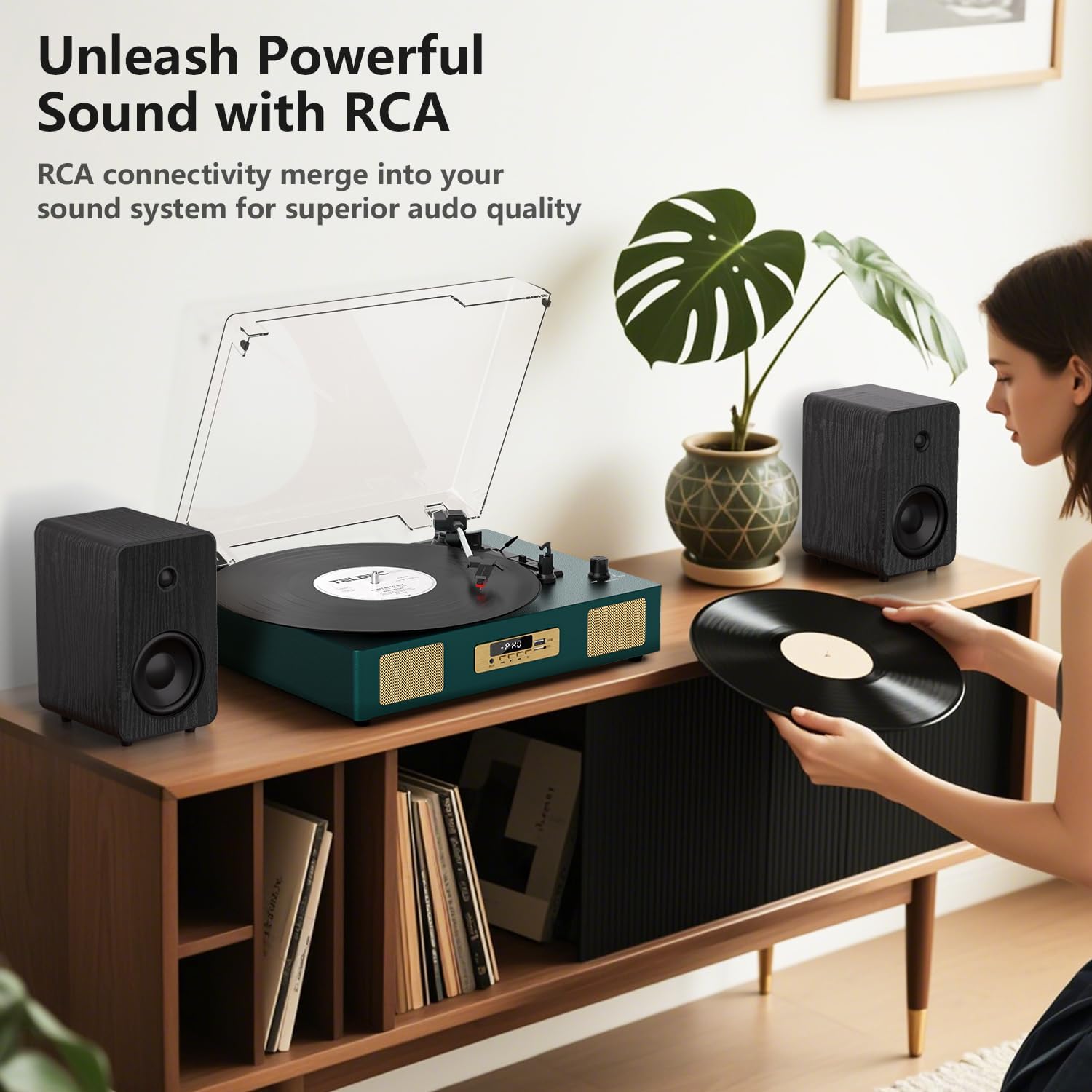
Figura 2: Posteriore view of the TE-2017 Record Player, illustrating the RCA output ports connected to external speakers for enhanced audio quality.
5.6 Jack per cuffie
For private listening, plug 3.5mm headphones into the headphone jack located on the front panel. The built-in speakers will be muted automatically.
6. Manutenzione
- Pulizia dello stilo: Use a soft brush (not included) to gently clean the stylus from back to front. Do not use excessive force.
- Pulizia del giradischi: Pulire l'unità con un panno morbido e asciutto. Non utilizzare detergenti abrasivi o solventi.
- Copertura antipolvere: Quando non lo si utilizza, tenere chiuso il coperchio antipolvere per proteggere il giradischi da polvere e detriti.
- Cura dei documenti: Handle records by their edges. Store them vertically in their sleeves to prevent warping and dust accumulation.
7. Risoluzione Dei Problemi
| Problema | Possibile causa | Soluzione |
|---|---|---|
| Nessun potere | Adattatore di alimentazione non collegato o presa difettosa. | Assicurarsi che l'adattatore di alimentazione sia collegato saldamente e che la presa sia funzionante. |
| Nessun suono dagli altoparlanti | Volume troppo basso; modalità selezionata non corretta; cuffie collegate. | Increase volume; select correct mode (PH, BT, AUX, USB); disconnect headphones. |
| Il giradischi non gira | Spegnimento; cinghia dislocata; arresto automatico attivato prematuramente. | Ensure power is on; check belt (refer to maintenance); try disabling auto-stop. |
| Suono saltato o distorto | Disco sporco o danneggiato; puntina sporca o usurata; giradischi non in piano. | Pulisci il disco; pulisci o sostituisci la puntina; assicurati che il giradischi sia posizionato su una superficie piana. |
| Bluetooth non associato | Incorrect mode; device too far; device already paired. | Ensure 'BT' mode is selected; move device closer; unpair from other devices. |
8. Specifiche
- Marca: DANFI AUDIODF
- Modello: TE 2017
- Velocità del giradischi: 33 1/3, 45, 78 giri al minuto
- Tipo di unità: Trasmissione a cinghia
- Connettività: Bluetooth Receiver, USB, SD Card, AUX Input, RCA Output
- Caratteristiche speciali: Digital Recorder, WAV Converter, Digital Display, Pitch Control, Auto-Stop
- Fonte di energia: Elettrico con cavo (DC 5V/1A)
- Signal-to-noise ratio (dB): 78 dB
- Dimensioni del prodotto: 35.56 x 27.94 x 12.45 cm (14 x 11 x 4.9 pollici)
- Peso: 3.07 kg (6.77 libbre)
9. Garanzia e supporto
For warranty information or technical support, please refer to the contact details provided with your purchase or visit the official DANFI AUDIO DF websito. Conservare la prova d'acquisto per eventuali reclami in garanzia.