
1. Introduzione
This manual provides comprehensive instructions for the AngelSense Assistive Technology Watch GPS Tracker, Model GPS Tracker Watch 2.0. Designed for teens, adults, seniors, and individuals with autism, special needs, or dementia, this device offers advanced safety and communication features. Please read this manual thoroughly to ensure proper setup and optimal use of your device.
2. Requisito di abbonamento
The AngelSense Assistive Technology Watch requires a monthly subscription for full functionality. The first month of service is free with easy activation. The standard monthly subscription is $49.99 per month with a 1-year contract. This includes a pre-installed SIM card, unlimited live tracking, assistive speakerphone with 60 voice minutes per month, alerts, premium safety features, and unlimited US customer care.

Immagine: Oltreview of subscription benefits for the AngelSense Watch.
3. Cosa c'è nella scatola
Your AngelSense Watch kit includes the following items:
- GPS Watch (47.5 mm)
- Watch Band
- Dock di ricarica magnetico
- Cavo di ricarica USB
- Pellicola protettiva per lo schermo
- Manuale d'uso
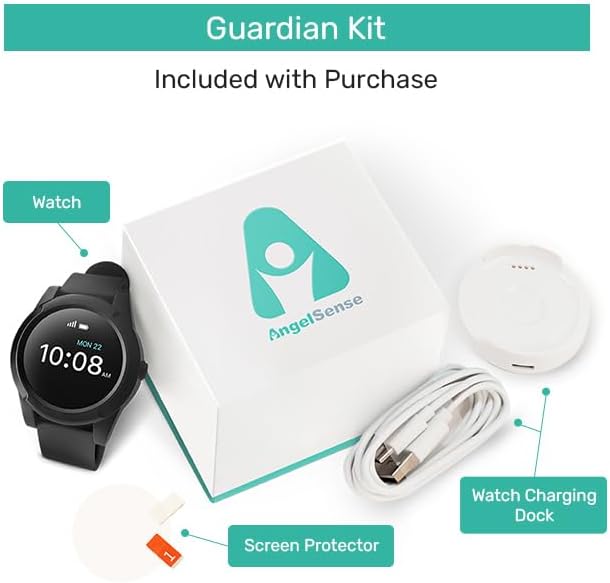
Image: The AngelSense Guardian Kit contents.
4. Impostazione
4.1. Attivazione iniziale
Your AngelSense Watch comes with a pre-installed SIM card. To activate your service plan, visit the AngelSense website or follow the instructions provided in the included user manual. You will receive a phone number for your device via email upon successful activation.
4.2. Carica del dispositivo
Before first use, fully charge your AngelSense Watch. Connect the magnetic charging dock to the USB charging cable, then plug the USB cable into a power source. Align the watch with the magnetic pins on the dock until it securely connects and begins charging. A full charge typically provides up to 16 hours of battery life.

Image: AngelSense Watch on its magnetic charging dock.
4.3. Accensione
Refer to the quick start guide included in your package for specific power-on instructions. Typically, devices are powered on by pressing and holding a designated button for a few seconds until the screen activates.
4.4. Mobile App Download & Login
Download the AngelSense app from the iOS App Store or Google Play Store. Once installed, open the app and log in using the credentials provided during your service activation. You will need the device ID, usually found on the back of the watch or its packaging, and a default password (if applicable) to log in for the first time.
5. Istruzioni per l'uso
5.1. Tracciamento GPS in tempo reale
The AngelSense Watch provides continuous, accurate, and reliable real-time tracking both outdoors and indoors. Access the live map through the AngelSense app to view your loved one's current location.
Image: Live GPS tracking displayed on the AngelSense app.
Video: Un oltreview of the AngelSense Assistive Technology Watch and its personal GPS tracking capabilities.
5.2. Location History & Daily Timeline
Review detailed location history and daily timelines within the app. This feature allows you to see where your loved one has been throughout the day, including specific places and transit routes.
Video: Un oltreview of AngelSense GPS tracking for safety and independence, including location history.
5.3. Geofencing & Safe Places
Set up customizable geofences and designate safe places within the app. You will receive alerts when your loved one enters or leaves these predefined areas. The system can also auto-detect and name places based on routine.
Video: Tutorial demonstrating the Indoor Map Feature for precise location tracking within buildings.
5.4. Proactive & Intelligent Alerts
AngelSense features intelligent alerts that auto-learn daily routines. You will be notified immediately of potentially dangerous situations such as early departure, unexpected places, late arrival, or late departure from routine locations.
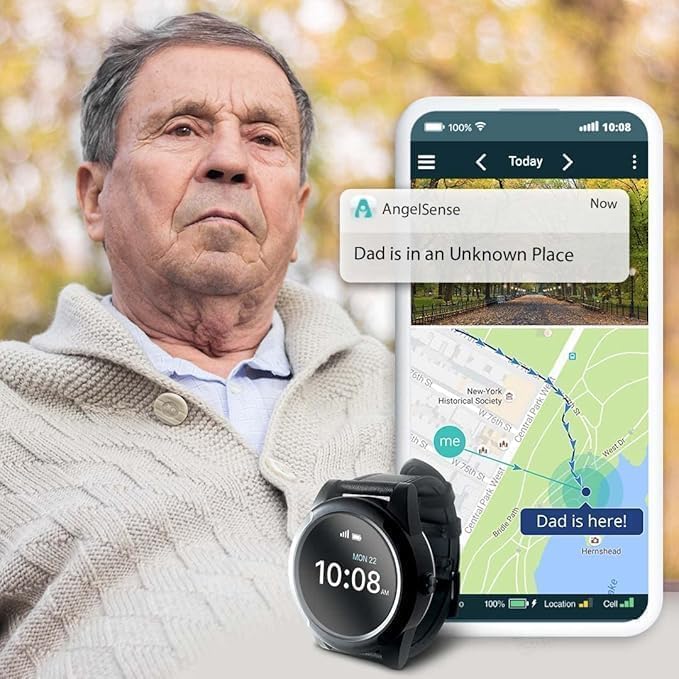
Image: AngelSense app showing an alert for an unknown location.
5.5. Safe Ride Monitoring
Monitor your loved one's transit with live route tracking, maximum speed, estimated time of arrival (ETA), and alerts for unexpected delays or stops. This includes notifications if they miss the bus, get off at the wrong stop, or do not enter school after disembarking.
5.6. Assistive Speakerphone & SOS Button
The assistive speakerphone features auto-pickup, allowing you to talk to your loved one at any time or listen in to ensure their well-being. The SOS call button enables the wearer to request help, initiating an immediate call to designated guardians.
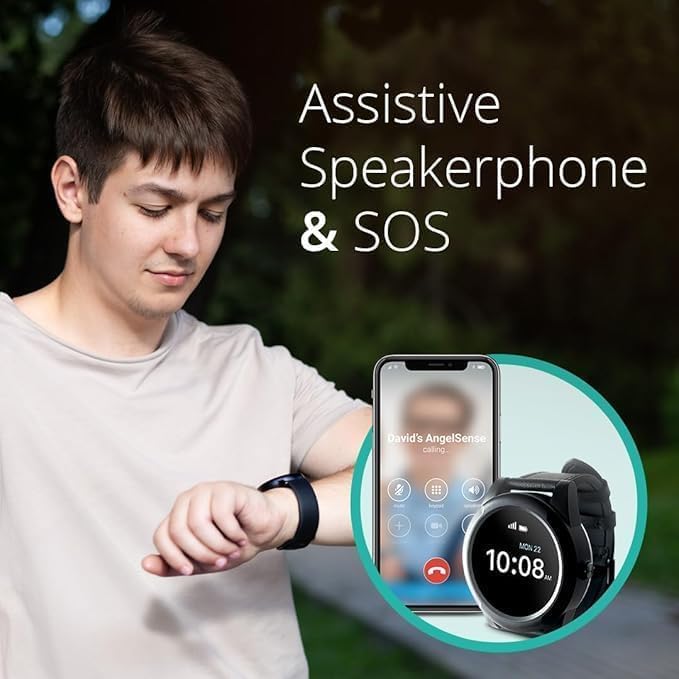
Image: Teenager interacting with the AngelSense Watch and app.

Image: AngelSense Watch communication features in use.
5.7. Emergency Search Tools
In an emergency, you can share your loved one's live location, updated in real-time, via text message to a search team. The app also allows you to see your own location in relation to your loved one and get directions. An audible device alarm can be activated to help locate them if they are hiding or lost in a crowd.
Video: Tutorial on using the 'My Location' feature for emergency tracking.
5.8. Well-being Features
The watch includes a step counter to monitor activity levels. A 1-Way Voice feature allows you to discreetly listen in and hear how your loved one is doing without them needing to answer a call.
5.9. School Dashboard
The School Dashboard provides customization options for school hours, offering limited access for teachers and staff to manage the device's features during the school day.
6. Manutenzione
6.1. Cura della batteria
The AngelSense Watch has a 16-hour battery life. For optimal performance, charge the device daily using the provided magnetic charging dock and USB cable. Avoid extreme temperatures during charging and storage.
6.2. Resistenza all'acqua
The device is water resistant. This means it can withstand splashes and brief exposure to water, but it is not recommended for swimming or prolonged submersion.
6.3. Pulizia
Per pulire l'orologio, strofinarlo delicatamente con un panno morbido eamp cloth. Avoid using harsh chemicals or abrasive materials that could damage the device or screen.
7. Risoluzione Dei Problemi
7.1. Il dispositivo non si accende
If the device does not power on, ensure it is fully charged. Connect it to the charger for several hours and then attempt to power it on again by pressing and holding the power button.
7.2. Problemi di precisione del GPS
For best GPS accuracy, ensure the device has a clear view of the sky. Indoor tracking relies on Wi-Fi signals and may have varying accuracy. If issues persist, check the app for any connectivity warnings or contact support.
7.3. Alerts Not Received
Verify that your app notification settings are correctly configured. Ensure the device has a stable cellular connection. Check that geofences and safe places are properly defined in the app.
8. Specifiche
| Caratteristica | Dettaglio |
|---|---|
| Nome del modello | Angelsense GPS Tracker Smart Watch 2 |
| Numero modello articolo | GPS Tracker Watch 2.0 |
| Marca | AngelSense |
| Dimensioni dello schermo | 0.95 pollici |
| Dimensioni di visualizzazione dello schermo in piedi | 0.95 pollici |
| Forma | Girare |
| GPS | GPS integrato |
| Tecnologia di connettività | Cellulare |
| Caratteristiche speciali | Audio Recording, GPS, Smartwatch for Special Needs, Video Call |
| Sistema operativo | Android Wear 2.9 |
| Tipo di batteria | 1 D batteries required (Lithium Ion) |
| Peso dell'articolo | 7.4 once |
| Dimensioni del pacco | 3.86 x 3.43 x 3.23 pollici |
9. Informazioni sulla garanzia
AngelSense offers various protection plans to safeguard your device. These plans typically cover accidental damage and extended warranty periods. For detailed information on available protection plans and their terms, please refer to the product's purchase page or contact AngelSense customer support.
- Piano di protezione biennale: Disponibile per l'acquisto.
- Piano di protezione biennale: Disponibile per l'acquisto.
- Protezione completa: Un piano mensile che copre gli acquisti idonei passati e futuri.
10. Supporto e contatto
For any questions, technical assistance, or support, please contact AngelSense US Customer Care. They are available to assist with setup, troubleshooting, and general inquiries. You can find contact information and additional resources on the official AngelSense websito.
Visitare il AngelSense Store per maggiori informazioni e accessori.