
1. Introduzione
Grazie per l'acquistoasing the AGPTEK External Blu-ray Drive, Model G01R13. This portable optical drive offers versatile read and write capabilities for Blu-ray, DVD, and CD formats, featuring high-speed USB 3.0 and Type-C connectivity. Its compact design and multi-port functionality make it an ideal solution for various computing needs across Windows, macOS, and Linux operating systems. This manual provides essential information for proper setup, operation, maintenance, and troubleshooting to ensure optimal performance and longevity of your device.

Figure 1: AGPTEK External Blu-ray Drive, Model G01R13
2. Prodotto finitoview
2.1 Contenuto della confezione
- AGPTEK External Blu-ray Drive (Model G01R13) x 1
2.2 Device Features and Components
The AGPTEK External Blu-ray Drive is designed for convenience and functionality. It features an integrated cable for easy storage and dual USB 3.0 and Type-C connectivity. Additionally, it includes multiple ports, allowing it to function as a USB hub.

Figure 2: Key features of the AGPTEK External Blu-ray Drive
The drive incorporates a silent design to minimize noise during operation, making it suitable for quiet environments. Its lightweight and slim profile (approximately 350g) enhance portability.
3. Impostazione
3.1 Connessione al computer
The drive supports both USB 3.0 (Type-A) and Type-C connections. Use the appropriate cable to connect the drive to an available USB port on your computer.
- For USB Type-A: Connect the USB 3.0 Type-A connector to your computer's USB-A port.
- For USB Type-C: Connect the USB Type-C connector to your computer's USB-C port.

Figure 3: Connecting the drive to a laptop
3.2 Alimentazione
The drive is primarily powered via USB bus power. In most cases, a single USB connection will provide sufficient power for operation. However, if you experience unstable operation or power-intensive tasks (e.g., Blu-ray playback or burning), an auxiliary power source can be used.
- Potenza ausiliaria: Connect a Micro USB cable (not always included, may require separate purchase) from the drive's auxiliary power port to a USB power adapter or another USB port on your computer. This ensures stable power delivery, especially during extended use or when playing Blu-ray discs.
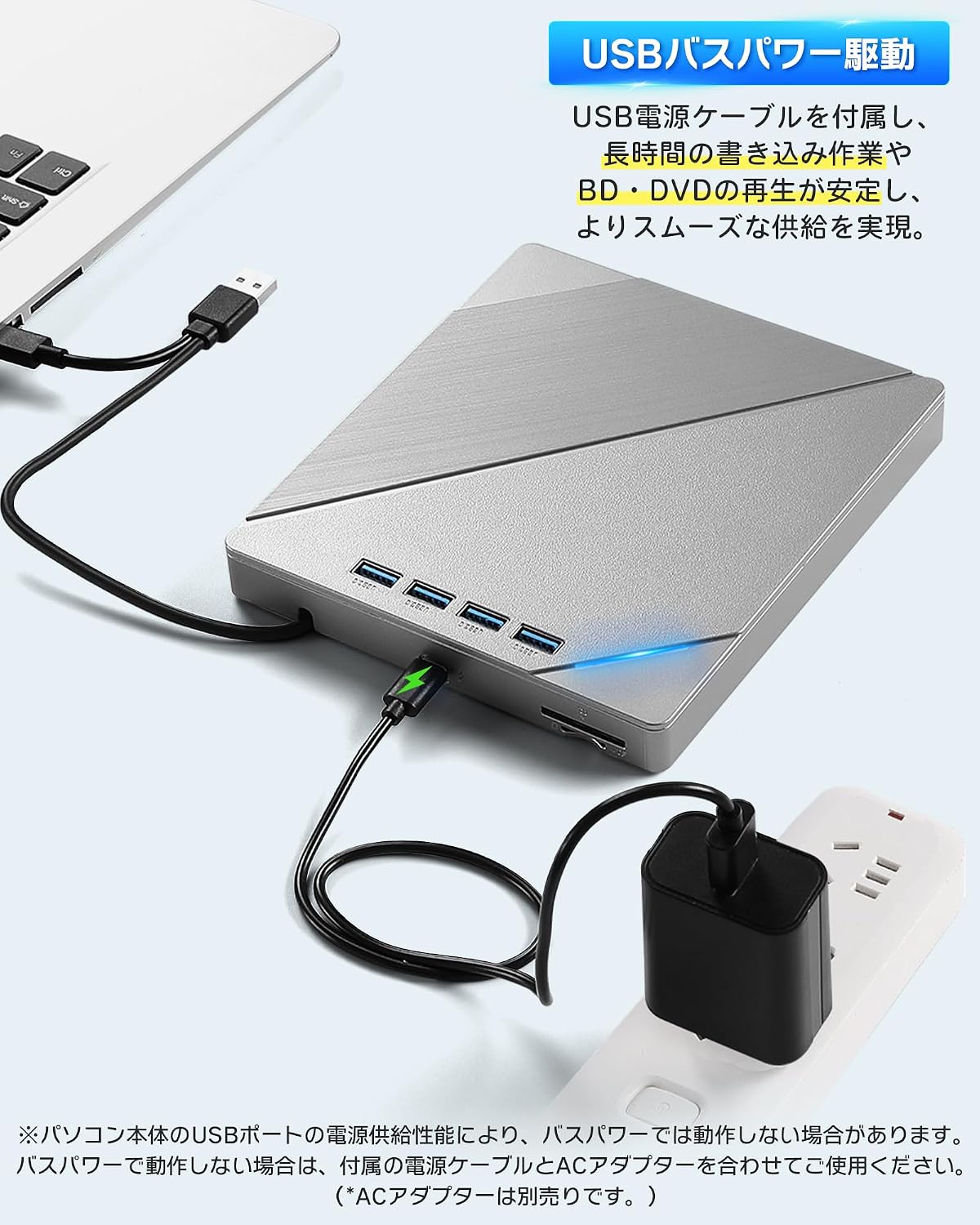
Figure 4: Connecting auxiliary power to the drive
3.3 Compatibilità del sistema operativo
The AGPTEK External Blu-ray Drive is compatible with a wide range of operating systems, including:
- Windows (Windows 7, 8, 10, 11, XP)
- sistema operativo macOS
- Linux
No additional drivers are typically required for basic plug-and-play functionality.
4. Istruzioni per l'uso
4.1 Inserimento ed espulsione dei dischi
- Inserire: Gently press the eject button on the front of the drive to open the disc tray. Place the disc label-side up onto the tray, ensuring it is centered on the spindle. Gently push the tray back into the drive until it clicks into place.
- Per espellere: Press the eject button on the front of the drive. Alternatively, you can eject the disc through your computer's operating system (e.g., right-click the drive icon and select 'Eject').

Figure 5: Inserting a disc
4.2 Playing Discs
After inserting a disc, your computer's operating system should recognize it. You may need compatible software to play Blu-ray movies, DVDs, or audio CDs. This drive does not include playback software.
- For Blu-ray/DVD Movies: Install a third-party Blu-ray/DVD playback software (e.g., Leawo Blu-ray Player, VLC Media Player, CyberLink PowerDVD).
- For Audio CDs: Most operating systems have built-in media players that can play audio CDs.
- For Data Discs: The disc contents should appear in your file explorer/finder.
4.3 Burning Discs
To burn data to a blank Blu-ray, DVD, or CD, you will need compatible burning software. This drive does not include burning software.
- Insert a blank recordable disc (BD-R, DVD-R, CD-R, etc.) into the drive.
- Open your preferred burning software and follow its instructions to select filee avviare il processo di masterizzazione.
4.4 Using the Integrated USB Hub and Card Readers
The drive features multiple ports, allowing it to function as a USB hub. You can connect various peripherals simultaneously:
- Porte USB: Connect USB memory sticks, external hard drives, mice, keyboards, or other USB devices.
- Slot per schede SD/TF: Insert SD or TF (MicroSD with adapter) cards to access their contents.
Note that while the drive offers expandability, simultaneous heavy usage of all ports and the optical drive might require auxiliary power for stable operation.
5. Manutenzione
5.1 Pulizia dell'unità
- Mantenere l'unità pulita e priva di polvere. Utilizzare un panno morbido e asciutto per pulire la parte esterna.
- Non utilizzare detergenti liquidi o materiali abrasivi.
- Avoid opening the drive casing, as this may void the warranty and expose sensitive components.
5.2 Handling Discs
- Always handle discs by their edges to avoid fingerprints and scratches on the data surface.
- Quando non vengono utilizzati, conservare i dischi nelle loro custodie per proteggerli da polvere e danni.
- Pulire i dischi sporchi con un panno morbido e privo di lanugine, procedendo dal centro verso l'esterno.
5.3 Conservazione
When not in use, store the drive in a cool, dry place away from direct sunlight and extreme temperatures. Ensure the integrated cable is neatly stored in its compartment.
6. Risoluzione Dei Problemi
6.1 Drive Not Recognized by Computer
- Assicurarsi che il cavo USB sia collegato saldamente sia all'unità che al computer.
- Prova a connetterti a un'altra porta USB del tuo computer.
- If using a desktop PC, try connecting to a USB port on the back of the computer, which typically provides more stable power.
- Connect the auxiliary power cable if the drive is not receiving sufficient power from a single USB port.
- Riavvia il computer.
6.2 Errori di lettura/scrittura del disco
- Assicurarsi che il disco sia pulito e privo di graffi o macchie.
- Verify that the disc type is compatible with the drive (refer to Specifications).
- Ensure you are using appropriate playback or burning software.
- Connect the auxiliary power cable to ensure stable power delivery, especially for Blu-ray discs or during burning.
- Provare un disco diverso per escludere che si tratti di un disco difettoso.
6.3 Prestazioni lente
- Ensure the drive is connected to a USB 3.0 or Type-C port on your computer for optimal speed. Connecting to a USB 2.0 port will result in slower transfer rates.
- Avoid running multiple demanding applications simultaneously.
- If using the integrated USB hub, disconnect other peripherals if you need maximum speed for disc operations.
7. Specifiche
| Caratteristica | Descrizione |
|---|---|
| Marca | AGPTEK |
| Numero di modello | G01R13 |
| Velocità di scrittura dell'archiviazione ottica | 6X (Blu-ray) |
| Velocità di lettura dell'archiviazione ottica | 24X (CD), 8X (DVD), 6X (Blu-ray) |
| Velocità di trasferimento dati | 5 Gigabit al secondo (USB 3.0) |
| Interfaccia di connettività | USB 3.0, USB di tipo C |
| Fattore di forma | Portatile |
| Piattaforma hardware | Desktop PC, Notebook PC |
| Supporto del sistema operativo | Windows, macOS, Linux |
| Supported Disc Formats (Read/Write) | BD-R, BD-R DL, BD-RE, BD-RE DL, DVD-R, DVD-ROM, DVD-R DL, DVD-RW, DVD-RAM, DVD+R, DVD+R9, DVD+RW, CD-R, CD-RW, Blu-ray, 3D Blu-ray, BDXL |
| Articoli inclusi | Unità principale x 1 |
| Paese di origine | Cina |
8. Garanzia e supporto
8.1 Informazioni sulla garanzia
This AGPTEK External Blu-ray Drive (Model G01R13) comes with a 180-day warranty from the date of purchase. This warranty covers manufacturing defects under normal use. Please retain your proof of purchase for warranty claims.
La garanzia non copre i danni causati da:
- Accident, abuse, misuse, or improper installation.
- Riparazioni o modifiche non autorizzate.
- Power surges or external electrical faults.
- Use with incompatible accessories.
8.2 Assistenza clienti
For technical assistance, warranty claims, or product inquiries, please contact AGPTEK customer support through the retailer's platform where you purchased the product or visit the official AGPTEK websito per le informazioni di contatto.