
Maggioranza Darwin
Majority Darwin Bluetooth Alarm Clock with 10W Wireless Charging
Model: Darwin | Brand: Majority
Introduzione
This manual provides detailed instructions for the operation and maintenance of your Majority Darwin Bluetooth Alarm Clock. This device integrates an FM radio, dual alarm clock, 10W wireless charging, and ambient lighting to enhance your bedside experience.
Informazioni sulla sicurezza
- Leggere attentamente tutte le istruzioni prima dell'uso.
- Tenere il dispositivo lontano da acqua e umidità.
- Non esporre a temperature estreme.
- Non tentare di smontare o riparare l'unità da soli. Rivolgersi a personale qualificato.
- Assicurare una ventilazione adeguata quando si utilizza la funzione di ricarica wireless.
Contenuto della confezione
Verificare che tutti gli articoli siano presenti nella scatola:
- Majority Darwin Bedside Clock
- Adattatore di alimentazione di rete
- Manuale d'uso

Image: Package contents of the Majority Darwin alarm clock, including the clock, power adapter, and user manual.
Prodotto finitoview
Familiarize yourself with the main components and control buttons of your Darwin alarm clock.
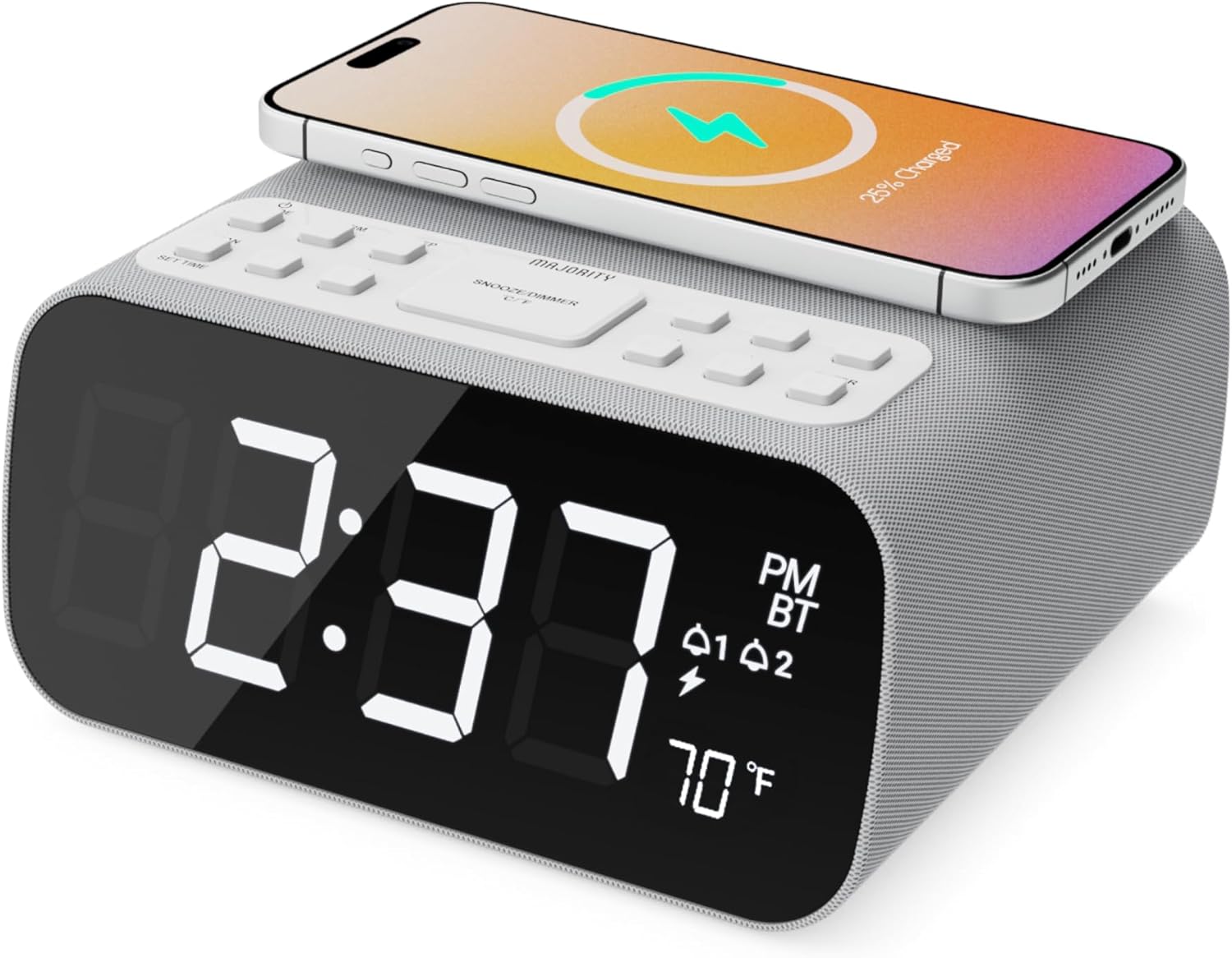
Immagine: Frontale view of the Majority Darwin alarm clock showing the large digital display, wireless charging pad on top, and control buttons.

Immagine: Lato view of the Majority Darwin alarm clock highlighting the control panel with buttons for time, alarm, volume, and light settings.
Controlli del pannello superiore
- Pad di ricarica wireless: Place compatible devices here for 10W wireless charging.
- Pulsante Snooze/Luce: Short press to snooze alarm; long press to adjust display brightness or cycle through ambient light colors.
- Time/Date Set Button: Press to enter time/date setting mode.
- Pulsanti di allarme 1/2: Press to activate/deactivate Alarm 1 or Alarm 2. Long press to set alarm time.
- Volume/Tune Buttons: Adjust volume or tune FM radio stations.
- Pulsante Modalità: Switch between FM Radio, Bluetooth, and White Noise modes.
Rear Panel Controls & Ports
- Ingresso CC 12 V: Connect the mains power adapter here.
- Porta di ricarica USB: For charging additional devices via USB cable.
- Vano batteria: For backup batteries (not for primary power).
- Cursore dimmer display: Manually adjust the brightness of the main time display.
- Dimmer per luce notturna: Adjust brightness of the ambient light.
Impostare
Collegamento di potenza
Connect the provided mains power adapter to the DC 12V input port on the rear of the alarm clock and plug it into a wall outlet. The display will light up.
For battery backup, open the battery compartment on the bottom and insert 2 x AAA batteries (not included). This will retain time settings during a power outage but will not power the display or charging functions.
Immagine: Posteriore view of the Majority Darwin alarm clock with the power adapter connected to the DC 12V input.
Impostazione dell'ora iniziale
- Premere a lungo il tasto Impostazione ora/data button on the top panel. The hour digits will start flashing.
- Utilizzare il Volume/Tune pulsanti per regolare l'ora.
- Premere il tasto Impostazione ora/data nuovamente il pulsante per confermare l'ora e passare all'impostazione dei minuti.
- Utilizzare il Volume/Tune pulsanti per regolare i minuti.
- Repeat this process for setting the year, month, and day.
- Premere il tasto Impostazione ora/data button one last time to save all settings.
Istruzioni per l'uso
Time Display & Dimmer
The large LED display shows the current time.
Dimmerazione manuale: Utilizzare il Cursore dimmer display on the rear panel to manually adjust the brightness of the time display.
Oscuramento automatico: The device features an auto-dimming function that adjusts display brightness at fixed time intervals (e.g., dimming at night, brightening during the day).

Immagine: Frontale view of the Majority Darwin alarm clock displaying time, AM/PM, and temperature, highlighting the dual alarm icons.
Impostazione allarme
The Darwin alarm clock supports two independent alarms (Alarm 1 and Alarm 2).
- Premere a lungo uno dei due Allarme 1 or Allarme 2 button. The hour digits for that alarm will flash.
- Utilizzare il Volume/Tune pulsanti per impostare l'ora desiderata per la sveglia.
- Premere il corrispondente Allarme nuovamente il pulsante per confermare l'ora e passare all'impostazione dei minuti.
- Utilizzare il Volume/Tune pulsanti per impostare i minuti desiderati per la sveglia.
- Premere il tasto Allarme button again to select the alarm source (FM radio or built-in tone). Use Volume/Tune pulsanti per selezionare.
- Premere il tasto Allarme button again to set the alarm volume.
- Premere il tasto Allarme button one last time to activate the alarm. An alarm icon will appear on the display.
Disattivazione di un allarme: Premere brevemente il tasto corrispondente Allarme 1 or Allarme 2 button to turn it off. The alarm icon will disappear.
Funzione snooze
Quando suona un allarme, premere brevemente il tasto Posticipa/Luce button on the top panel to temporarily silence the alarm for 9 minutes. The alarm will sound again after the snooze period.
Funzionamento della radio FM
- Premere il tasto Modalità finché sul display non compare la scritta "FM".
- Utilizzare il Volume/Tune pulsanti per sintonizzarsi manualmente sulla stazione FM desiderata.
- Auto Scan & Store Presets: Premere a lungo il tasto Modalità button to automatically scan and save available FM stations as presets.
- Premere brevemente il tasto Modalità pulsante per scorrere i preset salvati.
Bluetooth Pairing & Playback
- Premere il tasto Modalità button until "BT" appears on the display and the Bluetooth indicator starts flashing.
- On your smartphone or other Bluetooth device, enable Bluetooth and search for "Majority Darwin".
- Select the device to pair. Once connected, the Bluetooth indicator on the alarm clock will stop flashing.
- Ora puoi riprodurre l'audio dal tuo dispositivo tramite l'altoparlante della sveglia. Usa Volume/Tune buttons on the alarm clock or your device to adjust volume.

Image: A smartphone displaying music playback, connected via Bluetooth to the Majority Darwin alarm clock.
Ricarica wireless
La superficie superiore della sveglia è dotata di un caricabatterie wireless da 10 W.
- Place your Qi-compatible smartphone directly onto the wireless charging pad.
- Ensure the phone is centered on the charging symbol for optimal charging.
- A charging indicator (e.g., a lightning bolt icon) may appear on your phone's screen or the alarm clock's display to confirm charging.
Porta di ricarica USB: An additional USB port on the rear allows you to charge other devices using a USB cable.
Image: The Majority Darwin alarm clock with a smartphone placed on top, indicating active wireless charging.
Night Light / Ambient Light
The alarm clock features an ambient light ring around its base.
- Premere a lungo il tasto Posticipa/Luce button to turn the ambient light on/off.
- Premere brevemente il tasto Posticipa/Luce button to cycle through different color modes (e.g., red, green, blue, purple, white, color cycle).
- Utilizzare il Dimmer per luce notturna on the rear panel to adjust the brightness of the ambient light.

Image: The Majority Darwin alarm clock illuminated with a vibrant ambient light from its base.
Funzione rumore bianco
The device includes various white noise sounds to aid relaxation and sleep.
- Premere il tasto Modalità button until the white noise mode is activated (indicated by a specific icon or text on the display).
- Utilizzare il Volume/Tune buttons to adjust the volume of the white noise.
- Premere brevemente il tasto Modalità button again to cycle through different white noise sounds (e.g., nature sounds, fan noise).
Manutenzione
- Pulire il dispositivo con un panno morbido e asciutto. Non utilizzare detergenti abrasivi o solventi.
- Mantenere libere le aperture di ventilazione.
- If not in use for an extended period, disconnect from power and remove backup batteries.
Risoluzione dei problemi
Nessuna alimentazione / Display spento
- Assicurarsi che l'adattatore di alimentazione sia collegato saldamente sia al dispositivo sia a una presa di corrente funzionante.
- Controllare se la presa di corrente funziona.
La ricarica wireless non funziona
- Assicurati che il tuo dispositivo sia compatibile con Qi.
- Assicurati che il telefono sia posizionato al centro del caricabatterie.
- Remove any thick phone cases or metallic objects between the phone and the charging pad.
Problemi di accoppiamento Bluetooth
- Ensure the alarm clock is in Bluetooth pairing mode (BT flashing).
- Make sure your device's Bluetooth is enabled and searching.
- Prova a disaccoppiare e riassociare il dispositivo.
- Ensure no other devices are currently connected to the alarm clock via Bluetooth.
L'allarme non suona
- Verificare che l'allarme sia attivato (icona di allarme visibile sul display).
- Controllare l'impostazione del volume della sveglia.
- Ensure the correct alarm time is set.
Specifiche
| Caratteristica | Dettaglio |
|---|---|
| Marca | Maggioranza |
| Nome del modello | Darwin |
| Uscita di ricarica wireless | 10W |
| Potenza di uscita dell'altoparlante | 12 Watt |
| Tecnologia di connettività | Bluetooth |
| Fonte di alimentazione | Mains Power (Battery Backup) |
| Dimensioni del prodotto | 13.07 x 8.22 x 6.09 pollici |
| Peso dell'articolo | 1.42 libbre (645 grammi) |
| Caratteristiche speciali | Adjustable Volume, Dual Alarm, Bluetooth, Wireless Charging, FM Radio, Dimmable Display, Ambient Night Light, White Noise |
Garanzia e supporto
The Majority Darwin Bluetooth Alarm Clock comes with a standard manufacturer's warranty. Please refer to the warranty card included in your package for specific terms and conditions.
For technical support, troubleshooting, or warranty claims, please visit the official Majority websito o contattare il loro servizio clienti.
Online resources and FAQs may also be available on the product support page.
Documenti correlati - Darwin
 |
Majority Darwin Yöpöydän Kelloradio Käyttöohje - Aseta Aika, Herätys, FM e Bluetooth Tutustu Maggioranza Darwin Yöpöydän Kelloradion käyttöohjeeseen. Opi asettamaan aika ja herätykset, käyttämään FM-radiota ja Bluetooth-ominaisuuksia, sekä hyödyntämään langatonta latausta. |
 |
Manuale utente della radio da comodino e sveglia Majority Neptune Free Questo manuale utente fornisce istruzioni dettagliate per l'utilizzo della radio da comodino e sveglia Majority Neptune Free. Scopri le sue funzionalità, tra cui connettività Bluetooth, radio FM, riproduzione USB, ricarica wireless, impostazioni della sveglia e modalità sleep. Include specifiche e informazioni sulla sicurezza. |
 |
Manuale utente della radiosveglia da comodino Majority Darwin Manuale utente per la radiosveglia da comodino Majority Darwin. Scopri come configurare, utilizzare e risolvere i problemi del dispositivo, incluse le funzioni di radio FM, Bluetooth e ricarica wireless. |
 |
Manuale d'uso e istruzioni per la sveglia Braun BC20 Manuale utente completo per la sveglia Braun BC20, che descrive in dettaglio configurazione, caratteristiche, funzioni, linee guida di sicurezza, sostituzione della batteria, garanzia e informazioni di supporto. |
 |
Manuale utente della sveglia FUNFOR Sunrise - Luce sveglia, suoni naturali, luce notturna Questo manuale utente fornisce istruzioni dettagliate per la sveglia FUNFOR Sunrise, una luce sveglia progettata per chi ha il sonno profondo. È dotata di 6 suoni naturali, 10 opzioni di luce notturna, doppia sveglia con luce solare, funzioni di aiuto per il sonno e funzione snooze, che la rendono adatta alle camerette dei bambini. |
 |
Manuale utente della sveglia digitale a LED SZELAM Manuale utente per la sveglia digitale a LED SZELAM, che descrive in dettaglio le caratteristiche, il funzionamento e le impostazioni di ora, sveglia e luminosità. |
Ask a question about this manual
Ask about setup, troubleshooting, compatibility, parts, safety, or missing instructions. Manuals+ will review the question and use this page’s manual context to help answer it.