
1. Prodotto finitoview
The Fanvil V60P is a professional IP phone designed for business communication. It features a color display, programmable keys, and Power over Ethernet (PoE) support for simplified installation and operation. This manual provides essential information for setting up, operating, and maintaining your device.
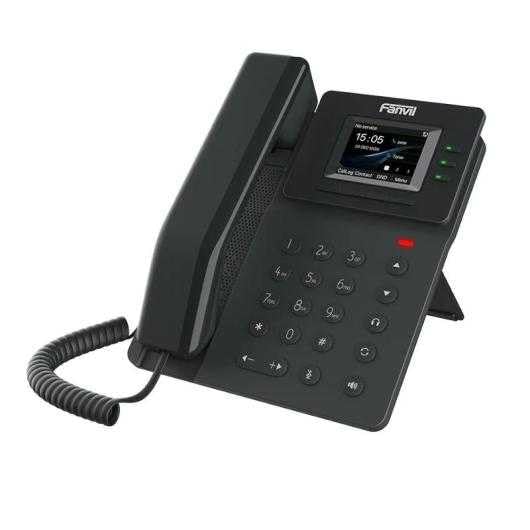
Figure 1: Fanvil V60P Professional IP Phone. This image shows the black IP phone with its handset, color display, and numeric keypad. The display shows "15:05" and menu options.
2. Configurazione e installazione
2.1 Contenuto della confezione
Prima dell'installazione, verificare che tutti gli elementi siano presenti nella confezione:
- Fanvil V60P IP Phone unit
- Cornetta e cavo a spirale
- Cavo Ethernet
- In piedi
- Guida di installazione rapida (se inclusa)
2.2 connessione fisica
- Attaccare il supporto: Securely attach the desk stand to the back of the phone unit.
- Collegare il portatile: Inserire un'estremità del cavo a spirale nel ricevitore e l'altra estremità nella porta del ricevitore sulla base del telefono.
- Connect to Network and Power (PoE):
- Collegare un'estremità del cavo Ethernet al Rete locale porta sul telefono.
- Connect the other end of the Ethernet cable to a Power over Ethernet (PoE) enabled switch or injector. The phone will power on automatically.
- Collegamento al PC (facoltativo): If you need to connect a computer through the phone, connect an Ethernet cable from your PC to the PC porta sul telefono.
Note: If PoE is not available, a separate power adapter (not included) may be required. Refer to the product specifications for compatible power adapter details.
3. Istruzioni per l'uso
3.1 Funzioni di chiamata di base
- Effettuare una chiamata:
- Pick up the handset or press the Speakerphone button.
- Comporre il numero desiderato utilizzando la tastiera.
- Premere il tasto Comporre tasto funzione o attendere il timeout della composizione automatica.
- Risposta a una chiamata:
- Solleva la cornetta.
- Alternatively, press the Speakerphone button or the Risposta tasto soft.
- Terminare una chiamata: Hang up the handset or press the Speakerphone button.
3.2 Using Programmable DSS Keys
The Fanvil V60P features 6 programmable DSS (Direct Station Select) keys. These keys can be configured for various functions such as speed dial, line keys, busy lamp field (BLF), or other custom features as defined by your system administrator.
- To use a programmed DSS key, simply press the corresponding button.
- Configuration of DSS keys is typically done via the phone's web interface or your IP PBX system.
3.3 Local Phonebook
The phone supports a local phonebook with up to 1000 entries.
- Access the phonebook via the Elenco or Contatti soft key on the display.
- Use the navigation keys to browse entries.
- Selezionare una voce e premere il tasto Comporre tasto funzione per avviare una chiamata.
3.4 Audioconferenza
The V60P supports local 6-party audio conferencing.
- Establish a call with the first participant.
- Premere il tasto Conf soft key. The first participant will be put on hold.
- Dial the number of the second participant and establish the call.
- Premere il tasto Conf soft key again to merge all participants into a conference.
- Repeat steps 2-4 to add more participants, up to a total of 6.
4. Manutenzione
4.1 Pulizia del dispositivo
To maintain the appearance and functionality of your Fanvil V60P IP Phone (made of plastic material), follow these cleaning guidelines:
- Disconnect the phone from its power source (PoE) before cleaning.
- Utilizzare una pasta morbida e leggermenteamppanno privo di lanugine per pulire le superfici.
- Evitare l'uso di prodotti chimici aggressivi, detergenti abrasivi o solventi, poiché potrebbero danneggiare la plastica e il display.
- Non spruzzare detergenti direttamente sul telefono.
4.2 Aggiornamenti firmware
Firmware updates may be released periodically to improve performance, add features, or fix bugs. Consult your IT administrator or Fanvil's official websito per informazioni sugli aggiornamenti disponibili e istruzioni per l'installazione.
5. Risoluzione Dei Problemi
This section addresses common issues you might encounter with your Fanvil V60P IP Phone.
| Problema | Possibile causa | Soluzione |
|---|---|---|
| Il telefono non si accende. | Nessuna connessione PoE o cavo Ethernet difettoso. | Ensure the Ethernet cable is securely connected to the LAN port and a PoE-enabled switch/injector. Verify the PoE source is active. |
| Nessun segnale di linea. | SIP registration failure or network issue. | Check network connectivity. Verify SIP account settings with your IT administrator. Restart the phone. |
| Impossibile effettuare/ricevere chiamate. | Network issues, incorrect SIP configuration, or firewall blocking. | Confirm network connection. Check SIP registration status on the phone's display. Contact your IT administrator for network and SIP configuration verification. |
| Qualità audio scadente. | Network congestion or faulty handset/speaker. | Check network bandwidth and latency. Try using a different handset or speaker mode. If the issue persists, contact support. |
6. Specifiche
| Caratteristica | Dettaglio |
|---|---|
| Modello | V60P |
| Sistema | Linux |
| Display | 2.4-inch, 320 x 240 Color Screen |
| Chiavi DSS | 6 tasti programmabili |
| Linee SIP | 4 |
| Elenco telefonico locale | Voci 1000 |
| Cornetta | Ricevitore cablato |
| Audioconferenza | 6-party Local Conference |
| Wideband Codecs | G.722, Opere |
| Narrowband Codecs | G.711, G.723.1, G.726, G.729, G.729A, G.729B, G.729AB, iLBC |
| PoE | SÌ |
| Porte di rete | 2 porte Ethernet da 10/100 Mbps |
| EHS Support | SÌ |
| Supporto IPv6 | SÌ |
| Materiale | Plastica |
| Dimensioni (LxWxH) | Dimensioni: 15 x 200 x 15 cm |
| Peso | 600 grammi |
| ID chiamante | SÌ |
| Funzionamento multilinea | SÌ |
| Conference Call Functionality | Support Multiple Conferences |
| Standby Duration (if applicable) | 10 ore |
7. Garanzia e supporto
7.1 Garanzia del prodotto
The Fanvil V60P IP Phone comes with a garanzia di tre anni contro i difetti di fabbricazioneLa presente garanzia copre i difetti di materiali e fabbricazione in condizioni di normale utilizzo. Si prega di conservare la prova d'acquisto per eventuali reclami in garanzia.
7.2 Supporto tecnico
For technical assistance, troubleshooting beyond this manual, or warranty inquiries, please contact your reseller or Fanvil's official customer support channels. You may need to provide your product model (V60P) and serial number.