
1. Introduzione
The DJI Air 3S Drone with RC 2 Fly More Combo is an advanced aerial photography platform designed for capturing high-quality images and videos. It features a dual-camera system, extended flight time, and comprehensive safety mechanisms. This manual provides essential information for the safe and effective setup, operation, and maintenance of your DJI Air 3S drone.
2. Cosa c'è nella scatola
Verifica che tutti i componenti siano presenti nel tuo pacchetto:
- DJI Air 3S Drone
- Telecomando RC2
- 3 x Intelligent Flight Battery
- 128GB Extreme microSD Memory Card
- High USB Speed Memory Card Reader
- Borsa a tracolla
- Drone Photography Backpack
- 3 x Extra Pair of Low-Noise Propellers
- Protettore del giunto cardanico
- Cavo USB-C PD
- ND Filter Set (ND8, ND32 & ND128)
- Hub di ricarica della batteria
- Piattaforma di atterraggio per droni
- Camera Lens Cleaning Kit
- 6-Slot Memory Card Wallet
- CPS 2 Year Warranty
- Bundle It Better Lens Cloth

Image: Contents of the DJI Air 3S Drone Fly More Combo package, including drone, controller, batteries, and accessories.
Video: Unboxing e oltreview of the DJI Air 3S Fly More Combo components, demonstrating what is included in the package.
Video: A user's experience with the DJI Air 3S, showcasinle sue caratteristiche e componenti.
3. Impostazione
3.1 Apertura del drone
- Posizionare il drone su una superficie piana e stabile.
- Gently unfold the front arms, then the rear arms, until they lock into position.
- Assicurarsi che tutte le eliche siano fissate saldamente e non presentino danni.

Image: The DJI Air 3S Drone fully unfolded, ready for flight, showing its front camera and sensors.
Video: Demonstrates the process of unfolding the DJI Air 3S drone's arms and preparing it for flight.
3.2 Preparing the RC 2 Remote Controller
- Remove the control sticks from their storage slots on the controller.
- Screw the control sticks into the designated ports.
- Ensure the controller is fully charged using the provided USB-C PD cable.
Video: A demonstration of setting up the RC 2 remote controller, including attaching the control sticks.
3.3 Installazione e ricarica della batteria
- Insert a fully charged Intelligent Flight Battery into the drone's battery compartment until it clicks into place.
- Use the Battery Charging Hub to charge multiple batteries efficiently. Connect the hub to a suitable power adapter (not included) and then to a power source.
3.4 Accensione iniziale e attivazione
- Press the power button on the drone once, then press and hold for two seconds to power on. Repeat for the remote controller.
- Follow the on-screen instructions on the RC 2 controller to activate the drone and link it to your DJI account. Ensure a stable internet connection for activation.
4. Utilizzo del drone
4.1 Controlli di volo di base
Familiarize yourself with the RC 2 controller's joysticks and buttons. The left stick typically controls altitude and yaw, while the right stick controls forward, backward, and sideways movement. Always perform a pre-flight check before takeoff.
4.2 Funzionamento della fotocamera
The DJI Air 3S features a dual-camera system: a 1" CMOS 24mm 50MP wide-angle camera and a 1/1.3" CMOS 70mm 48MP medium telephoto camera. It supports 4K/60fps HDR video recording and 48MP still images. Use the DJI Fly app on the RC 2 controller to switch between cameras, adjust settings, and initiate recording or photo capture.
- Scatti Master: Automated flight and shooting sequences for cinematic results.
- Scatti rapidi: Pre-programmed flight paths for dynamic video clips.
- Riprese verticali 2.7K: Available on both cameras for social media content.

Image: The DJI Air 3S Drone in mid-flight, showcasing its design and operational capabilities.
4.3 Caratteristiche di sicurezza
The Air 3S is equipped with advanced safety features:
- Omnidirectional Obstacle Sensing (APAS): Detects obstacles in all directions, providing comprehensive protection.
- Ritorno a casa avanzato (RTH): The drone can intelligently return to its takeoff point, utilizing a forward-facing LiDAR sensor for obstacle avoidance during nighttime RTH.
- Non-GPS RTH: If GPS is unavailable, the drone can retrace its flight path to return safely.
Trasmissione video HD 4.4 O4
The O4 HD video transmission system, with its six-antenna array, provides a stable 1080p/60fps live feed up to 20 km, ensuring clear and reliable communication between the drone and controller.
Video: Un review of the DJI Air 3S Drone with RC 2 Fly More Combo, highlighting its operational features and performance.
5. Manutenzione
5.1 Cura della batteria
- Charge batteries fully before each flight.
- Se non vengono utilizzate per lunghi periodi, conservare le batterie con una carica pari a circa il 50-60%.
- Evitare temperature estreme durante la ricarica e lo stoccaggio.
5.2 Ispezione e sostituzione dell'elica
- Before each flight, inspect propellers for cracks, bends, or damage.
- Replace damaged propellers immediately using the extra pairs provided. Follow the drone's manual for correct installation.

Immagine: in alto view of the DJI Air 3S Drone, showing its propellers and overall design.
5.3 Gimbal and Lens Care
- Montare sempre la protezione del gimbal durante il trasporto o lo stoccaggio del drone.
- Use the provided lens cleaning kit to keep the camera lenses free from dust and smudges.
5.4 Aggiornamenti firmware
Regularly check for and install firmware updates via the DJI Fly app to ensure optimal performance, new features, and enhanced safety.
6. Risoluzione Dei Problemi
This section addresses common issues you might encounter. For detailed troubleshooting, refer to the official DJI support resources.
- Nessun segnale GPS: Ensure you are flying in an open area away from tall buildings or strong magnetic interference.
- Remote Controller Disconnection: Ensure the drone and controller are within range and there is no significant interference. Re-link the controller if necessary.
- Obstacle Avoidance Warnings: Pay attention to on-screen warnings and adjust flight path. Ensure sensors are clean and unobstructed.
- Malfunzionamento del giunto cardanico: Check for physical obstructions. Restart the drone and controller. If the issue persists, contact support.
- Batteria non in carica: Verify the charging cable and adapter are functioning correctly. Ensure batteries are inserted properly into the charging hub.
7. Specifiche
| Caratteristica | Specificazione |
|---|---|
| Marca | DJI |
| Nome del modello | Air 3S |
| Caratteristiche speciali | Omnidirectional Obstacle Sensing, Six-Antenna Array |
| Risoluzione di acquisizione video | 4K |
| Risoluzione fissa efficace | 50 MP (Wide-angle), 48 MP (Telephoto) |
| Tempo massimo di volo | Fino a 45 minuti |
| Portata massima | 20 Kilometers (O4 HD Transmission) |
| Tipo di batteria | Ioni di litio |
| Peso dell'articolo | 151 Grams (Drone only, approximate) |
| Dimensioni articolo (L x P x A) | 12.8"L x 10.5"W x 4.2"H (Unfolded, approximate) |
| Tecnologia di connettività | USB, Wi-Fi |
| Tecnologia dei sensori ottici | CMOS |
8. Garanzia
This product includes a CPS 2 Year Warranty, providing coverage for protection, repair, and replacement services. Please refer to the warranty documentation included in your package for full terms and conditions.
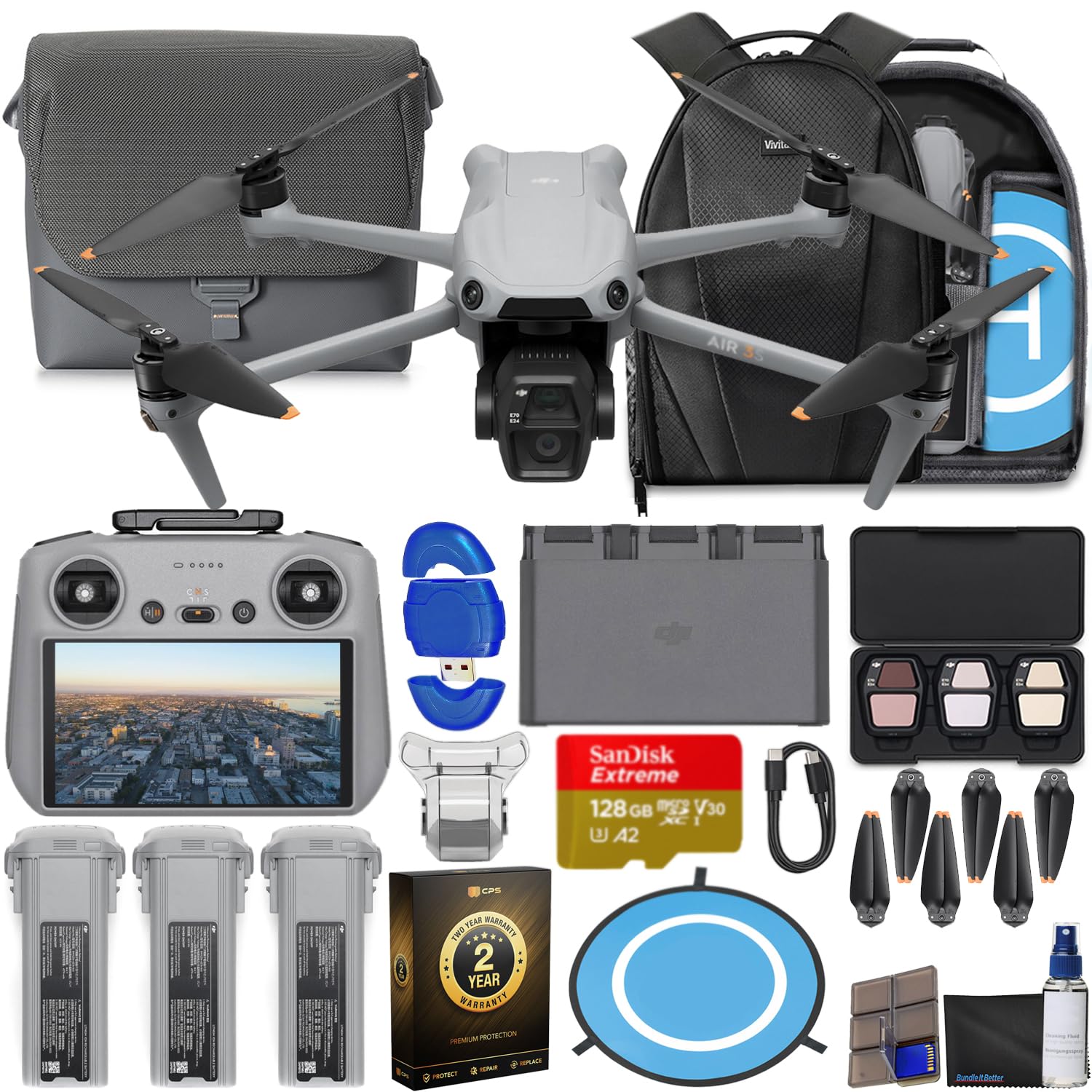
Image: The CPS 2 Year Warranty box, indicating premium protection, repair, and replacement services.
9. Supporto
For further assistance, detailed user guides, firmware downloads, and technical support, please visit the official DJI support websito. Puoi anche trovare FAQ e forum della community per ulteriore assistenza.
DJI ufficiale Websito: www.dji.com/support