
1. Introduzione
Thank you for choosing the ELISWEEN Wireless PC Gaming Controller. This controller is designed to provide a superior gaming experience across multiple platforms, including PC, Nintendo Switch, Android, and iOS devices. Featuring advanced Hall Effect joysticks, programmable back buttons, and customizable vibration, this manual will guide you through its setup, operation, and maintenance to ensure optimal performance.
2. Contenuto della confezione
- ELISWEEN Wireless PC Gaming Controller
- Cavo di ricarica USB-C (1.5 m)
- Chiavetta USB da 2.4 GHz
- Manuale d'uso
3. Prodotto finitoview
Familiarizzare con i componenti del controller:
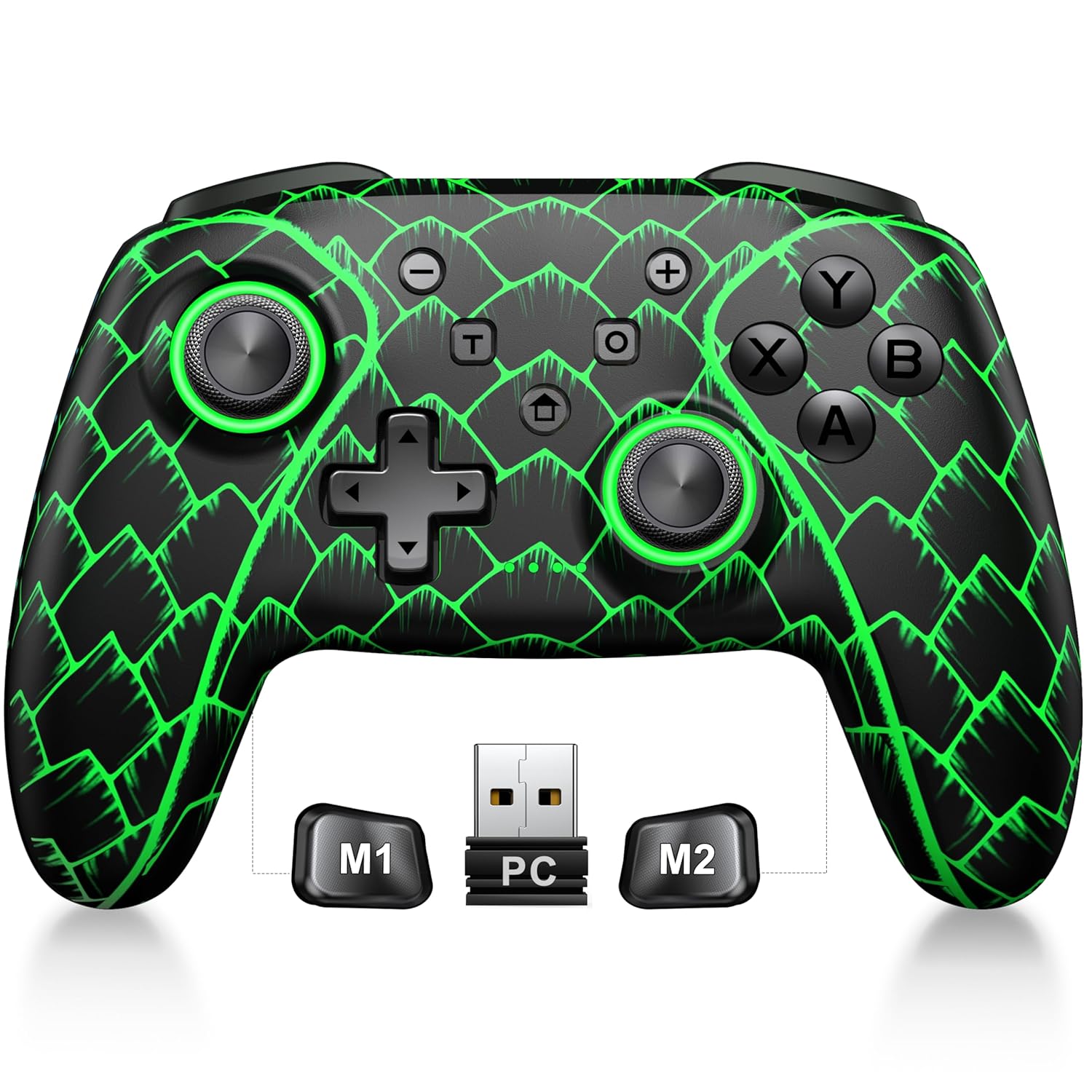
Figure 3.1: ELISWEEN Wireless PC Gaming Controller with its 2.4GHz USB dongle and highlighted M1/M2 programmable buttons.
- Stick analogici sinistro/destro: Hall Effect joysticks for precise movement.
- Tasto direzionale: Input direzionale.
- Pulsanti di azione (A/B/X/Y): Pulsanti di input standard per il gioco.
- Bottoni sulle spalle (S/D): Pulsanti montati nella parte superiore.
- Trigger Buttons (ZL/ZR): Hall Effect analog triggers.
- Pulsanti M1/M2: Pulsanti posteriori programmabili.
- Pulsante Home: Powers on/off and returns to system home screen.
- +/- Pulsanti: System navigation/menu buttons.
- Pulsante Screenshot: Cattura schermate.
- Pulsante turbo: Attiva/disattiva la funzione turbo.
- Porta USB-C: Per la ricarica e la connessione cablata.
4. Configurazione e connessione
4.1 Ricarica del controller
Before first use, fully charge the controller. Connect the USB-C cable to the controller's USB-C port and the other end to a USB power source (e.g., PC, USB wall adapter). The charging indicator will show status and turn off when fully charged. A full charge takes approximately 3 hours.
4.2 Connecting to PC (Wireless 2.4GHz)

Figure 4.1: Multi-platform compatibility of the ELISWEEN controller, including PC, Switch, Android, and iOS.
- Inserire il dongle USB da 2.4 GHz in una porta USB disponibile sul PC.
- Press the Home button on the controller to power it on.
- The controller will automatically connect to the dongle. The indicator lights will stabilize once connected.
4.3 Connecting to PC (Wired USB-C)
- Connect the USB-C cable to the controller and the other end to your PC.
- The controller will be recognized as a plug-and-play device.
4.4 Connessione a Nintendo Switch
- On your Nintendo Switch, go to System Settings > Controllers and Sensors > Disconnect Controllers.
- Quindi, vai su Controller e sensori > Cambia presa/ordine.
- Press and hold the Home button on the ELISWEEN controller until the indicator lights begin to flash rapidly.
- Once paired, the indicator light(s) corresponding to the player number will remain solid.
4.5 Connecting to Android/iOS (Bluetooth)
- Assicurati che il Bluetooth sia abilitato sul tuo dispositivo Android o iOS.
- On the controller, press and hold the X + Home buttons simultaneously until the indicator lights flash rapidly, indicating pairing mode.
- On your device, search for Bluetooth devices and select "STK-7040RG" (or similar) to pair.
- Once connected, the indicator light will stabilize. Supports iOS 13+ MFi titles.
5. Istruzioni per l'uso
5.1 Joystick ad effetto Hall
The controller features precision Hall Effect joysticks and triggers, designed to prevent stick drift and provide accurate, responsive control. These magnetic, contactless sensors ensure long-term durability and precision.

Figura 5.1: Interno view of Hall Effect joystick technology, highlighting its magnetic, contactless design for enhanced accuracy and durability.
Zero Deadzone Mode: For competitive gaming, activate a temporary 0 deadzone mode by holding the T pulsante + R3 (right stick click) or L3 (left stick click). A green light confirms activation. To revert to default calibration, press the same combo (blue light indicator). The controller automatically resets to factory default settings upon restart for consistent anti-drift performance.
5.2 Pulsanti posteriori programmabili (M1/M2)
The M1 and M2 back buttons can be programmed to map up to 21 different key combinations, allowing for quick execution of complex actions.

Figure 5.2: The M1 and M2 programmable back buttons, capable of mapping up to 21 different actions for enhanced control.
Refer to the Keylinker App (search "NC300") for detailed instructions on programming and customizing these buttons.
5.3 Funzione Turbo
The controller supports Turbo fire functionality for 10 action buttons with adjustable speeds (5, 12, or 20 presses per second).
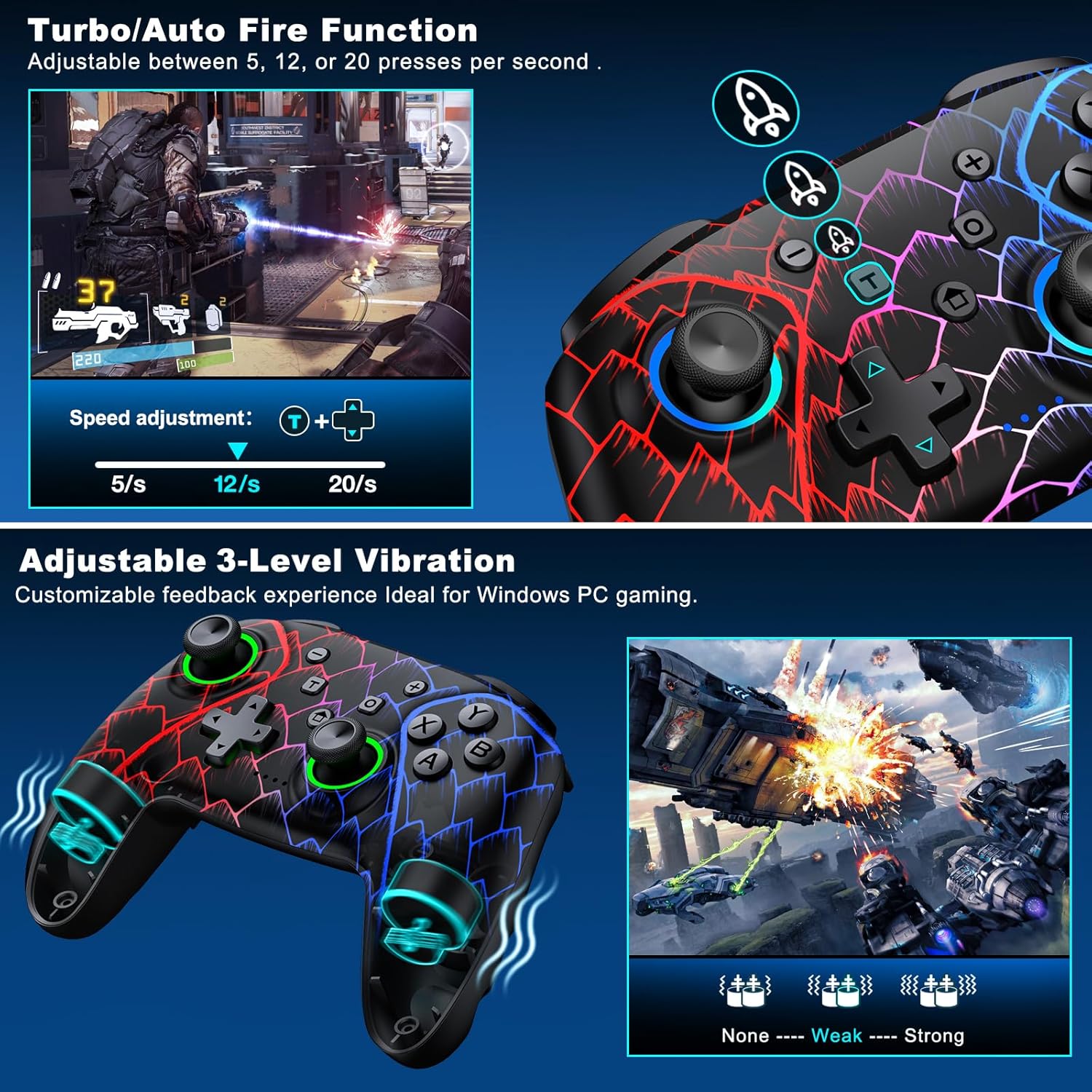
Figure 5.3: Visual representation of the Turbo/Auto Fire function and the adjustable 3-level vibration feature.
- Attiva Turbo: Premere il tasto Turbo button + the desired action button.
- Regola la velocità: Premere Turbo + Up arrow (increase) or Giù arrow (decrease) on the D-pad.
- Cancella Turbo: Tieni premuto il Meno pulsante + Giù arrow on the D-pad to instantly clear all Turbo binds.
5.4 Regolazione delle vibrazioni
Experience immersive feedback with dual vibration motors offering 3 intensity levels.
- Adjust intensity by pressing L + R + ZL + ZR simultaneously. Cycle through levels: None, Weak, Strong.
- Note: Vibration is disabled on mobile platforms. Gyro functionality works only with Nintendo systems.
5.5 Hair Trigger Locks
Shorten trigger pulls for faster response times in games requiring quick inputs, such as first-person shooters.
5.6 Gestione della durata della batteria
The controller is equipped with a 1000mAh battery, providing over 20 hours of continuous gameplay on a single charge. Charging takes approximately 3 hours via USB-C.

Figure 5.4: The ELISWEEN controller's 1000mAh battery provides extended playtime with quick charging capabilities.
5.7 Effetti di illuminazione dinamici
Customize the controller's lighting effects via the Keylinker App (search "NC300").
5.8 Spegnimento automatico
To conserve battery, the controller will automatically power off after 20 minutes of inactivity.
6. Manutenzione
- Pulizia: Per pulire il controller, utilizzare un panno morbido e asciutto. Non utilizzare detergenti abrasivi o solventi.
- Magazzinaggio: Conservare il controller in un luogo fresco e asciutto, lontano dalla luce solare diretta e da temperature estreme.
- Cura della batteria: Evitare di scaricare completamente la batteria frequentemente. Caricarla regolarmente per prolungarne la durata.
7. Risoluzione Dei Problemi
- Il controller non si connette:
- Assicurati che il controller sia carico.
- Verify the correct connection method for your device (2.4GHz dongle for PC, Bluetooth for mobile, pairing for Switch).
- Prova a riavviare il controller e il dispositivo a cui ti stai connettendo.
- For PC, try a different USB port for the dongle or wired connection.
- Deriva dello stick o input impreciso:
- Activate the 0 deadzone mode (T + R3/L3) to recalibrate.
- Ensure the controller firmware is up to date via the Keylinker App.
- I pulsanti non rispondono:
- Controllare che il controller sia collegato correttamente.
- Assicurarsi che non vi siano detriti incastrati sotto i pulsanti.
- Perform a factory reset if issues persist (refer to Keylinker App or contact support).
- Problemi di ricarica:
- Prova un cavo USB-C e una fonte di alimentazione diversi.
- Ensure the USB-C port on the controller is clean and free of obstructions.
8. Specifiche
| Connettività | Bluetooth 5.2, wireless a 2.4 GHz, USB-C cablato |
| Compatibilità | PC, Nintendo Switch, Android, iOS (iOS 13+ MFi) |
| Capacità della batteria | 1000mAh |
| Tempo di gioco | 20+ ore (circa) |
| Tempo di ricarica | 3 ore (circa) |
| Joystick | Hall Effect (Drift-Proof) |
| Pulsanti programmabili | 4 Back Buttons (M1/M2) |
| Vibrazione | Dual Motors, 3 Adjustable Levels |
| Dimensioni | 6.38 x 4.72 x 2.64 pollici |
| Peso | 11.99 once (circa 340 g) |
| Produttore | Tecnologia Qixun |
| Paese di origine | Cina |
9. Garanzia e supporto
The ELISWEEN Wireless PC Gaming Controller comes with a standard manufacturer's warranty. For specific warranty terms and conditions, please refer to the product packaging or contact our customer support.
For any technical assistance, troubleshooting, or inquiries, our 24/7 Expert Support team is available to help. Please refer to the contact information provided on the product packaging or our official websito.