
CG3A
User Manual for Generic Security Camera CG3A
1080P Color Night Vision WiFi Outdoor Security Camera
1. Introduzione
This manual provides comprehensive instructions for the installation, operation, and maintenance of your Generic CG3A Outdoor Security Camera. Designed for reliable outdoor surveillance, this camera features 1080P live video, full-color night vision, wireless connectivity, and a rechargeable battery. Please read this manual thoroughly before using the product to ensure proper setup and optimal performance.
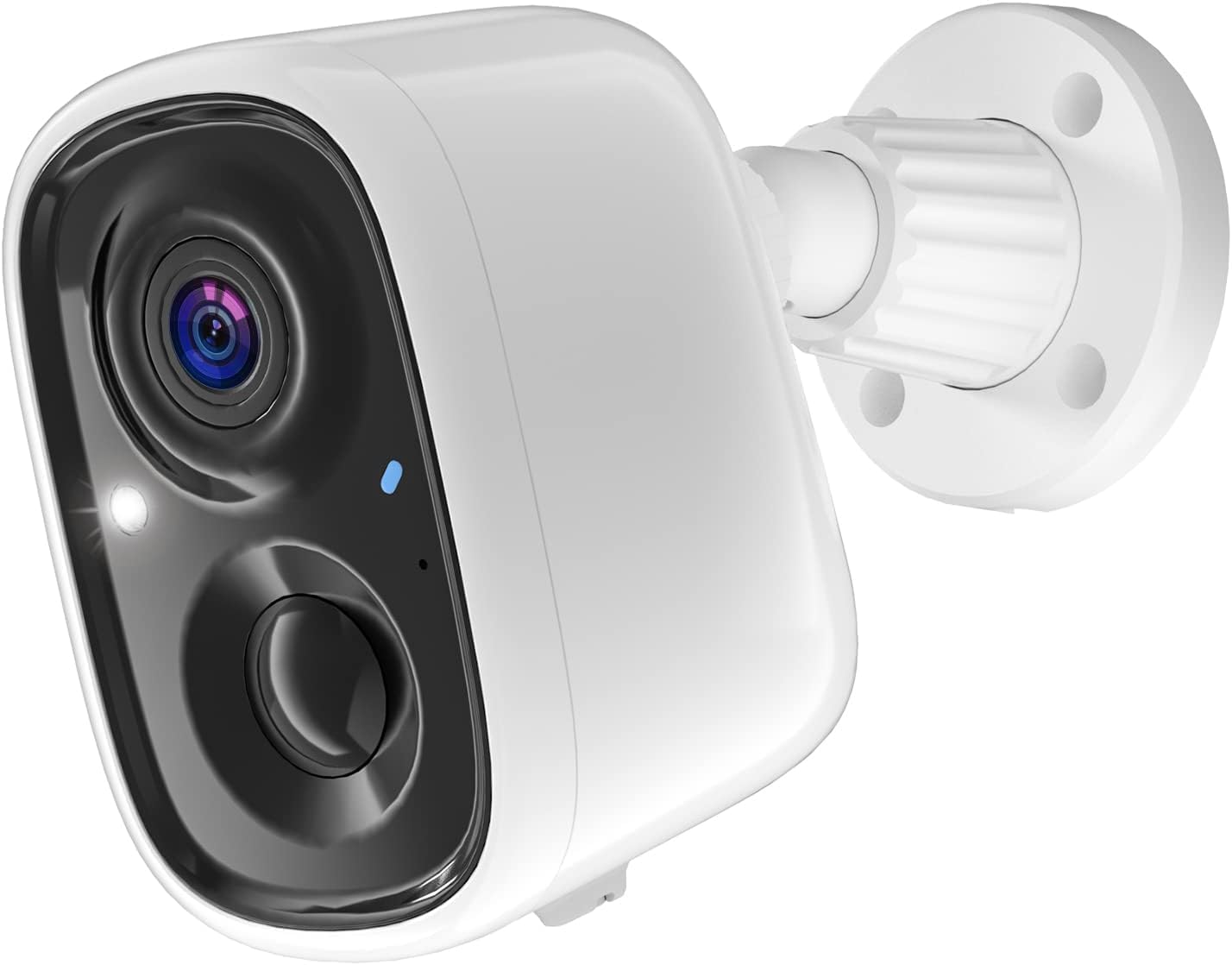
Figure 1: Generic CG3A Outdoor Security Camera. This image shows the white bullet-style camera with its lens, infrared lights, and a blue status indicator, attached to a white wall-mount base.
2. Contenuto della confezione
Verificare che tutti gli articoli elencati di seguito siano presenti e in buone condizioni all'apertura della confezione. Se alcuni articoli risultano mancanti o danneggiati, contattare l'assistenza clienti.
- Generic CG3A Outdoor Security Camera
- Staffa di montaggio a parete
- Cavo di ricarica USB
- Mounting Screws and Wall Anchors (typically 4 sets)
- Manuale di istruzioni (questo documento)

Figure 2: Package Contents. This image displays the security camera, its wall mount, a USB charging cable, a set of screws and wall anchors, and a small instruction manual booklet.
3. Caratteristiche del prodotto
- Video Full HD 1080P: Cattura video chiari e dettagliatitage.
- Visione notturna a colori: Provides vivid, full-color video even in low-light conditions, enhancing visibility and detail compared to traditional black-and-white infrared night vision.
- Connettività wireless: Connects to your home Wi-Fi network for flexible placement without network cables.
- Batteria ricaricabile: Equipped with a long-lasting battery for wire-free operation.
- IP65 resistente alle intemperie: Progettato per resistere a diverse condizioni meteorologiche esterne, garantendo durata e prestazioni affidabili.
- PIR Motion Detection & AI Recognition: Advanced passive infrared (PIR) sensor detects human motion, and AI technology helps differentiate between humans, pets, cars, and packages, reducing false alarms.
- Audio bidirezionale: Il microfono e l'altoparlante integrati consentono di comunicare in tempo reale con i visitatori o di scoraggiare gli intrusi.
- Archiviazione cloud: Offers free 3-day video history cloud storage for convenient access to recorded events.

Figure 3: PIR Motion Detection & AI Recognition. This image illustrates the camera's ability to distinguish between humans, pets, cars, and packages, with examples of detected objects highlighted by green boxes on a smartphone screen displaying the camera's app interface.
4. Guida all'installazione
4.1 Carica iniziale
Before first use, fully charge the camera battery. Connect the provided USB cable to the camera's charging port and plug the other end into a 5V/1A USB power adapter (not included). The indicator light will show charging status and turn solid when fully charged.
4.2 Installazione dell'app e creazione dell'account
- Download the "Smart Camera" app from your smartphone's app store (Google Play Store for Android or Apple App Store for iOS).
- Apri l'app e segui le istruzioni sullo schermo per creare un nuovo account.
- Accedi al tuo account appena creato.
4.3 Abbinamento della fotocamera
- Nell'app, tocca l'icona "+" per aggiungere un nuovo dispositivo.
- Select "Security Camera" or "Wireless Camera" from the device list.
- Power on the camera. Ensure the camera's indicator light is blinking, indicating it's ready for pairing. If not, press and hold the reset button for 5 seconds until it blinks.
- Enter your 2.4GHz Wi-Fi network name (SSID) and password into the app. Nota: questa fotocamera supporta solo Wi-Fi a 2.4 GHz.
- The app will generate a QR code. Hold your smartphone approximately 6-8 inches (15-20 cm) in front of the camera lens until you hear a confirmation sound from the camera.
- Once connected, the camera's indicator light will turn solid blue, and the app will confirm successful pairing. You can then name your camera.
4.4 Montaggio della telecamera
- Choose a suitable outdoor location for mounting. Consider Wi-Fi signal strength, viewing angle, and proximity to a charging point if needed.
- Utilizzare la staffa di montaggio a parete come modello per contrassegnare i punti di foratura sulla parete.
- Drill holes at the marked positions. Insert wall anchors if mounting on masonry or drywall.
- Fissare la staffa di montaggio a parete alla parete utilizzando le viti fornite.
- Attach the camera to the wall mount bracket and adjust the angle for optimal coverage. Ensure it is securely fastened.
5. Istruzioni per l'uso
5.1 Vivere View
Open the "Smart Camera" app and select your camera from the device list. You will see the live video feed. From here, you can take screenshots, record manually, or use the two-way audio function.
5.2 Rilevamento del movimento e registrazione
- The camera automatically records video clips when motion is detected. These clips are stored in the cloud for 3 days.
- To adjust motion detection sensitivity or set detection zones, navigate to the camera settings within the app.
- You will receive push notifications on your smartphone when motion is detected, allowing you to view il feed live o l'evento registrato.
Visione notturna a colori 5.3
The camera automatically switches to full-color night vision mode in low-light conditions. This feature utilizes built-in spotlights to illuminate the area, providing clear, color images at night.
5.4 Audio bidirezionale
Mentre in diretta view, tap the microphone icon in the app to speak through the camera's speaker. Tap it again to end speaking. The speaker icon allows you to hear audio from the camera's microphone.
5.5 Playback Recorded Videos
Accedi alla sezione "Riproduzione" o "Cronologia" nell'app per rivedereview recorded motion-triggered events. You can filter by date and time.
6. Manutenzione
6.1 Ricarica della batteria
Monitor the battery level via the app. When the battery is low, remove the camera from its mount and recharge it using the USB cable. A full charge typically takes several hours.
6.2 Pulizia della fotocamera
Pulire periodicamente l'obiettivo e l'alloggiamento della fotocamera con un panno morbido eamp cloth. Do not use harsh chemicals or abrasive cleaners, as these can damage the camera's finish or lens coating.
6.3 Aggiornamenti firmware
Check the app regularly for firmware updates. Keeping your camera's firmware updated ensures optimal performance, security, and access to new features. Follow the in-app instructions for any available updates.
7. Risoluzione Dei Problemi
| Problema | Possibile causa | Soluzione |
|---|---|---|
| La fotocamera non si accende. | La batteria è scarica. | Caricare completamente la fotocamera utilizzando il cavo USB in dotazione. |
| Impossibile connettersi al Wi-Fi. | Password Wi-Fi errata; telecamera troppo lontana dal router; rete Wi-Fi a 5 GHz. | Assicurati che la password Wi-Fi a 2.4 GHz sia corretta. Avvicina la telecamera al router. Verifica che il router trasmetta a 2.4 GHz. Reimposta la telecamera e riprova ad associarla. |
| Motion detection is too sensitive/not sensitive enough. | Le impostazioni di sensibilità non sono ottimizzate. | Adjust the PIR motion detection sensitivity in the app settings. Ensure camera is not facing busy streets or swaying trees if false alarms are an issue. |
| No video or poor image quality. | Lens is dirty; poor Wi-Fi signal; camera offline. | Clean the camera lens. Check Wi-Fi signal strength in the app. Ensure camera is online and connected. |
| L'audio bidirezionale non funziona. | Microfono/altoparlante disattivati nell'app; autorizzazioni dell'app. | Check if microphone/speaker icons are enabled in the app. Verify app has microphone permissions on your smartphone. |
8. Specifiche
| Caratteristica | Dettaglio |
|---|---|
| Nome del modello | CG3A |
| Uso interno/esterno | All'aperto |
| Risoluzione di acquisizione video | Formato: 1080p |
| Tecnologia di connettività | Senza fili (Wi-Fi 2.4 GHz) |
| Fonte di alimentazione | Alimentato a batteria (1 batteria agli ioni di litio inclusa) |
| Caratteristica speciale | 2-Way Audio, Full Color Night Vision, PIR Motion Detection, AI Recognition, IP65 Waterproof |
| Dispositivi compatibili | Smartphone (Android, iOS) |
| Tipo di montaggio | Montaggio a parete |
| Dimensioni del prodotto | 5.04 x 3.27 x 6.26 pollici |
| Peso dell'articolo | 14.1 once |
9. Garanzia e supporto
This product comes with a standard manufacturer's warranty. For specific warranty terms and conditions, please refer to the documentation included with your purchase or contact the retailer. For technical support, troubleshooting assistance, or inquiries regarding your Generic CG3A Security Camera, please contact the manufacturer's customer service. Contact information can typically be found on the product packaging or the manufacturer's official websito.
Conservare la ricevuta d'acquisto per eventuali reclami in garanzia.
Ask a question about this manual
Ask about setup, troubleshooting, compatibility, parts, safety, or missing instructions. Manuals+ will review the question and use this page’s manual context to help answer it.