
1. Prodotto finitoview
The CHOEZON TXG26UBF Console Table is designed to provide a functional and space-saving surface with integrated charging capabilities. This narrow table is suitable for placement behind sofas, in entryways, or hallways, offering convenient access to power outlets and USB ports.

Image 1.1: The CHOEZON 62.99" Console Table with a rustic brown top and black metal frame, shown in a living room setting.
Caratteristiche principali:
- Design salvaspazio: With a width of 5.9 inches, this slim console table fits well in narrow spaces.
- Stazione di ricarica integrata: Includes 2 standard AC outlets, 1 USB-A port, and 1 Type-C port for convenient device charging.
- Posizionamento versatile: Functions as a console table, sofa table, entryway table, or display table.
- Costruzione durevole: Made from particleboard and a metal frame for stability.
- Piedini regolabili: Equipped with 6 adjustable feet to ensure stability on uneven surfaces.
- Kit antiribaltamento: Includes hardware to secure the table to a wall for enhanced safety.
2. Specifiche
| Caratteristica | Dettaglio |
|---|---|
| Marca | CHOEZON |
| Numero di modello | TXG26UBF |
| Dimensioni del prodotto (P x L x A) | 62.99" x 5.9" x 32.3" |
| Materiale del telaio | Metallo |
| Tipo di materiale superiore | Truciolato |
| Colore | Marrone rustico, nero |
| Stazione di ricarica | 2 prese CA, 1 porta USB-A, 1 porta di tipo C |
| Caratteristiche speciali | Adjustable Legs, Anti-Tip Device, Sturdy Metal Frame |
| Componenti inclusi | Guida all'assemblaggio, strumento di installazione |

Image 2.1: Detailed dimensions of the console table, showing length, width, and height.
3. Istruzioni di montaggio
The CHOEZON Console Table is designed for straightforward assembly. All necessary tools and a detailed illustrated guide are included with your purchase. Please follow the steps below and refer to the provided assembly guide for specific part identification.
- Disimballare i componenti: Carefully unbox all parts and verify against the parts list in your assembly guide. Ensure all pieces are present and undamaged.
- Identificare le parti: Each component is labeled with a letter or number. Match these labels with the corresponding steps in the instruction manual.
- Montare il telaio: Connect the metal frame components using the provided screws and tools. Do not fully tighten screws until the entire frame is assembled to allow for minor adjustments.
- Fissare il piano del tavolo: Fissare il piano del tavolo in truciolato al telaio metallico assemblato.
- Installa la stazione di ricarica: Place the power strip into its designated slot on the tabletop. The power strip can be installed on the side or in the middle based on your preference.
- Regola i piedi: Screw in the adjustable feet at the bottom of the table legs. Adjust them as needed to ensure the table is level and stable on your floor.
- Fissaggio con kit antiribaltamento: For safety, especially in households with children or pets, attach the anti-tip kit to the table and secure it to a wall.
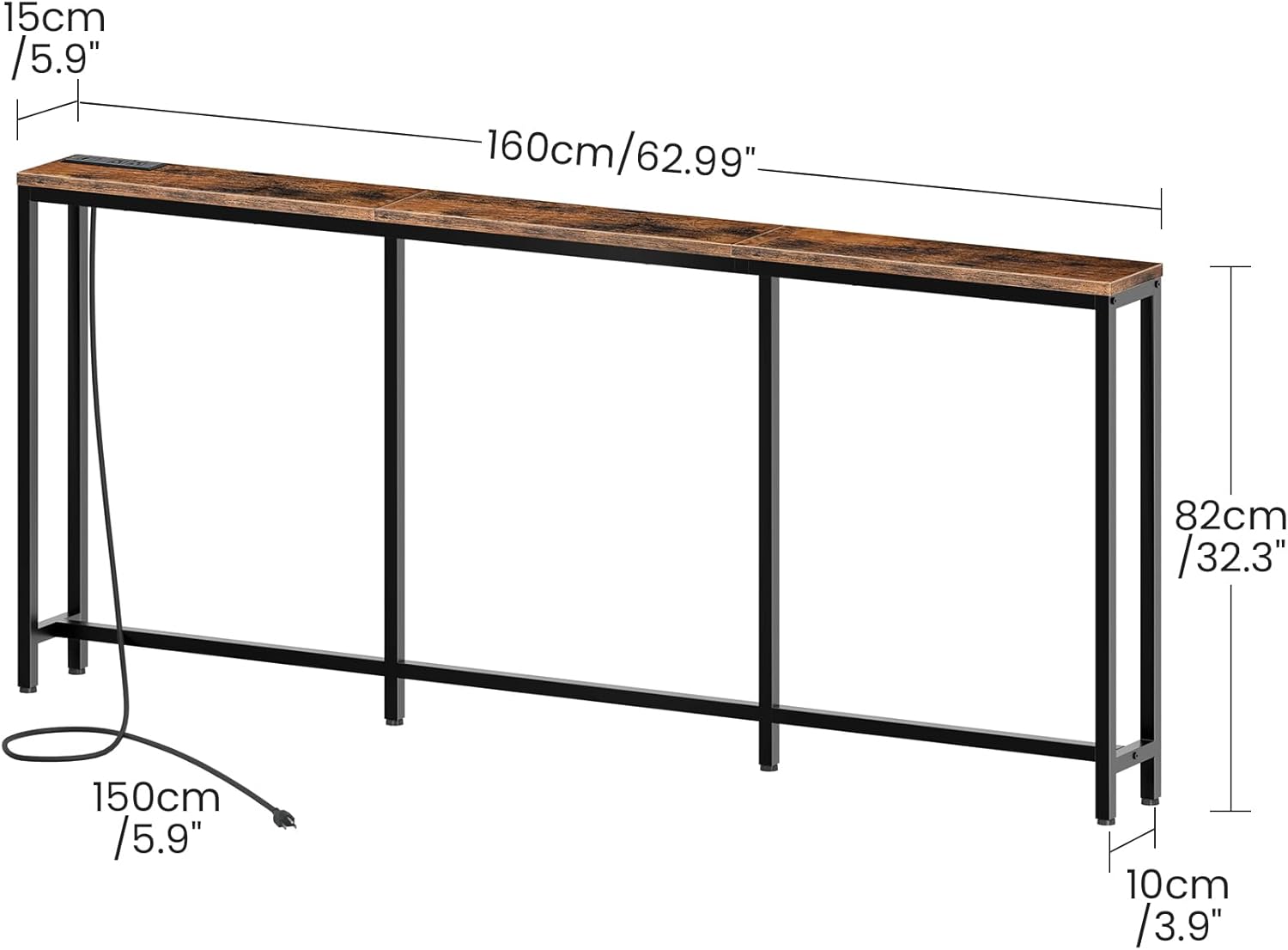
Image 3.1: The charging station can be installed in the middle or on either side of the table.

Image 3.2: Detail showing the anti-tip kit for wall attachment and the adjustable feet for leveling.
Video di montaggio:
Video 3.1: A short demonstration of the CHOEZON Narrow Console Table with Power Outlet, highlighting its features and ease of use.
4. Istruzioni per l'uso (stazione di ricarica)
La stazione di ricarica integrata fornisce un comodo accesso all'alimentazione per i tuoi dispositivi elettronici.
- Connettiti all'alimentazione: Collegare il cavo di alimentazione del tavolo a una presa a muro standard.
- Prese CA: Use the two standard AC outlets (125V/12A) for devices requiring wall adapters, such as lampo computer portatili.
- Porte USB: Utilize the USB-A port (5V/2A) and the Type-C port (5V/2A) to charge compatible smartphones, tablets, and other USB-powered devices.

Image 4.1: Detail of the built-in charging station, showing the two AC outlets, one USB-A port, and one Type-C port.
5. Manutenzione
Per garantire la longevità e l'aspetto del tuo tavolo consolle, segui queste semplici linee guida per la manutenzione:
- Pulizia: Pulisci la superficie del tavolo e la struttura con un panno morbido e asciutto.amp stoffa. Evitare detergenti abrasivi o prodotti chimici aggressivi che potrebbero danneggiare la finitura.
- Fuoriuscite: Promptly clean any spills to prevent staining, especially on the particleboard surface.
- Ispezione: Controllare periodicamente tutte le viti e i collegamenti per assicurarsi che siano ben serrati. Serrare nuovamente se necessario.
- Evitare il peso eccessivo: Do not place excessively heavy objects on the table to prevent damage or instability.
6. Informazioni sulla sicurezza
Please read and adhere to the following safety precautions to prevent injury or damage:
- Kit antiribaltamento: Always secure the table to the wall using the provided anti-tip kit to prevent accidental tipping, especially in homes with children or pets.
- Distribuzione del peso: Distribute weight evenly across the tabletop. Avoid placing heavy objects on one side.
- Sicurezza elettrica: Do not overload the charging station. Ensure that devices plugged into the AC outlets and USB ports do not exceed the specified voltage e amplimiti di rabbia.
- Solo per uso interno: This table is designed for indoor use. Do not expose it to outdoor elements or excessive moisture.
- Superficie stabile: Place the table on a flat, stable surface. Use the adjustable feet to compensate for uneven flooring.
7. Risoluzione Dei Problemi
If you encounter any issues with your CHOEZON Console Table, please refer to the following common solutions:
- Il tavolo oscilla:
- Assicurarsi che tutte le viti siano serrate saldamente.
- Adjust the leveling feet at the bottom of each leg until the table is stable.
- Verify the table is placed on a flat surface.
- Stazione di ricarica non funzionante:
- Check if the main power cord is securely plugged into a functional wall outlet.
- Ensure the power strip is correctly installed and connected within the table.
- Test the outlets/ports with a different device to rule out device-specific issues.
- Evitare di sovraccaricare la stazione di ricarica.
- Parti mancanti o componenti danneggiati:
- Refer to the parts list in your assembly guide.
- Contact CHOEZON customer support for assistance (see Section 8).
8. Garanzia e supporto
For warranty information, replacement parts, or further assistance, please contact CHOEZON customer support. You can find more information and contact details on the official CHOEZON store page: