
KLIM K7
Manuale utente del lettore di cassette portatile e convertitore MP3 KLIM K7
Modello: K7
1. Introduzione
The KLIM K7 is a versatile portable cassette player designed for both playback of audio cassettes and conversion of cassette audio to digital MP3 format. It features a built-in microphone for recording, an integrated speaker, and a rechargeable battery for on-the-go use. This manual provides detailed instructions for setting up, operating, and maintaining your KLIM K7 device.

Immagine: Oltreview of KLIM K7 features including cassette to MP3 conversion, tape playback, built-in microphone, earphone jack, speaker, and compact size.
2. Contenuto della confezione
Si prega di verificare che tutti gli articoli elencati di seguito siano inclusi nel pacchetto:
- KLIM K7 Portable Cassette Player and Converter
- Auricolari KLIM Fusion
- Scheda Micro SD da 32 GB
- Micro SD Card Reader (USB adapter)
- Cavo di ricarica USB di tipo C.
- Manuale dell'utente (questo documento)

Image: A visual representation of all items included in the KLIM K7 package: the cassette player, Type-C USB cable, 32GB Micro SD card, SD card reader, and Fusion earphones.
3. Prodotto finitoview
Familiarize yourself with the various parts and controls of your KLIM K7 device.

Immagine: Frontale view of the KLIM K7 cassette player, showing the cassette compartment, control buttons, built-in speaker, display, and included earphones, SD card, and USB adapter.
Controlli e porte:
- Scomparto per cassetta: Insert your audio cassettes here.
- Schermo di visualizzazione: Shows track time, SD card status, and recording indicator.
- Pulsante Play/Pausa: Starts or pauses cassette playback/MP3 playback.
- Pulsante di arresto: Interrompe la riproduzione o la registrazione.
- Pulsanti di avanzamento rapido/riavvolgimento: Navigates through cassette tape or MP3 tracks.
- Pulsante di registrazione: Initiates recording from cassette or microphone to SD card.
- Pulsante Modalità: Switches between cassette playback, MP3 playback, and recording modes.
- Controllo del volume: Regola il livello di uscita audio.
- Jack per auricolari da 3.5 mm: Connect included earphones or other standard headphones.
- Microfono: Microfono incorporato per la registrazione vocale.
- Slot per scheda SD: Insert the provided 32GB Micro SD card for storage.
- Porta USB di tipo C: Per caricare il dispositivo.
- Interruttore di alimentazione (ON/OFF): Accende o spegne il dispositivo.
4. Impostazione
4.1 Ricarica del dispositivo
The KLIM K7 is equipped with a 1000mAh rechargeable battery. Before first use, or when the battery is low, charge the device using the provided Type-C USB cable.
- Connect the Type-C end of the USB cable to the charging port on the KLIM K7.
- Connect the standard USB-A end of the cable to a USB power adapter (not included) or a computer's USB port.
- The charging indicator on the device will illuminate. A full charge typically takes approximately 2 hours.
- Una volta caricata completamente, scollegare il cavo.

Image: The KLIM K7 device shown with its Type-C USB charging cable, illustrating the rechargeable battery feature.
4.2 Inserimento della scheda Micro SD
The included 32GB Micro SD card is essential for converting cassettes to MP3 and for recording audio. Ensure it is properly inserted before use.
- Locate the Micro SD card slot on the side of the KLIM K7.
- Gently insert the 32GB Micro SD card into the slot with the gold contacts facing down, until it clicks into place.
- Per rimuoverla, spingere delicatamente la scheda verso l'interno finché non scatta, quindi rilasciarla e la scheda uscirà.

Image: The KLIM K7 with its cassette compartment open, illustrating the insertion of the 32GB Micro SD card into its designated slot.
4.3 Inserting an Audio Cassette
- Aprire lo sportello del vano cassetta.
- Insert your audio cassette with the open edge facing the playback head.
- Chiudere saldamente lo sportello del vano cassetta finché non scatta in posizione.
5. Istruzioni per l'uso
5.1 Accensione/Spegnimento
Slide the Power Switch (ON/OFF) located on the side of the device to the 'ON' position to power on. Slide it to 'OFF' to power off.
5.2 Riproduzione di una cassetta
- Assicurarsi che sia inserita una cassetta e che il dispositivo sia acceso.
- Premere il tasto Giocare pulsante (►). The tape will begin to play.
- Regolare il volume utilizzando il controllo del volume.
- Per mettere in pausa, premere il Riproduci/Pausa di nuovo il pulsante.
- Per interrompere, premere il Fermare pulsante (■).
- Utilizzare il Avanti veloce (►►) E Riavvolgere (◄◄) per navigare nel nastro.
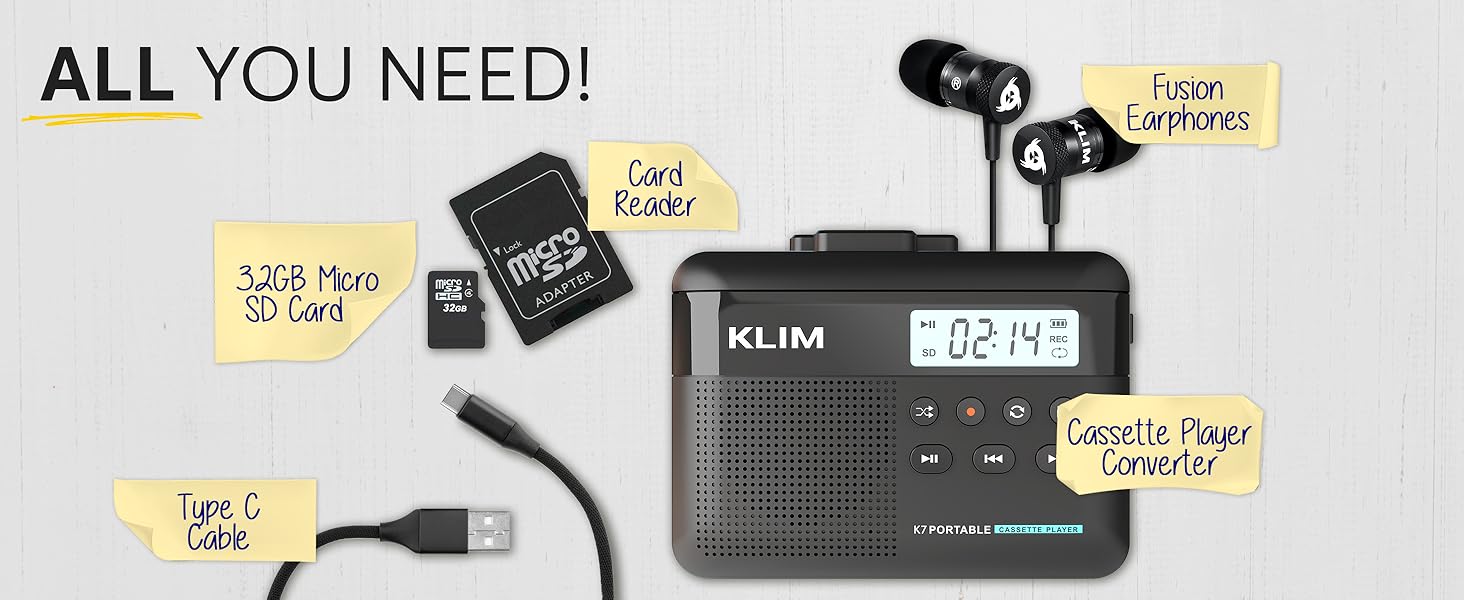
Image: A mother and child sharing earphones connected to the KLIM K7, demonstrating the device's use for listening to cassette tapes.
5.3 Converting Cassette to MP3
The KLIM K7 allows you to convert your cassette tapes directly to MP3 files on the inserted Micro SD card without needing a computer.
- Ensure a cassette tape is inserted and the 32GB Micro SD card is in its slot.
- Accendere il dispositivo.
- Premere il tasto Giocare pulsante (►) to start playing the cassette.
- Premere a lungo il tasto Documentazione pulsante (●) to begin recording. The display will show a recording indicator.
- The device will convert the audio from the cassette to an MP3 file on the SD card. Each side of the tape will typically be saved as one MP3 file.
- Per interrompere la registrazione, premere il pulsante Documentazione pulsante (●) Ancora.
- After recording, you can remove the SD card and use the provided USB adapter to transfer the MP3 files to a computer or other device.

Image: A five-step visual guide demonstrating how to convert cassette audio to MP3 files on the Micro SD card using the KLIM K7.
5.4 Using the Built-in Microphone for Recording
The KLIM K7 allows you to record external audio using its built-in microphone directly to the Micro SD card.
- Ensure the 32GB Micro SD card is inserted.
- Accendere il dispositivo.
- Premere il tasto Modalità button until the device is in microphone recording mode (indicated on the display).
- Premere il tasto Documentazione pulsante (●) per avviare la registrazione.
- Speak clearly towards the built-in microphone.
- Per interrompere la registrazione, premere il pulsante Documentazione pulsante (●) Ancora.
Note: The KLIM K7 does not support recording onto cassette tapes.

Image: A woman singing into a microphone, with the KLIM K7 and its SD card slot visible, illustrating the high-quality sound recording capability to the SD card.
5.5 Riproduzione di MP3 Files from SD Card
The KLIM K7 can also function as an MP3 player, playing filevengono memorizzati sulla scheda Micro SD.
- Ensure the Micro SD card with MP3 files è inserito.
- Accendere il dispositivo.
- Premere il tasto Modalità button until the device is in MP3 playback mode.
- Premere il tasto Giocare pulsante (►) to start playing the first MP3 file.
- Utilizzare il Avanti veloce (►►) E Riavvolgere (◄◄) per saltare le tracce.
- Regolare il volume utilizzando il controllo del volume.
5.6 Using Earphones and Speaker
The KLIM K7 offers flexible listening options:
- Auricolari: Per un ascolto privato, collega gli auricolari KLIM Fusion inclusi al jack da 3.5 mm. L'altoparlante integrato si disattiverà automaticamente.
- Altoparlante incorporato: For shared listening, ensure no earphones are plugged in. The audio will play through the integrated speaker.

Image: A man wearing earphones, connected to the KLIM K7, highlighting the universal 3.5mm jack port for personal listening.
6. Manutenzione
Proper care and maintenance will ensure the longevity and optimal performance of your KLIM K7.
- Pulizia: Use a soft, dry cloth to clean the exterior of the device. Do not use liquid cleaners or abrasive materials. For the playback head and pinch rollers, use a specialized cassette head cleaner if necessary, following its instructions.
- Magazzinaggio: Quando non in uso, conservare il dispositivo in un luogo fresco e asciutto, lontano dalla luce solare diretta e da temperature estreme.
- Cura della batteria: Per prolungare la durata della batteria, evitare di scaricarla completamente frequentemente. Caricare regolarmente il dispositivo, anche se non lo si utilizza costantemente.
- Cassette Tapes: Use clean, well-maintained cassette tapes to prevent damage to the playback head and ensure good audio quality.
7. Risoluzione Dei Problemi
If you encounter issues with your KLIM K7, refer to the following common problems and solutions:
| Problema | Possibile causa | Soluzione |
|---|---|---|
| Il dispositivo non si accende. | Batteria scarica o scarica. | Carica il dispositivo utilizzando il cavo USB-C in dotazione. |
| Nessun suono durante la riproduzione della cassetta. | Volume too low; earphones not properly connected; dirty playback head. | Increase volume; ensure earphones are fully plugged in or removed for speaker; clean playback head. |
| Cassette to MP3 conversion not working. | SD card not inserted or full; cassette not playing. | Ensure SD card is correctly inserted and has free space; verify cassette playback is active before recording. |
| Poor audio quality during playback or recording. | Dirty playback head/pinch rollers; damaged cassette tape; low battery. | Clean playback head and pinch rollers; try a different cassette; ensure device is charged. |
| MP3 files not visible on computer after transfer. | SD card not properly read by computer/adapter. | Ensure SD card is fully inserted into the card reader; try a different USB port on your computer. |
8. Specifiche
| Caratteristica | Dettaglio |
|---|---|
| Dimensioni del prodotto | 4.76 x 3.61 x 1.56 pollici |
| Peso dell'articolo | 7.7 once |
| Produttore | CLIMA |
| Numero di modello | K7 |
| Batteria | Ioni di litio da 1000 mAh (ricaricabile, inclusa) |
| Porta di ricarica | Tipo-C USB |
| Magazzinaggio | Scheda Micro SD da 32 GB (inclusa) |
| Uscita audio | Built-in Speaker, 3.5mm Earphone Jack |
| Funzione di registrazione | Cassette to MP3, Built-in Microphone to MP3 (to SD card) |

Image: The KLIM K7 device with its compact dimensions (4.7" x 3.5" x 1.4") and weight (8 oz), highlighting its portability.
9. Garanzia e supporto
KLIM is committed to producing quality electronics. The KLIM K7 comes with a 5-year assurance against manufacturing defects. If you encounter any problems with your device, please contact KLIM customer support for assistance.
For further support, product registration, or to view frequently asked questions, please visit the official KLIM websito:
10. Informazioni sulla sicurezza
- Non esporre il dispositivo ad acqua, umidità o temperature estreme.
- Evitare di far cadere o sottoporre il dispositivo a forti impatti.
- Non tentare di smontare o riparare il dispositivo da soli. Rivolgersi a personale qualificato.
- Tenere fuori dalla portata dei bambini.
- Smaltire il dispositivo e la batteria in modo responsabile, nel rispetto delle normative locali.
Ask a question about this manual
Ask about setup, troubleshooting, compatibility, parts, safety, or missing instructions. Manuals+ will review the question and use this page’s manual context to help answer it.