
VTech 80-580600
VTech Spidey and His Amazing Friends Spidey to The Rescue Driver
Manuale di istruzioni
Prodotto finitoview
Incontra il team di Spidey della serie di successo MARVEL Spidey e i suoi fantastici amici e scopri cosa può fare questo pilota 2 in 1! Ruota le manopole e trasforma facilmente il veicolo da Spidey a... Web-Crawler and Spin’s Techno-Racer. Practice driving each vehicle while exploring the rules of the road. Learn about Spidey and his friends Spin, Ghost-Spider, Ms. Marvel and Hulk by pressing the WEB-Ster or character buttons. Team up with Spidey to play seven thrilling games and follow instructions to complete missions—like rescuing a puppy or stopping super-villains such as Doc Ock, Green Goblin, and Rhino. What a ride! Intended for ages 3+ years. Requires 2 AA batteries. Batteries included for demo purposes only. New batteries recommended for regular use.
- Web out and hop in this 2-in-1 driver that switches between Spidey’s Web-Crawler e il Techno-Racer di Spin.
- Turn the steering wheel and explore driving directions, turn signals and traffic lights.
- Hear super facts about Spidey, Spin, Ghost-Spider, Ms. Marvel, and Hulk with voices, phrases, and cool sound effects from the show.
- Complete simple missions or go up against super-villains like Doc Ock, Green Goblin and Rhino in seven action-packed games.
- Intended for ages 3+ years; requires 2 AA batteries; batteries included for demo purposes only; new batteries recommended for regular use.
- This pretend-play driver toy is great for preschoolers to explore problem-solving and cause-and-effect; makes an exciting unisex gift for holidays, birthdays or just because.
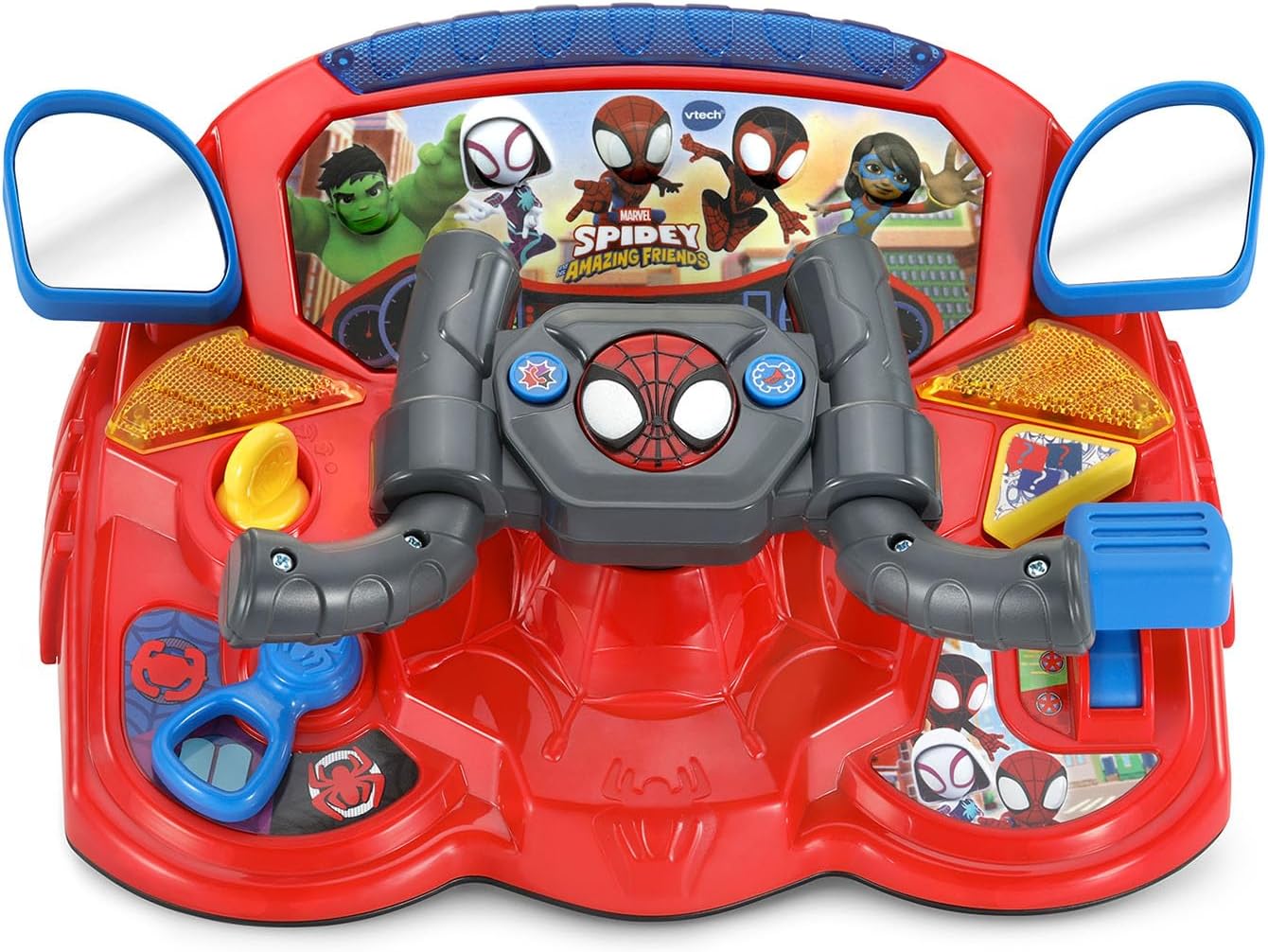
Figure 1: Spidey to The Rescue Driver in Web-Crawler mode.
Impostare
Installazione della batteria
The Spidey to The Rescue Driver requires 2 AA batteries. Batteries are included for demonstration purposes only. For regular use, new alkaline batteries are recommended.
- Individuare il vano batterie sul lato inferiore dell'unità.
- Utilizzando un cacciavite, allentare la vite sul coperchio del vano batteria.
- Togliere il coperchio.
- Insert 2 new AA (LR6) batteries, ensuring correct polarity (+ and -).
- Richiudere il coperchio del vano batteria e serrare saldamente la vite.
Informazioni importanti sulla batteria:
- Le batterie non ricaricabili non devono essere ricaricate.
- Le batterie ricaricabili devono essere rimosse dal giocattolo prima di essere caricate.
- Le batterie ricaricabili devono essere caricate solo sotto la supervisione di un adulto.
- Non mischiare batterie vecchie e nuove.
- Do not mix different types of batteries (e.g., alkaline, standard carbon-zinc, or rechargeable nickel-cadmium).
- Si devono utilizzare solo batterie dello stesso tipo o di tipo equivalente a quelle consigliate.
- Le batterie devono essere inserite rispettando la polarità corretta.
- Le batterie esaurite devono essere rimosse dal giocattolo.
- I terminali di alimentazione non devono essere cortocircuitati.

Figure 2: Back of the product packaging indicating battery requirements.
Istruzioni per l'uso
Accensione/spegnimento
Locate the On/Off switch, usually on the side or back of the unit. Slide the switch to the "On" position to activate the toy. To conserve battery life, slide the switch to "Off" when not in use. The toy also features an automatic shut-off function after a period of inactivity.
Trasformazione 2 in 1
The Spidey to The Rescue Driver can transform between two modes: Spidey's Web-Crawler and Spin's Techno-Racer. To transform, simply turn the hand grips on the steering wheel. The toy will announce the current mode.

Figure 3: Spidey's Web-Crawler mode.

Figure 4: Spin's Techno-Racer mode.
Controlli e caratteristiche
- Volante: Turn the steering wheel to simulate driving and interact with games.
- WEB-Pulsante Ster: Press this button to hear facts about Spidey and his friends.
- Pulsanti dei personaggi: Press buttons featuring Spidey, Spin, Ghost-Spider, Ms. Marvel, and Hulk to hear their voices and phrases.
- Controllo della velocità: Adjust the speed for racing and braking sounds.
- Pulsante Aiuto: Press for hints or assistance during missions.
- Pulsanti di controllo: Use these buttons to honk the horn or call a Spidey team member.
- Turn Signals & Traffic Lights: Interact with these features to learn about road rules.
Play Modes and Games
The driver offers seven action-packed games and various play modes. Use the mode selector to choose between different activities. Follow the instructions provided by the toy to complete missions, rescue characters, and stop super-villains like Doc Ock, Green Goblin, and Rhino.

Figure 5: Child engaging with the Spidey Driver.

Figure 6: Child using the Spidey Driver at a table.
Manutenzione
Istruzioni per la pulizia
To keep your Spidey to The Rescue Driver in optimal condition:
- Pulisci il giocattolo con un panno leggermenteamp stoffa.
- Non utilizzare prodotti chimici aggressivi o detergenti abrasivi.
- Non immergere il giocattolo in acqua.
Magazzinaggio
Store the toy in a cool, dry place away from direct sunlight and heat sources when not in use for extended periods. Remove batteries if the toy will not be used for a long time to prevent leakage.
Risoluzione dei problemi
| Problema | Soluzione |
|---|---|
| Il giocattolo non si accende o non risponde. |
|
| Il suono è distorto o troppo basso. |
|
| Toy is not transforming correctly. |
|
Specifiche
| Caratteristica | Dettaglio |
|---|---|
| Numero di modello | 80-580600 |
| Marca | VTech |
| Tipo di materiale | Plastica |
| Dimensioni del prodotto | 29.69 x 12.09 x 0.25 cm; 839.15 g |
| Peso dell'articolo | 1.85 libbre |
| Batterie richieste | 2 batterie AA (incluse per la dimostrazione) |
| Età consigliata | 36 mesi - 6 anni |
| Data di rilascio | 1 luglio 2025 |
Garanzia e supporto
VTech products are designed to provide years of educational fun. For detailed warranty information or technical support, please visit the official VTech websito o contattare il loro servizio clienti.
Puoi trovare maggiori informazioni e supporto su Negozio VTech su Amazon.
Ask a question about this manual
Ask about setup, troubleshooting, compatibility, parts, safety, or missing instructions. Manuals+ will review the question and use this page’s manual context to help answer it.