
Eonon P6
Eonon P6 Motorcycle Display User Manual
Modello: P6
1. Introduzione
The Eonon P6 is a 7-inch IPS display system designed for motorcycles, offering advanced connectivity and recording capabilities. It integrates Apple CarPlay and Android Auto for seamless smartphone integration, features dual cameras for front and rear DVR recording, and is built to withstand various weather conditions. This manual provides essential information for setup, operation, maintenance, and troubleshooting.
2. Cosa c'è nella scatola
Prima di iniziare l'installazione, verificare che tutti i componenti elencati di seguito siano presenti nella confezione:
- Ospite x 1
- Cavo di alimentazione x 1
- Customer Test Power Cable x 1
- Antenna GPS x 1
- Camera x 2
- Wired Control x 1
- Tire Pressure Sensor x 2
- Staffa di montaggio x 1
- Chiave esagonale x 1
- Cacciavite a croce x 1
- Chiave inglese x 1
- Manuale utente x 1

Image: All components included in the Eonon P6 package.
3. Configurazione e installazione
Follow these steps to properly install your Eonon P6 system on your motorcycle:
- Install the bracket to the handlebar: Securely attach the mounting bracket to your motorcycle's handlebar using the provided screws. Ensure it is firmly in place to prevent movement during rides.
- Install the screen and adjust its angle: Mount the Eonon P6 display onto the installed bracket. Adjust the screen's angle for optimal viewing, then tighten all fasteners to secure it. The bracket allows for 360-degree rotation for flexible positioning.
- Installazione completata: Once the display is securely mounted and angled correctly, proceed with connecting the power cables, cameras, GPS antenna, and wired remote control as per the wiring diagram (refer to the full user manual for detailed wiring instructions).
Image: Visual guide for the Eonon P6 installation process.
Modelli applicabili
The Eonon P6 is compatible with DC12V-24V vehicles, including various types of motorcycles and ATVs.
Image: Various vehicle types compatible with the Eonon P6 system.
4. Istruzioni per l'uso
Smart Riding Features
The Eonon P6 records essential ride details such as time, speed, altitude, and compass direction, providing comprehensive data for your journeys.

Image: Eonon P6 displaying real-time riding metrics.
Wireless CarPlay e Android Auto
Connect your smartphone wirelessly to access Apple CarPlay or Android Auto. This allows for hands-free navigation, music playback, and communication, helping you stay focused on the road.
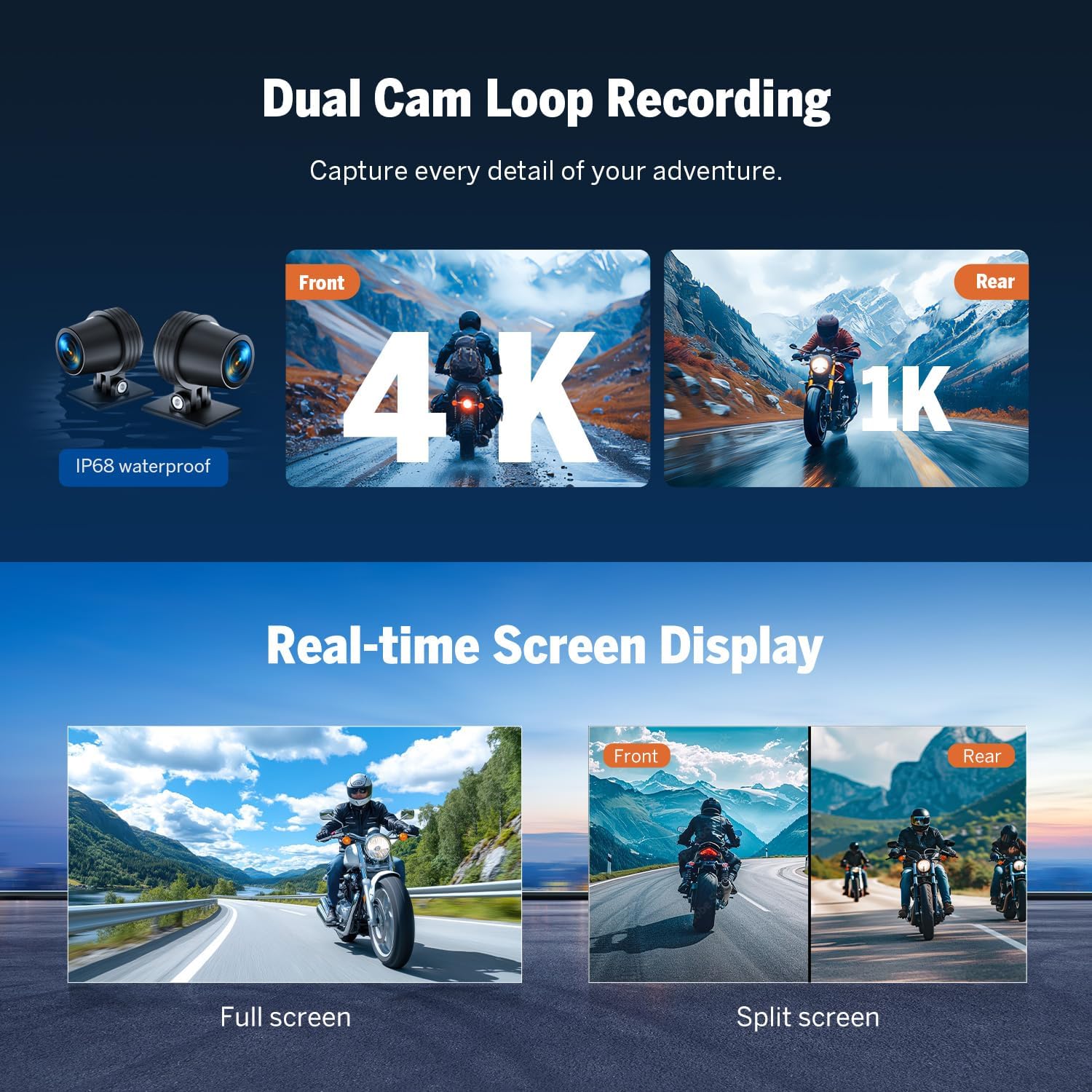
Image: Wireless CarPlay and Android Auto functionality on the Eonon P6.
Dual Cam Loop Recording
Capture every detail of your ride with dual cameras. The front camera records in 4K resolution, and the rear camera records in 1K. Both cameras are IP68 waterproof, ensuring reliable performance in wet conditions. The system supports continuous loop recording.
Real-time Screen Display
View cibo vivotage from both cameras on the 7-inch IPS display. You can switch between full-screen view for either front or rear camera, or use the split-screen mode to see both simultaneously.

Image: Dual camera recording and real-time display modes.
Direct Phone-to-Headset Connectivity & Built-in Speaker
Connect your headset directly to your phone via the Eonon P6 for clearer and more stable audio during calls and music playback, even in challenging riding conditions. The unit also features a built-in speaker for audio output.
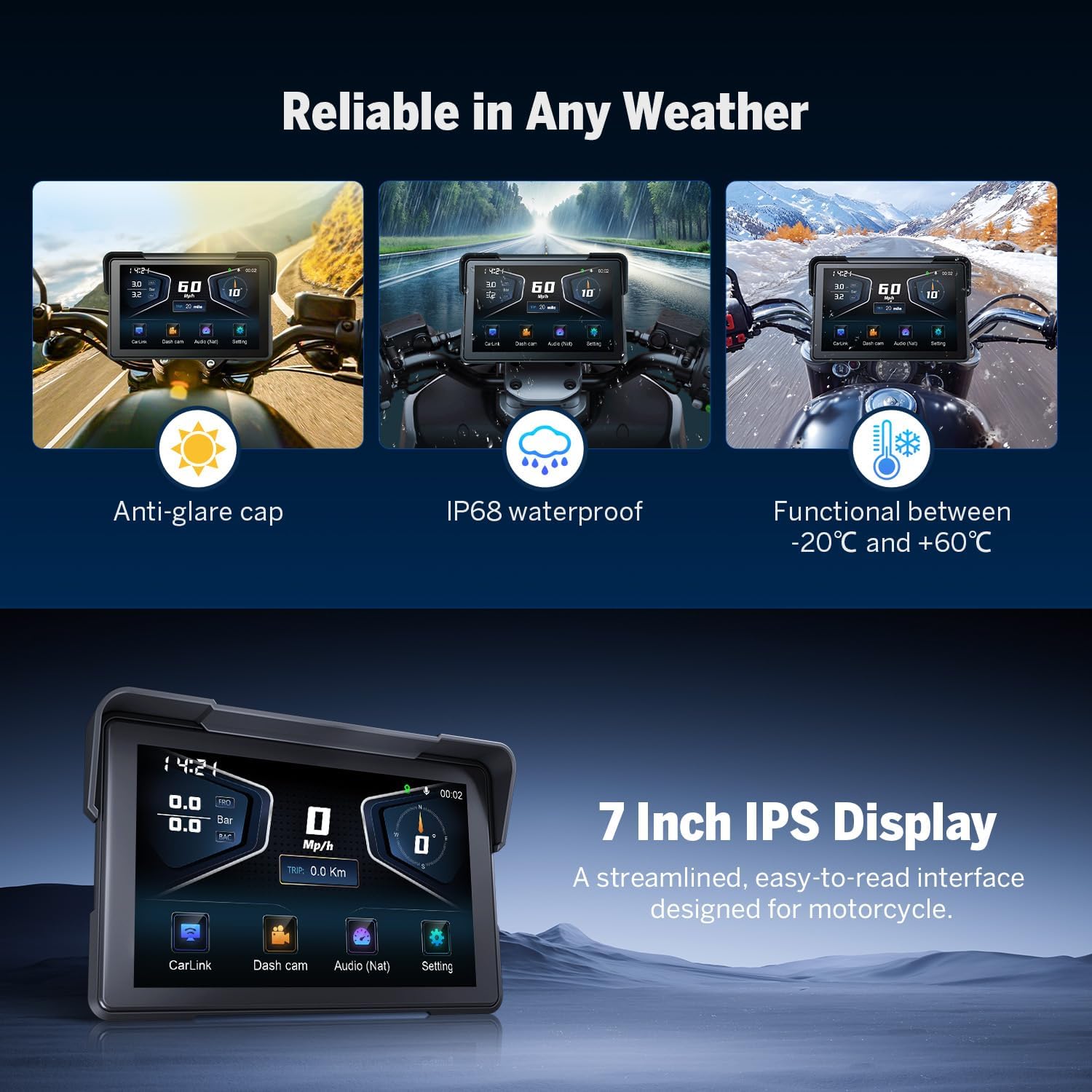
Image: Connectivity options and integrated speaker.
Reliable in Any Weather & 7-Inch IPS Display
The Eonon P6 is designed for durability, featuring an anti-glare cap for visibility in bright sunlight and IP68 waterproofing. It operates reliably in temperatures ranging from -20°C to +60°C. The 7-inch IPS display provides a streamlined, easy-to-read interface optimized for motorcycle use.

Image: Weather resistance and display features of the Eonon P6.
App Integration (Viidure)
Download the Viidure app to access professional riding footage and data. The app allows you to review time, speed, altitude, location, and driving routes recorded by the device. You can download the app from https://www.6zhentan.com/app/d0001/index.html.

Image: Viidure app integration for riding data analysis.
TPMS Supported
The system supports real-time tire pressure monitoring (TPMS) to enhance driving safety. Ensure the tire pressure sensors are correctly installed and paired with the device.
Safeguard Your Data
The Eonon P6 comes with a 64GB microSD card included and is expandable up to 256GB. It records continuously without interruption, ensuring your ride data is safely stored.

Image: TPMS support and data storage features.
Weatherproof Wired Handlebar Remote
Control essential functions easily with the weatherproof wired handlebar remote, ideal for motorcycles and ATVs, allowing for safe operation without taking your hands off the handlebars.
Image: Wired handlebar remote control for the Eonon P6.
5. Specifiche
| Marca | Eone |
| Produttore | Eone |
| Nome del modello | P6 |
| Numero di parte | P6 |
| Dimensioni della scheda di memoria inclusa | 64 GB |
| Dispositivi compatibili | Smartphone |
| Caratteristiche speciali | Apple CarPlay, Android Auto |
| Numero di articoli | 1 |
| Standing Screen Size | 7 pollici |
| Tipo di schermo | LCD |
| Batterie incluse | NO |
| Batterie richieste | NO |
| Tipo di connessione | Bluetooth |
| Tipo di montaggio | Posterioreview Supporto per specchio |
| Attuale Viewangolo di ing | 110 gradi |
| Dimensioni del prodotto | 29 x 18 x 10 cm; 500 g |
| Prima data disponibile | 20 febbraio 2025 |
| Tipo di servizio del veicolo | Motociclo |
| Metodo di controllo | Tocco |
6. Manutenzione
To ensure the longevity and optimal performance of your Eonon P6, follow these maintenance guidelines:
- Pulizia: Pulisci regolarmente lo schermo e il corpo del dispositivo con un panno morbido eamp panno. Evitare l'uso di prodotti chimici aggressivi o materiali abrasivi che potrebbero danneggiare il display o casing.
- Condizioni ambientali: While the device is designed for various weather conditions, avoid prolonged exposure to extreme temperatures outside its operating range (-20°C to +60°C) when not in use.
- Connessioni via cavo: Periodically check all cable connections (power, cameras, GPS, remote) to ensure they are secure and free from damage. Loose connections can lead to intermittent functionality.
- Aggiornamenti software: Controlla l'Eonon ufficiale website or the Viidure app for any available software or firmware updates to ensure your device has the latest features and bug fixes.
7. Risoluzione Dei Problemi
If you encounter issues with your Eonon P6, refer to the following common problems and solutions:
- Il dispositivo non si accende:
- Ensure the power cable is correctly connected to the device and the motorcycle's power source.
- Verify that the power connector is not mistakenly plugged into the GPS port, as this can prevent the device from functioning.
- Check the motorcycle's battery and fuse for any issues.
- Device Permanently Boots/Restarts:
- This may indicate a power supply issue or a software malfunction. Ensure stable power delivery.
- Prova a eseguire un ripristino delle impostazioni di fabbrica (per le istruzioni, consulta il manuale utente completo).
- Assicurarsi che il dispositivo non si surriscaldi.
- TPMS Will Not Connect:
- Ensure the tire pressure sensors are correctly installed and have working batteries.
- Follow the pairing instructions in the full user manual to connect the sensors to the display.
- Verificare la presenza di eventuali ostacoli o interferenze che potrebbero influire sul segnale wireless.
- Screen Brightness is Poor/Hard to See in Sunlight:
- Adjust the screen brightness settings through the device's menu.
- Ensure the anti-glare cap is properly positioned to minimize direct sunlight on the screen.
- Consider the angle of the screen relative to the sun.
For further assistance, please contact Eonon customer support.
8. Garanzia e supporto
Eonon products are designed for reliability and performance. For information regarding warranty coverage, technical support, or service, please refer to the warranty card included with your product or visit the official Eonon websito. Conservare la ricevuta d'acquisto come prova d'acquisto per eventuali reclami in garanzia.
Assistenza clienti: For any operational questions, troubleshooting assistance beyond this manual, or warranty inquiries, please contact Eonon customer service through their official channels.
Documenti correlatiP6

Ask a question about this manual
Ask about setup, troubleshooting, compatibility, parts, safety, or missing instructions. Manuals+ will review the question and use this page’s manual context to help answer it.