
Introduzione
This instruction manual provides guidance for the proper use and maintenance of your ZdalaMit RMT-AM120U replacement remote control. This remote is designed to be compatible with various Sony Home Audio Systems, offering direct functionality without the need for programming.
Compatibilità
The RMT-AM120U remote control is compatible with the following Sony Home Audio System models:
- SHAKE-X7D
- MHC-GT3D
- MHC-GT5D
- MHC-V7D
- SHAKE-X1D
- SHAKE-X3D
- HCD-SHAKEX3
- HCD-SHAKEX1
- SS-SHAKEX3
- SS-SHAKEX1
Impostare
Installazione della batteria
- Individuare il vano batterie sul retro del telecomando.
- Per aprire il coperchio del vano batteria, farlo scorrere verso il basso o nella direzione indicata dalla freccia.
- Inserire due (2) batterie alcaline AAA da 1.5 V, assicurandosi che i terminali positivo (+) e negativo (-) corrispondano agli schemi all'interno del vano.
- Chiudere il coperchio del vano batteria facendolo scorrere nuovamente in posizione finché non scatta in posizione.
Nota: Le batterie non sono incluse nel telecomando. Per prestazioni ottimali, utilizzare batterie alcaline nuove.
Utilizzo iniziale
No programming is required for this replacement remote control. Once batteries are installed correctly, the remote is ready for immediate use with your compatible Sony Home Audio System.
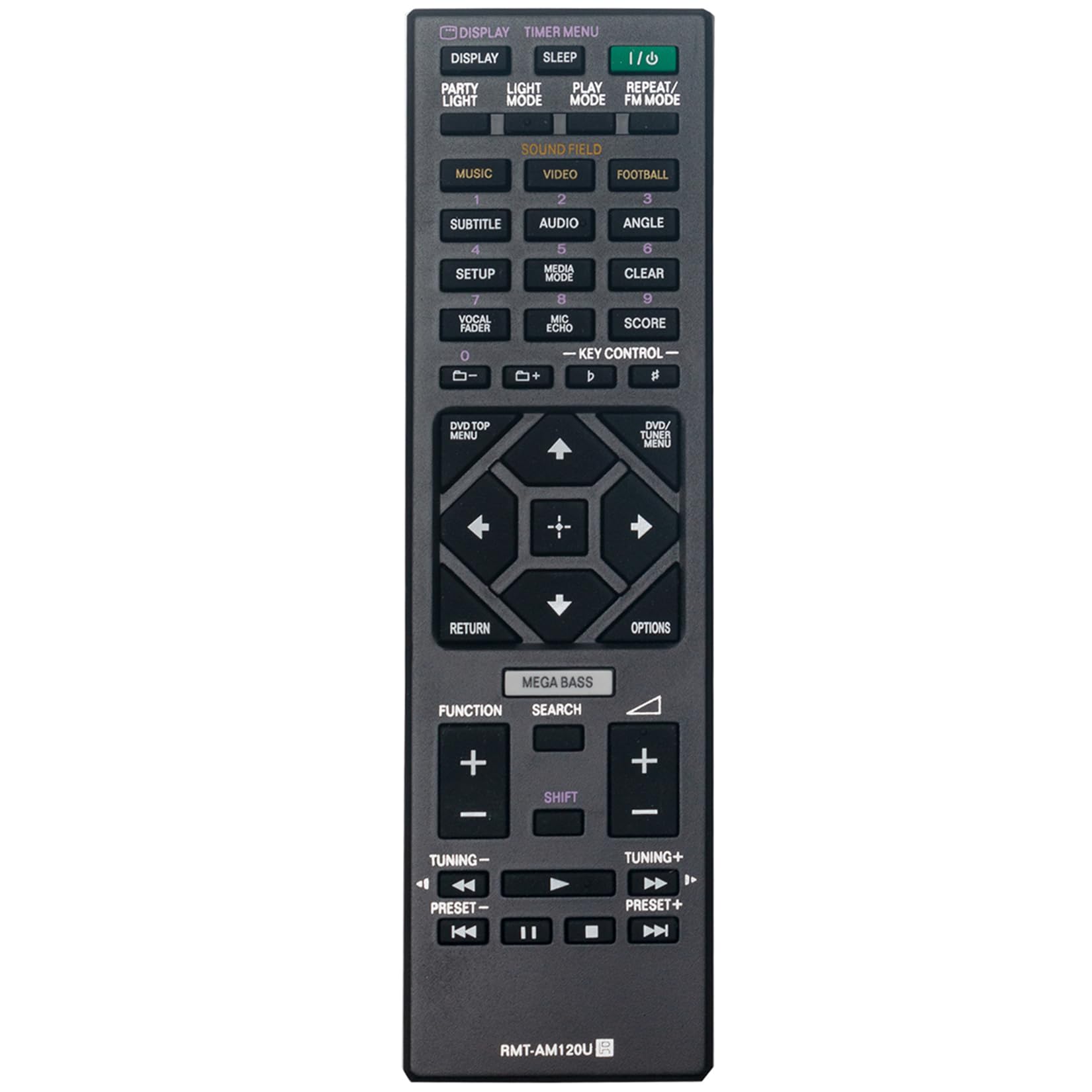
Figura 1: Fronte view of the RMT-AM120U remote control.
Istruzioni per l'uso
Point the remote control directly at the infrared sensor on your Sony Home Audio System. Ensure there are no obstructions between the remote and the system.
Funzioni chiave
The remote control features various buttons for controlling your audio system. Common functions include:
- Alimentazione (I/O): Accende o spegne il sistema audio.
- Display: Changes or shows display information.
- Timer Menu: Accede alle impostazioni del timer.
- Sonno: Imposta un timer di spegnimento.
- Modalità di gioco: Selects playback modes (e.g., Normal, Shuffle).
- Modalità ripetizione/FM: Toggles repeat playback or switches FM radio mode.
- Music/Video/Football: Selects input sources or sound modes.
- Subtitle/Audio/Angle: Controls DVD/Blu-ray playback options.
- Impostare: Accede alle impostazioni di sistema.
- Modalità multimediale: Selects media input.
- Chiaro: Cancella voci o selezioni.
- Vocal Fader/Mic Echo/Score: Controls microphone and karaoke functions.
- Controllo chiave: Adjusts key for karaoke.
- Pulsanti numerici (0-9): Per la selezione diretta o l'inserimento delle tracce.
- DVD/TOP MENU: Accesses the top menu of a DVD/Blu-ray disc.
- DVD/TUNER MENU: Accesses the menu for DVD or tuner functions.
- Pulsanti di navigazione (Su, Giù, Sinistra, Destra, Invio): Per la navigazione e la selezione del menu.
- Ritorno: Ritorna alla schermata o al menu precedente.
- Opzioni: Displays options menu.
- MEGA BASSI: Migliora i bassi.
- Ricerca: Initiates search function.
- Funzione: Cycles through functions or inputs.
- Volume (+/-): Regola il livello del volume.
- Tuning (+/-): Tunes radio frequencies.
- Preset (+/-): Seleziona le stazioni radio preimpostate.
- Controlli di riproduzione (Riproduci, Pausa, Stop, Avanti veloce, Riavvolgi, Salta avanti, Salta indietro): Controlla la riproduzione multimediale.

Figura 2: Angolato view highlighting the button layout.
Manutenzione
Sostituzione della batteria
Replace batteries when the remote control's response becomes sluggish or stops functioning. Always replace both batteries at the same time with new 1.5V AAA alkaline batteries. Do not mix old and new batteries, or different types of batteries.
Pulizia
Wipe the remote control with a soft, dry cloth. Do not use abrasive cleaners, solvents, or alcohol, as these can damage the surface or internal components.
Magazzinaggio
Se il telecomando non verrà utilizzato per un periodo prolungato, rimuovere le batterie per evitare perdite e potenziali danni.
Risoluzione dei problemi
- Il telecomando non risponde:
- Controllare che le batterie siano inserite correttamente, rispettando la polarità corretta.
- Sostituire le vecchie batterie con quelle nuove.
- Assicurarsi che non vi siano ostacoli tra il telecomando e il sensore del sistema audio.
- Make sure you are within the effective operating range (approximately 33 feet).
- Autonomia limitata o funzionamento intermittente:
- Assicurarsi che le batterie siano nuove.
- Verify that the remote control is pointed directly at the audio system.
- Avoid strong light sources (e.g., direct sunlight, fluorescent lights) that might interfere with the infrared signal.
Specifiche
| Caratteristica | Specificazione |
|---|---|
| Modello | RMT-AM120U |
| Alimentazione elettrica | 2 batterie alcaline AAA da 1.5 V |
| Tecnologia di connettività | Infrarossi |
| Quantità del pulsante | 15 |
| Portata massima | 33 piedi (10 metri) |
| Dimensioni (L x P x A) | 6.35" x 1.79" x 0.55" (16.13 cm x 4.55 cm x 1.40 cm) |
| Peso dell'articolo | 40 grammi (0.09 libbre) |
| Colore | Nero |

Figure 3: Remote control with approximate dimensions.
Informazioni sulla garanzia
This ZdalaMit RMT-AM120U replacement remote control comes with a Garanzia di 1 anno from the date of purchase. This warranty covers manufacturing defects under normal use. It does not cover damage caused by misuse, accidents, unauthorized modifications, or battery leakage.
For warranty claims or support, please contact your retailer or the manufacturer directly.
Supporto
For further assistance or inquiries regarding your ZdalaMit RMT-AM120U remote control, please refer to the contact information provided by your seller or visit the ZdalaMit official support channels.