
Pyle PHSKR28.5
Manuale utente del mini sistema stereo Hi-Fi Bluetooth Pyle PHSKR28.5
Modello: PHSKR28.5
Introduzione
This manual provides detailed instructions for the setup, operation, and maintenance of your Pyle PHSKR28.5 Mini Hi-Fi Bluetooth Stereo System. Please read this manual thoroughly before using the product to ensure proper function and to maximize your listening experience.

Image: The Pyle PHSKR28.5 Mini Hi-Fi Bluetooth Stereo System, featuring a central unit and two accompanying speakers, all in black.
Cosa c'è nella scatola
Verificare che tutti i componenti siano presenti nella confezione:
- Main Stereo Unit
- Due relatori
- BT Stereo System Remote Control
- Cavo di collegamento AV
- Un microfono wireless
- Cavo di alimentazione
- Cavo dell'antenna FM

Image: An illustration showing all items included in the product package: the main stereo unit, two speakers, a microphone, an AV cable, an FM antenna, and a remote control.
Istruzioni di installazione
1. Collegamento degli altoparlanti
- Connect the speaker wires from the main unit to the corresponding speaker terminals on each speaker. Ensure correct polarity (positive to positive, negative to negative).
- Posizionare gli altoparlanti per una distribuzione ottimale del suono.
2. Collegamento dell'antenna
- Connect the supplied FM antenna cable to the FM antenna input on the rear of the main unit.
- Estendi l'antenna per una migliore ricezione.
3. Collegamento elettrico
- Plug the power cord into the AC inlet on the main unit.
- Connect the other end of the power cord to a standard AC power outlet.
4. Connessioni opzionali
- Dispositivi USB: Insert a USB flash drive into the USB port for media playback or recording.
- Ingresso AUX: Connect external audio devices (e.g., smartphone, MP3 player) using an AUX cable to the AUX input.
- Uscita HDMI: Connect an HDMI cable from the unit's HDMI output to a compatible display for video output from CD/DVD playback.
- Microfono: Connect the wireless microphone receiver or a wired microphone to the microphone input for karaoke or recording.

Image: The Pyle PHSKR28.5 stereo system highlighting its various input options including Aux, HDMI, and USB ports, alongside visual cues for Bluetooth connectivity with a laptop and smartphone.
Istruzioni per l'uso
Accensione/spegnimento
Premere il tasto ENERGIA pulsante sul pannello frontale o sul telecomando per accendere o spegnere l'unità.
Selezione della fonte
Premere il tasto FONTE or FUNZIONE button on the front panel or remote control to cycle through available input sources: Bluetooth, CD/DVD, FM Radio, USB, AUX, HDMI.
Accoppiamento Bluetooth
- Select the Bluetooth source using the FONTE button. The display will show "BT" and indicate pairing mode.
- Sul tuo dispositivo mobile, attiva il Bluetooth e cerca i dispositivi disponibili.
- Select "Pyle PHSKR28.5" (or similar) from the list.
- Una volta effettuata l'associazione, l'unità confermerà la connessione.
Riproduzione CD/DVD
- Selezionare la sorgente CD/DVD.
- Premere il tasto APRI/CHIUDI pulsante per aprire il vassoio del disco.
- Place a CD or DVD (compatible with MP3, CD-R/RW) onto the tray with the label side up.
- Premere APRI/CHIUDI again to close the tray. Playback will begin automatically or can be started with the RIPRODUCI/PAUSA pulsante.

Immagine: un primo piano view of the Pyle PHSKR28.5 stereo system's tray-loading CD player, with a hand inserting a disc.
Sintonizzazione radio FM
- Selezionare la sorgente Radio FM.
- Utilizzare il SINTONIA +/- pulsanti per sintonizzarsi manualmente su una stazione.
- Premere e tenere premuto SINTONIA +/- per la scansione automatica alla successiva stazione disponibile.
- Per salvare un preset, premere MEMORIA, quindi utilizzare PRESET +/- per selezionare un numero preimpostato e premere MEMORIA di nuovo per confermare.
USB Playback, Recording, and CD Ripping
- Riproduzione USB: Insert a USB flash drive. Select the USB source. The unit will automatically detect and play compatible audio files.
- Registrazione USB: While playing audio from another source (e.g., FM radio, AUX, microphone input), press the DOCUMENTAZIONE button to begin recording to the connected USB drive.
- Estrazione CD: While a CD is playing, press the CD RIP button to convert tracks from the CD to MP3 format and save them onto the USB drive.
Utilizzo del microfono
Connect the microphone to the designated input. Use the VOL MICROFONO knob to adjust microphone volume. Adjust ECO E RIVERBERO effects as desired for vocal enhancement.
Impostazioni equalizzatore
Premere il tasto EQ button on the front panel or remote to cycle through various equalizer presets such as Jazz, Rock, Pop, Classical, and Bass. These settings adjust the audio frequency response for different music genres.

Image: The Pyle PHSKR28.5 stereo system with its speakers illuminated by colorful LED lights, illustrating the visual feedback of equalizer effects and strong bass output.


Image: Icons representing various equalizer presets: Jazz (saxophone), Classical (cello), and Pop (person with headphones).
Volume, Bass, and Treble Adjustment
Utilizzare il VOLUME PRINCIPALE manopola sul pannello frontale o volume +/- buttons on the remote to adjust the overall volume. Separate BASS E ALTI controls are available on the remote for fine-tuning the audio output.
Funzioni del telecomando
The included remote control provides convenient access to all major functions, including power, source selection, volume, track control, equalizer settings, and microphone effects.

Immagine: Un dettaglio view of the Pyle PHSKR28.5 main unit's control panel, showing buttons for digital amplifier, Bluetooth 5.0, USB ports, LED indicators, and microphone volume/bass/treble adjustments.
Manutenzione
- Pulizia: Utilizzare un panno morbido e asciutto per pulire le superfici esterne dell'unità e degli altoparlanti. Non utilizzare detergenti liquidi o materiali abrasivi.
- Ventilazione: Assicurarsi che le aperture di ventilazione dell'unità non siano ostruite per evitare il surriscaldamento.
- Cura del disco: Maneggiare CD e DVD tenendoli per i bordi. Conservarli nelle loro custodie per evitare graffi. Pulire i dischi con un panno morbido e privo di lanugine, procedendo dal centro verso l'esterno.
- Magazzinaggio: Se si conserva l'unità per un periodo prolungato, scollegarla dalla presa di corrente e conservarla in un luogo fresco e asciutto.
Risoluzione dei problemi
| Problema | Possibile causa | Soluzione |
|---|---|---|
| Nessun potere | Cavo di alimentazione non collegato; presa di corrente non attiva. | Assicurarsi che il cavo di alimentazione sia collegato saldamente. Testare la presa con un altro dispositivo. |
| Nessun suono | Volume too low; Incorrect source selected; Speaker wires loose. | Increase volume. Select the correct input source. Check speaker wire connections. |
| Bluetooth non associato | Unit not in pairing mode; Device too far; Previously paired device connected. | Ensure unit is in Bluetooth pairing mode. Move device closer. Disconnect from other Bluetooth devices. |
| CD/DVD non riprodotto | Disc inserted incorrectly; Disc is scratched or dirty; Incompatible disc format. | Insert disc correctly. Clean or replace disc. Ensure disc is compatible (MP3, CD-R/RW). |
| Scarsa ricezione FM | Antenna not properly connected or extended; Weak signal. | Adjust FM antenna position. Try repositioning the unit. |
| Il telecomando non funziona | Batterie scariche; ostruzione tra il telecomando e l'unità. | Replace remote control batteries. Ensure clear line of sight to the unit's IR sensor. |
Specifiche
| Caratteristica | Dettaglio |
|---|---|
| Numero di modello | PHSKR28.5 |
| Marca | Pilo |
| Potenza in uscita | Potenza nominale 160 W |
| Connettività | Bluetooth 5.0, USB, AUX, HDMI |
| Riproduzione multimediale | CD, DVD, VCD, CD-R/RW, MP3, FM Radio |
| Caratteristiche speciali | DSP Technology, Equalizer Settings (Jazz, Rock, Pop, Classical, Bass), Microphone Inputs with Echo/Reverb, USB Recording, CD Ripping |
| Colore | Nero |
| Dimensioni del prodotto (L x P x A) | 10.8 x 12 x 15.5 inches (Main Unit + Speakers) |
| Peso dell'articolo | 16 libbre |
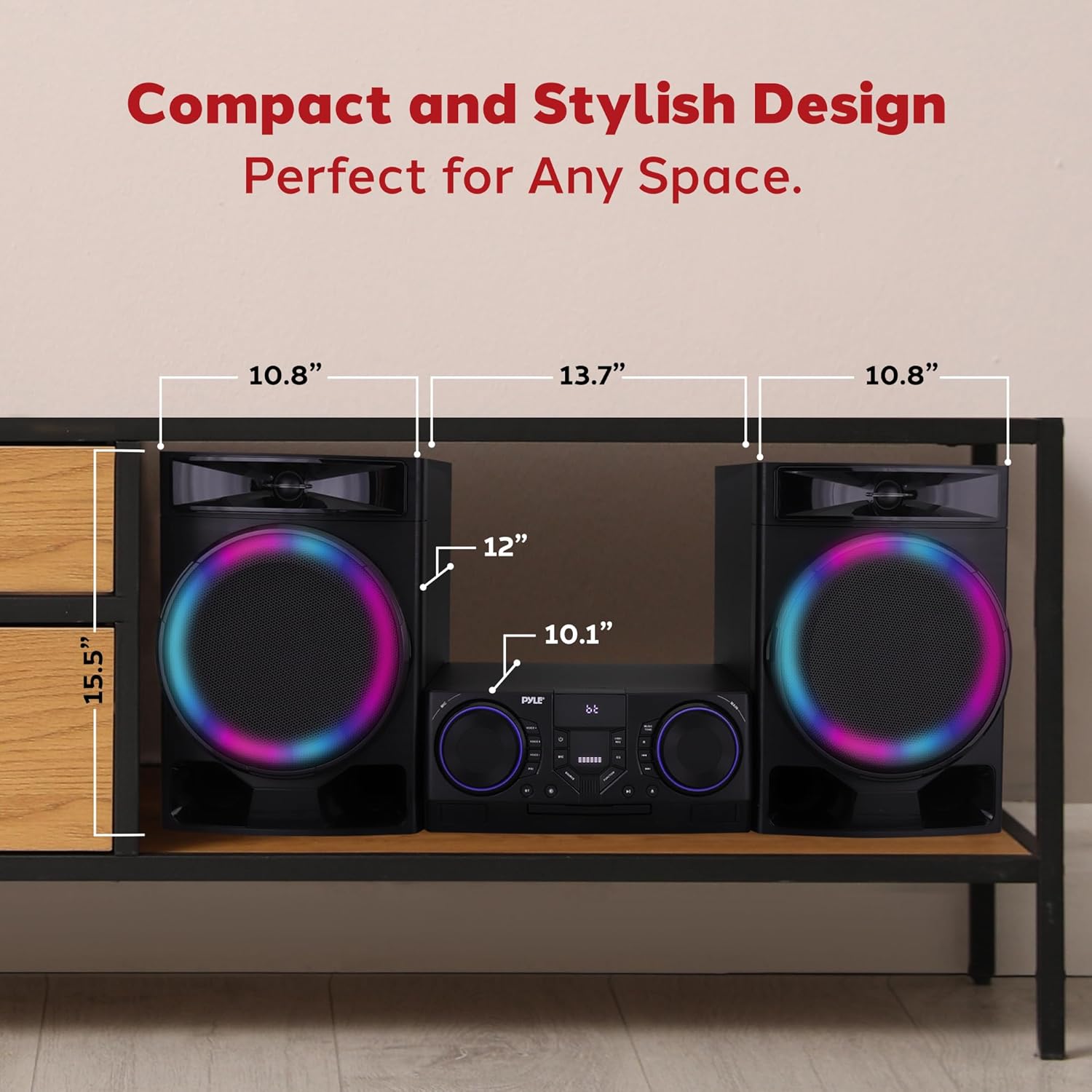
Image: A diagram illustrating the dimensions of the Pyle PHSKR28.5 stereo system, including the main unit and speakers, with measurements for length, width, and height.
Garanzia e supporto
I prodotti Pyle sono progettati per garantire affidabilità e prestazioni. Per informazioni sulla garanzia, consultare la scheda di garanzia inclusa con il prodotto o visitare il sito Web ufficiale Pyle. websito. Per supporto tecnico o richieste di assistenza, contattare il servizio clienti Pyle.
Nota: Conservare la ricevuta d'acquisto come prova d'acquisto per eventuali reclami in garanzia.