
Ausom Gallop SR1
Manuale utente dello scooter elettrico Ausom Gallop SR1
Model: Gallop SR1 | Brand: Ausom
1. Informazioni importanti sulla sicurezza
Always prioritize safety when operating the Ausom Gallop SR1 Electric Scooter. Read this manual thoroughly before first use. Failure to follow safety guidelines can result in serious injury or property damage.
- Indossare sempre il casco e l'attrezzatura di sicurezza adeguata (ginocchiere, gomitiere, guanti).
- Non guidare in condizioni di bagnato, sotto una pioggia battente o nelle pozzanghere.
- Prima di ogni utilizzo, assicurarsi che tutti i bulloni e gli sganci rapidi siano ben serrati.
- Adhere to local laws and regulations regarding electric scooter use.
- Non superare il limite di peso massimo di 143 libbre (65 kg).
- Evitare di guidare su pendii ripidi o su terreni irregolari che superino le capacità dello scooter.
2. Prodotto finitoview
The Ausom Gallop SR1 is a high-performance electric scooter designed for adults, featuring dual 1000W motors for powerful acceleration and a top speed of up to 41 mph. It boasts a robust aluminum alloy frame, 10"x3" off-road tires, and dual suspension for a stable and comfortable ride across various terrains. Key features include an integrated security system with NFC unlock, a comprehensive lighting system with turn signals, and a smart LCD screen for real-time information and mode control.

Figure 2.1: Ausom Gallop SR1 Electric Scooter in unfolded and folded states.

Figure 2.2: Dual 1000W motors provide powerful acceleration and a 46% climb angle.

Figure 2.3: The 20.8Ah battery offers a cruising range of up to 54 miles.
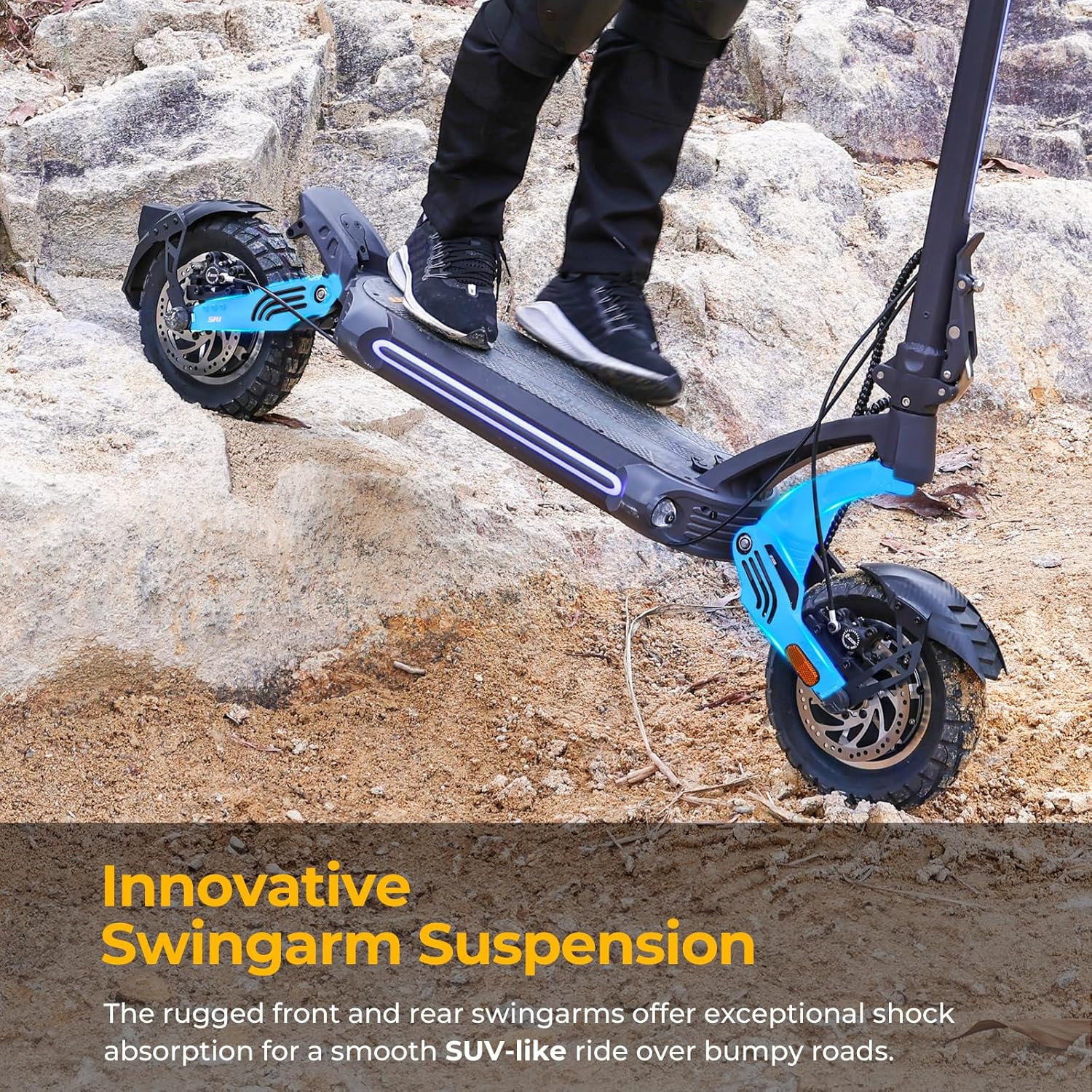
Figure 2.4: Innovative swingarm suspension ensures a smooth ride over bumpy roads.
3. Contenuto della confezione
Upon unboxing your Ausom Gallop SR1 Electric Scooter, please verify that all components are present:
- Ausom Gallop SR1 Electric Scooter (folded)
- Manuale d'uso
- Adattatore di alimentazione
- Cavo di alimentazione
- Kit di strumenti
- Motor Nut Caps (4 pieces)
- Reflectors (2 pieces)
- NFC Card (for unlocking)
Video 3.1: Unboxing of Ausom Gallop SR1 Electric Scooters. This video demonstrates the contents of the package and initial unboxing steps.
4. Istruzioni di montaggio
Follow these steps to assemble your Ausom Gallop SR1 Electric Scooter:
- Step 1: Unfold the Stem
Open the kickstand to make the scooter stand upright. Carefully unfold the stem until it locks into place. - Step 2: Loosen Locking Screw
Turn the locking screw counter-clockwise to loosen it, preparing the folding mechanism. - Step 3: Secure Folding Mechanism
Fit the hook into the slot and push up the folding mechanism until it is attached to the stem. - Step 4: Tighten Locking Screw
Turn the locking screw clockwise to securely fasten the folding mechanism. - Passaggio 5: collegare il manubrio
Place the handlebar onto the clip at the top of the stem. Ensure the clip is centered on the handlebar. - Fase 6: Visualizzazione sicura
Place the display unit onto the handlebar and secure it with the four M5 screws provided in the tool kit. - Step 7: Attach Reflectors
Peel off the adhesive strip covers from the reflectors and stick them firmly onto the swingarms as shown in the video. - Step 8: Install Motor Nut Caps
Place the motor nut caps onto the motor nuts on both wheels.
Video 4.1: Unboxing and Assembly of Ausom Gallop SR1 Electric Scooters. This video provides a visual guide for the assembly steps.
5. Istruzioni per l'uso
Familiarize yourself with the controls and functions of your scooter for optimal performance and safety.
5.1 Accensione/spegnimento e sblocco
- Accensione: Press and hold the power button on the display until it illuminates.
- Sblocco: The scooter will be in Park mode upon startup. To unlock, tap the provided NFC card or your NFC-enabled phone against the NFC detection area on the display.
- Exiting Park Mode: Short press the Plus button on the display to exit Park mode.
5.2 modalità di velocità
The scooter features three speed levels: Eco, Sport, and Race. Short press the Plus (+) or Minus (-) buttons on the display to cycle through these speed levels.
5.3 Sistema di illuminazione
- Luci ambientali: Press the light switch twice to turn the ambient lights on or off.
- Faro: Long press the light switch for 3 seconds to turn the headlight on or off.
- Indicatori di direzione: Push the turn signal switch to the left to activate the left turn signal, and to the right for the right turn signal.
5.4 Horn and Motor Modes
- Corno: Premere il pulsante del clacson per suonare il clacson.
- Modalità motore: Short press the DDM button to switch between single-motor and dual-motor modes.
5.5 Funzione Power Bank
The scooter is equipped with USB-A and USB-C outputs, allowing you to charge your mobile phone and other devices directly from the scooter.
Video 5.1: Riding Video of SR1. This video demonstrates the scooter in operation, including speed and handling.
Video 5.2: NFC Connection Instruction. This video details how to use NFC to unlock your scooter with both iPhone and Android devices.
6. Manutenzione
Una manutenzione regolare garantisce la longevità e il funzionamento sicuro del tuo scooter.
- Pulizia: Pulisci lo scooter con un pannoamp panno dopo ogni utilizzo. Evitare l'uso di getti d'acqua ad alta pressione.
- Pneumatici: Regularly check tire pressure (pneumatic tires) and inspect for wear or damage. Maintain recommended pressure for optimal performance and safety.
- Freni: Periodically check the hydraulic disc brakes for proper function and wear. Adjust or replace brake pads as needed.
- Meccanismo di piegatura: Mantenere il meccanismo di piegatura pulito e lubrificato per garantirne il corretto funzionamento.
- Batteria: Conservare lo scooter in un luogo fresco e asciutto. In caso di rimessaggio prolungato, caricare la batteria a circa il 50-70% e ricaricarla ogni 30-60 giorni per evitare una scarica profonda.
- Ispezione generale: Regularly inspect all screws, bolts, and connections for tightness.
7. Risoluzione Dei Problemi
Se riscontri problemi con il tuo scooter, consulta questi comuni suggerimenti per la risoluzione dei problemi:
- Lo scooter non si accende: Controllare il livello della batteria. Assicurarsi che il pulsante di accensione sia premuto correttamente.
- Scooter not unlocking with NFC: Ensure NFC is enabled on your phone (refer to Video 5.2). Try repositioning the phone/card on the display.
- Portata/potenza ridotta: Check tire pressure. Ensure battery is fully charged. Riding conditions (hills, rider weight, temperature) can affect performance.
- Freni non reattivi: Inspect brake cables and calipers. Adjust or seek professional assistance if needed.
- Rumori insoliti: Interrompere immediatamente la guida e controllare che lo scooter non presenti parti allentate o danneggiate.
For persistent issues not covered here, please contact Ausom customer support.
8. Specifiche
| Caratteristica | Specificazione |
|---|---|
| Marca | Ausom |
| Nome del modello | Gallop SR1 |
| Colore | Grigio scuro |
| Fascia d'età (descrizione) | Adulto |
| Caratteristica speciale | Pieghevole |
| Limite di peso | 143 libbre (65 kg) |
| Dimensioni del prodotto (LxWxH) | 53.5" x 24.8" x 50" (135.9 cm x 63 cm x 127 cm) |
| Numero di ruote | 2 |
| Materiale della ruota | Gomma pneumatica |
| Materiale del telaio | Alluminio |
| Tipo di manubrio | Unico |
| Tipo di ruota | Pneumatico |
| Tipo di sospensione | Doppia sospensione |
| Tipo di impugnatura | Ergonomic |
| Stile del freno | Handbrake and Electric Brake |
| Distanza massima di portata | 54 miglia (87 km) |
9. Garanzia e supporto
The Ausom Gallop SR1 Electric Scooter comes with a limited warranty. Please refer to the warranty card included in your package for specific terms and conditions. For technical support, replacement parts, or any inquiries not covered in this manual, please contact Ausom customer service through their official websito o rivenditore presso cui è stato acquistato il prodotto.
Ask a question about this manual
Ask about setup, troubleshooting, compatibility, parts, safety, or missing instructions. Manuals+ will review the question and use this page’s manual context to help answer it.