Prodotto finitoview
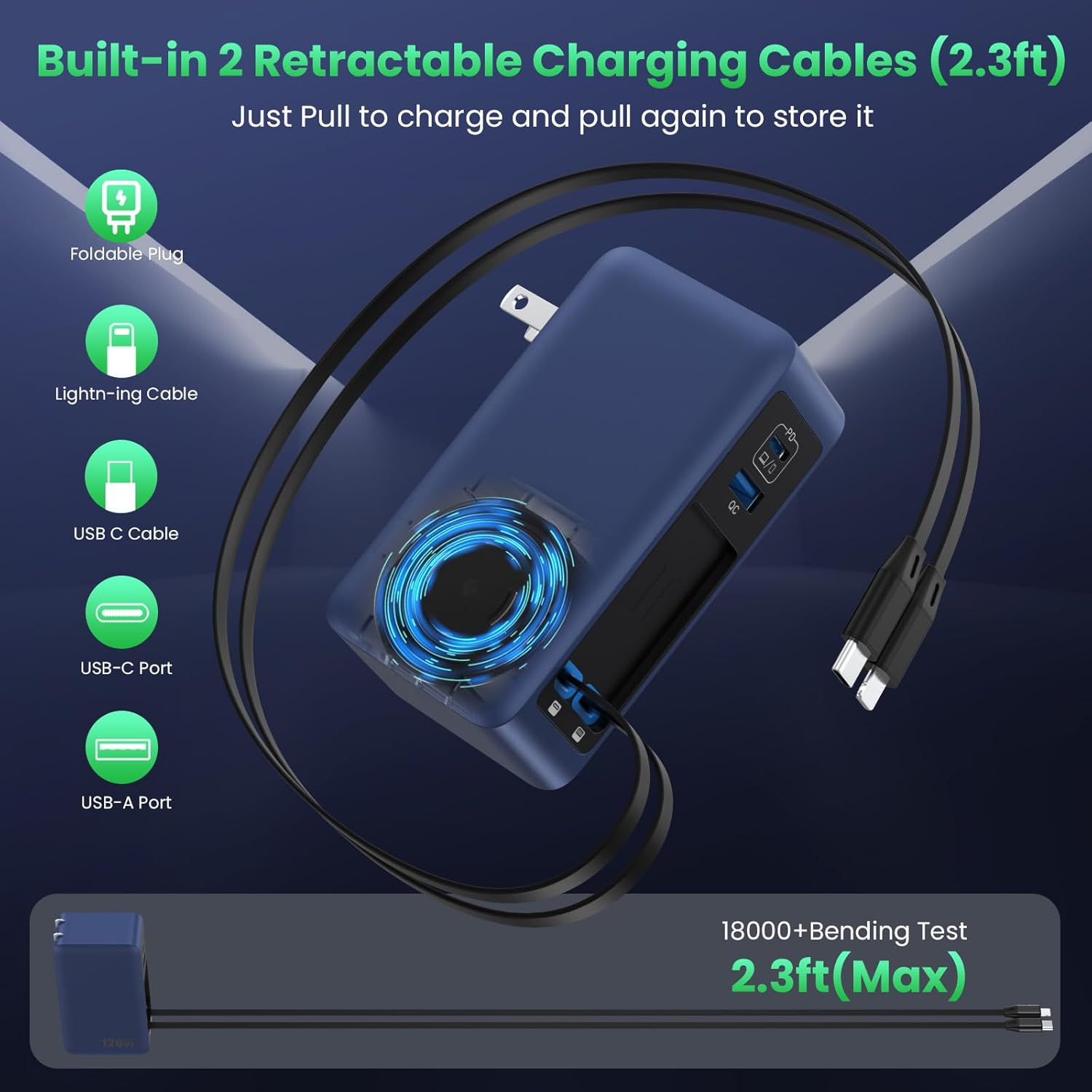
The FOCHEW 120W 4-Port GaN IV USB C Charger Block is a versatile and compact charging solution designed to power multiple devices simultaneously. Featuring two built-in retractable cables (USB-C and Lightning), a dedicated 65W Power Delivery (PD) USB-C port, and an additional USB-A port, this charger offers efficient and clutter-free charging for laptops, tablets, smartphones, and other electronic devices. Its advanced GaN IV technology ensures high power output in a smaller, cooler, and safer design.
Caratteristiche principali
- All-in-One Design with 2 Built-in Retractable Cables: Eliminates cable clutter with integrated USB-C and Lightning cables that retract neatly into the charger.
- Extended Reach with Reel Charger: Retractable cables extend up to 27.56 inches (70 cm) for flexible use and retract smoothly for tidy storage.
- 120W Multi-Port Charging: Powers up to 4 devices concurrently with a total output of 120W, compatible with PD and PPS protocols.
- Upgraded 65W Laptop Charging: The top USB-C1 port delivers 65W PD, capable of fast charging laptops like a MacBook Pro 13" to 46% in 30 minutes.
- GaN IV Technology: Utilizes advanced Gallium Nitride (GaN IV) chip for a 50% reduction in size and weight compared to traditional chargers, while enhancing efficiency and minimizing heat.
- Ampia compatibilità: Supports a broad range of USB-C devices, including MacBooks, Galaxy Books, Lenovo IdeaPads, ASUS Vivobooks, HP Chromebooks, Google Pixelbooks, Dell XPS, iPads, Samsung Tabs, Google Pixel Slates, Amazon Fire HD10, iPhones (16/15/14/13/12/11 series), Samsung Galaxy (S25/24/23/22/21 series), Google Pixel, LG, and other Android cellphones.
Istruzioni di installazione
1. Disimballaggio
Carefully remove the FOCHEW 120W USB C Charger Block and any included accessories from its packaging. Verify that all components listed in the 'What You Will Get' section are present.
2. Collegamento all'alimentazione
Locate a standard wall outlet. Unfold the charger's prongs and plug the unit firmly into the outlet. The foldable plug design allows for easy storage and portability.
3. Extending Retractable Cables
To use a built-in retractable cable (USB-C or Lightning), gently pull both ends of the cable simultaneously until it reaches the desired length. Avoid pulling only one side, as this may cause uneven retraction or damage. To retract the cable, pull it slightly further, and it will automatically coil back into the charger.
4. Collegamento dei dispositivi
Connect your electronic devices to the appropriate charging ports:
- For fast charging laptops or high-power devices, use the dedicated USB-C1 (PD) port.
- For other USB-C compatible devices, use the second USB-C port or the built-in retractable USB-C cable.
- For devices requiring a Lightning connector, use the built-in retractable Lightning cable.
- For standard USB-A devices, use the Porta USB-A.
Istruzioni per l'uso
1. Dispositivi di ricarica
Once connected to a power source and your devices, the charger will automatically begin charging. The intelligent GaN IV chip optimizes power distribution across all connected ports to ensure efficient and safe charging.
2. Optimal Charging Performance
For the fastest charging of a single high-power device (e.g., a laptop), it is recommended to use the 65W USB-C1 (PD) port. When multiple devices are connected, the total 120W output is shared, which may adjust individual charging speeds.
Manutenzione
- Pulizia: Disconnect the charger from the power outlet before cleaning. Use a dry, soft cloth to wipe the surface. Avoid liquid cleaners or abrasive materials.
- Magazzinaggio: When not in use, ensure the retractable cables are fully retracted and the foldable plug is folded for compact storage. Store in a cool, dry place away from direct sunlight and extreme temperatures.
- Cura del cavo: Always pull both ends of the retractable cables simultaneously to extend or retract. Avoid sharp bends or excessive force on the cables to prevent damage.
Risoluzione dei problemi
1. Dispositivo non in carica
- Controllare la connessione di alimentazione: Assicurarsi che il caricabatterie sia collegato saldamente a una presa a muro funzionante.
- Verifica la connessione del cavo: Make sure the charging cable is firmly connected to both the charger and your device.
- Prova una porta/un cavo diverso: Test with a different port on the charger or a different charging cable to rule out a faulty port or cable.
- Compatibilità del dispositivo: Verifica che il tuo dispositivo sia compatibile con le specifiche di uscita del caricabatterie.
2. Ricarica lenta
- Qualità del cavo: Ensure you are using high-quality cables that support fast charging.
- Distribuzione di energia: If multiple devices are connected, the total 120W output is shared. Disconnect less critical devices to prioritize charging speed for essential ones.
- Requisiti del dispositivo: Some devices may have specific fast-charging protocols. Ensure your device supports PD or PPS for optimal speed.
3. Surriscaldamento
- Ventilazione: Ensure the charger is placed in a well-ventilated area and not covered by anything that could trap heat.
- Ridurre il carico: If the charger feels excessively hot, disconnect some devices to reduce the power load.
- Fattori ambientali: Avoid using the charger in extremely hot environments.
Specifiche del prodotto
| Caratteristica | Dettaglio |
|---|---|
| Marca | FOCHEW |
| Numero di modello | HX-P27 |
| Cosatage | 120 watts (Total Output) |
| Tipo di connettore | USB Type A, USB Type C, Built-in USB-C, Built-in Lightning |
| Ingresso volumetage | 240 Volt |
| Corrente di uscita | 3 Amps (massimo) |
| Volume di uscitatage | 20 Volt (Max) |
| Caratteristica speciale | 2 Built-in Retractable Cables, 4-in-1 GaN IV Foldable Plug, Fast Charging Station, PD 65W Laptop Adapter |
| Componenti inclusi | 1x USB C Charger, 1x Product Instruction |
| Materiale | Plastica |
| Colore | Blu scuro |
Garanzia e supporto
This FOCHEW 120W 4-Port GaN IV USB C Charger Block (Model HX-P27) comes with a Garanzia di 3 anno from the manufacturer, Dongguan Yuanhaoxun Technology Co., Ltd. If you encounter any issues with the product or require assistance, please refer to the contact information provided in your product packaging or reach out to FOCHEW customer service for support.
Immagini del prodotto
Immagini del prodotto