
aowoka noiTag professionista
aowoka noiTag Manuale di istruzioni del localizzatore Bluetooth Pro
Modello: noiTag professionista
Introduzione
L'aowoka noiTag pro is a Bluetooth item tracker designed to help you locate your valuables using the Apple Find My app on iOS devices. This manual provides detailed instructions for setting up, operating, maintaining, and troubleshooting your weTag pro tracker.
Nota importante: This device is compatible only with Apple Find My app on iOS devices. Ensure your iOS device is updated to the latest version for optimal functionality.
Contenuto della confezione
- aowoka noiTag pro Bluetooth Tracker(s)
- Manuale d'uso
- Batteria CR2032 (preinstallata o inclusa)
Configurazione e abbinamento
Follow these steps to pair your aowoka weTag pro with your iOS device:
- Abilita Bluetooth e servizi di localizzazione: On your iOS device, ensure Bluetooth is turned on and Location Services are enabled for the Find My app.
- Apri Trova la mia app: Avvia l'app "Dov'è" sul tuo iPhone o iPad.
- Aggiungi elemento: Navigate to the "Items" tab within the Find My app. Tap on "Add Item," then select "Other Supported Item."
- Attiva Tracker: Premi il pulsante sul tuo weTag pro tracker once. You should hear a tone indicating it's ready for pairing.
- Collegare: Follow the on-screen instructions in the Find My app to complete the connection. The app will detect your weTag pro and allow you to name it.

Figure 1: Simple Matching steps for the weTag pro tracker.
Once paired, your weTag pro will appear in the "Items" tab of your Find My app.
Operating Your weTag professionista
Localizzazione degli elementi
You can locate your items using the Find My app in several ways:
- View sulla mappa: The Find My app displays the last known location of your weTag pro on a map. This location is updated by the global Find My network of billions of iOS devices.
- Riprodurre l'audio: If your item is within Bluetooth range (up to 60 meters / 200 feet), you can tap "Play Sound" in the Find My app to make your weTag pro emit a loud sound (80-100 dB), helping you pinpoint its exact location.

Figure 2: Locating an item using the Apple Find My app.

Figure 3: Using the 'Play Sound' feature to find nearby items.
Ricordare ciò che è rimasto indietro
If you leave an item with your weTag pro behind and it disconnects from your iOS device's Bluetooth range, the Find My app will send you an immediate notification. This feature helps prevent accidental loss.

Figure 4: Left Behind Remind notification.
Modalità smarrita
If an item is truly lost, you can activate "Lost Mode" in the Find My app. This allows any nearby Apple device to detect your weTag pro and provide its location to you anonymously. You can also include your contact information, which can be accessed by someone who finds your tag, enabling them to return your item.
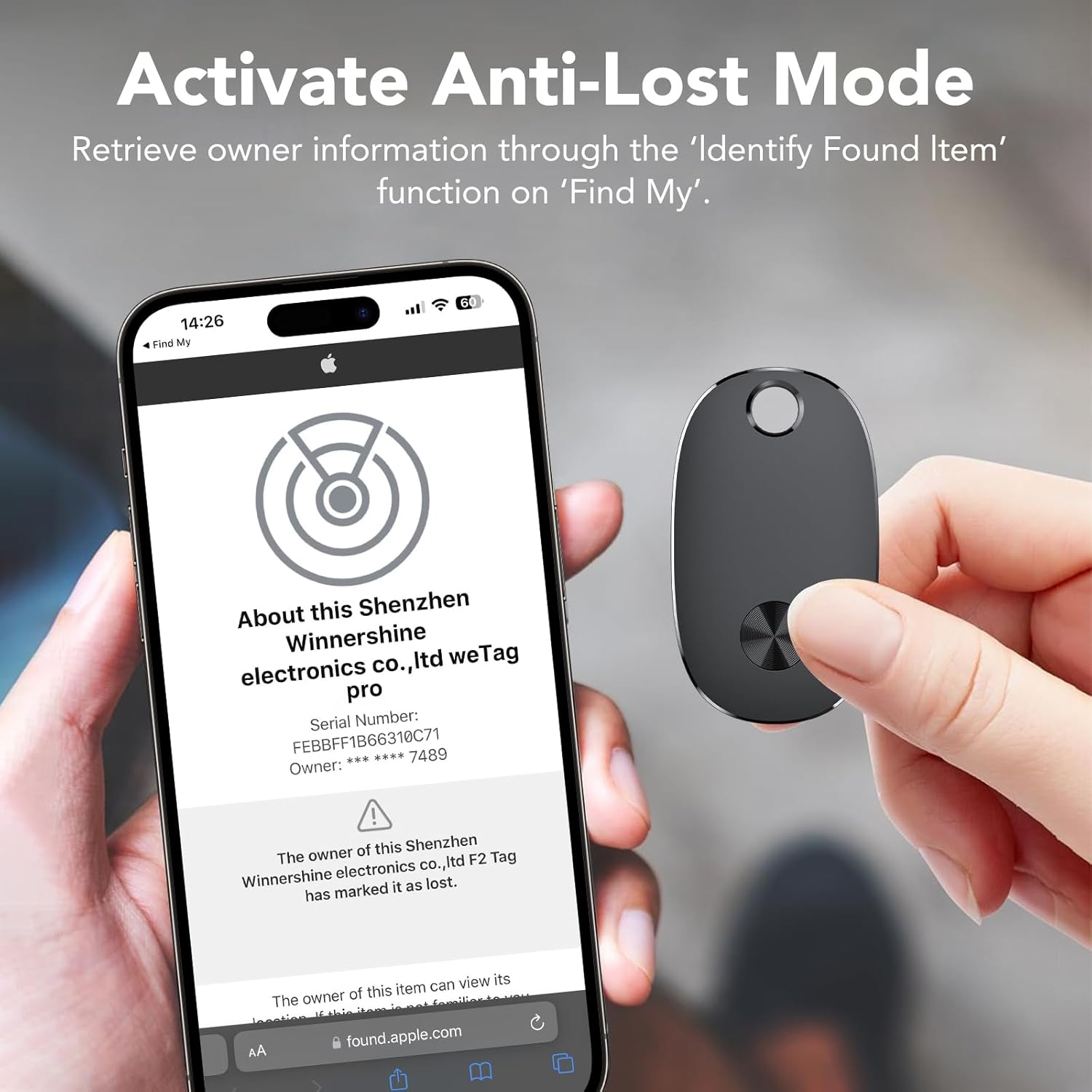
Figure 5: Activating Lost Mode and viewing tracker information.
Condivisione del tuo tracker
Il noiTag pro allows you to share its location with up to 5 other Apple devices. This is useful for families or groups tracking shared items like luggage or car keys.

Figure 6: Sharing tracker access with family and friends.
Manutenzione
Sostituzione della batteria
Il noiTag pro uses a replaceable CR2032 coin cell battery, which typically lasts up to 2 years. When the battery is low, you will receive a notification in the Find My app.
- Rimuovi la copertura: Locate the small notch on the side of the tracker. Use a thin tool (like a small screwdriver or a coin) to gently pry open the cover.
- Sostituire la batteria: Carefully remove the old CR2032 battery and insert a new one, ensuring the positive (+) side faces upwards.
- Chiudi copertina: Allineare il coperchio e premere con decisione finché non scatta saldamente in posizione.

Figura 7: Fasi di sostituzione della batteria.
Pulizia e cura
Il noiTag pro is IP67 water and dust resistant, meaning it can withstand splashes, rain, and brief immersion in water. However, it is not recommended for prolonged submersion. Clean the device with a soft, damp stoffa. Evitare l'uso di prodotti chimici aggressivi o materiali abrasivi.
Risoluzione dei problemi
| Problema | Possibile soluzione |
|---|---|
| Tracker not pairing. |
|
| Cannot hear the sound from the tracker. |
|
| Location is inaccurate or not updating. |
|
| "Left Behind Remind" not working. |
|
Specifiche
| Caratteristica | Dettaglio |
|---|---|
| Marca | aowoka |
| Modello | weTag professionista |
| Connettività | Bluetooth |
| Compatibilità | Apple Find My app (iOS only) |
| Tipo di batteria | CR2032 (sostituibile) |
| Durata della batteria | Fino a 2 anni |
| Resistenza all'acqua | IP67 (resistente alla polvere e all'acqua) |
| Portata Bluetooth | Fino a 60 metri (200 piedi) |
| Peso | Circa 9 grammi |
| Materiale | Plastica |
Informazioni sulla garanzia
L'aowoka noiTag pro comes with a Garanzia del produttore di 1 anno dalla data di acquisto. La presente garanzia copre i difetti di materiali e fabbricazione in condizioni di normale utilizzo. Non copre i danni causati da uso improprio, incidenti, modifiche non autorizzate o normale usura. Si prega di conservare la prova d'acquisto per eventuali reclami in garanzia.
Assistenza clienti
If you encounter any issues or have questions regarding your aowoka weTag pro, please refer to the troubleshooting section of this manual. For further assistance, contact aowoka customer support through the retailer's platform or the official aowoka websito.
Per informazioni e supporto aggiornati, visitare: aowoka Official Store on Amazon
Ask a question about this manual
Ask about setup, troubleshooting, compatibility, parts, safety, or missing instructions. Manuals+ will review the question and use this page’s manual context to help answer it.