
Prodotto finitoview
The GOBOULT Y1 Pro Wireless Earbuds are designed to provide a high-quality audio experience with features like extended playtime, clear calling, and low-latency gaming. This manual provides detailed instructions for setting up, operating, and maintaining your earbuds.

Immagine: Un collage mostraasing key features of the GOBOULT Y1 Pro Earbuds, including 60 hours playtime, Zen Quad Mic ENC, 45ms low latency gaming, 13mm bass drivers, Type-C fast charging, and Bluetooth 5.3.
Contenuto della confezione
- GOBOULT Y1 Pro Wireless Earbuds
- Custodia di ricarica
- Cavo di ricarica USB di tipo C.
- Cuscinetti auricolari (varie misure)
- Punte auricolari (varie misure)
- Scheda di garanzia
Impostare
1. Ricarica degli auricolari e della custodia
Before initial use, ensure both the earbuds and the charging case are fully charged. This optimizes battery life and performance.
- Connect the provided USB Type-C charging cable to the charging port on the case and to a compatible USB power adapter (not included).
- The LED indicator on the charging case will illuminate to show charging status.
- A full charge typically takes a few hours. A quick 10-minute charge can provide approximately 120 minutes of playtime.

Image: The GOBOULT Y1 Pro earbuds and charging case, illustrating the Type-C fast charging capability, where 10 minutes of charge provides 120 minutes of playtime.
2. Abbinamento iniziale
Per associare gli auricolari al dispositivo per la prima volta, segui questi passaggi:
- Remove any protective film from the charging contacts on the earbuds.
- Place both earbuds into the charging case and close the lid for a few seconds.
- Open the charging case lid. The earbuds will automatically power on and enter pairing mode, indicated by flashing LED lights.
- Sul tuo smartphone o altro dispositivo abilitato Bluetooth, vai alle impostazioni Bluetooth.
- Cercare dispositivi disponibili e seleziona "GOBOULT Y1 Pro" dalla lista.
- Una volta effettuata la connessione, un messaggio vocale confermerà l'avvenuta associazione.

Image: A diagram illustrating the initial setup steps, including removing protective film and opening the case, along with a detailed guide to the touch controls for both left and right earbuds.
3. Riconnessione automatica
Dopo l'associazione iniziale, gli auricolari si connetteranno automaticamente all'ultimo dispositivo associato quando vengono rimossi dalla custodia di ricarica e il Bluetooth è abilitato sul dispositivo.

Image: GOBOULT Y1 Pro earbuds and charging case, demonstrating Bluetooth 5.3 for stable, efficient, and fast pairing with a connected smartphone.
Istruzioni per l'uso
Accensione/spegnimento
- Accensione: Open the charging case lid. The earbuds will power on automatically. Alternatively, if outside the case, long press the touch area on both earbuds for 3 seconds.
- Spegni: Place both earbuds back into the charging case and close the lid. They will power off automatically. Alternatively, long press the touch area on both earbuds for 5 seconds.
Controlli touch
The GOBOULT Y1 Pro earbuds feature intuitive touch controls for managing music, calls, and other functions. Refer to the diagram below and the following list for specific actions:
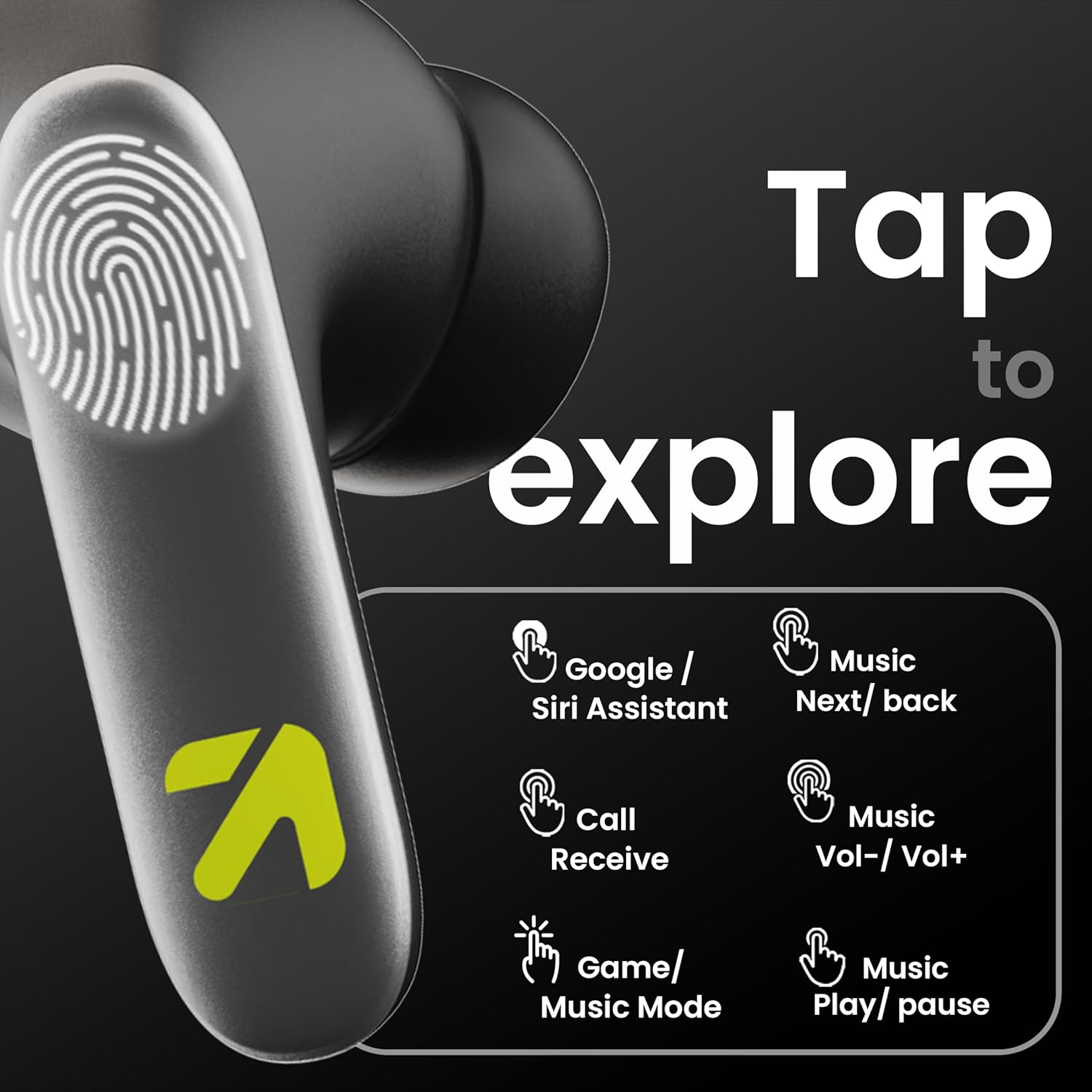
Image: A visual guide to the touch controls on the GOBOULT Y1 Pro earbuds, detailing actions for Google/Siri Assistant, music navigation, call management, volume control, and game/music mode switching.
- Single Tap (Left/Right): Riproduci/Metti in pausa la musica, Rispondi/Termina chiamata.
- Doppio tocco (auricolare sinistro): Canzone precedente.
- Doppio tocco (auricolare destro): Prossima canzone.
- Triplo tocco (auricolare sinistro): Abbassa il volume.
- Triplo tocco (auricolare destro): Alza il volume.
- Long Press (2 seconds, Left/Right): Reject incoming call, Activate Voice Assistant (Google/Siri).
- Four Taps (Left/Right): Activate/Deactivate Gaming Mode.
Modalità di gioco
For an enhanced gaming experience, activate the ultra-low latency Gaming Mode:
- Attivazione: Tap the touch area four times on either earbud.
- Disattivazione: Tap the touch area four times again.

Image: GOBOULT Y1 Pro earbuds and charging case, highlighting the 45ms low latency gaming mode for real-time audio synchronization, activated by four taps.
Assistente vocale
Quickly access your device's voice assistant (Siri or Google Assistant) for hands-free control:
- Attivazione: Perform a long tap on the touch area of either earbud.

Image: Illustration showing how to access Siri or Google Assistant with a long tap on the earbud's touch sensor.
Cancellazione del rumore ambientale (ENC)
The GOBOULT Y1 Pro features Zen Quad Mic ENC technology, ensuring crystal-clear calls by effectively filtering out ambient noise from your surroundings.

Image: A diagram explaining how Environmental Noise Cancellation (ENC) works by isolating your voice from environmental noise, ensuring clear communication during calls.
Manutenzione
Pulizia
- Pulisci regolarmente gli auricolari e la custodia di ricarica con un panno morbido, asciutto e privo di lanugine.
- Ensure the charging contacts on both the earbuds and inside the case are free from dust and debris to maintain proper charging.
- Do not use abrasive cleaners, solvents, or harsh chemicals, as these may damage the product.
Resistenza all'acqua
The GOBOULT Y1 Pro earbuds are rated IPX5 water-resistant. This means they are protected against low-pressure water jets from any direction, making them suitable for workouts and light splashes.
- Non immergere gli auricolari in acqua.
- Avoid exposing them to heavy rain or extreme moisture.
- Per evitare danni, assicurarsi che gli auricolari siano asciutti prima di riporli nella custodia di ricarica.

Image: GOBOULT Y1 Pro earbuds with water droplets, illustrating their IPX5 water resistance, providing protection against sweat and splashes.
Risoluzione dei problemi
If you encounter any issues with your GOBOULT Y1 Pro earbuds, refer to the following common troubleshooting steps:
Gli auricolari non si associano o non si connettono
- Ensure both earbuds and the charging case have sufficient battery.
- Turn off Bluetooth on your device, wait 5 seconds, then turn it back on.
- On your device, "Forget" or "Unpair" "GOBOULT Y1 Pro" from the Bluetooth list, then attempt the pairing process again.
- Place both earbuds back into the charging case, close the lid, wait 10 seconds, then open the lid to re-enter pairing mode.
Un solo auricolare funzionante
- Assicurati che entrambi gli auricolari siano carichi.
- Riponi entrambi gli auricolari nella custodia di ricarica, chiudi il coperchio e poi riaprilo. Spesso, questo li sincronizza nuovamente.
- Se il problema persiste, prova a reimpostare gli auricolari (fai riferimento alle istruzioni del produttore) websito per istruzioni specifiche sul reset se non dettagliate qui).
Scarsa qualità del suono o volume basso
- Ensure the earbuds are properly seated in your ears to create a good seal. Try different sized eartips.
- Pulisci eventuali detriti dalle griglie degli auricolari.
- Check the audio source device's volume and sound settings.
- Avvicinati al dispositivo connesso per evitare interferenze del segnale.
Problemi di ricarica
- Assicurarsi che il cavo di ricarica sia collegato saldamente sia alla custodia sia alla fonte di alimentazione.
- Try a different USB Type-C charging cable or power adapter.
- Pulisci i contatti di ricarica su entrambi gli auricolari e all'interno della custodia con un batuffolo di cotone asciutto.
Specifiche
| Caratteristica | Dettaglio |
|---|---|
| Marca | GOBOULT |
| Nome del modello | AirBass |
| Versione Bluetooth | 5.3 |
| Posizionamento dell'orecchio | Nell'orecchio |
| Controllo del rumore | Cancellazione del rumore ambientale (ENC) |
| Dimensioni del driver audio | 13 millimetri |
| Tempo di gioco totale | Fino a 60 ore (con custodia di ricarica) |
| Bassa latenza | 45 ms (modalità di gioco) |
| Tipo di ricarica | Ricarica rapida di tipo C |
| Resistenza all'acqua | Grado di protezione IPX5 |
| Metodo di controllo | Tocco |
| Dispositivi compatibili | Smartphone, tablet, laptop, desktop, altoparlanti intelligenti |
| Peso dell'articolo | 50 grammi |
| Paese di origine | Cina |
Informazioni sulla garanzia
The GOBOULT Y1 Pro Wireless Earbuds are covered by a Garanzia del produttore di 1 anni dalla data di acquisto.
This warranty covers manufacturing defects. Please retain your proof of purchase for any warranty claims. The warranty does not cover damage caused by misuse, accidents, unauthorized modifications, or normal wear and tear.
Supporto
Per ulteriore assistenza, supporto tecnico o richieste di garanzia, contattare:
- Produttore: Exotic Mile Private Limited, B-67 Wazirpur Industrial Area, New Delhi 110052
- Importatore: Exotic Mile Pvt. Ltd. , B67 Wazirpur Industrial Area , New Delhi 110052
- For customer service contact details, please refer to the GOBOULT official websito o piattaforma in cui hai acquistato il prodotto.