
Introduzione
Welcome to the user manual for your new AOLON Mars R3 Smartwatch. This guide provides detailed instructions on how to set up, operate, maintain, and troubleshoot your device. The Mars R3 Smartwatch features a 3D flexible surface design, high-definition Bluetooth calling capabilities, and comprehensive notification display. It is designed to keep you connected and track your daily activities with ease.
Le caratteristiche principali includono:
- True IP68 waterproof rating for enhanced durability.
- 3D flexible surface design for a sleek aesthetic.
- HD Bluetooth calls, allowing you to answer calls directly from your wrist.
- Large screen display for clear viewing of messages and notifications.
- Support for custom photo wallpapers and a variety of default clock displays.
- Integrated activity tracking features.
Prodotto finitoview
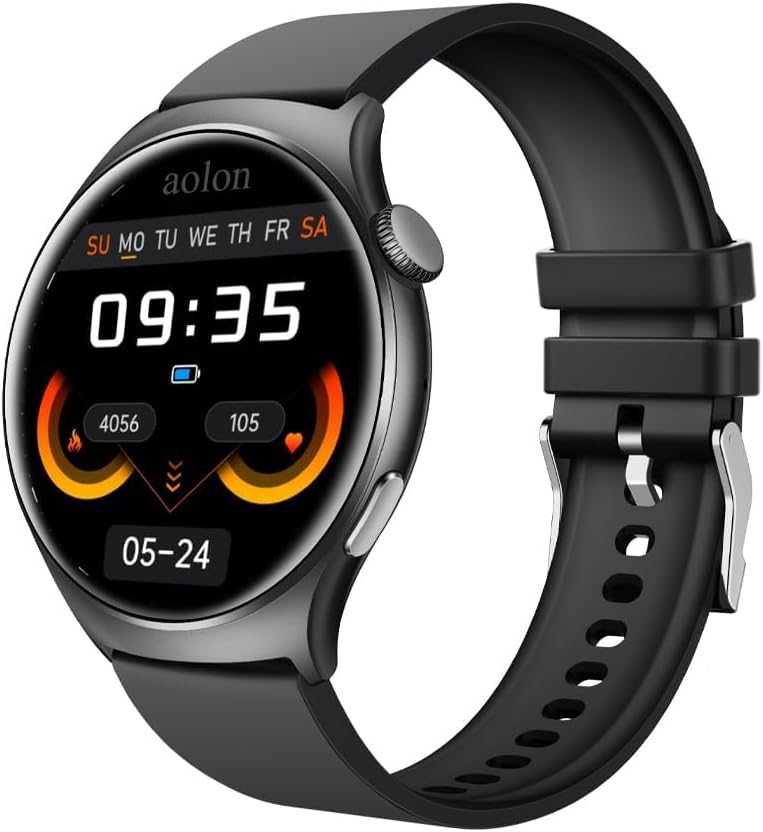
Figure 1: The AOLON Mars R3 Smartwatch, showcasing its round display and black silicone strap. The screen displays the current time, date, and various health metrics.
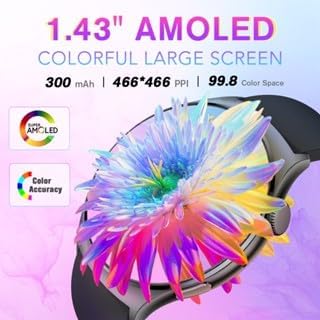
Figure 2: The 1.83-inch AMOLED colorful large screen of the Mars R3 Smartwatch, highlighting its vibrant display capabilities and high resolution.

Figure 3: The Bluetooth call feature of the Mars R3 Smartwatch, demonstrating how users can answer or hang up calls directly from their wrist, seamlessly switching between the watch and mobile phone.
Impostare
1. Ricarica iniziale
Before first use, fully charge your Mars R3 Smartwatch. Connect the magnetic charging cable to the charging contacts on the back of the watch and plug the USB end into a standard USB power adapter (not included) or a computer USB port. The watch display will indicate charging status.
2. Accensione/Spegnimento
- Per accendere: Press and hold the side button until the AOLON logo appears.
- Per spegnere: Tieni premuto il pulsante laterale, quindi seleziona l'opzione "Spegni" sullo schermo.
3. Installazione e associazione dell'app
To unlock the full functionality of your smartwatch, you need to install the companion application on your smartphone. The watch operates with an Android 7.0 based system, ensuring broad compatibility.
- Scan the QR code provided in the watch's quick start guide or search for the official AOLON smartwatch app in your smartphone's app store (Google Play Store for Android, Apple App Store for iOS).
- Scarica e installa l'app.
- Abilita il Bluetooth sul tuo smartphone.
- Open the AOLON app and follow the on-screen instructions to pair your Mars R3 Smartwatch. Ensure the watch is powered on and within Bluetooth range of your phone.
- Conferma la richiesta di associazione sia sul telefono che sullo smartwatch.
Istruzioni per l'uso
1. Navigazione di base
- Schermo tattile: Scorri verso sinistra, destra, in alto o in basso per navigare tra menu e schermate. Tocca per selezionare un elemento.
- Pulsante laterale: Premi per tornare alla schermata iniziale o riattivare il display. Premi a lungo per le opzioni di risparmio energetico.
2. Effettuare e ricevere chiamate
The Mars R3 Smartwatch supports HD Bluetooth calls, allowing you to manage calls directly from your wrist.
- Per rispondere a una chiamata: Quando ricevi una chiamata, tocca l'icona verde di risposta sullo schermo dell'orologio.
- Per rifiutare una chiamata: Tap the red decline icon on the watch screen.
- Per effettuare una chiamata: Access the dialer or contacts list through the watch's menu. Tap to dial a number or select a contact. Ensure your watch is connected to your phone via Bluetooth.
3. Notifiche
Ricevi e view notifications from your smartphone directly on your smartwatch screen.
- Ensure notification permissions are enabled in the AOLON app on your smartphone.
- Scorri verso il basso dalla parte superiore del quadrante dell'orologio per view notifiche recenti.
- Messages from social media applications will display their content on the large screen.
4. Monitoraggio delle attività
The smartwatch automatically tracks various activities and health metrics.
- View daily steps, distance, and calories burned directly on the watch face or in the activity tracking menu.
- Detailed historical data and additional health insights are available in the companion app.
5. Personalizzazione dei quadranti dell'orologio
Personalizza il tuo smartwatch con diversi quadranti.
- Sull'orologio: Long press the current watch face to enter the watch face selection menu. Swipe left or right to browse available faces and tap to select.
- Tramite App: Use the 'App Jam Display Market' within the AOLON app to explore a wider range of watch faces. You can also set your own photos as wallpaper through the app.
Manutenzione
1. Pulizia dello smartwatch
Una pulizia regolare aiuta a preservare l'aspetto e la funzionalità del dispositivo.
- Pulire lo schermo e il corpo con un panno morbido e privo di lanugine. Se necessario, dampinumidire leggermente il panno con acqua.
- Non utilizzare prodotti chimici aggressivi, detergenti abrasivi o solventi, poiché potrebbero danneggiare la finitura e le guarnizioni dell'orologio.
- Pulire periodicamente i contatti di ricarica con un panno asciutto per garantire una buona connessione.
2. Resistenza all'acqua (IP68)
The Mars R3 Smartwatch has a True IP68 waterproof rating, meaning it is protected against dust ingress and can withstand immersion in water up to 1.5 meters for up to 30 minutes.
- It is suitable for everyday use, including hand washing, rain, and brief immersion.
- Avoid using the watch in hot water, saunas, or steam rooms, as steam can penetrate seals.
- Non premere i pulsanti sott'acqua.
- After exposure to water, especially saltwater, rinse the watch with fresh water and dry it thoroughly before charging.
3. Cura della batteria
- Evitare di scaricare completamente la batteria frequentemente.
- Caricare l'orologio regolarmente, idealmente prima che il livello della batteria scenda troppo.
- Se non lo si utilizza per lunghi periodi, conservare l'orologio in un luogo fresco e asciutto, con la batteria carica al 50% circa.
Risoluzione dei problemi
1. L'orologio non si accende
- Assicurati che l'orologio sia completamente carico. Collegalo al caricabatterie per almeno 30 minuti.
- Controllare che il cavo di ricarica e l'adattatore non siano danneggiati.
- Prova una porta USB o un alimentatore diverso.
2. Impossibile associare il telefono
- Assicurati che il Bluetooth sia abilitato sul telefono e sull'orologio.
- Assicurati che l'orologio sia nelle immediate vicinanze del telefono.
- Riavvia sia il telefono che lo smartwatch.
- Forget the device in your phone's Bluetooth settings and try pairing again through the AOLON app.
- Ensure the AOLON app has necessary permissions enabled (e.g., location, Bluetooth).
3. Notifiche non visualizzate
- Verify that notification permissions are granted to the AOLON app in your phone's settings.
- Check if the app's notification settings are configured correctly for the desired applications.
- Assicurati che l'orologio sia connesso al telefono tramite Bluetooth.
- Disattiva e riattiva le notifiche nell'app.
4. Monitoraggio impreciso delle attività
- Assicurati che l'orologio sia indossato comodamente al polso, né troppo largo né troppo stretto.
- Update the AOLON app to the latest version.
- Calibrate the watch if an option is available in the app.
Specifiche
| Caratteristica | Specificazione |
|---|---|
| Numero di modello | aolon |
| Dimensioni dello schermo | 1.83 pollici |
| Dimensioni di visualizzazione dello schermo in piedi | 1.83 pollici |
| Forma | Rettangolare |
| Sistema operativo | Android7.0 |
| Capacità di archiviazione della memoria | 128 MB |
| Dimensione della memoria RAM installata | 128 MB |
| Tecnologia di connettività | Bluetooth |
| Standard di comunicazione wireless | Bluetooth |
| Capacità della batteria | 244.98 milioneamp Ore |
| Composizione delle celle della batteria | Ioni di litio |
| Caratteristica speciale | Monitoraggio attività |
| GPS | Nessun GPS |
| Peso dell'articolo | 1.96 once (55.5 grammi) |
| Dimensioni del pacco | 1.1 x 0.28 x 0.26 pollici |
| Cosa c'è nella scatola | Orologio intelligente |
Garanzia e supporto
Informazioni sulla garanzia
Specific warranty details for your AOLON Mars R3 Smartwatch are typically provided with your purchase documentation or can be found on the official AOLON websito. Conservare la prova d'acquisto per eventuali reclami in garanzia.
Assistenza clienti
For further assistance, technical support, or inquiries regarding your AOLON Mars R3 Smartwatch, please visit the official AOLON website or contact their customer service department. You can often find FAQs, troubleshooting guides, and contact information on the manufacturer's support pages.
Visit the AOLON Store: AOLON Official Store