
Introduzione
This manual provides essential information for setting up, operating, and maintaining your UPERFECT 15.6-inch FHD Portable Touchscreen Monitor. Please read it thoroughly before using the product to ensure optimal performance and longevity. This monitor is designed to enhance your productivity and entertainment experience with its versatile connectivity and intuitive touchscreen functionality.
Contenuto della confezione
Si prega di selezionare la casella per i seguenti elementi:
- Monitor portatile da 15.6 pollici
- Smart Cover (funziona anche come supporto)
- Cavo da USB-C a USB-C
- Cavo da USB-A a USB-C
- Cavo da mini HDMI a HDMI
- Adattatore di alimentazione (5 V 3 A)
- M3*5mm VESA Screws (4 pcs)

Caratteristiche del prodotto
- Touchscreen capacitivo a 10 punti: Provides precise and fluid interaction for various tasks.
- Schermo IPS Full HD (1920x1080) da 15.6 pollici: Offers clear images, vivid colors, and a wide 178-degree viewangolo di ing.
- Supporto HDR: Enhances contrast and color range for a more immersive visual experience.
- Tecnologia per la cura degli occhi: Includes a blue light filter to reduce eye strain during prolonged use.
- Design ultra-portatile: With only 0.4 inches thickness and 1.5 lbs weight, it is ideal for travel and remote work.
- Integrated Smart Cover: Protects the screen and functions as a stable stand for desktop use.
- Compatibile con montaggio VESA: Supports 75x75mm VESA mounting for fixed installations or multi-monitor setups.
- Connettività versatile: Features two full-function USB-C ports, one Mini HDMI port, and a 3.5mm audio jack for wide device compatibility.
- Dual Integrated Speakers: Delivers clear and balanced audio for an enhanced multimedia experience.
- Modalità di visualizzazione multiple: Supports Mirror, Extend, and Second Monitor modes, as well as horizontal and vertical display orientations.


Configurazione e collegamenti
The UPERFECT portable monitor offers flexible connectivity options. No drivers are required for most connections.
Capire le porte

- Mini porta HDMI: Per l'ingresso video e audio da dispositivi con uscita HDMI.
- Type C 3.1 Ports (x2): Full-function ports for power, video, audio, and touch signal transmission.
- Jack audio da 3.5 mm: Per collegare cuffie o altoparlanti esterni.
- Pulsante della puleggia: Used to navigate the On-Screen Display (OSD) menu and adjust settings.
- Pulsante di accensione/indietro: Used to power the monitor on/off and to go back in the OSD menu.
Connessione ai dispositivi
Refer to the diagram below for common connection methods:
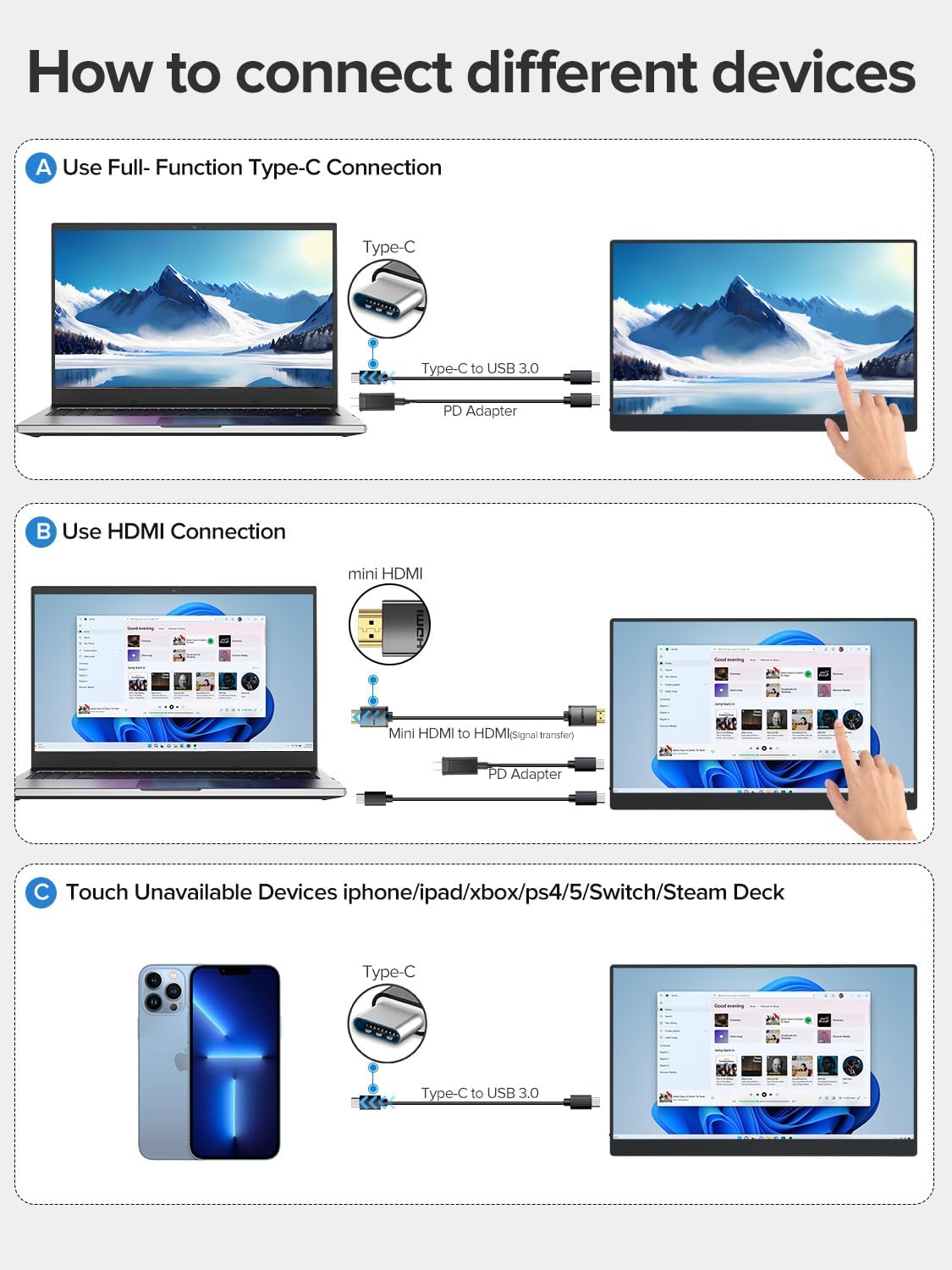
- Using a Full-Function USB-C Cable: Connect one end of the USB-C to USB-C cable to your device's full-function USB-C port and the other end to one of the monitor's Type C 3.1 ports. This single cable can transmit power, video, audio, and touch signals. An additional power adapter may be needed for some devices or if the monitor requires more power.
- Using HDMI and USB-A to USB-C Cables: Connect the Mini HDMI to HDMI cable from your device's HDMI port to the monitor's Mini HDMI port for video and audio. Then, connect the USB-A to USB-C cable from your device's USB-A port to one of the monitor's Type C 3.1 ports for power and touch functionality. An additional power adapter may be required.
- Devices Without Touch Support: For devices like iPhones, iPads, Xbox, PS5, Nintendo Switch, or Steam Deck, you can connect for display and audio using the appropriate cables (e.g., USB-C for video/power or HDMI for video/audio). Touch functionality will not be available for these devices.
Using the Protective Case as a Stand
The included smart cover can be folded to create a stable stand for your monitor. Watch the video below for a demonstration.
Istruzioni per l'uso
Accensione/spegnimento
- To power on the monitor, press the Pulsante di accensione/indietro.
- To power off the monitor, press and hold the Pulsante di accensione/indietro for a few seconds until the screen turns off.
Menu OSD (On-Screen Display)
Il menu OSD consente di regolare varie impostazioni di visualizzazione. Utilizzare il Pulsante della puleggia to navigate and select options, and the Pulsante di accensione/indietro to exit or go back.
- Premere il tasto Pulsante della puleggia per aprire il menu OSD.
- Rotolare il Pulsante della puleggia verso l'alto o verso il basso per navigare tra le opzioni del menu.
- Premere il tasto Pulsante della puleggia per selezionare un'opzione o confermare un'impostazione.
- Premere il tasto Pulsante di accensione/indietro per tornare al menu precedente o uscire dall'OSD.
Funzionalità touch
The monitor features a 10-point capacitive touchscreen for intuitive interaction. Touch functionality depends on the connected device.

- Supporto multi-touch: Fully supported for Windows PCs, Android phones, and tablets, allowing for gestures like pinch-to-zoom, scrolling, and swiping.
- Single-Touch Support: For Mac devices (MacBook, iMac, Mac mini), single-touch gestures are supported.
- No Touch Support: Devices such as iPhones, iPads, Xbox, PS5, Nintendo Switch, and Steam Deck do not support touch input on this monitor. The monitor will function as a non-touch display for these devices.

Modalità di visualizzazione
Il monitor supporta diverse configurazioni di visualizzazione per soddisfare le tue esigenze:

- Modalità specchio: Duplica il contenuto dello schermo principale sul monitor portatile.
- Modalità estesa: Extends your desktop across both screens, providing more workspace. You can set the portable monitor as your main screen.
- Modalità secondo schermo: Uses the portable monitor as a secondary display. Note that touch functionality may be limited or unavailable in this mode for certain operating systems or devices.
- Orientamento: The monitor supports both horizontal (landscape) and vertical (portrait) orientations. Adjust settings on your connected device as needed.
Manutenzione
- Pulizia dello schermo: Utilizzare un panno morbido e privo di lanugine leggermente dampcon acqua o una soluzione detergente per schermi. Evitare prodotti chimici aggressivi o materiali abrasivi.
- Pulizia del corpo: Pulire il corpo del monitor con un panno morbido e asciutto.
- Magazzinaggio: When not in use, store the monitor in its protective case in a cool, dry place away from direct sunlight and extreme temperatures.
- Gestione: Evitare di far cadere il monitor o di sottoporlo a forti urti. Non posizionare oggetti pesanti sopra di esso.
Risoluzione dei problemi
| Problema | Possibile causa | Soluzione |
|---|---|---|
| Nessun display/Nessun segnale | Incorrect cable connection; Insufficient power; Incorrect input source selected. | Ensure cables are securely connected. Connect the power adapter. Check your device's display settings. Use the OSD menu to select the correct input source. |
| La funzione touch non funziona | Incorrect cable connection; Device does not support touch; Operating system limitations. | Ensure the USB-C cable (or USB-A to USB-C for HDMI) is connected and supports touch data. Verify your device's compatibility with touch input. Some devices/OS configurations may limit touch functionality. |
| Sfarfallio dello schermo | Cable issue; Power instability. | Try a different cable. Ensure the monitor is receiving stable power, especially if using a single USB-C connection. Connect the dedicated power adapter. |
| Nessun suono | Volume too low; Incorrect audio output selected on device; Faulty cable. | Adjust monitor volume via OSD. Check your device's audio output settings. Ensure cables are properly connected. |
Specifiche
| Caratteristica | Specificazione |
|---|---|
| Numero di modello | UP15605 |
| Dimensioni dello schermo | 15.6 pollici |
| Risoluzione | FHD 1080p (1920 x 1080 pixel) |
| Tipo di pannello | Schermo LCD IPS |
| Frequenza di aggiornamento | Frequenza 60 Hz |
| Tempo di risposta | 1 millisecondo |
| Proporzioni | 16:9 |
| Rapporto di contrasto | 2000:1 |
| Luminosità | 300 lm (nits) |
| Viewangolo di ing | 178 gradi |
| Superficie dello schermo | Opaco |
| Valore gamma colore | 125% |
| Caratteristiche speciali | USB Hub, Touchscreen, Portable, Flicker-Free, Ultra-Thin, HDR, Eye Care, Contrast Enhancement, G-Sync Compatible |
| Interfaccia Hardware | Mini HDMI, USB-C (x2) |
| Dimensioni del prodotto (PxLxA) | Dimensioni: 35 x 22 x 1 cm |
| Peso | 2 chilogrammi (circa 1.5 libbre) |
| Dispositivi compatibili | Desktop PC, Laptop, Smartphone, Tablet, Game Consoles |
Garanzia e supporto
Your UPERFECT monitor comes with a garanzia di un anno dalla data di acquisto, a copertura dei difetti di fabbricazione. Si prega di conservare la prova d'acquisto per eventuali reclami in garanzia.
For technical support, warranty inquiries, or any questions regarding your product, please contact UPERFECT customer service through the retailer's platform or the official UPERFECT website. Our support team is available to assist you with any issues you may encounter.