
6189411163239
Manuale utente della scheda madre Q57H-AD
Modello: 6189411163239
1. Introduzione
This manual provides detailed instructions for the installation, setup, operation, and maintenance of the Q57H-AD Motherboard. Please read this manual thoroughly before beginning installation to ensure proper functionality and to prevent damage to the components.
The Q57H-AD Motherboard is designed for LGA 1156 processors and supports DDR3 memory, offering a robust foundation for various computing needs.
2. Prodotto finitoview
The Q57H-AD Motherboard features a standard form factor and includes essential ports and slots for a complete system build.
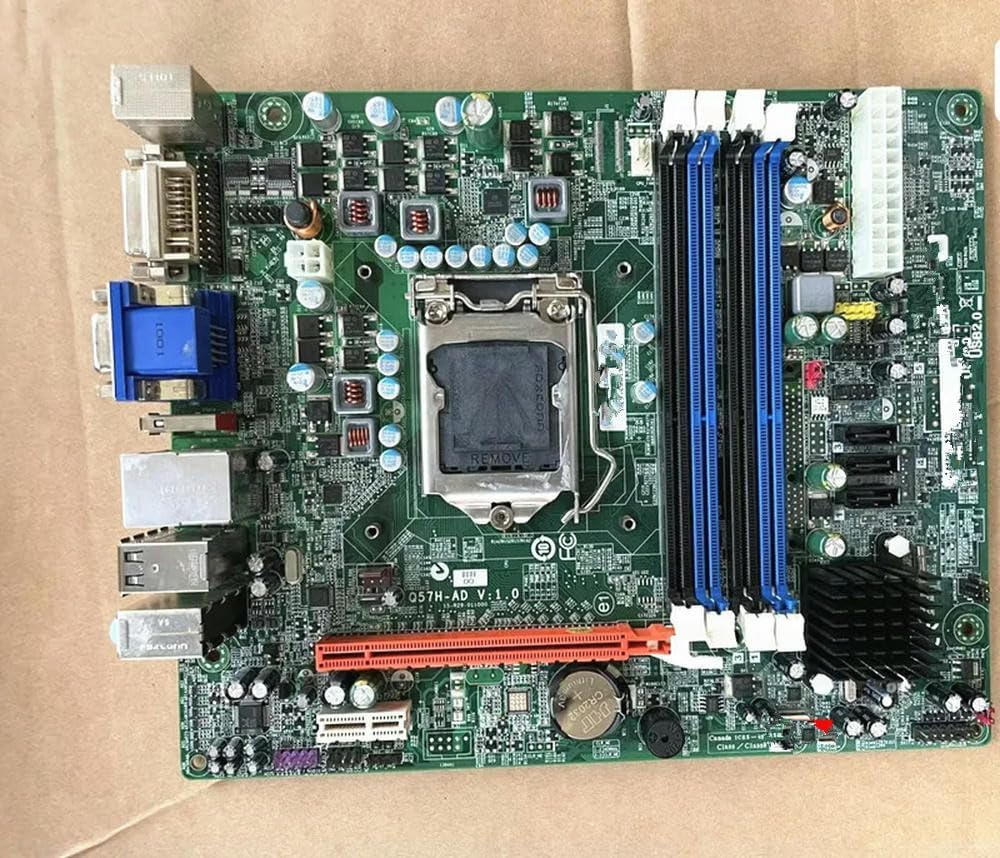
Figura 2.1: Q57H-AD Motherboard Layout. This image displays the full layout of the Q57H-AD motherboard, highlighting the central LGA 1156 CPU socket, four DDR3 RAM slots (two blue, two black), multiple PCIe expansion slots, and various I/O ports including VGA, DVI, USB, and Ethernet. Key components like the chipset heatsink and power connectors are also visible.
2.1 componenti chiave
- Socket CPU LGA 1156: Per processori Intel Core i3/i5/i7 (1a generazione) e serie Xeon 3400.
- Slot DIMM DDR3: Four slots supporting dual-channel DDR3 memory.
- Slot PCIe: Various Peripheral Component Interconnect Express slots for graphics cards and other expansion cards.
- Porte SATA: Per collegare dispositivi di archiviazione come HDD e SSD.
- Pannello I/O: Includes USB ports, audio jacks, Ethernet port, and video outputs (VGA, DVI).
- Batteria CMOS: A CR2032 battery for maintaining BIOS settings and system time.
3. Configurazione e installazione
Before installation, ensure your system is powered off and unplugged. Wear an anti-static wrist strap to prevent electrostatic discharge (ESD) damage.
3.1 Installazione della CPU
- Individuare il socket della CPU LGA 1156 sulla scheda madre.
- Gently push down the load lever and pull it sideways to open the CPU socket retention frame.
- Allineare il segno triangolare sulla CPU con il segno corrispondente sul socket. Inserire con cautela la CPU nel socket, senza forzarla.
- Close the retention frame and secure it by pushing the load lever back into place.
- Applicare uno strato sottile e uniforme di pasta termica sulla parte superiore della CPU.
- Installare il dissipatore della CPU seguendo le istruzioni del produttore.
Figura 3.1: CPU Socket Area. This detailed view focuses on the LGA 1156 CPU socket, showing the
Ask a question about this manual
Ask about setup, troubleshooting, compatibility, parts, safety, or missing instructions. Manuals+ will review the question and use this page’s manual context to help answer it.