
VTech VM5267
Manuale utente del baby monitor video digitale VTech VM5267
Modello: VM5267
Introduzione
Grazie per l'acquistoasing the VTech VM5267 Digital Video Baby Monitor. This manual provides comprehensive instructions for setting up, operating, and maintaining your new baby monitor. Please read this manual thoroughly before use to ensure proper operation and safety.
Contenuto della confezione
- Unità genitore (con schermo LCD da 5 pollici)
- Unità bambino (telecamera)
- Two power adapters
- Manuale d'uso
- Guida rapida

Image: The VTech VM5267 Digital Video Baby Monitor package contents, including the parent unit with a 5-inch display and the baby unit (camera).
Impostare
1. Powering On the Baby Unit
- Connect the small plug of the power adapter to the DC jack on the back of the baby unit.
- Collegare la spina grande dell'adattatore di corrente a una presa a muro.
- L'unità bambino si accenderà automaticamente.
2. Powering On the Parent Unit
- Connect the small plug of the power adapter to the DC jack on the side of the parent unit.
- Collegare la spina grande dell'adattatore di corrente a una presa a muro.
- Premere e tenere premuto il tasto ENERGIA sull'unità genitore finché lo schermo non si accende.
Note: For optimal performance, ensure both units are placed within range and away from other electronic devices that may cause interference.
Funzionamento del monitor
Viewil tuo bambino
Once both units are powered on and linked, the parent unit will display the video feed from the baby unit. The 5-inch high-resolution color LCD screen provides a clear view.
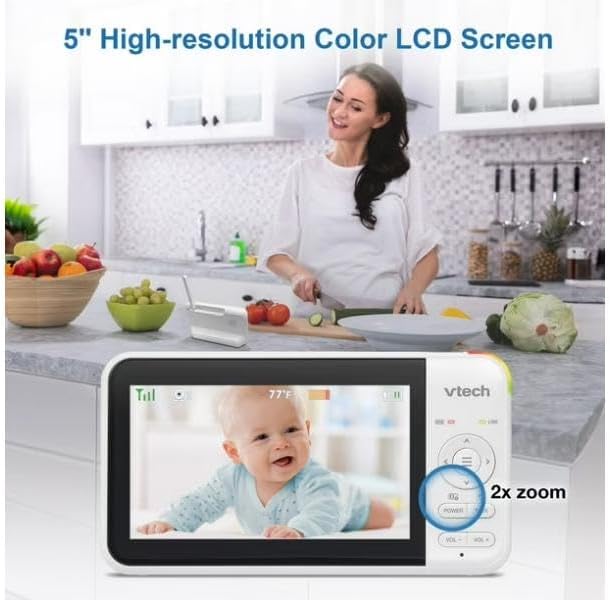
Image: The parent unit's 5-inch high-resolution color LCD screen showing a clear image of a baby, with an indication of 2x zoom capability.
Funzione panoramica e inclinazione
Use the navigation buttons on the parent unit to remotely pan (move horizontally) and tilt (move vertically) the camera lens of the baby unit. This allows you to adjust the viewing angle without physically moving the camera.
Interfono bidirezionale con risposta vocale
Premere e tenere premuto il tasto PARLARE sull'unità genitore per parlare al tuo bambino tramite l'altoparlante dell'unità bambino. Rilascia il pulsante per ascoltare il tuo bambino.

Image: A visual representation of the two-way talk-back intercom, demonstrating communication between the parent unit and the baby unit.
Night Light and Soothing Sounds
The baby unit features a multi-color night light and can play soothing sounds and lullabies. Use the dedicated buttons on the parent unit to control these features.
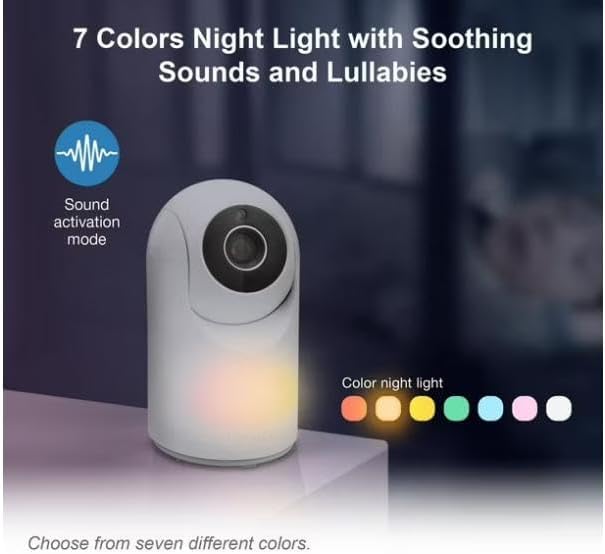
Image: The baby unit showcasing its 7-color night light feature, along with an icon indicating sound activation mode.
Visione notturna automatica a infrarossi
The baby unit is equipped with infrared LEDs that automatically activate in low-light conditions, providing a clear black-and-white video image of your baby, even in complete darkness.

Image: A side-by-side comparison illustrating the superior clarity of VTech's enhanced night vision compared to standard night vision.
Sound Activation Screen
The parent unit screen can be set to automatically turn on when sound is detected from the baby unit, conserving battery life. The night light on the baby unit can also be configured to turn on with sound detection.

Image: The parent unit displaying a baby, with visual cues indicating the sound activation feature that turns the screen on when noise is detected.
Manutenzione
Pulizia delle unità
- Pulire le superfici dell'unità genitore e dell'unità bambino con un panno morbido e asciutto.amp stoffa.
- Non utilizzare spray detergenti o detergenti liquidi.
- Ensure units are dry before reconnecting to power.
Cura della batteria (unità genitore)
- The parent unit uses a rechargeable battery.
- Caricare la batteria per almeno 12 ore prima del primo utilizzo.
- To prolong battery life, fully discharge the battery periodically before recharging.
- If storing the unit for an extended period, remove the battery.
Risoluzione dei problemi
| Problema | Possibile soluzione |
|---|---|
| No link / Out of range |
|
| Nessuna immagine / Schermo nero |
|
| Statico o interferenza |
|
Specifiche
- Modello: VM5267
- Display: 5-inch (12.7 cm) Color LCD
- Caratteristiche della fotocamera: Pan, Tilt, Digital Zoom, Automatic Infrared Night Vision, Multi-color Night Light
- Caratteristiche audio: Two-Way Talk-Back Intercom, Soothing Sounds & Lullabies, Sound Activation
- Energia: AC power adapters for both units; Rechargeable battery for Parent Unit
- Frequenza operativa: FHSS a 2.4 GHz
- Campo di funzionamento: Fino a 300 metri (campo aperto)
- Dimensioni (unità genitore): Approximately 7.62 x 7.62 x 5.08 cm (as per parcel dimensions, actual unit dimensions may vary slightly)
- Peso: Approximately 750 g (total package weight)
Garanzia e supporto
Per informazioni sulla garanzia e supporto tecnico, fare riferimento alla scheda di garanzia inclusa nella confezione del prodotto o visitare il sito ufficiale VTech website. Please have your product model number (VM5267) and purchase date ready when contacting support.
VTech Official Websito: www.vtechphones.com
Ask a question about this manual
Ask about setup, troubleshooting, compatibility, parts, safety, or missing instructions. Manuals+ will review the question and use this page’s manual context to help answer it.