
1. Introduzione
This manual provides essential information for the safe and efficient operation of your Machenike Machcreator N17A laptop. Please read this manual thoroughly before using the device and retain it for future reference.
2. Contenuto della confezione
Verificare che tutti gli articoli siano presenti nel pacco:
- Machenike Machcreator N17A Laptop
- Adattatore di alimentazione
- Manuale dell'utente (questo documento)
3. Prodotto finitoview
The Machenike Machcreator N17A is a 17.3-inch laptop designed for daily computing tasks. It features an Intel N100 Processor, 8GB DDR5 RAM, and a 256GB PCIe SSD for responsive performance. The 17.3" Full HD 120Hz display provides clear visuals, and the laptop runs on Windows 11 Home.
3.1. Componenti del laptop

Figura 3.1: Fronte view of the Machenike Machcreator N17A laptop.
This image shows the overall design of the Machenike Machcreator N17A laptop, highlighting its large 17.3-inch display and sleek chassis.

Figure 3.2: The 17.3-inch Full HD 120Hz display.
Un dettagliato view of the laptop's 17.3-inch Full HD display, emphasizing its narrow bezels and 120Hz refresh rate for smooth visuals.

Figure 3.3: Backlit keyboard and touchpad.
This image highlights the backlit keyboard and the spacious touchpad, designed for comfortable typing and navigation.
3.2. Porte e connettori
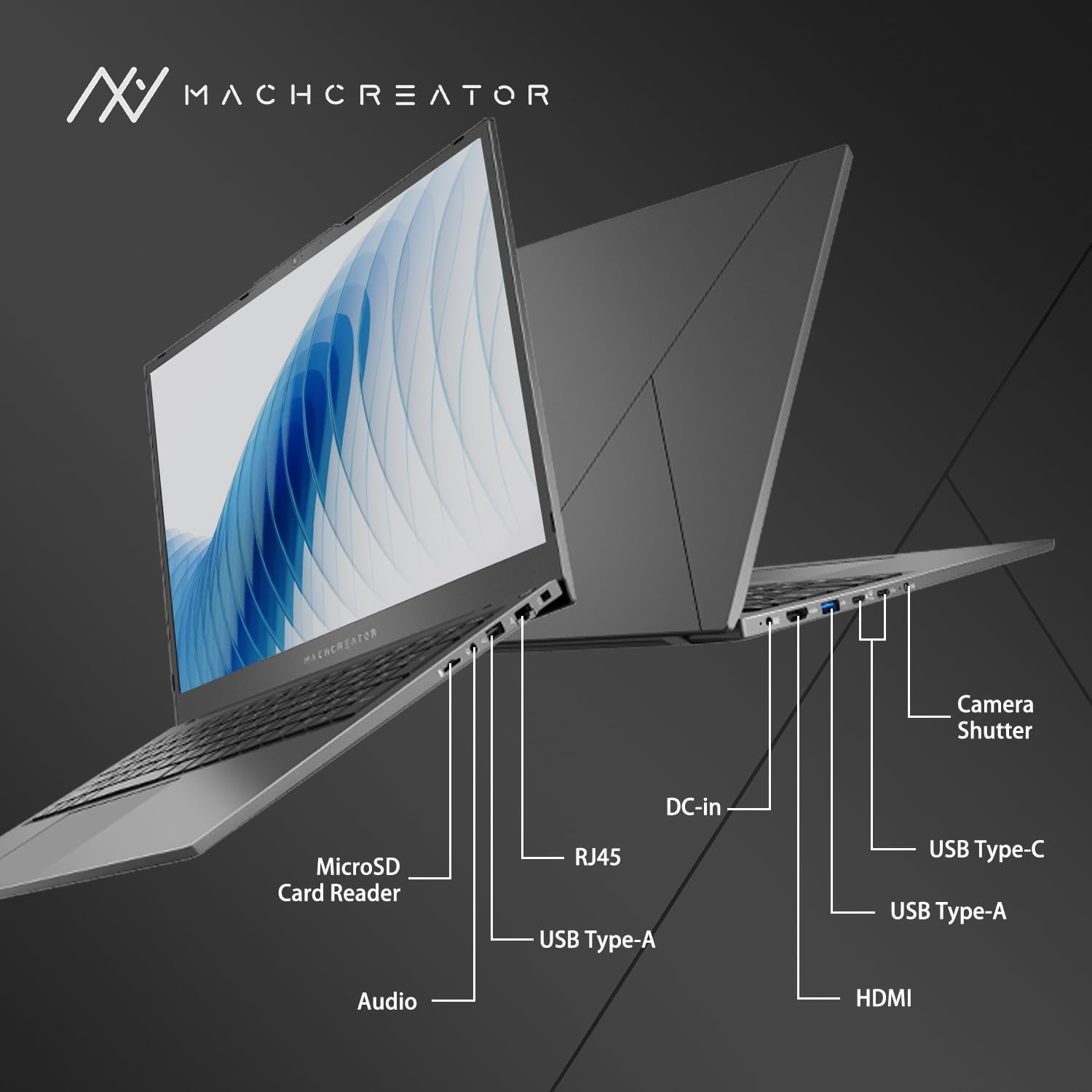
Figura 3.4: lato view con etichette delle porte.
An illustration detailing the various input/output ports available on the laptop, including USB, HDMI, and the SD card reader.
- Lettore di schede MicroSD: For reading and writing data to MicroSD cards.
- Ingresso CC: Connect the power adapter for charging and power supply.
- Thunderbolt 4 (x2): High-speed data transfer, video output, and power delivery.
- USB 2.0 Tipo-A (x2): Collega i dispositivi USB.
- HDMI: Collegati a display o proiettori esterni.
- RJ45: Porta Ethernet per la connessione di rete cablata.
- Jack audio: Collega cuffie o altoparlanti esterni.
4. Impostazione
4.1. Accensione iniziale
- Disimballare il computer portatile e tutti gli accessori dalla scatola.
- Collegare l'adattatore di alimentazione alla porta CC-in del laptop e quindi a una presa di corrente.
- Apri il coperchio del portatile.
- Per accendere il portatile, premere il pulsante di accensione situato sulla tastiera.
- Segui le istruzioni visualizzate sullo schermo per completare la configurazione di Windows 11 Home. Questa procedura include la selezione della regione, della lingua e la configurazione dell'account utente.
4.2. Connessione al Wi-Fi
- During the Windows setup, you will be prompted to connect to a Wi-Fi network. Select your desired network from the list.
- Enter the Wi-Fi password if prompted and click "Connect".
- If you skip this step, you can connect later via Windows Settings: Go to Inizio > Impostazioni > Rete e Internet > Wifi.
5. Istruzioni per l'uso
5.1. Utilizzo della tastiera e del touchpad
The laptop features a full-size keyboard with a numeric keypad and a large touchpad. The keyboard is backlit, which can be activated or adjusted using the function keys (e.g., Fn + F5).
Figura 5.1: Disposizione della tastiera e del touchpad.
This image illustrates the keyboard and touchpad, showing the key layout and the size of the touchpad for user interaction.
5.2. Collegamento di dispositivi esterni
Utilizzare le porte disponibili per collegare dispositivi esterni:
- Dispositivi USB: Plug USB drives, mice, or keyboards into the USB Type-A or Thunderbolt 4 (USB-C) ports.
- Display esterno: Connect an external monitor or TV using the HDMI port or one of the Thunderbolt 4 ports (with an appropriate adapter, if needed).
- Schede SD: Insert a MicroSD card into the MicroSD Card Reader slot to access its contents.
- Rete cablata: Per una connessione Internet cablata stabile, collegare un cavo Ethernet alla porta RJ45.
5.3. Adjusting the Display Angle
The laptop screen can be adjusted up to a 170-degree angle, providing flexibility for various viewing positions, presentations, or collaborative work.
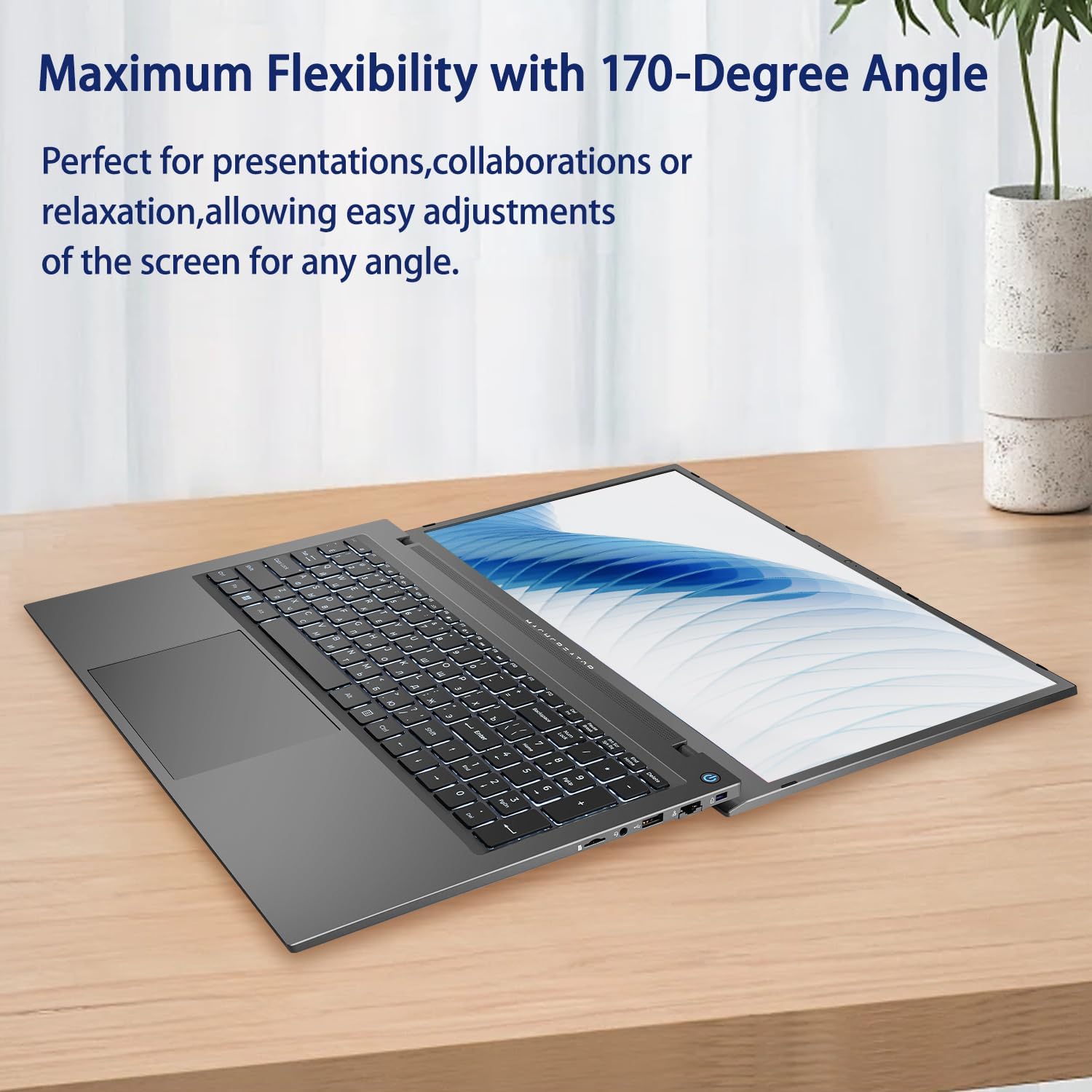
Figure 5.2: Laptop display at 170-degree angle.
This image demonstrates the laptop's ability to open its screen to a wide 170-degree angle, useful for various viewscenari.
5.4. Ricarica del laptop
Connect the provided power adapter to the DC-in port. The laptop also supports fast charging via its USB-C (Thunderbolt 4) ports with a compatible USB-C Power Delivery charger.
6. Manutenzione
6.1. Pulizia
- Utilizzare un panno morbido e privo di lanugine per pulire lo schermo. Per i segni ostinati, strofinare leggermenteampInumidire il panno con acqua o con una soluzione detergente per schermi.
- Wipe the keyboard and chassis with a soft, dry cloth. Avoid using harsh chemicals or abrasive materials.
- Prima di pulirlo, assicurarsi che il computer portatile sia spento e scollegato.
6.2. Cura della batteria
- Evitare di scaricare completamente la batteria frequentemente.
- Non esporre il portatile a temperature estreme.
- If storing the laptop for an extended period, charge the battery to approximately 50-70% before turning it off.
6.3. Aggiornamenti software
Aggiorna regolarmente il sistema operativo Windows e i driver per garantire prestazioni e sicurezza ottimali. Vai a Inizio > Impostazioni > Aggiornamento di Windows per verificare la presenza di aggiornamenti.
7. Risoluzione Dei Problemi
| Problema | Possibile soluzione |
|---|---|
| Il portatile non si accende. |
|
| Nessuna connessione Wi-Fi. |
|
| Lo schermo è vuoto o tremolante. |
|
| La retroilluminazione della tastiera non funziona. |
|
8. Specifiche
| Caratteristica | Dettaglio |
|---|---|
| Nome del modello | Machenike Machcreator N17A |
| Processore | Intel N100 (4 Cores, up to 3.4 GHz) |
| Memoria RAM | 8 GB DDR5 (4800 MHz) |
| Magazzinaggio | SSD PCIe da 256 GB |
| Grafica | Grafica Intel UHD (integrata) |
| Display | 17.3" FHD (1920x1080) IPS, 120Hz |
| Sistema operativo | Windows 11 Casa |
| Porti | 2x Thunderbolt 4, 2x USB 2.0 Type-A, 1x HDMI, 1x RJ45, 1x MicroSD Card Reader, 1x Audio Jack, 1x DC-in |
| Connettività wireless | Wi-Fi (802.11n) |
| Caratteristiche speciali | Tastiera retroilluminata, tastierino numerico |
| Dimensioni (LxWxH) | 15.6 x 10.32 x 1.02 pollici |
| Peso | 5.78 libbre |
| Colore | Grigio |
9. Garanzia e supporto
For warranty information and technical support, please refer to the documentation provided with your purchase or visit the official Machenike websito. Conservare la prova d'acquisto per eventuali reclami in garanzia.
Risorse online:
- Ufficiale Machenike Websito: www.machenike.com (Nota: questo è un segnaposto URL, please refer to your product's specific warranty card for the correct support contact.)
10. Video dimostrativo del prodotto
Video 10.1: Machcreator N17A Laptop Overview.
Questo video fornisce una panoramica visivaview of the Machenike Machcreator N17A laptop, showcasing its design, key features, and various ports. It demonstrates the unboxing experience, the backlit keyboard, and the available connectivity options.