
GPD RM-Pocket-4
Manuale utente del mini laptop GPD Pocket 4
Model: RM-Pocket-4 | Brand: GPD
1. Introduzione
Welcome to the user manual for your GPD Pocket 4 Mini Laptop. This document provides essential information for setting up, operating, maintaining, and troubleshooting your device. The GPD Pocket 4 is a high-performance, ultra-portable 2-in-1 device designed for both productivity and entertainment, featuring an AMD Ryzen AI 9 HX 370 CPU and an 8.8-inch 2.5K 144Hz touchscreen display.
Please read this manual thoroughly before using your GPD Pocket 4 to ensure proper operation and to maximize its capabilities.
2. Informazioni sulla sicurezza
- Alimentazione elettrica: Use only the original power adapter provided with the device. Using unauthorized adapters may damage the device and void the warranty.
- Cura della batteria: Do not attempt to replace the battery yourself. Avoid exposing the device to extreme temperatures (below 0°C or above 35°C) or direct sunlight for prolonged periods.
- Acqua e umidità: Tenere il dispositivo lontano da acqua, pioggia e umidità eccessiva. Non utilizzare con le mani bagnate.
- Ventilazione: Ensure proper ventilation. Do not block the ventilation openings, especially during heavy use, to prevent overheating.
- Pulizia: Disconnect the power before cleaning. Use a soft, dry cloth. Avoid liquid cleaners or aerosols.
- Smontaggio: Do not attempt to disassemble or repair the device yourself. This may cause damage and void the warranty. Contact authorized service personnel for repairs.
3. Contenuto della confezione
Si prega di controllare il contenuto della confezione al momento del disimballaggio. Se qualche articolo risulta mancante o danneggiato, contattare immediatamente il rivenditore.
- Mini laptop GPD Pocket 4
- USB-C Power Adapter (100W PD Fast Charging)
- Cavo da USB-C a USB-C
- Manuale dell'utente (questo documento)
4. Prodotto finitoview
The GPD Pocket 4 is a versatile 2-in-1 device, combining a mini laptop with a tablet. It features a high-resolution touchscreen and a physical keyboard.
4.1 Caratteristiche principali
- Processore: AMD Ryzen AI 9 HX 370 CPU (up to 5.1 GHz)
- Grafica: AMD Radeon 890M iGPU (RDNA 3.5 architecture)
- Display: 8.8-inch 2.5K (2560x1600) IPS Touchscreen, 144Hz refresh rate
- Memoria: 32GB LPDDR5X RAM (7500 MT/s)
- Magazzinaggio: 2TB M.2 NVMe PCIe 4.0 SSD
- Sistema operativo: Windows 11 Casa
- Connettività: Wi-Fi 6E, Bluetooth 5.3
- Batteria: 44.8Wh, up to 9 hours video playback
- Porte: HDMI 2.1, 2x USB-C (full-featured), USB-A, RJ45 Network Port, Earphone/Microphone Ports
- Modular IO: Support for 4G, MicroSD, KVM, and RS-232 modules.
4.2 Disposizione del dispositivo

Figura 4.2.1: Laterale e posteriore view of the GPD Pocket 4 highlighting ports and features.
- Top/Rear: Charge Indicator, USB4, Memory Card Readers, Reset Button, HDMI 2.1, USB A 3.2 Gen 2, Speaker Port.
- Lato sinistro: Full-Featured USB-C, Air Outlet, RJ45 Network Port, Lanyard Hole, Earphone/Microphone Ports, USB-A, Power Button/Fingerprint.
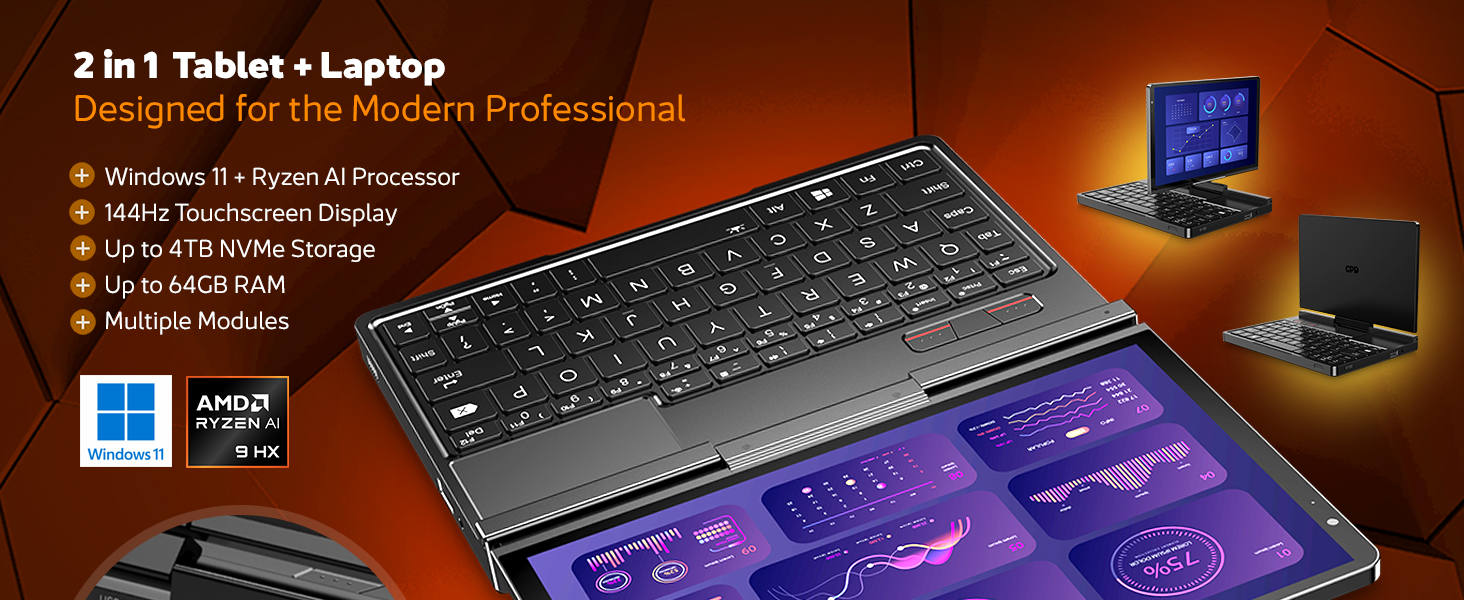
Figura 4.2.2: Oltreview of the GPD Pocket 4's core specifications and 2-in-1 design.
This image illustrates the device's key technical specifications, including its modular IO, screen, CPU, GPU, RAM, storage, OS, battery, and connectivity, emphasizing its nature as a pocket-sized modular AI PC.

Figure 4.2.3: Modular expansion options for the GPD Pocket 4.
The GPD Pocket 4 supports various modular expansions, including KVM, Memory Card Reader, 4G LTE, and RS-232 modules, enhancing its versatility for different professional needs.
5. Impostazione
5.1 Accensione iniziale
- Carica il dispositivo: Before first use, connect the GPD Pocket 4 to the power adapter using the provided USB-C cable. Plug the adapter into a wall outlet. The charge indicator light will illuminate.
- Accensione: Press and hold the Power Button (integrated with the fingerprint sensor) for a few seconds until the GPD logo appears on the screen.
- Installazione di Windows: Follow the on-screen instructions to complete the Windows 11 Home setup process. This includes selecting your region, language, connecting to Wi-Fi, and creating a user account.
5.2 Collegamento delle periferiche
- Display esterno: Connect an external monitor via the HDMI 2.1 port or one of the full-featured USB-C ports.
- Dispositivi USB: Use the USB-A or USB-C ports for connecting external keyboards, mice, USB drives, or other peripherals.
- Rete: For a wired internet connection, connect an Ethernet cable to the RJ45 network port.
- Audio: Connect headphones or external speakers to the 3.5mm earphone/microphone port.
6. Operating the GPD Pocket 4
6.1 Modalità di funzionamento
- Modalità portatile: Use the integrated keyboard and touchpad for traditional laptop functionality. The 8.8-inch display provides a compact yet clear workspace.
- Modalità Tablet: Fold the screen back to transform the device into a tablet. The 10-point multi-touch display allows for intuitive navigation and interaction.

Figure 6.1.1: GPD Pocket 4 in tablet mode, showcasing la sua interfaccia touch.
The device seamlessly transitions between laptop and tablet modes, offering flexibility for various tasks.
6.2 Tastiera e touchpad
- The integrated keyboard is designed for comfortable typing in a compact form factor.
- Il touchpad supporta i gesti multi-touch per la navigazione. Per la personalizzazione, consultare le impostazioni di Windows.
- The power button doubles as a fingerprint sensor for secure login.

Figure 6.2.1: User interacting with the GPD Pocket 4's keyboard and touchpad.
This image highlights the comfortable keyboard and backlit trackpad, along with the integrated camera and microphone for meetings.
6.3 Gestione della batteria
- The GPD Pocket 4 features a 44.8Wh battery.
- For optimal battery life, adjust power settings in Windows.
- The device supports 100W PD fast charging. Use the provided charger for quickest recharge times.

Figura 6.3.1: Interno view showing the 44.8Wh battery and device dimensions.
This image provides a visual representation of the device's internal battery and its compact dimensions, emphasizing its portability and power endurance.
7. Manutenzione
7.1 Pulizia
- Always power off the device and disconnect the charger before cleaning.
- Use a soft, lint-free cloth to wipe the screen and chassis. For stubborn smudges on the screen, lightly dampen the cloth with water or a screen-specific cleaner (do not spray directly on the screen).
- Use a soft brush or compressed air to clean dust from the keyboard and ventilation openings.
- Evitare l'uso di prodotti chimici aggressivi, detergenti abrasivi o solventi.
7.2 Aggiornamenti software
- Regularly check for Windows updates to ensure your system has the latest security patches and performance improvements. Go to Impostazioni > Windows Update.
- Periodically check the GPD official website for driver updates, especially for graphics (AMD Radeon 890M) and chipset drivers, to ensure optimal performance.
7.3 Gestione dell'archiviazione
- Eliminare regolarmente ciò che non è necessario filee applicazioni per liberare spazio di archiviazione.
- Valutare l'utilizzo dell'archiviazione cloud per grandi fileper ridurre il consumo di spazio di archiviazione locale.
- The 2TB M.2 NVMe SSD is expandable; consult GPD support for compatible upgrade options if needed.
8. Risoluzione Dei Problemi
| Problema | Possibile causa | Soluzione |
|---|---|---|
| Il dispositivo non si accende. | Low battery; Power adapter not connected; Hardware issue. | Ensure the device is fully charged. Verify the power adapter and cable are securely connected. If issues persist, perform a hard reset (press and hold power button for 15 seconds). |
| Lo schermo è vuoto o tremolante. | Display driver issue; Incorrect resolution; Hardware fault. | Restart the device. Update graphics drivers. Check display settings in Windows. |
| Wi-Fi o Bluetooth non funzionanti. | Wireless adapter disabled; Driver issue; Interference. | Check Wi-Fi/Bluetooth settings in Windows. Restart the device. Update wireless drivers. Ensure no physical obstructions or strong interference sources. |
| Il dispositivo è lento o non risponde. | Too many applications running; Low storage space; Overheating. | Close unnecessary applications. Free up disk space. Ensure ventilation is not blocked. Check Task Manager for resource-intensive processes. |
| Il touchscreen non risponde. | Software glitch; Driver issue; Physical damage. | Restart the device. Check for touchscreen driver updates. If physically damaged, contact support. |
9. Specifiche
| Caratteristica | Dettaglio |
|---|---|
| Marca | PIL |
| Nome del modello | Pocket (RM-Pocket-4) |
| Processore | AMD Ryzen AI 9 HX 370 (5.1 GHz) |
| Coprocessore grafico | Radeon™ 890M |
| Memoria RAM | 32 GB LPDDR5X |
| Magazzinaggio | 2 TB NVMe PCIe Gen4 SSD |
| Dimensioni dello schermo | 8.8 pollici |
| Risoluzione dello schermo | 2560 x 1600 pixel (2.5K) |
| Frequenza di aggiornamento | 144 Hz |
| Sistema operativo | Windows 11 Casa |
| Tipo senza fili | 802.11ax (Wi-Fi 6E), Bluetooth 5.3 |
| Durata media della batteria | 9 ore (riproduzione video) |
| Peso dell'articolo | 1.6 libbre (725 grammi) |
| Dimensioni del prodotto | 8.11 x 5.67 x 0.87 pollici |
| Colore | Nero |
10. Garanzia e supporto
GPD products typically come with a limited manufacturer's warranty. Please refer to the warranty card included in your package or visit the official GPD websito per termini e condizioni di garanzia dettagliati specifici per la tua regione.
For technical support, troubleshooting assistance beyond this manual, or warranty claims, please contact GPD customer support through their official website or the retailer from whom you purchased the device.
GPD Official Websito: www.gpd.hk
Please have your product model number (RM-Pocket-4) and purchase information ready when contacting support.
Ask a question about this manual
Ask about setup, troubleshooting, compatibility, parts, safety, or missing instructions. Manuals+ will review the question and use this page’s manual context to help answer it.