
Introduzione
Grazie per l'acquistoasing the Sharp Digital Alarm Clock, Model SPC5148AMZ. This alarm clock features a large, easy-to-read red LED display, dual alarms, adjustable alarm volume, and a convenient snooze function. It is designed for simple operation and includes a battery backup feature to maintain time and alarm settings during power outages.
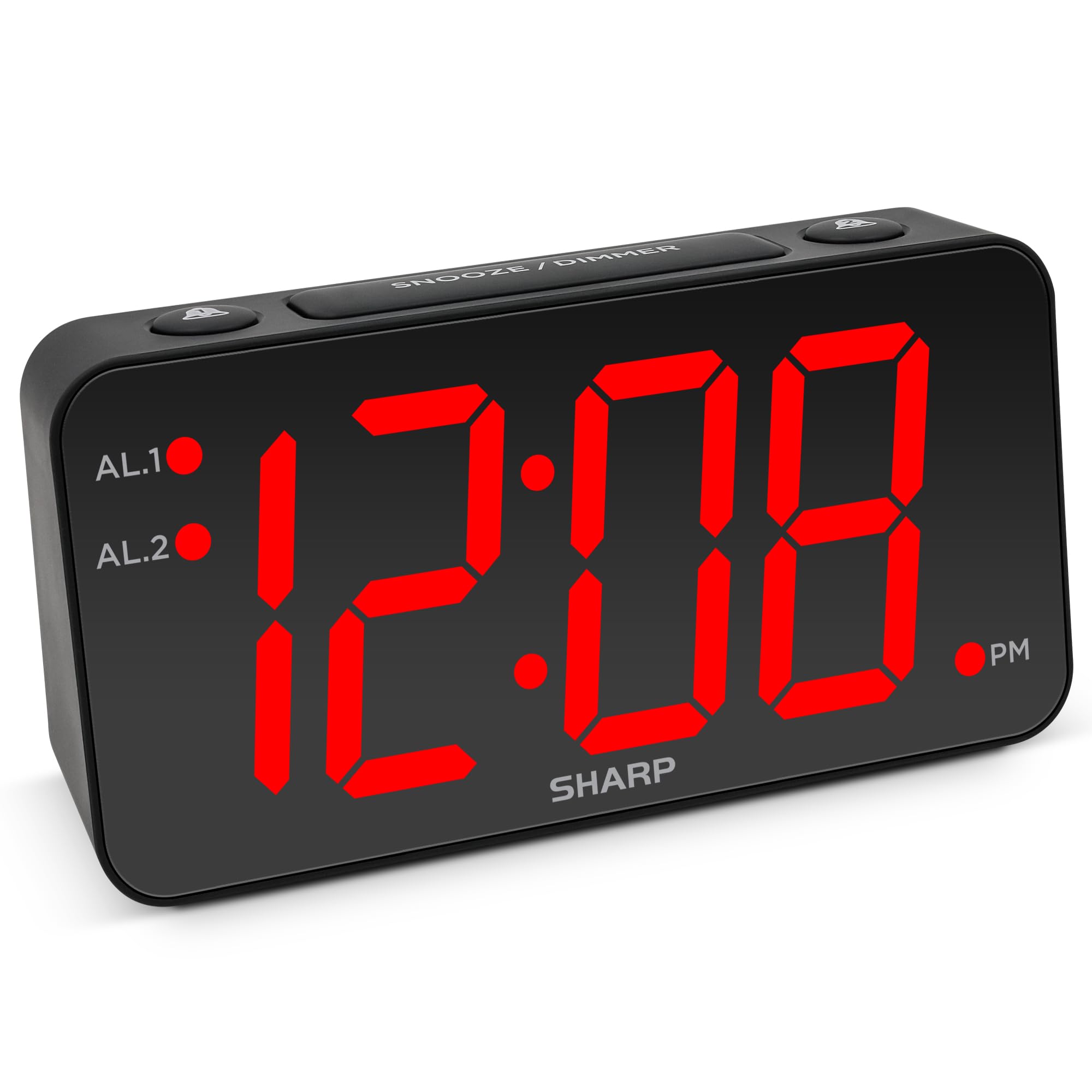
Immagine: Frontale view of the Sharp Digital Alarm Clock, Model SPC5148AMZ, showcasing its large red LED time display.
Componenti e controlli del prodotto
Prendi familiarità con le varie parti e i comandi della tua sveglia.
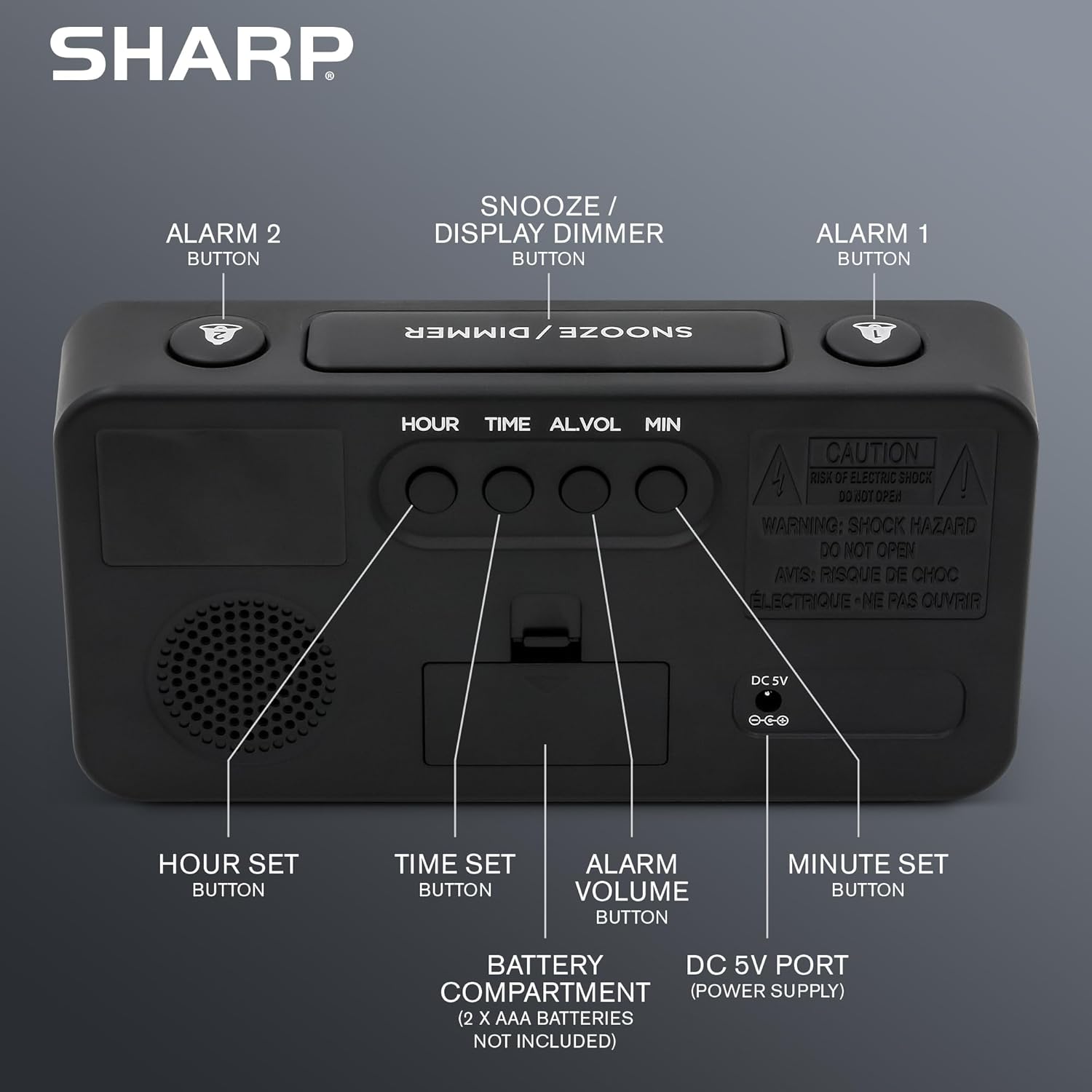
Immagine: Posteriore view of the alarm clock, highlighting the Hour Set, Time Set, Alarm Volume, Minute Set buttons, Battery Compartment, and DC 5V Power Port.
- Pulsante SNOOZE / DIMMER: Located on top. Press to snooze alarm or adjust display brightness.
- Pulsante ALLARME 1: Located on top. Activates/deactivates Alarm 1.
- Pulsante ALLARME 2: Located on top. Activates/deactivates Alarm 2.
- HOUR SET Button: Located on the back. Used to set the hour for time or alarm.
- Pulsante IMPOSTAZIONE ORA: Located on the back. Used to enter time setting mode.
- ALARM VOLUME Button: Located on the back. Adjusts the alarm loudness.
- MINUTE SET Button: Located on the back. Used to set the minute for time or alarm.
- Porta CC 5V: Power input for the clock.
- Vano batteria: Holds 2 x AAA batteries (not included) for backup.
Impostare
Collegamento di potenza
- Collegare l'adattatore di alimentazione in dotazione alla porta DC 5V sul retro della sveglia.
- Plug the adapter into a standard 110V/120V AC power outlet. The display will illuminate.
Installazione della batteria di backup
For battery backup, which retains time and alarm settings during a power outage (display will be blank), install batteries:
- Aprire il coperchio del vano batterie sul retro dell'unità.
- Insert 2 new AAA batteries (not included), observing the correct polarity (+ and -).
- Chiudere saldamente il coperchio del vano batterie.
Importante: Batteries are for backup only. The clock requires AC power for the display to function and for the alarm to sound at full volume.
Istruzioni per l'uso
Impostazione dell'ora
- Premere e tenere premuto il tasto IMPOSTAZIONE DELL'ORA pulsante sul retro dell'orologio finché le cifre delle ore non iniziano a lampeggiare.
- Premere il tasto ORA IMPOSTATA button repeatedly to adjust the hour. Pay attention to the PM indicator light.
- Premere il tasto IMPOSTAZIONE MINUTI ripetutamente il pulsante per regolare i minuti.
- Una volta impostato il tempo desiderato, premere il tasto IMPOSTAZIONE DELL'ORA nuovamente il pulsante per confermare e uscire dalla modalità di impostazione dell'ora.
Setting the Alarm (Alarm 1 and Alarm 2)
This clock features dual alarms. The procedure is the same for both Alarm 1 and Alarm 2.
- Premere e tenere premuto il tasto ALLARME 1 or ALLARME 2 button on the top of the clock until the alarm hour digits begin to flash.
- Premere il tasto ORA IMPOSTATA ripetutamente il pulsante per regolare l'ora della sveglia. Assicurarsi di aver selezionato l'ora corretta AM/PM.
- Premere il tasto IMPOSTAZIONE MINUTI ripetutamente il pulsante per regolare i minuti della sveglia.
- Premere il tasto ALLARME 1 or ALLARME 2 button again to confirm the alarm time. The corresponding alarm indicator light (AL.1 or AL.2) will illuminate on the display, indicating the alarm is active.
Attivazione/disattivazione degli allarmi
- To activate an alarm: Press the ALLARME 1 or ALLARME 2 button once. The corresponding indicator light will turn on.
- To deactivate an alarm: Press the ALLARME 1 or ALLARME 2 button again. The corresponding indicator light will turn off.
Funzione snooze
Quando suona la sveglia, premere il tasto grande SNOOZE / DIMMER button on top of the clock. The alarm will pause for 9 minutes and then sound again. You can repeat this process until the alarm is manually turned off.
Regolazione della luminosità del display (Dimmer)
Premere il tasto SNOOZE / DIMMER button (when the alarm is not sounding) to cycle through the display brightness levels: High, Medium, Low, or OFF.
Regolazione del volume dell'allarme
Premere il tasto VOLUME ALLARME button on the back of the clock to cycle through the alarm loudness levels: High, Medium, Low.
Manutenzione
- Pulizia: Pulire l'orologio con un panno morbido e asciutto. Non utilizzare detergenti abrasivi o solventi.
- Sostituzione della batteria: Replace backup batteries annually or when the clock experiences frequent power outages to ensure settings are retained.
- Posizionamento: Posizionare l'orologio su una superficie stabile e piana. Evitare la luce solare diretta, temperature estreme e umidità elevata.
Risoluzione dei problemi
| Problema | Soluzione |
|---|---|
| Il display dell'orologio è vuoto. | Ensure the AC power adapter is securely plugged into both the clock and a working electrical outlet. Check if there's a power outage. If using battery backup, the display will be blank during an outage, but timekeeping continues. |
| L'allarme non suona. |
|
| Impossibile impostare l'ora o la sveglia. | Ensure you are pressing and holding the correct SET button until the digits flash. Release the button, then use HOUR SET and MINUTE SET to adjust. Press the SET button again to confirm. |
| Il display è troppo luminoso/scurato. | Premere il tasto SNOOZE / DIMMER button (when alarm is not sounding) to cycle through brightness levels. |
Specifiche
- Modello: SPC5148AMZ
- Marca: Affilato
- Tipo di visualizzazione: LED digitale (rosso)
- Dimensioni dello schermo: 3 inches (Jumbo Numbers)
- Fonte di energia: Corded Electric (110V/120V AC)
- Batteria di backup: 2 batterie AAA (non incluse)
- Dimensioni (L x A): 8.27" x 4.13"
- Peso: 0.41 chilogrammi
- Caratteristiche speciali: Dual Alarms, Adjustable Brightness (High, Medium, Low, OFF), Adjustable Alarm Volume (High, Medium, Low), 9-minute Snooze.
Informazioni sulla garanzia
Sharp products are manufactured and sold by M.Z. Berger & Co. Inc. This product comes with a limited warranty against defects in materials and workmanship. For specific warranty details, including duration and terms, please refer to the warranty card included in your product packaging or contact customer support.
Assistenza clienti
For assistance with your Sharp Digital Alarm Clock, please contact the manufacturer's customer support. Contact information can typically be found on the product packaging or the manufacturer's official websito.
Manufacturer: Sharp (M.Z. Berger & Co. Inc.)
Prodotto finitoview Video
Video: An official Sharp video showcasing various Sharp clocks, including features like alarm, decor, charging, precision, and specialty functions. This video provides a general overview of Sharp's clock offerings.