
1. Introduzione
This manual provides detailed instructions for the Symcode Wearable Glove Barcode Scanner. This device is designed for efficient, hands-free barcode scanning, featuring dual wireless connectivity (Bluetooth 6.0 & 2.4G) and a long-lasting battery. It is suitable for various applications including warehouses, retail, and logistics, offering fast decoding of 1D, 2D, and QR codes.
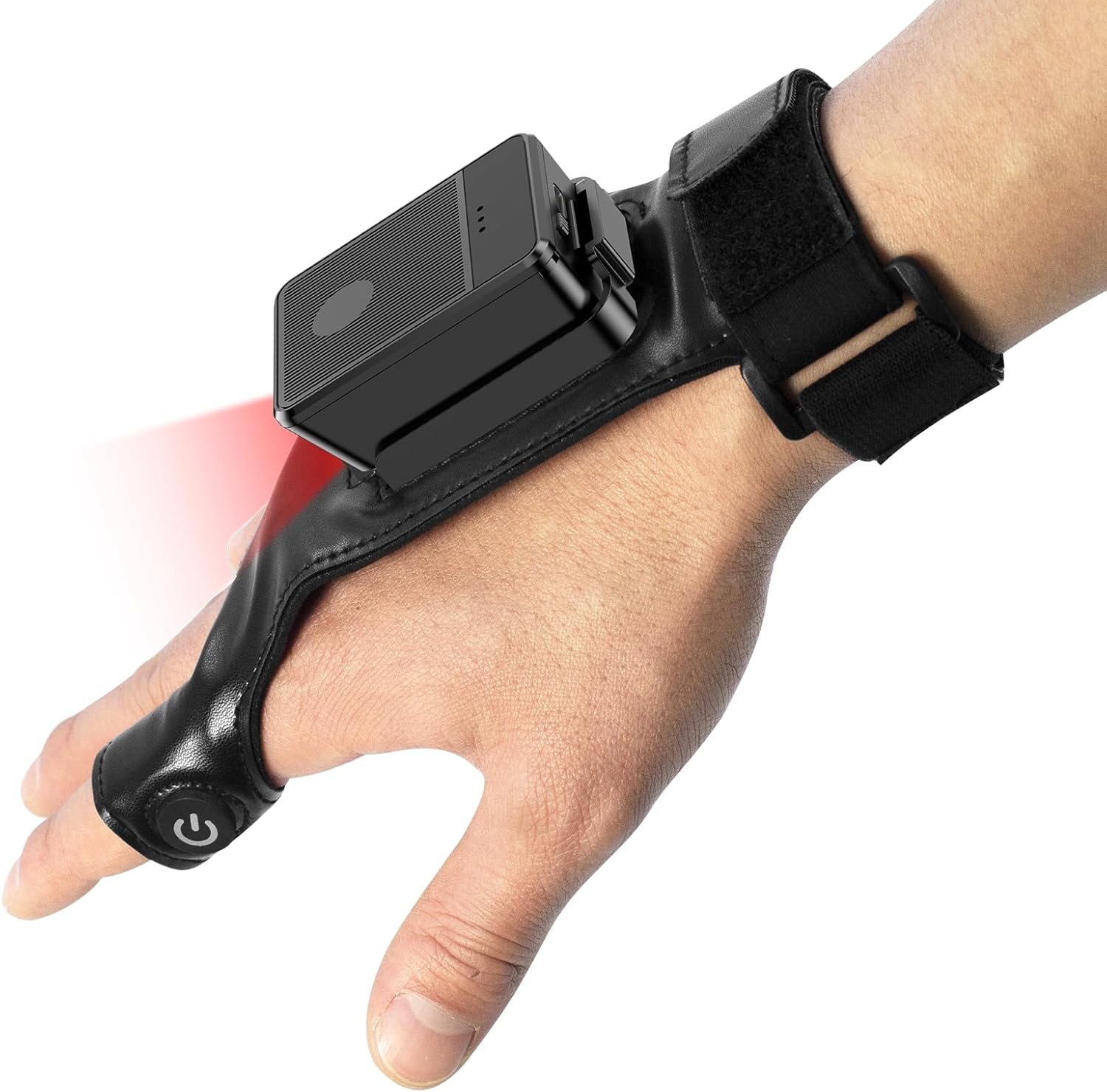
This image shows the Symcode Wearable Glove Barcode Scanner attached to a user's hand, demonstrating its ergonomic, hands-free design. The scanner unit is positioned on the back of the hand, with the scanning beam visible.
2. Informazioni sulla sicurezza
- Non esporre il dispositivo a temperature estreme, umidità o sostanze corrosive.
- Evitare l'esposizione diretta degli occhi alla luce di scansione.
- Non tentare di smontare o riparare il dispositivo da soli. Contattare personale qualificato per l'assistenza.
- Per evitare danni, utilizzare esclusivamente il cavo di ricarica e l'adattatore forniti.
3. Contenuto della confezione
Si prega di controllare il contenuto del pacco al momento della ricezione. Se qualche articolo risulta mancante o danneggiato, contattare il venditore.
- Symcode Wearable Glove Barcode Scanner
- Cavo di ricarica USB
- Dongle wireless 2.4G
- Manuale d'uso
4. Prodotto finitoview
The Symcode Wearable Glove Barcode Scanner consists of a compact scanning unit and an adjustable glove-style strap. The scanning unit features a durable trigger button, indicator lights, and a charging port. The glove is designed for comfort and secure fit, allowing for hands-free operation.

Un primo piano view of the scanner on a hand, highlighting the red scanning beam and the durable resin material of the trigger button located on the index finger. The image also shows a roll of barcode labels, indicating its primary function.
5. Impostazione
5.1 Ricarica del dispositivo
Before first use, fully charge the scanner. Connect the USB charging cable to the scanner's charging port and to a power source (e.g., computer USB port or USB wall adapter). The charging indicator light will show charging status. A full charge takes approximately 5 hours.
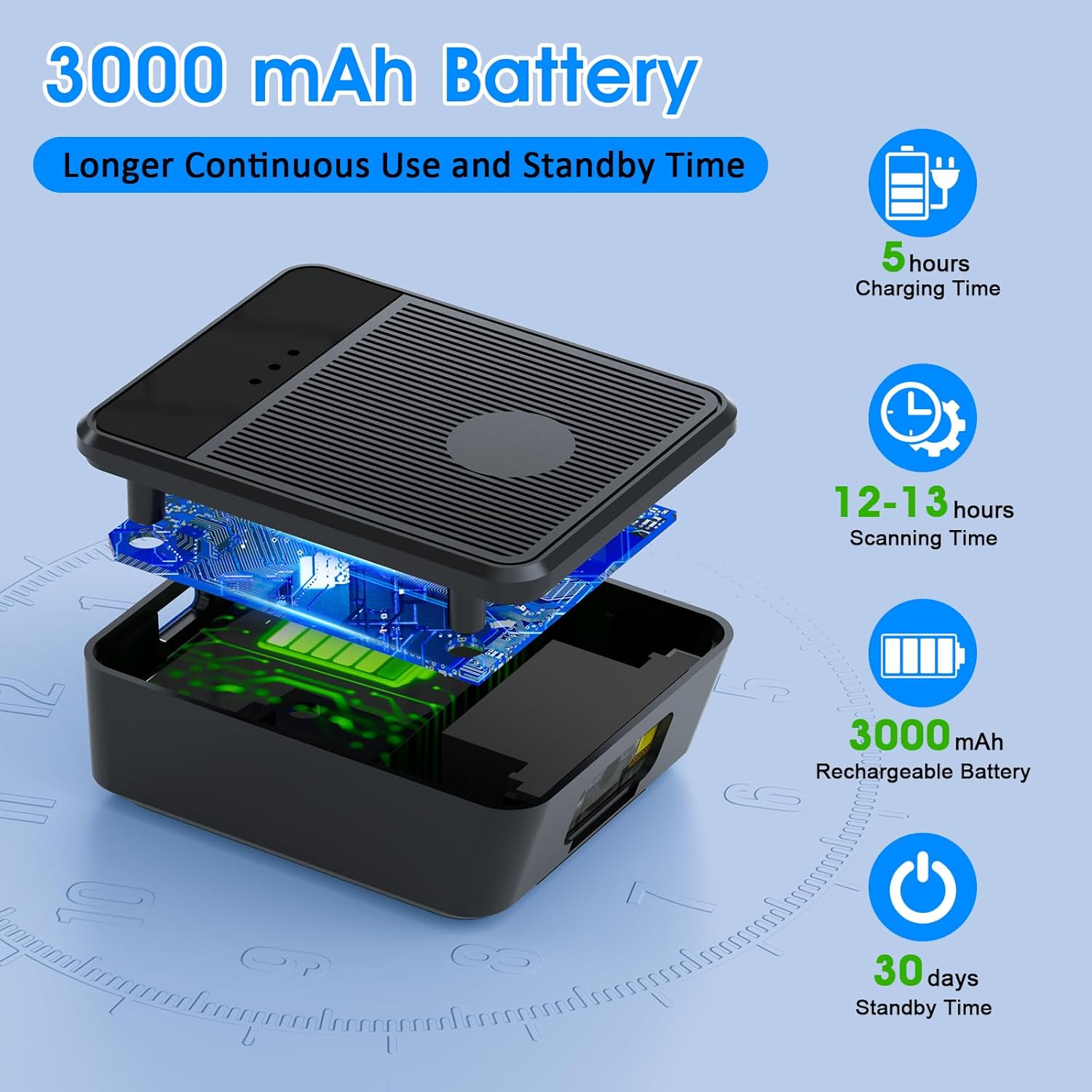
Un esploso view diagram of the scanner unit, emphasizing its 3000 mAh rechargeable battery. Accompanying text indicates a 5-hour charging time, 12-13 hours of continuous scanning, and 30 days of standby time.
5.2 Indossare lo scanner
Slide your hand into the glove, ensuring the scanner unit is positioned comfortably on the back of your hand. Adjust the strap for a secure fit. The trigger button should align with your index finger for easy access.

Two workers are shown in a warehouse environment, handling boxes. One worker is actively using the wearable barcode scanner on their hand to scan a package, demonstrating the hands-free benefit of the device during logistics operations.
5.3 Connessione a un dispositivo
The scanner supports two wireless connection methods:
5.3.1 2.4G Wireless Dongle Connection
- Plug the 2.4G wireless dongle into a USB port on your computer or compatible device.
- Accendi lo scanner. Dovrebbe associarsi automaticamente al dongle.
- A successful connection is indicated by a specific light pattern or sound (refer to device indicators).
Connessione Bluetooth 6.0 5.3.2
- Accendere lo scanner.
- Attiva il Bluetooth sul tuo dispositivo host (ad esempio, smartphone, tablet, computer).
- Cercare available Bluetooth devices and select the Symcode scanner from the list.
- Pairing may require a confirmation or a default PIN (check device documentation for specific PIN if required).
6. Istruzioni per l'uso
6.1 Scansione di base
To scan a barcode, point the scanner's beam at the barcode and press the trigger button located on your index finger. A successful scan will typically be indicated by a beep, a vibration, or a change in the indicator light.
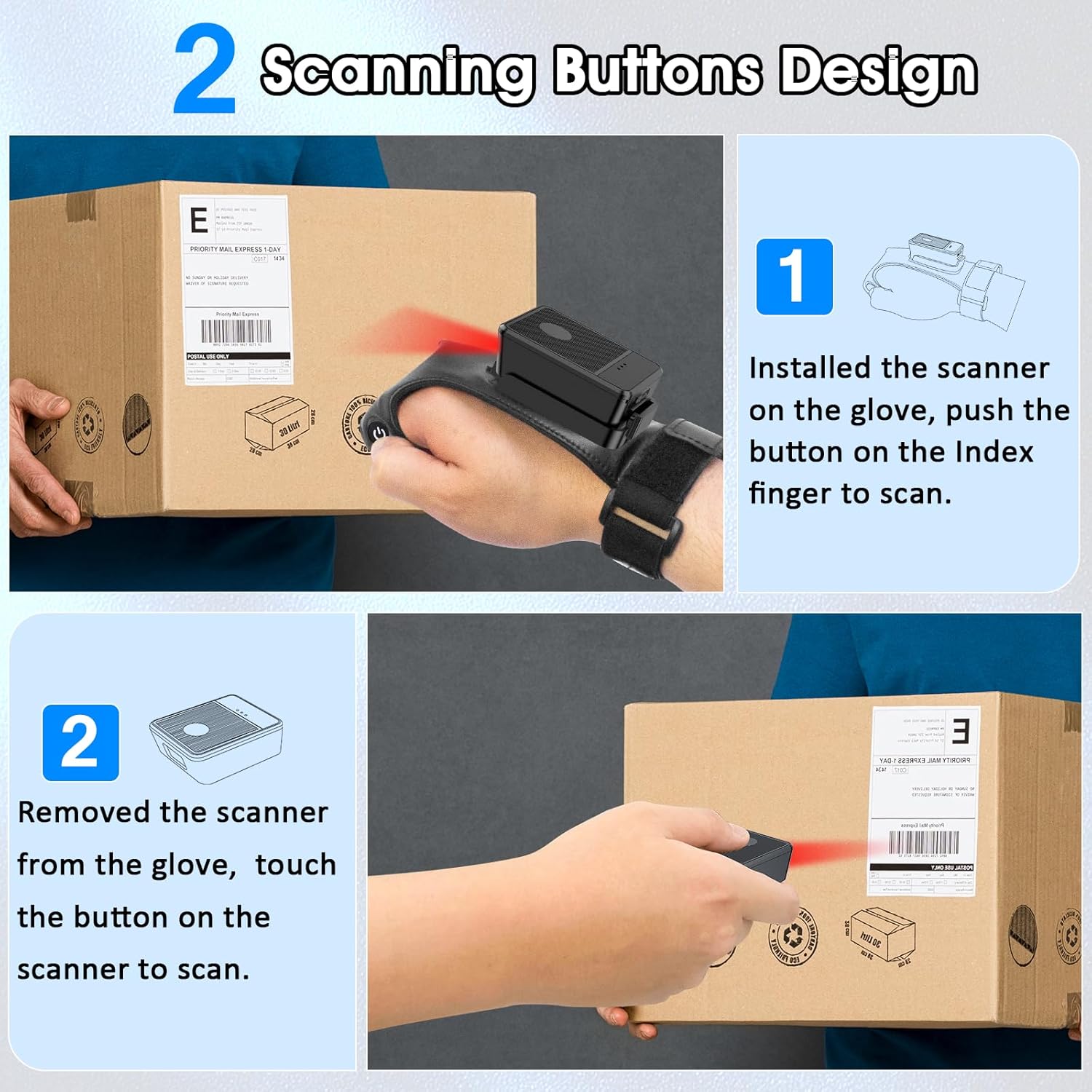
This diagram illustrates two ways to use the scanner: 1) installed on the glove, scanning with the index finger button, and 2) removed from the glove, scanning by touching the button directly on the scanner unit. Both methods are shown with the scanner pointed at a package.
6.2 modalità di lavoro
The scanner supports two operational modes:
6.2.1 Modalità di caricamento istantaneo
In this mode, scanned barcode data is immediately transmitted to the connected host device. This is ideal for real-time inventory updates or point-of-sale transactions.
6.2.2 Offline Storage Mode
This mode allows the scanner to store up to 50,000 barcodes internally when not connected to a host device or when connectivity is intermittent. Data can then be uploaded to a computer or POS system at a later time.
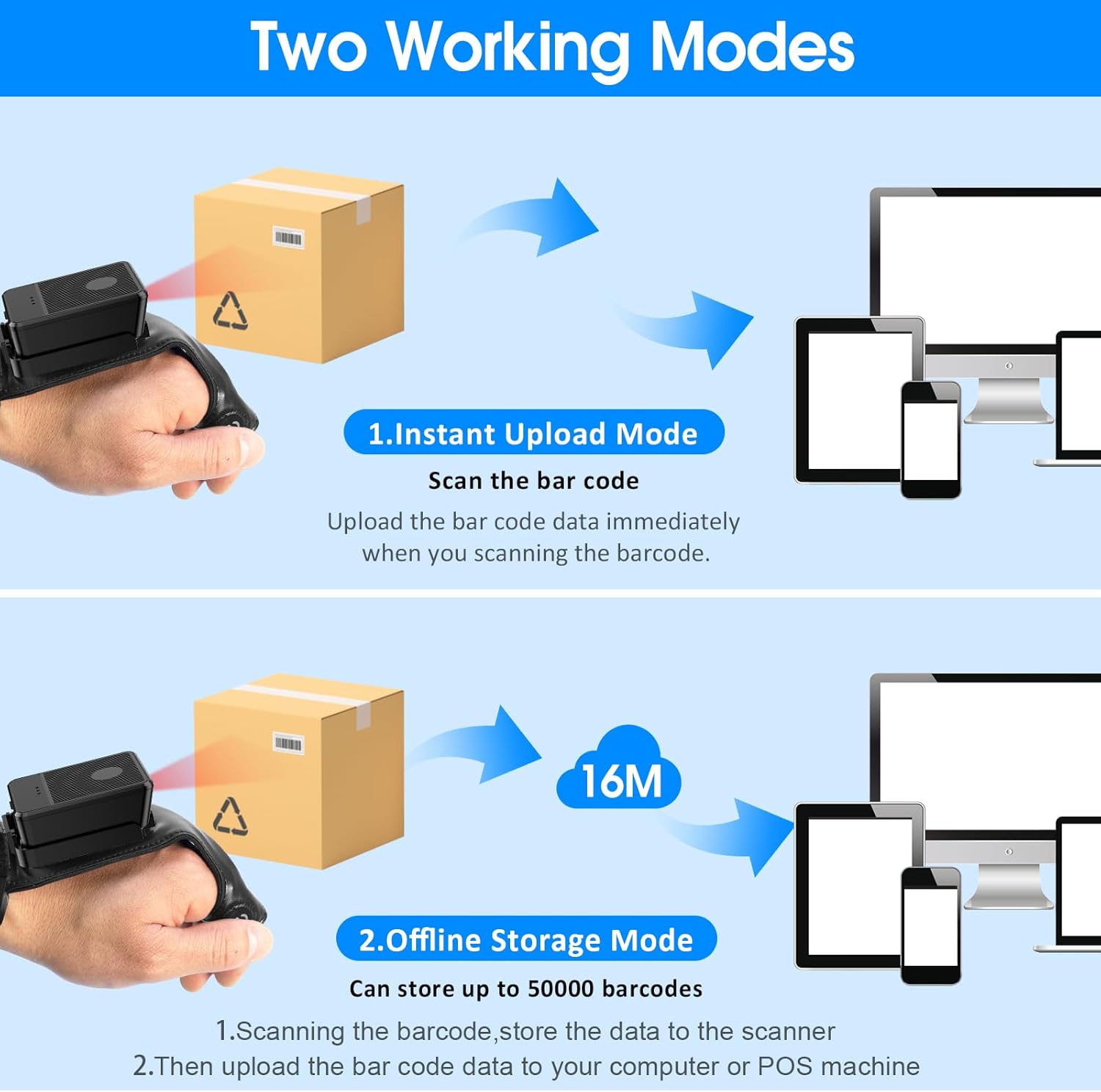
This image explains the two operational modes: Instant Upload Mode, where scanned data is immediately sent to a connected device, and Offline Storage Mode, which allows storing up to 50,000 barcodes internally before uploading them to a computer or POS system.
6.3 Personalizzazione delle impostazioni
The scanner allows for customization of various settings, including:
- Suono: Enable or disable the audible beep for successful scans.
- Vibrazione: Enable or disable vibration alerts for successful scans, useful in quiet environments.
- Funzioni della tastiera: Add keyboard functions such as TAB or Enter after each scan for seamless data entry into applications.
Refer to the quick setup guide or manufacturer's website for specific programming barcodes to adjust these settings.
7. Manutenzione
- Pulizia: Use a soft, dry cloth to clean the scanner's exterior. For stubborn dirt, slightly dampLavare il panno con acqua. Non utilizzare prodotti chimici aggressivi o detergenti abrasivi.
- Magazzinaggio: Quando non lo si utilizza, conservare lo scanner in un luogo fresco e asciutto, lontano dalla luce solare diretta e da temperature estreme.
- Cura della batteria: Per prolungare la durata della batteria, evitare di scaricarla completamente frequentemente. Caricare regolarmente il dispositivo, anche se non lo si utilizza costantemente.
8. Risoluzione Dei Problemi
8.1 Lo scanner non si accende
- Assicurarsi che la batteria sia carica. Collegare lo scanner a una fonte di alimentazione e lasciarlo caricare per almeno 30 minuti prima di provare a riaccenderlo.
8.2 Unable to Connect Wirelessly
- Connessione 2.4G: Verify the 2.4G dongle is securely plugged into the host device. Try plugging it into a different USB port. Ensure the scanner is within range of the dongle.
- Connessione Bluetooth: Ensure Bluetooth is enabled on your host device. Delete any previous pairings for the scanner and attempt to pair again. Ensure the scanner is in pairing mode (refer to device indicators).
- Riavviare sia lo scanner che il dispositivo host.
8.3 Lo scanner non legge i codici a barre
- Assicurarsi che il codice a barre sia pulito, integro e stampato in modo chiaro.
- Regolare la distanza e l'angolazione tra lo scanner e il codice a barre.
- Check if the scanner is in the correct working mode (Instant Upload or Offline Storage).
- Verify that the barcode type is supported by the scanner (1D, 2D, QR codes are supported).
9. Specifiche
| Marca | codice simmetrico |
| Modello | Wearable Glove Barcode Scanner (B0F1FSMWCD) |
| Tecnologia di connettività | 2.4G, Bluetooth 6.0 |
| Dispositivi compatibili | Desktop, Laptop, Tablet, Smartphone (Windows XP/7/8/10, Android, iOS) |
| Fonte di alimentazione | Alimentato a batteria |
| Tipo di batteria | 1 batteria ai polimeri di litio (inclusa) |
| Capacità della batteria | 1100mAh (Product Description) / 3000mAh (Image) - Note: Discrepancy in source data, refer to product packaging for accurate capacity. |
| Tempo di funzionamento continuo | Up to 10 hours (Product Description) / 12-13 hours (Image) - Note: Discrepancy in source data, refer to product packaging for accurate time. |
| Tempo di ricarica | Circa 5 ore |
| Tempo di standby | Fino a 30 giorni |
| Velocità di scansione | Fino a 300 scansioni al secondo |
| Gamma di scansione | Da 2 a 4.9 piedi |
| Capacità di archiviazione offline | Fino a 50,000 codici a barre |
| Peso dell'articolo | 5 once |
| Dimensioni del pacco | 7.48 x 3.74 x 2.44 pollici |
10. Informazioni sulla garanzia
This Symcode product is covered by a manufacturer's warranty. For specific warranty terms, duration, and conditions, please refer to the warranty card included with your product or visit the official Symcode websito. Conservare la prova d'acquisto per eventuali reclami in garanzia.
11. Assistenza clienti
If you encounter any issues or have questions regarding your Symcode Wearable Glove Barcode Scanner, please contact Symcode customer support. Contact details can typically be found on the product packaging, the official Symcode websito o tramite il tuo rivenditore.