
Introduzione
Thank you for choosing the Thomasville Rivington 60" W L-Shaped Corner Desk & Hutch. This manual provides essential information for the safe assembly, operation, and maintenance of your new desk. Please read all instructions carefully before beginning assembly and retain this manual for future reference.
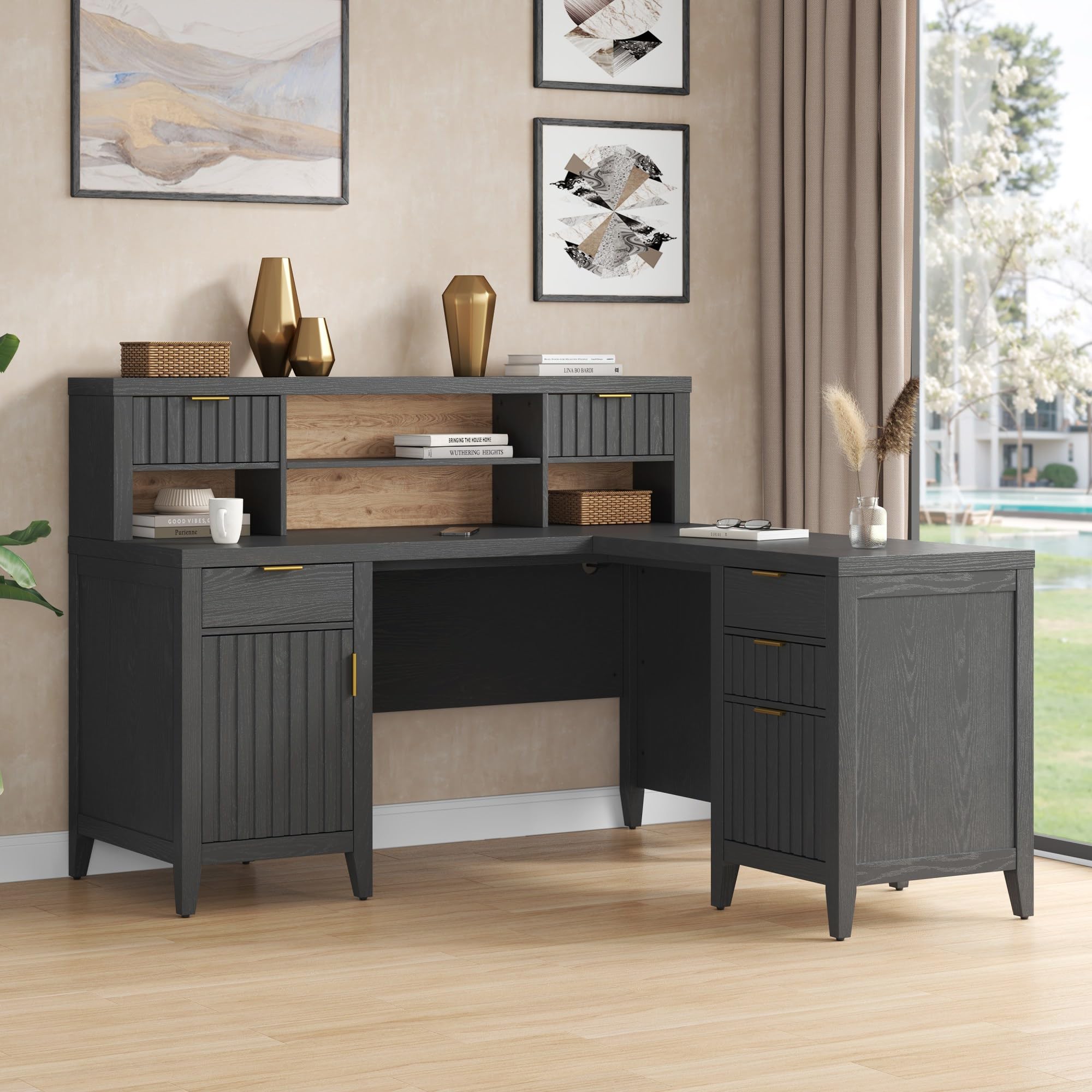
The Thomasville Rivington desk is designed to enhance your home office with its modern aesthetic and functional features, including an integrated power outlet, USB charging port, and ample storage. Constructed from durable particleboard, it offers a robust and stylish workspace.
Informazioni importanti sulla sicurezza
- This product is heavy and/or oversized. It may require more than one person for safe handling and assembly.
- Always follow assembly instructions precisely to ensure structural integrity and safety.
- Non sovraccaricare cassetti o ripiani. Distribuire il peso in modo uniforme.
- Durante il montaggio, tenere le parti di piccole dimensioni lontano dalla portata dei bambini.
- Ensure all electrical connections are made according to local codes and safety standards.
Installazione e assemblaggio
Assembly of the Thomasville Rivington L-Shaped Corner Desk & Hutch is required. Please ensure you have sufficient space and assistance before beginning. All necessary assembly tools are not included, so prepare your own basic tools such as screwdrivers and a hammer.
Componenti finitiview
The desk consists of an L-shaped main desk unit, a hutch, multiple drawers, and cabinet storage. Familiarize yourself with all parts before assembly.

Fasi di assemblaggio (linee guida generali)
- Disimballare e identificare: Carefully unpack all components and hardware. Compare them against the parts list provided in your separate assembly guide to ensure all pieces are present.
- Preparare l'area di lavoro: Clear a large, flat, and clean area for assembly. Place a blanket or cardboard down to protect the desk components and your floor.
- Assemblare le unità di base: Begin by assembling the main desk sections and the hutch base according to the detailed instructions in your assembly guide.
- Installare cassetti e ante: Attach drawer slides, assemble drawers, and install cabinet doors. Ensure soft-close mechanisms function correctly.
- Presa di corrente integrata: Follow instructions for installing the integrated power outlet and USB charging port. Ensure all wiring is secure and routed through the cord management system.
- Allega Hutch: Securely attach the hutch to the main desk unit.
- Aggiustamenti finali: Once assembled, check all connections and tighten hardware as needed. Adjust floor levelers to ensure stability.
Refer to the separate detailed assembly instructions included with your product for step-by-step guidance.
Istruzioni per l'uso
Integrated Power Outlet and USB Charging Port
- The desk features a built-in power center with two standard outlets and one USB-C port.
- To use, plug the desk's main power cord into a grounded wall outlet.
- Connect your electronic devices to the integrated outlets or USB-C port for convenient power access.
- Utilize the cord management cut-out to keep cables organized and out of sight.
Caratteristiche di archiviazione
The Rivington desk offers various storage solutions:
- Soft-Close Accessory Drawers: Three drawers in the hutch provide convenient storage for small office supplies. The soft-close mechanism ensures quiet operation.
- Soft-Close Cabinet Door: A cabinet with an adjustable interior shelf offers concealed storage for larger items.
- Chiusura ammortizzata File Cassetto: Un dedicato file drawer accommodates letter and legal-size documents, ensuring your important papers are organized and accessible.


Manutenzione
Pulizia
- Pulire le superfici con un panno morbido, damp panno. Evitare detergenti abrasivi o prodotti chimici aggressivi, che possono danneggiare la finitura.
- In caso di fuoriuscite, asciugare immediatamente con un panno pulito e asciutto.
Assistenza generale
- Periodically check and tighten all hardware to ensure the desk remains stable and secure.
- Evitare di appoggiare oggetti caldi direttamente sulla superficie della scrivania. Utilizzare sottobicchieri o cuscinetti protettivi.
- Tenere la scrivania lontana dalla luce solare diretta e da sbalzi di temperatura estremi per evitare deformazioni o scolorimenti.
- Do not stand or sit on the desk or hutch.
Risoluzione dei problemi
Problemi comuni e soluzioni
- La scrivania è traballante:
- Assicurarsi che tutta la ferramenta di montaggio sia ben serrata.
- Adjust the floor levelers on the bottom of the desk legs to compensate for uneven floors.
- I cassetti non scorrono fluidamente:
- Check that the drawer slides are correctly aligned and free of obstructions.
- Assicurarsi che i cassetti non siano sovraccarichi.
- Power outlet not working:
- Verificare che il cavo di alimentazione principale della scrivania sia collegato saldamente a una presa a muro funzionante.
- Controllare l'interruttore automatico della presa a muro.
- Ensure the internal connections for the power strip are properly seated (refer to assembly guide).
Se riscontri problemi non trattati qui, contatta l'assistenza clienti.
Specifiche
| Marca | Thomasville |
| Modello | Rivington |
| Progettazione della scrivania | L-Shaped Corner Desk with Hutch |
| Colore | Corvo Nero |
| Materiale | Legno ingegnerizzato (truciolato) |
| Tipo di finitura | Painted/Lacquered |
| Dimensioni complessive (circa) | 63.5 inches (Working Surface Diagonal Length) x 27 inches (Depth) x 44.25 inches (Height including floor levelers) |
| Peso dell'articolo | 243 libbre |
| Caratteristiche speciali | Built-In USB Outlet, Cord Management System, Soft-Close Drawers and Cabinet |
| Numero di cassetti | 4 (3 accessory, 1 file) |
| Numero di armadi | 2 |
| Numero di ripiani | 2 (allegato) |
| Assemblaggio richiesto | SÌ |
| Codice UPC | 764053567018 |
| ASIN | B0F1JSGZD2 |
Garanzia e supporto
Garanzia del produttore
The Thomasville Rivington L-Shaped Corner Desk & Hutch is backed by the manufacturer’s Garanzia limitata di 5 annoLa presente garanzia copre i difetti di materiali e fabbricazione in condizioni di normale utilizzo. Si prega di conservare la prova d'acquisto per eventuali reclami in garanzia.
For specific details regarding warranty coverage, limitations, and how to file a claim, please refer to the warranty documentation included with your product or visit the official Thomasville websito.
Assistenza clienti
If you have any questions about assembly, operation, maintenance, or warranty, please contact Thomasville customer support. Contact information can typically be found on the manufacturer's websito o nei materiali di imballaggio.
For online resources and further assistance, you may visit the Thomasville Store on Amazon.