
1. Prodotto finitoview
The Hisense 65E7Q QLED Smart TV offers a premium viewing experience with its 65-inch QLED display. This television integrates advanced technologies such as Dolby Vision and Dolby Atmos for immersive audio-visuals, AI Smooth Motion for fluid images, and dedicated modes for gaming and sports. Powered by the VIDAA operating system, it provides easy access to a wide range of streaming content and smart features, including voice control.

Davanti view of the Hisense 65E7Q QLED Smart TV.
Caratteristiche principali:
- Colore QLED: Experience rich, vibrant, and realistic colors.
- Movimento fluido AI: Advanced MEMC and 3D Noise Reduction for fluid, blur-free images.
- Dolby Vision e Dolby Atmos: Cinematic picture and immersive sound for an enhanced entertainment experience.
- Modalità di gioco Plus: Reduces input lag to 16ms, with 60Hz VRR and ALLM for ultra-fluid gaming.
- Modalità Sport AI: Optimizes picture and sound for sports content, reducing motion blur and enhancing stadium-like audio.
- Upscaler 4K AI: Enhances blurry images to near-4K quality.
- VIDAA Smart TV OS: Fast, secure, and intuitive operating system with access to popular streaming applications.
- Controllo vocale: Integrated Alexa and VIDAA Voice for convenient operation.
2. Informazioni sulla sicurezza
Please read all safety instructions carefully before using your TV. Keep this manual for future reference. Always ensure the TV is placed on a stable surface to prevent tipping. Do not expose the TV to rain or moisture. Refer to the full safety guidelines in the included safety manual.
3. Contenuto della confezione
Verificare che tutti gli articoli siano presenti nella scatola:
- Smart TV QLED Hisense 65E7Q
- Cavo di alimentazione
- Remote Control (with 1 AAAA battery included)
- Supporto TV (2 pezzi)
- Viti per il montaggio del supporto
- Manuale dell'utente (questo documento)
- Scheda di garanzia
4. Impostazione
4.1 Montaggio del supporto
- Posizionare con cautela lo schermo del televisore su una superficie morbida e piana per evitare danni.
- Allineare i pezzi del supporto con le fessure corrispondenti nella parte inferiore del televisore.
- Fissare i pezzi del supporto utilizzando le viti fornite. Assicurarsi che siano ben serrate.

Diagram illustrating TV dimensions and stand installation points.
4.2 Montaggio a parete
If you plan to wall mount your TV, ensure you use a VESA-compatible wall mount kit (not included). The Hisense 65E7Q supports a VESA mounting standard of 600 x 400 mm. Follow the instructions provided with your wall mount kit for safe installation.
4.3 Collegamento delle periferiche
Connect your external devices to the TV's ports as needed. Refer to the port diagram below:

Posteriore view showing available ports and connections.
- Porte HDMI (x3): Connect Blu-ray players, game consoles, and other HDMI devices. One port supports eARC for enhanced audio return.
- Porte USB (x2): Connect USB flash drives for media playback. (1x USB 3.0, 1x USB 2.0)
- Antenna Inputs (x2): Collega l'antenna terrestre o via cavo.
- Ethernet (LAN): Per la connessione di rete cablata.
- Uscita audio ottica: Collegalo a una soundbar o a un ricevitore audio per l'audio digitale.
- Jack per cuffie: Per l'ascolto privato.
- Ingressi AV: Per collegare dispositivi più vecchi utilizzando cavi video composito e audio stereo.
4.4 Accensione iniziale
- Collegare il cavo di alimentazione al televisore e poi a una presa di corrente.
- Premere il pulsante di accensione sul telecomando o sul televisore.
- Seguire le istruzioni sullo schermo per completare la configurazione iniziale, inclusa la selezione della lingua, la connessione di rete e la scansione dei canali.
5. Utilizzo della TV
5.1 telecomando
The included remote control allows you to navigate the TV's features. Insert the provided AAAA battery into the remote. The remote supports voice control for convenient operation.
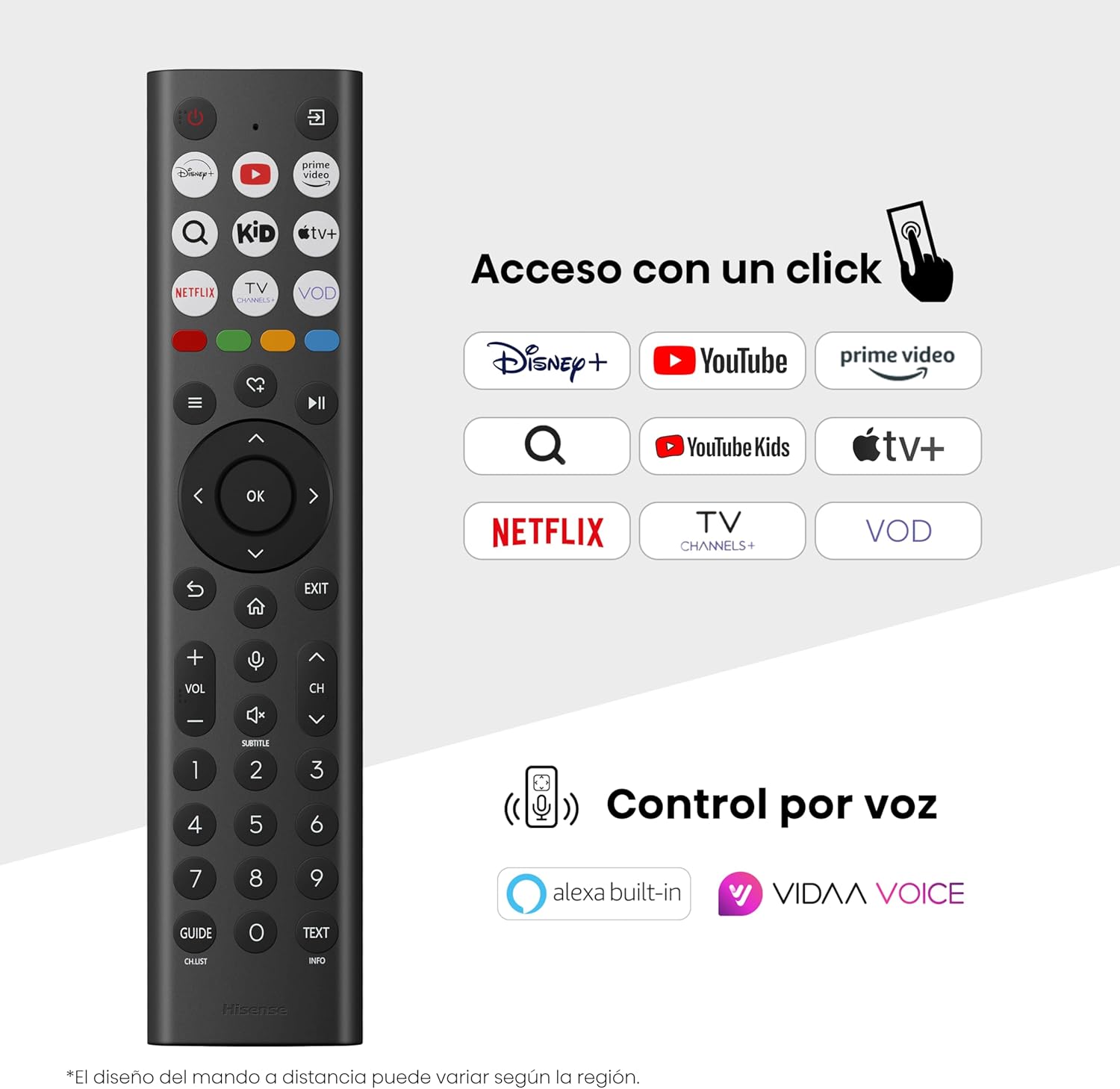
Hisense Smart TV remote control with dedicated app buttons and voice control.
5.2 Funzionalità Smart TV (sistema operativo VIDAA)
Your Hisense TV runs on the VIDAA operating system, offering a user-friendly interface for accessing various applications and services.

The VIDAA Smart TV interface with popular streaming applications.
- Applicazioni: Accedi ad app preinstallate come Netflix, YouTube, Prime Video e altro ancora.
- Controllo vocale: Use the remote's voice function to search for content, adjust settings, or interact with Alexa built-in and VIDAA Voice.
- Mirroring dello schermo (AirPlay): Share content from your Apple devices directly to the TV.
- Condividi su TV: Easily send content from your mobile devices to the TV.
5.3 Impostazioni immagine
Ottimizza il tuo viewing experience with various picture enhancement technologies:
- Colore QLED: Delivers over a billion shades of vibrant, lifelike colors.
- Upscaler 4K AI: Automatically enhances lower-resolution content to near-4K quality.
- Movimento fluido AI: Reduces motion blur in fast-paced scenes, ensuring clear and fluid visuals.
- Dolby Vision: Provides stunning brightness, contrast, and color for a dramatic visual experience.
- Modalità Filmmaker: Preserves the original aspect ratio, colors, and frame rates to display movies as intended by the director.
- Sensore di luce AI: Intelligently adjusts screen brightness based on ambient light for optimal viewing ed efficienza energetica.
- Modalità Cura degli Occhi: Riduce l'emissione di luce blu per ridurre al minimo l'affaticamento degli occhi.
- Modalità risparmio energetico: Optimizes power consumption without significantly compromising picture quality.

QLED technology delivers over a billion vibrant color tones.

AI 4K Upscaler enhances lower resolution content to near 4K clarity.

AI Smooth Motion ensures fluid images without blur, especially in fast-moving scenes.

Filmmaker Mode presents content exactly as the director intended.
5.4 Impostazioni audio
Migliora la tua esperienza audio con:
- Dolby Atmos: Immersive, multi-dimensional sound that fills your room.
- Altoparlante integrato: Built-in speakers with a maximum output of 1 Watt per channel.
- EzPlay: Seamlessly control compatible Hisense soundbars directly from your TV screen.

Dolby Vision and Dolby Atmos combine for a spectacular audio-visual experience.
5.5 Caratteristiche di gioco
For gamers, the TV offers:
- Modalità di gioco Plus: Reduces input lag to 16ms, ensuring responsive gameplay.
- VRR (frequenza di aggiornamento variabile) a 60 Hz: Synchronizes the TV's refresh rate with the game console's output to prevent screen tearing.
- ALLM (modalità automatica a bassa latenza): Automatically switches the TV to low-latency mode when a game is detected.
- Barra di gioco: An integrated control center for quick access to game settings and real-time performance monitoring.

Game Mode Plus provides ultra-fluid, lag-free gaming.

The Game Bar offers centralized control for game settings.
5.6 Sports Features
- Modalità Sport AI: Automatically detects sports content and optimizes picture and sound settings for a stadium-like experience, enhancing clarity and audio effects.
6. Manutenzione
6.1 Pulizia del televisore
- Scollegare sempre la TV prima di pulirla.
- Utilizzare un panno morbido, asciutto e privo di lanugine per pulire delicatamente lo schermo e il corpo del televisore.
- Per segni ostinati, leggermente dampInumidire il panno con acqua o con un detergente specifico per schermi (non spruzzare direttamente sullo schermo).
- Evitare l'uso di detergenti abrasivi, alcol, benzene o diluenti, poiché potrebbero danneggiare la superficie del televisore.
6.2 Aggiornamenti software
Il tuo televisore potrebbe ricevere periodicamente aggiornamenti software per migliorare le prestazioni e aggiungere nuove funzionalità. Assicurati che il televisore sia connesso a Internet per ricevere questi aggiornamenti. Di solito è possibile controllare manualmente la presenza di aggiornamenti nel menu delle impostazioni del televisore.
7. Risoluzione Dei Problemi
Se riscontri problemi con la tua TV, fai riferimento alle seguenti soluzioni comuni:
- Nessun potere: Controlla che il cavo di alimentazione sia collegato saldamente e che la presa di corrente funzioni. Prova una presa diversa.
- Nessuna immagine/suono: Assicurarsi che sia selezionata la sorgente di ingresso corretta. Controllare tutti i collegamenti dei cavi (HDMI, antenna).
- Il telecomando non funziona: Check the battery (1 AAAA battery). Ensure there are no obstructions between the remote and the TV.
- Problemi di connessione di rete: Verify your Wi-Fi password or Ethernet cable connection. Restart your router.
- Scarsa qualità dell'immagine: Regola le impostazioni dell'immagine (luminosità, contrasto, nitidezza). Assicurati che la sorgente di ingresso fornisca un segnale di alta qualità.
- Distorsione del suono: Check audio settings. If using external speakers, ensure they are connected correctly.
For more detailed troubleshooting, consult the full electronic user manual or contact Hisense customer support.
8. Specifiche
Specifiche tecniche dettagliate per la Smart TV Hisense 65E7Q QLED:
| Caratteristica | Specificazione |
|---|---|
| Numero di modello | 65E7Q |
| Dimensioni dello schermo | 65 pollici |
| Tecnologia di visualizzazione | QLED |
| Risoluzione | Risoluzione 4K (3840 x 2160) |
| Frequenza di aggiornamento | Frequenza 60 Hz |
| Supporto formato HDR | Visione Dolby |
| Motion Enhancement Technology | Movimento fluido AI |
| Miglioramento della qualità dell'immagine | AI 4K Upscaler, AI Smooth Motion, QLED Colour |
| Tempo di risposta | 100 millisecondi |
| Configurazione della retroilluminazione | Direct Illumination, Dimming |
| Descrizione dell'altoparlante | Integrated speaker with Dolby Atmos |
| Potenza massima in uscita dell'altoparlante | 1 Watt |
| Canali audio | Multicanale |
| Surround Sound Format | Dolby Atmos |
| Sistema operativo | VIDAA |
| Capacità di archiviazione della memoria | 1 GB |
| Metodo di controllo | Voce |
| Tecnologia di connettività | Bluetooth, HDMI, Wi-Fi |
| Internet Applications | Netflix, YouTube, Prime Video, AirPlay 2 |
| Porte HDMI | 3 (including HDMI 2.1 with eARC) |
| Porte USB | 2 (1x USB 3.0, 1x USB 2.0) |
| Tecnologia senza fili | Wifi |
| Screen Mirroring Technology | Giocare ad aria |
| Standard di montaggio VESA | 600 x 400 millimetri |
| Dimensioni del prodotto (PxLxA) | Dimensioni: 7.6 x 145.3 x 83.8 cm |
| Peso del prodotto | 15.2 kg (con supporto) |
| Classe di efficienza energetica | E |
| Consumo energetico annuale | 84 kWh/1000h (SDR), 160 kWh/1000h (HDR) |
| Energia | 1 Watt (standby) |
| Voltage | 100-240 VCA 50-60 Hz |
| Componenti inclusi | Cavo di alimentazione, telecomando, supporto |
| Anno del modello | 2025 |
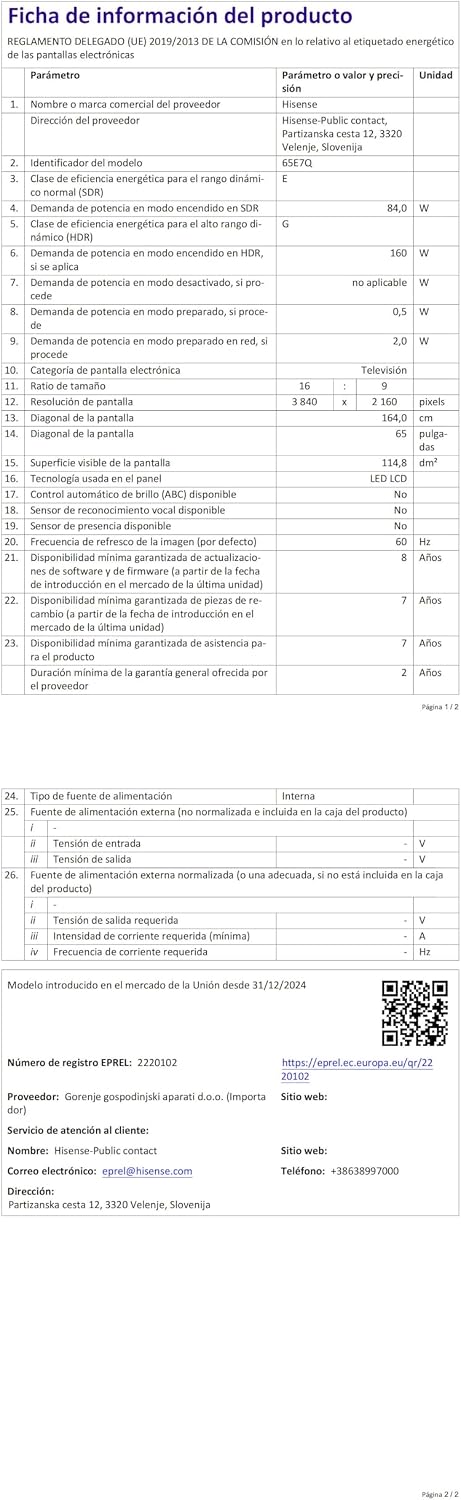
Energy label for the Hisense 65E7Q TV.
Per informazioni più dettagliate sul prodotto, consultare il database EPREL: https://eprel.ec.europa.eu/qr/2220102
9. Garanzia e supporto
9.1 Garanzia del prodotto
Questa TV Hisense è dotata di un Garanzia del prodotto di 3 anniSi prega di conservare la prova d'acquisto per eventuali reclami in garanzia.
9.2 Disponibilità dei pezzi di ricambio
Spare parts for this model are guaranteed to be available in the EU for a duration of 10 anni from the product's market introduction.
9.3 Assistenza clienti
For technical assistance, troubleshooting, or warranty service, please contact Hisense customer support. Refer to the contact information provided in your warranty card or visit the official Hisense websito per la tua regione.