
Oilsky M303
Oilsky M303 Android 9.0 MP3 Player User Manual
Modello: M303
1. Introduzione
The Oilsky M303 is a versatile digital audio and video player running on Android 9.0. It features a 4-inch full-touch screen, 8-core processor, 2GB RAM, 16GB internal storage (expandable with a 64GB microSD card included), Wi-Fi, and Bluetooth connectivity. This manual provides essential information for operating your device.
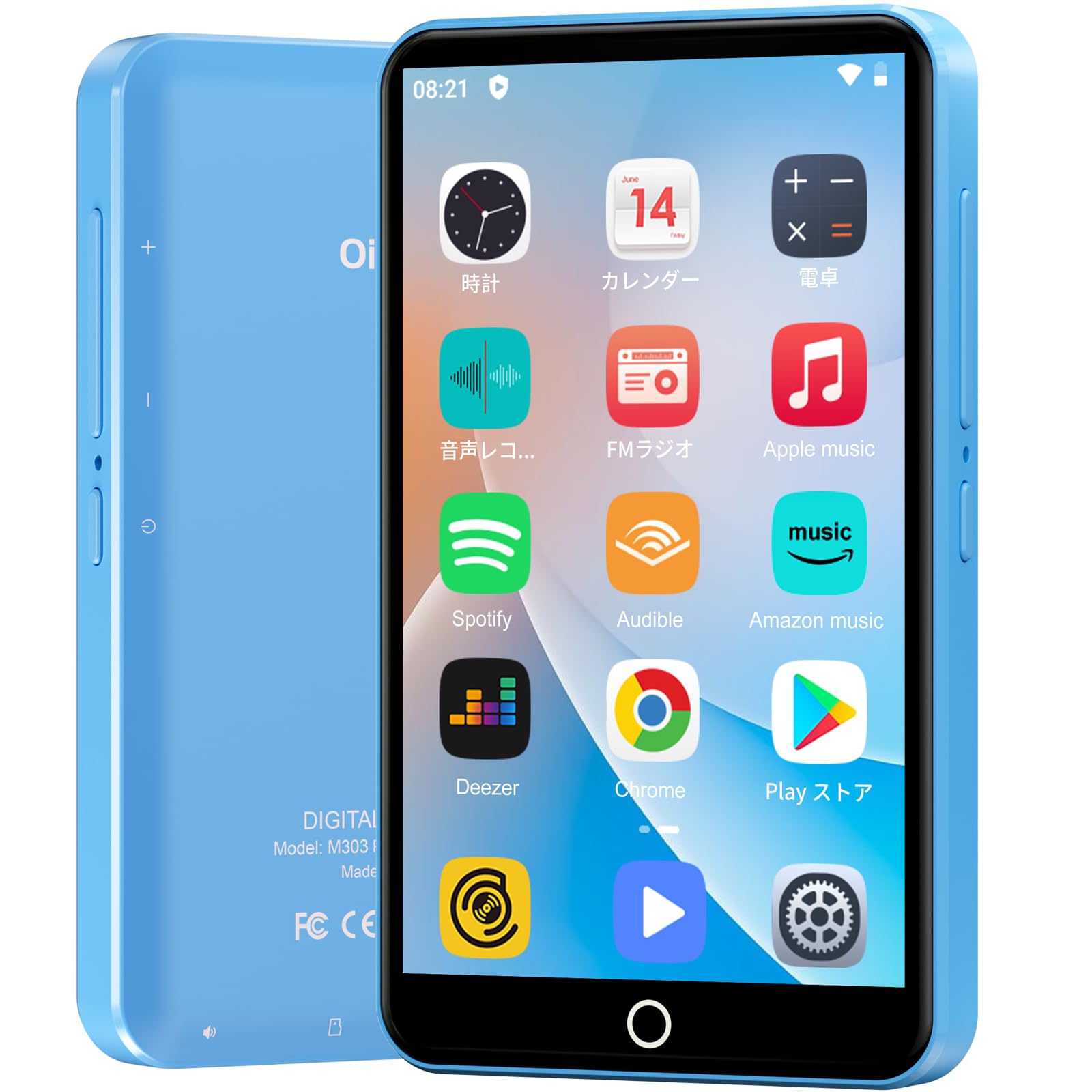
Immagine: Frontale view of the Oilsky M303 MP3 Player, showcasingrazie al suo design compatto e all'interfaccia touchscreen.
2. Cosa c'è nella scatola
Si prega di verificare che tutti i seguenti articoli siano inclusi nel pacchetto:
- Oilsky M303 Main Unit
- Auricolari
- Cavo dati di tipo C
- Protective Film (one pre-installed, one spare)
- Multi-language User Manual (including Japanese)
- Custodia protettiva in silicone
- Scheda di memoria 64GB

Image: All included accessories for the Oilsky M303 MP3 Player, neatly arranged.
3. Prodotto finitoview
Familiarizzare con le caratteristiche fisiche e i comandi del dispositivo.
3.1. Disposizione del dispositivo

Immagine: Lato view of the Oilsky M303, highlighting the volume buttons, power button, and USB-C port.
- Pulsante di accensione: Tieni premuto per accendere/spegnere o riavviare. Premi brevemente per accendere/spegnere lo schermo.
- Pulsanti del volume: Regola il volume dell'audio.
- Porta USB-C: Per la ricarica e il trasferimento dei dati.
- Jack per cuffie da 3.5 mm: Collegare gli auricolari cablati.
- Slot per scheda MicroSD: Inserire una scheda microSD per espandere la memoria.
- Altoparlante incorporato: Per la riproduzione audio senza cuffie.
4. Impostazione
4.1. Ricarica iniziale
Before first use, fully charge the device. Connect the provided Type-C data cable to the player and a USB power adapter (not included). A full charge takes approximately 3 hours. The device has a 2000mAh battery for extended use.
4.2. Accensione/spegnimento
- Per accendere: Tieni premuto il pulsante di accensione finché lo schermo non si accende.
- Per spegnere: Tenere premuto il pulsante di accensione, quindi selezionare "Spegni" dalle opzioni.
- Schermo acceso/spento: Short press the Power button to turn the screen on or off.
4.3. Impostazioni della lingua
Upon first boot, you may need to set the language. Navigate to Impostazioni > Sistema > Lingue e input > Lingue to select your preferred language, such as English or Japanese.
4.4. Connessione wifi
Per accedere alle funzionalità online e scaricare app, connettiti a una rete Wi-Fi:
- Vai a Impostazioni > Rete e Internet > Wi-Fi.
- Attiva/disattiva Wi-Fi On.
- Seleziona la rete desiderata dall'elenco e inserisci la password se richiesta.
4.5 Google Play Store
The Oilsky M303 supports Google Play Store, allowing you to download various applications.
- Assicurati di essere connesso al Wi-Fi.
- Aprire il Negozio di giochi app dalla schermata iniziale.
- Accedi con il tuo account Google.
- Cercare and install desired applications like YouTube, Spotify, or other streaming services.

Image: The Oilsky M303 screen showing the Google Play Store interface with various app icons.
5. Istruzioni per l'uso
5.1. Riproduzione di musica
The device supports various audio formats including MP3, WMA, WAV, FLAC, OGG, AAC, APE, and M4A.
- Transfer Music: Connect the player to your computer using the Type-C cable and transfer audio files to the device's internal storage or the microSD card.
- Riproduci musica: Open the Music app. You can browse by artist, album, song, or create custom playlists.
- Equalizzatore: Adjust sound settings using the built-in equalizer for a personalized audio experience.
- Online Lyrics: The player supports displaying online lyrics for songs.

Image: The Oilsky M303 displaying its music playback interface, showing options for song classification, search, playlist creation, and equalizer settings.
5.2. Riproduzione video
Enjoy videos on the 4-inch IPS full-touch screen with 480x800px resolution, supporting up to 1080P Full HD video playback. Supported formats include RM, AVI, RMVB, FLV, MP4, DAT, MKV, MPG, MOV, TS.
- Transfer Videos: Trasferisci video files dal tuo computer al dispositivo.
- Riproduci video: Open the Video app and select your desired video.
- Opzioni di riproduzione: Features include loop or random playback, variable speed playback, sleep timer, and gesture controls for zoom.

Image: The Oilsky M303 displaying a video on its 4-inch screen, illustrating its video playback capabilities.
5.3. Connessione Bluetooth
Connect your player to Bluetooth headphones, speakers, or car audio systems.
- Vai a Impostazioni > Dispositivi connessi > Bluetooth.
- Attiva Bluetooth On.
- Make sure your Bluetooth accessory is in pairing mode.
- Selezionare l'accessorio dall'elenco dei dispositivi disponibili per l'associazione.

Image: The Oilsky M303 demonstrating its Bluetooth connectivity with various audio devices like speakers and headphones.
5.4. Radio FM
The device includes an FM radio function. Connect wired earphones to act as an antenna for optimal reception.
5.5. Registratore vocale
Use the built-in voice recorder for capturing audio notes or lectures. Open the Registratore di suoni app to start recording.
5.6. File Gestione
The player comes with 16GB of internal storage and a 64GB microSD card, providing a total of 80GB usable storage. This can be expanded further up to 512GB using a larger microSD card. Use the File Manager app to organize your media and documents.
6. Manutenzione
- Pulizia: Utilizzare un panno morbido e asciutto per pulire il dispositivo. Evitare detergenti liquidi o materiali abrasivi.
- Magazzinaggio: Conservare il dispositivo in un luogo fresco e asciutto, lontano dalla luce solare diretta e da temperature estreme.
- Cura della batteria: Per prolungare la durata della batteria, evitare di scaricarla completamente frequentemente. Caricarla regolarmente.
- Aggiornamenti software: Controllare periodicamente gli aggiornamenti del sistema in Impostazioni > Sistema > Avanzate > Aggiornamento di sistema per garantire prestazioni e sicurezza ottimali.
7. Risoluzione Dei Problemi
| Problema | Possibile soluzione |
|---|---|
| Il dispositivo non si accende. | Assicurarsi che la batteria sia carica. Collegare il dispositivo a un caricabatterie per almeno 30 minuti prima di riprovare ad accenderlo. |
| Impossibile connettersi al Wi-Fi. | Controlla che il Wi-Fi sia abilitato nelle impostazioni. Assicurati che la password sia corretta. Riavvia il dispositivo e il router Wi-Fi. |
| La connessione Bluetooth è instabile o si disconnette. | Ensure the player and Bluetooth accessory are within close range. Avoid areas with strong electromagnetic interference. Try re-pairing the devices. |
| Le app sono lente o non rispondono. | Close unnecessary background applications. Clear app cache (Settings > Apps & notifications > See all apps > [App Name] > Storage & cache > Clear cache). Restart the device. |
| Il dispositivo si riscalda durante l'uso. | It is normal for the device to warm up during intensive use (e.g., video playback, gaming). If it becomes excessively hot, close applications and let it cool down. |
| Cannot charge with USB-C PD charger. | The device may not support USB-C Power Delivery (PD) protocols. Use a standard USB-A to USB-C cable with a compatible USB-A power adapter (5V, up to 900mA). |
8. Specifiche
| Marca | Oilsky |
| Modello | Numero di modello: M303 |
| Sistema operativo | Androide 9.0 |
| Schermo | 4-inch Full-touch IPS LCD (480x800px) |
| Processore | 8-core (MTK 8-Core) |
| Memoria RAM | 2 GB |
| Memoria interna | 16 GB |
| Archiviazione espandibile | MicroSD card up to 512GB (64GB card included) |
| Batteria | 2000mAh |
| Connettività | Wi-Fi, Bluetooth |
| Formati audio supportati | MP3, WMA, WAV, FLAC, OGG, AAC, APE, M4A |
| Formati video supportati | RM, AVI, RMVB, FLV, MP4, DAT, MKV, MPG, MOV, TS (up to 1080P) |
| Dimensioni (P x L x A) | Dimensioni: 1 x 6.1 x 10.3 cm |
| Caratteristiche | Touchscreen, Voice Recorder, Built-in Speaker, Video Playback, FM Radio, Calculator, Calendar, Alarm |
| Origine | Cina |
9. Garanzia e supporto
The Oilsky M303 MP3 Player comes with a Garanzia di 1 anno dalla data di acquisto. Conservare la prova d'acquisto per eventuali reclami in garanzia.
For technical support or warranty inquiries, please contact the retailer or manufacturer directly. Refer to the contact information provided in the packaging or on the official Oilsky websito.
Ask a question about this manual
Ask about setup, troubleshooting, compatibility, parts, safety, or missing instructions. Manuals+ will review the question and use this page’s manual context to help answer it.