1. Importanti istruzioni di sicurezza
Please read all instructions carefully before using this walking pad. Keep this manual for future reference.
- Posizionare sempre il tappetino da passeggio su una superficie piana e stabile.
- Ensure adequate clear space around the walking pad during operation.
- Do not allow children or pets near the walking pad while it is in use.
- Consultare un medico prima di iniziare qualsiasi nuovo programma di esercizi.
- Scollegare il tappetino da passeggio dalla presa di corrente quando non lo si utilizza o prima di pulirlo.
- Non utilizzare il walking pad se il cavo o la spina sono danneggiati o se non funziona correttamente.
- Capacità massima di peso dell'utente: 265 libbre.
2. Prodotto finitoview
The ACTFLAME Walking Pad with Incline is a versatile and compact fitness device designed for home and office use. It offers a convenient way to incorporate walking and light running into your daily routine.
Caratteristiche principali:
- Space Saving & Portable: With a thickness of 4.5 inches, it can be easily stored under a sofa or bed. Built-in wheels allow for easy movement.
- Boost Fitness with Inclined Walking: Features a manual incline adjustment to increase workout intensity, enhance cardiovascular health, and build muscle strength.
- Motore silenzioso e potente: Equipped with a 2.5HP motor for powerful yet quiet operation (below 45dB), supporting up to 265 lbs.
- 5 Layers Durable Anti-slip Belt: Designed with a 5-layer belt for improved safety, durability, easy cleaning, and reduced knee shock.
- 2 Shock Absorb Cushions: Integrated cushioning pads reduce impact on knees and ankles during exercise.
- Large LED Display and Smart Remote: Displays speed, calories, distance, and time. Speed can be adjusted from 0.6-3.8 mph using the remote control.

Figure 2.1: The ACTFLAME Walking Pad with Incline, showcasingrazie al suo design compatto e al display integrato.
3. Contenuto della confezione
Upon opening your ACTFLAME Walking Pad package, please verify that all the following items are included:
- Tapis roulant x1
- Manuale utente x1
- Telecomando x1
- Batteria x1
- Lubrificante x2
- Chiave x1

Figure 3.1: All components included in the ACTFLAME Walking Pad package.
4. Impostazione
4.1 Disimballaggio e posizionamento
The ACTFLAME Walking Pad comes pre-assembled. Simply remove it from the packaging and place it on a firm, level surface. Ensure there is sufficient clear space around the unit for safe operation.
4.2 Regolazione manuale dell'inclinazione
This walking pad features a manual incline adjustment. To engage the incline, locate the adjustable feet at the front of the unit. Flip these feet forward to raise the front of the walking pad, creating an incline. To return to a flat surface, simply flip the feet back into their original position.

Figure 4.1: Demonstrating the manual incline adjustment mechanism.
5. Istruzioni per l'uso
5.1 Accensione/Spegnimento
- Connect the power cord to a suitable electrical outlet and to the walking pad.
- Locate the main power switch (usually near the power cord input) and turn it to the 'ON' position.
- To power off, turn the main power switch to the 'OFF' position and unplug the unit.
5.2 Utilizzo del telecomando
The walking pad is operated via the included remote control. Ensure the battery is correctly inserted. The remote allows you to start, stop, and adjust the speed.
- Premere il tasto Energia pulsante per attivare il display.
- Premere il tasto Riproduci/Pausa button to start or pause the walking pad. A countdown from 3 to 1 will initiate before the belt starts moving.
- Utilizzare il + E - buttons to increase or decrease the speed. The speed range is 0.6 to 3.8 mph.
- IL M button may cycle through different display modes or preset programs (refer to the physical user manual for specific modes).

Figure 5.1: The large LED display shows exercise data, controlled by the smart remote.
Il mio profilo
The large LED display on the walking pad cycles through various data points, including:
- Velocità (mph)
- Calorie bruciate
- Distanza percorsa
- Tempo trascorso
5.4 Modalità di utilizzo
The walking pad supports different usage scenarios:
- Modalità di lavoro: Ideal for use under a standing desk, with a speed range of 0.6-2.5 mph.
- Modalità Sport: For more active walking or light running, with a speed range of 0.6-3.8 mph.

Figure 5.2: The walking pad can be used for both work (under desk) and sport (active walking) activities.
6. Manutenzione
6.1 Lubrificazione della cinghia
Regular lubrication of the running belt is crucial for optimal performance and longevity of your walking pad. The product comes with two bottles of lubricant. The machine is pre-lubricated from the factory, so initial lubrication is not immediately required. Refer to the physical user manual for the recommended lubrication schedule and procedure.
6.2 Pulizia
To clean the walking pad, ensure it is powered off and unplugged. Use a soft, damp cloth to wipe down the surfaces. Avoid using abrasive cleaners or solvents that could damage the finish.
6.3 Regolazione della cinghia
If the running belt becomes off-center or slips during use, it may require adjustment. Refer to the detailed instructions in the physical user manual for proper belt alignment procedures. This typically involves using the included wrench to adjust tension bolts at the rear of the unit.
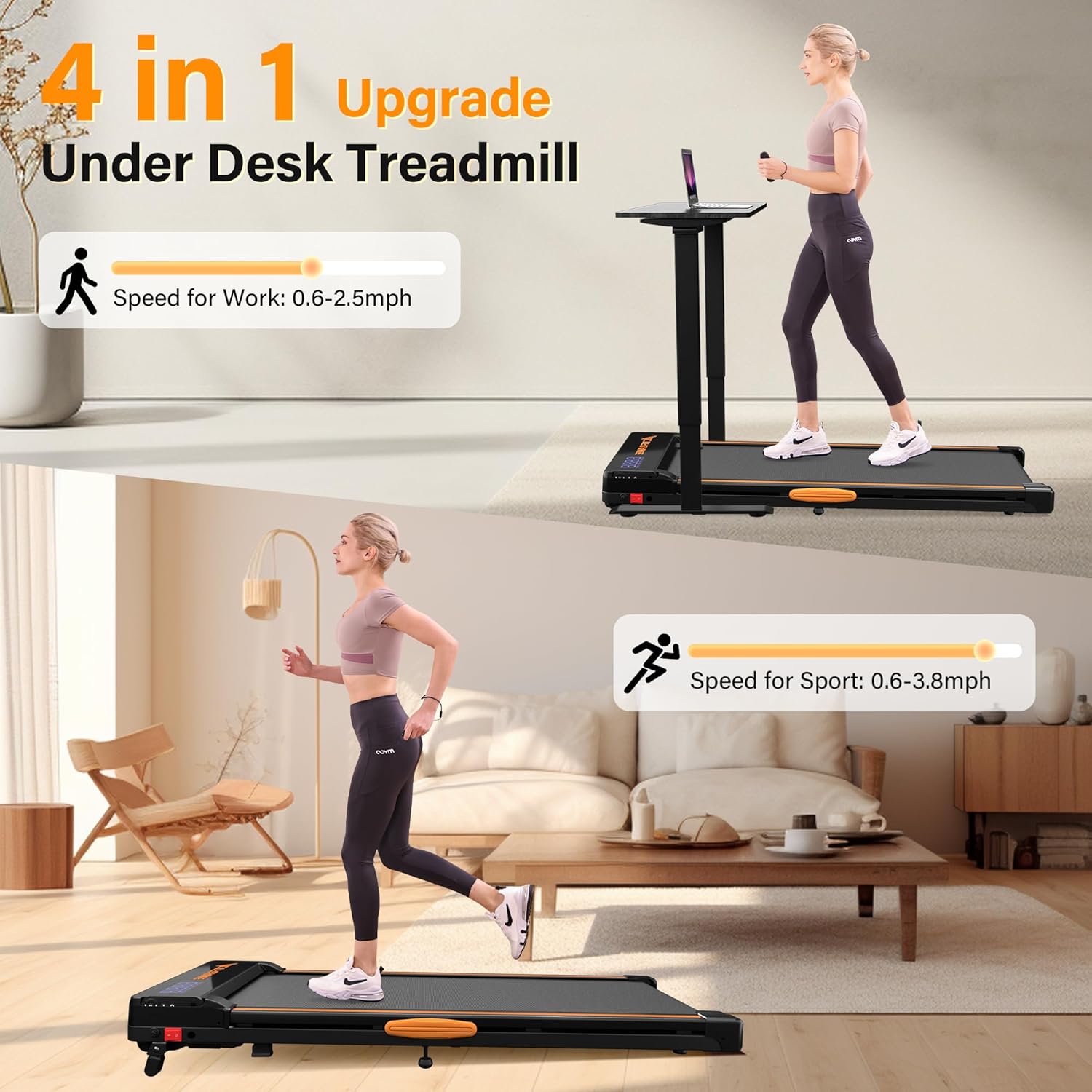
Figure 6.1: The durable 5-layer running belt designed for comfort and longevity.
7. Risoluzione Dei Problemi
If you encounter any issues with your ACTFLAME Walking Pad, please refer to the following common troubleshooting tips. For more detailed solutions, consult the comprehensive user manual PDF available online or contact customer support.
- Nessuna alimentazione/display: Ensure the power cord is securely plugged into both the unit and the wall outlet, and the main power switch is in the 'ON' position. Check the power outlet with another device.
- La cinghia non si muove: Press the Play/Pause button on the remote. Ensure the safety key (if applicable, though not explicitly mentioned for this model, it's a common feature) is in place.
- Rumore insolito: Check for any loose parts or foreign objects under the belt. Lubricate the belt if it's dry. Ensure the unit is on a level surface.
- Belt Slipping/Off-Center: The belt may need adjustment. Follow the belt adjustment instructions in the physical manual.
8. Specifiche
| Specificazione | Dettaglio |
|---|---|
| Marca | ACTFLAME |
| Nome del modello | TM600 |
| Dimensioni del prodotto | 45.5"P x 20"L x 5"A |
| Peso dell'articolo | 45 libbre |
| Materiale | Acciaio legato |
| Velocità massima | 3.8 miglia all'ora |
| Velocità minima | 0.6 miglia all'ora |
| Potenza massima | 2.5 cavalli |
| Peso massimo raccomandato | 265 libbre |
| Tipo di visualizzazione | GUIDATO |
| Caratteristica speciale | Lightweight, Manual Incline |
| Assemblaggio richiesto | NO |
| Componenti inclusi | Lubrificante |
9. Garanzia e supporto
The ACTFLAME Walking Pad comes with a 1-year manufacturer's guarantee. For any questions, concerns, or support needs, please contact ACTFLAME customer service. You can also refer to the official User Manual (PDF) for more detailed information.
- Garanzia: 1-year manufacturer's guarantee.
- Manuale utente (PDF): Scarica PDF
- Produttore: ACTFLAME