
1. Introduzione e oltreview
This manual provides essential information for the safe and efficient operation of your Velieta Commercial Beverage Refrigerator, Model VT-DCW400H. Please read all instructions carefully before use and retain this manual for future reference.
Your Velieta commercial beverage refrigerator is designed for optimal beverage display and cooling in various commercial settings. Key features include:
- Spacious 383L capacity with easily adjustable shelving for diverse beverage sizes.
- Integrated LED lighting and a customizable billboard lightbox to enhance product visibility.
- Rapid and consistent cooling, maintaining temperatures between 32°F to 50°F.
- Versatile application for restaurants, convenience stores, supermarkets, and more.
- Flexible placement options (freestanding or built-in) with front ventilation and lockable caster wheels for mobility and secure positioning.
2. Cosa c'è nella scatola
Dopo aver disimballato, assicurarsi che siano presenti tutti gli elementi elencati di seguito:
- Velieta Commercial Beverage Refrigerator Unit
- Adjustable Wire Shelves (5 included)
- Manuale di istruzioni (questo documento)
- Chiavi per la serratura della porta
- Customizable Lightbox Panel
3. Istruzioni per l'installazione
- Disimballaggio: Estrarre con cautela il frigorifero dall'imballaggio. Verificare che non vi siano danni causati dal trasporto.
- Posizionamento: Choose a location that is well-ventilated and away from direct sunlight or heat sources. The unit features front-facing ventilation, allowing for both freestanding and built-in installation. Ensure adequate space for door opening.
- Livellamento: Adjust the leveling feet or lockable caster wheels to ensure the refrigerator is stable and level. This is crucial for proper door sealing and efficient operation.
- Pulizia iniziale: Before first use, clean the interior and exterior surfaces with a soft cloth and mild detergent. Rinse thoroughly and dry.
- Collegamento elettrico: Collegare il frigorifero a una presa elettrica dedicata con messa a terra. Lasciare l'unità in posizione verticale per almeno 2-4 ore prima di collegarla, per consentire ai refrigeranti di depositarsi.
- Installazione scaffalature: Insert the adjustable wire shelves into the desired positions. Ensure they are securely seated.
- Lightbox Customization: Install your desired graphic or branding into the customizable lightbox panel at the top of the unit.

4. Istruzioni per l'uso
4.1 Controllo digitale della temperatura
The refrigerator features a digital temperature control panel located at the bottom front. The temperature range is 32°F to 50°F (0°C to 10°C).
- Impostazione della temperatura: Use the up and down arrow buttons on the control panel to adjust the desired temperature. The displayed temperature fluctuates in real-time.
- Accensione/spegnimento: Utilizzare l'interruttore di alimentazione principale per accendere o spegnere l'unità.

4.2. LED Lighting and Customizable Lightbox
The unit is equipped with internal LED lighting and a customizable lightbox to illuminate your beverages.
- Luce LED interna: A dedicated light switch on the control panel allows you to turn the internal LED lighting on or off.
- Lightbox: The top lightbox is designed for displaying promotional graphics. Ensure the panel is securely inserted.

4.3. Ripiani regolabili
The five wire shelves can be adjusted to accommodate various bottle and can heights.
- Ripiani di regolazione: To adjust, empty the shelf, lift it slightly, and slide it out. Reinsert into the desired slot, ensuring it is level and stable before reloading.

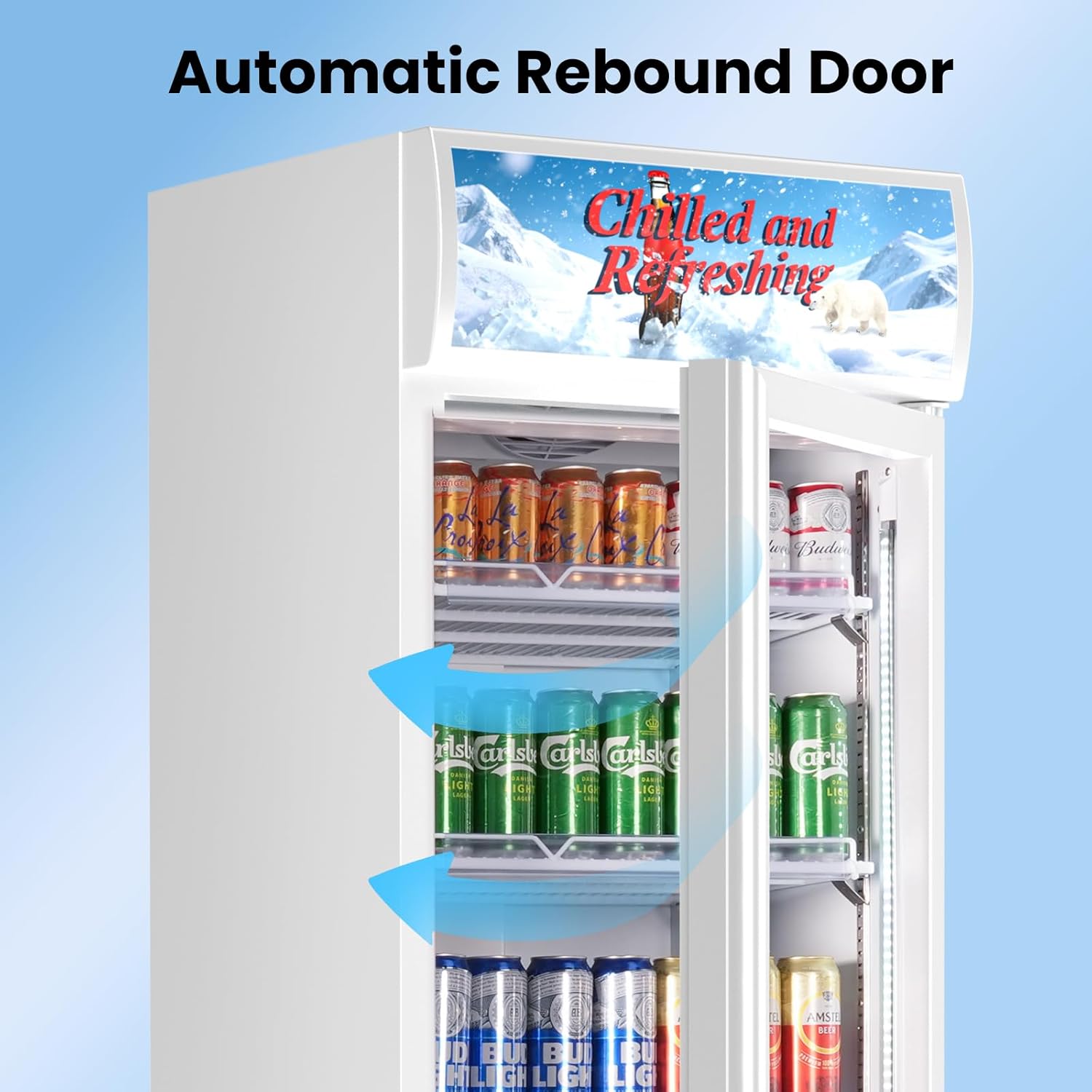
4.4. Automatic Rebound Door and Lockable Wheels
- Automatic Rebound Door: The glass door is designed to automatically close if left slightly ajar, helping to maintain internal temperature and energy efficiency.
- Serratura: Use the provided key to lock the door for security, especially in commercial environments.
- Lockable Caster Wheels: The unit is equipped with wheels for easy movement. Engage the locks on the wheels to secure the refrigerator in place.
5. Manutenzione
- Pulizia regolare: Clean the interior and exterior regularly with a mild detergent and soft cloth. Avoid abrasive cleaners or solvents.
- Pulizia della serpentina del condensatore: Periodically clean the condenser coils (located at the front bottom) to ensure efficient cooling. Use a soft brush or vacuum cleaner.
- Ispezione della guarnizione della porta: Check the door gasket regularly for any signs of wear or damage. A tight seal is essential for energy efficiency.
- Sbrinamento automatico: This unit features an automatic defrost system, eliminating the need for manual defrosting. Ensure the drain pan is clear.

6. Risoluzione Dei Problemi
If you experience issues with your refrigerator, consult the following common troubleshooting steps:
| Problema | Possibile causa | Soluzione |
|---|---|---|
| Il frigorifero non funziona. | Non collegato; interruttore automatico scattato; interruttore di alimentazione spento. | Ensure unit is plugged in, check circuit breaker, turn power switch on. |
| La temperatura non è abbastanza fredda. | Porta non chiusa correttamente; aperture eccessive della porta; aggiunta di oggetti caldi; scarsa ventilazione; temperatura impostata troppo alta. | Check door seal, minimize door openings, allow warm items to cool before placing inside, ensure proper ventilation, lower temperature setting. |
| L'unità è rumorosa. | Unità non livellata; parti allentate; ventola ostruita. | Level the unit, check for loose components, ensure fan is clear of obstructions. |
| Acqua sul pavimento. | Drain pan overflow; clogged drain. | Empty drain pan, clear any obstructions from the drain. |
If problems persist after attempting these solutions, please contact Velieta customer support.
7. Specifiche
| Caratteristica | Dettaglio |
|---|---|
| Marca | Velieta |
| Informazioni sul modello | VT-DCW400H |
| Numero modello articolo | VT-DCW400H |
| Numero di parte | VT-KD382-01-NEW |
| Capacità | 383 litri |
| Dimensioni del prodotto (P x L x A) | 24.02 x 24.41 x 77.76 pollici |
| Peso dell'articolo | 187.4 libbre |
| Consumo energetico annuale | 1423.5 kilowattora all'anno |
| Tipo di installazione | Freestanding & Built-in |
| Fattore di forma | Congelatore di dimensioni standard senza congelatore |
| Caratteristiche speciali | Adjustable Shelves, Digital Temperature Control, Door Lock, Frost Free, Large Capacity |
| Colore | Nero Bianco |
| Voltage | 115 Volt (CA) |
| Sistema di sbrinamento | Automatico |
| Cerniere per porte | Giusto |
| Tipo di materiale della porta | Bicchiere |
| Tipo di ripiano | Filo |
| Numero di ripiani | 5 |
| Numero di porte | 1 |
8. Garanzia e supporto
For warranty information, please refer to the documentation provided with your purchase. For any questions, technical assistance, or support needs, please contact Velieta customer service:
- E-mail di supporto: support@velieta.com
- Telefono di supporto: (213) 432-5433
Our professional support service team is available to assist you.