
Macap MI40 Touch
Manuale utente del macinacaffè istantaneo Macap MI40 Touch
Model: MI40 Touch
Brand: Macap
1. Prodotto finitoview
The Macap MI40 Touch Instant Burr Coffee Grinder is a high-performance appliance designed for precise and consistent coffee grinding. Featuring 65mm flat burrs, a responsive 3.5-inch touchscreen, and multiple operating modes, it is suitable for various brewing methods from espresso to cold brew. Its robust construction ensures quiet operation and stability.
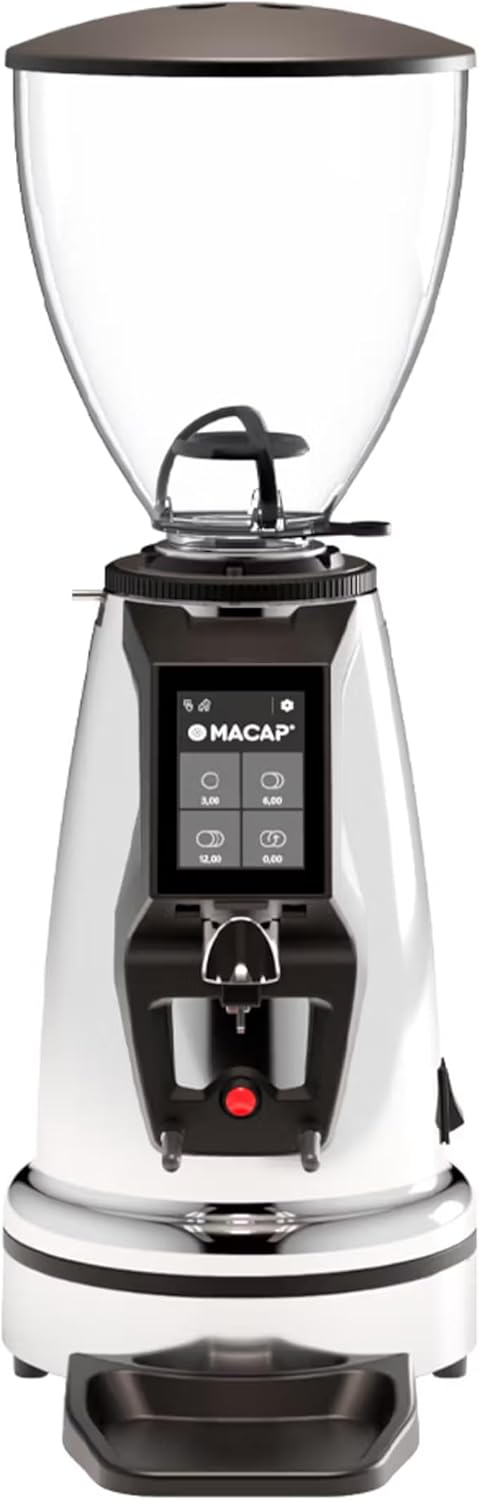
Davanti view of the Macap MI40 Touch Instant Burr Coffee Grinder, showcasing its sleek chrome finish and integrated touchscreen display.
2. Informazioni sulla sicurezza
Please read all safety instructions carefully before operating the grinder to prevent injury or damage.
- Always unplug the grinder from the power outlet before cleaning, maintenance, or if it will be left unattended.
- Non immergere il macinacaffè, il cavo di alimentazione o la spina in acqua o altri liquidi.
- Keep hands and utensils out of the bean hopper and grind chute during operation.
- Ensure the bean hopper lid is securely in place before grinding.
- Questo apparecchio è destinato esclusivamente alla macinazione di chicchi di caffè tostati interi. Non macinare altre sostanze.
- Non utilizzare il macinacaffè se il cavo o la spina sono danneggiati, oppure se l'apparecchio non funziona correttamente o è stato danneggiato in qualsiasi modo.
- Tenere l'apparecchio fuori dalla portata dei bambini.
3. componenti
Familiarize yourself with the main components of your MI40 Touch coffee grinder:
Tramoggia dei fagioli: Transparent container for holding whole coffee beans. Capacity: 1.2 Kilograms.

3.5'' Touchscreen Display: Intuitive interface for controlling grind settings, dose programming, and operating modes.

Collare di regolazione della macinatura: Stepless micrometric adjustment for precise control over grind particle size.

Portafilter Fork & Drip Tray: Adjustable fork to hold your portafilter for hands-free grinding, with a removable drip tray for easy cleaning.
4. Impostazione
Follow these steps to set up your Macap MI40 Touch grinder:
- Disimballaggio: Carefully remove the grinder and all accessories from the packaging. Retain the packaging for future transport or storage.
- Posizionamento: Posizionare il macinacaffè su una superficie stabile, piana e asciutta. Assicurarsi che ci sia un'adeguata ventilazione attorno all'unità.
- Installazione della tramoggia: Place the bean hopper onto the grinder body, aligning the tabs. Rotate the hopper clockwise until it locks securely into place.
- Installazione del vassoio raccogli gocce: Slide the removable drip tray into its designated slot at the base of the grinder.
- Collegamento elettrico: Collegare il cavo di alimentazione a una presa elettrica dotata di messa a terra.
- Pulizia iniziale: Prima del primo utilizzo, pulire l'esterno con un panno umido.amp cloth. Ensure the burrs and grind chute are free of any packing debris.

Lato view of the Macap MI40 Touch grinder, illustrating its compact design and the placement of the bean hopper and drip tray.
5. Istruzioni per l'uso
5.1. Regolazione della macinatura
The MI40 Touch features stepless micrometric grind adjustment, allowing for precise control over particle size. To adjust the grind:
- Ensure the grinder is off or not actively grinding.
- Rotate the grind adjustment collar located below the bean hopper.
- Ruotare in senso orario for a finer grind (e.g., for espresso).
- Ruotare Antiorario for a coarser grind (e.g., for drip, French press, or cold brew).
- Make small adjustments and test the grind to achieve the desired consistency for your brewing method.
Avvicinamento view of the grind adjustment collar, showing the numerical markings for reference.
5.2. Interfaccia touchscreen
The 3.5-inch touchscreen allows for intuitive control and customization of your grinding experience. It features four programmable dose buttons and various settings.
The 3.5-inch touchscreen display showing the main interface with programmable dose buttons.
For a detailed demonstration of the touchscreen interface and its functionalities, please refer to the official video below:
This video demonstrates the various features and customization options of the 3.5-inch touchscreen interface on the Macap MI Series coffee grinders, including dose programming, color customization, and different operating modes.
5.3. Modalità operative
The MI40 Touch offers three primary operating modes:
- Modalità standard: Allows you to select a pre-programmed dose by pressing the corresponding button on the touchscreen. The grinder will dispense the set amount of coffee.
- Modalità Spinta e Grind: Grinding starts when the portafilter activates the button on the fork and stops when the portafilter is removed. This mode is ideal for manual control.
- Barista Hands-Free Mode: Similar to Push and Grind, but designed for continuous grinding as long as the portafilter is in place, allowing baristas to multitask.
6. Manutenzione e pulizia
Una pulizia e una manutenzione regolari garantiranno prestazioni ottimali e una lunga durata del vostro macinacaffè.
6.1. Pulizia quotidiana
- Scivolo di macinazione: Use a brush or vacuum to clear any residual coffee grounds from the grind chute after each use.
- vassoio antigoccia: Remove and empty the drip tray regularly. Wipe it clean with a damp panno e asciugarlo accuratamente.
- Esterno: Pulisci l'esterno del macinino con un panno morbido eamp panno. Non usare detergenti abrasivi o solventi.

The removable drip tray and portafilter fork area, designed for easy cleaning.
6.2. Deep Cleaning (Weekly/Bi-Weekly)
- Scollegare il macinino.
- Rimuovere la tramoggia dei chicchi: Empty any remaining beans. Rotate the hopper counter-clockwise to unlock and remove it.
- Pulisci le sbavature: Use a stiff brush or a specialized grinder brush to remove accumulated coffee oils and grounds from the burrs. You may need to remove the upper burr for thorough cleaning (refer to specific instructions in the full manual for burr removal).
- Camera di macinazione pulita: Use a vacuum cleaner with a narrow attachment to remove grounds from the grind chamber.
- Rimontare: Reinstall the burrs (if removed) and the bean hopper securely.
7. Risoluzione Dei Problemi
If you encounter issues with your MI40 Touch grinder, refer to the table below for common problems and solutions.
| Problema | Possibile causa | Soluzione |
|---|---|---|
| Il macinino non si accende. | Non collegato; interruttore di alimentazione spento; interruttore automatico scattato. | Controllare il collegamento elettrico; assicurarsi che l'interruttore di alimentazione sia acceso; ripristinare l'interruttore automatico. |
| Non viene erogato caffè. | Hopper empty; grind chute clogged; burrs jammed. | Fill hopper; clean grind chute; clear any foreign objects from burrs (unplug first). |
| Macinatura incoerente. | Burrs dirty or worn; grind setting too coarse/fine. | Clean burrs thoroughly; adjust grind setting incrementally. Consider burr replacement if worn. |
| Grinder is excessively noisy. | Corpi estranei nelle frese; componenti allentati. | Unplug and inspect burrs for foreign objects; check for loose parts. If noise persists, contact support. |
| Il touchscreen non risponde. | Problema software temporaneo; problema di alimentazione. | Unplug the grinder for 30 seconds, then plug back in. If issue persists, contact support. |
8. Specifiche
Key technical specifications for the Macap MI40 Touch Instant Burr Coffee Grinder:
| Caratteristica | Specificazione |
|---|---|
| Modello | MI40 Touch |
| Tipo di sbavatura | Macine piatte |
| Diametro della bava | 65mm |
| Potenza del motore | 480W |
| Capacità della tramoggia | 1.2 chilogrammi |
| Regolazione della macinatura | Micrometrico continuo |
| Display | 3.5'' Touchscreen |
| Dimensioni del prodotto (L x P x A) | 12" x 7.63" x 22" |
| Peso dell'articolo | 19.58 libbre |
| Paese di origine | Italia |
9. Garanzia e supporto
Macap products are manufactured to high standards and undergo rigorous quality control. For warranty information, technical support, or service inquiries, please refer to the warranty card included with your product or visit the official Macap website. Please have your model number (MI40 Touch) and purchase date available when contacting support.
Ask a question about this manual
Ask about setup, troubleshooting, compatibility, parts, safety, or missing instructions. Manuals+ will review the question and use this page’s manual context to help answer it.